
이 페이지는 앱이나 개발자의 공식 페이지가 아니며, 정보 제공 및 논평을 목적으로 작성된 독립 편집 간행물입니다. 명시적으로 달리 언급되지 않는 한, 해당 앱이나 개발자는 MWM, Apple, Google Play, 앱 퍼블리셔 또는 앱 개발자와 제휴, 보증, 후원, 승인 또는 공식적으로 연결되어 있지 않으며, 이 페이지의 어떤 내용도 해당 앱이 MWM의 서비스를 사용하여 개발되었음을 의미하지 않습니다. 모든 상표, 로고, 스크린샷 및 기타 콘텐츠는 해당 소유자의 자산입니다.


TV Cast for Samsung TV App
모바일 기기를 거대한 리모컨으로 변신시킵니다. 이 앱은 웹 비디오를 거실로 끌어들이는 능력을 부여합니다. 더 이상 작은 화면에 갇히지 않습니다.
다운로드
10M+사용자 평점
총 평가 수
117.8K개발사
카테고리
Photo & Video지원 언어
1최신 버전
3.8크기
34.7 MB출시일
2015년 3월 26일iOS 기기에서 삼성 스마트 TV로 간편하게 웹 콘텐츠를 스트리밍하는 도구의 주요 기능 탐색
삼성 TV용 TV Cast 앱 분석
웹 동영상 및 라이브 스트림 캐스팅
이 앱은 웹 동영상, 온라인 영화, 라이브 스트림 및 라이브 TV 프로그램을 삼성 스마트 TV로 쉽게 전송하여 시청할 수 있도록 지원합니다.
개인 미디어 파일 전송
이 도구는 아이폰 또는 아이패드 카메라 롤에 저장된 MP4, M4V, MOV 형식의 로컬 동영상을 삼성 TV로 스트리밍할 수 있게 해줍니다.
간편한 설정 및 미디어 서버 불필요
사용자는 Plex와 같은 복잡한 미디어 서버나 다른 타사 소프트웨어 설치 없이 삼성 TV에 수신 앱만 설치하여 바로 앱을 사용할 수 있습니다.
고급 원격 재생 제어
이 앱은 동영상을 시청하는 동안 탐색 막대를 통해 빨리 감기, 되감기, 일시 정지 등 고급 재생 제어 기능을 제공하여 편리함을 더합니다.
다양한 웹 동영상 형식 지원
이 도구는 MP4, M3U8, HLS 라이브 스트림 및 HTTPS를 통한 동영상 등 다양한 웹 동영상 형식을 지원하여 콘텐츠 호환성을 높입니다.
광고 차단 기능
이 앱은 대부분의 웹사이트에서 광고 및 팝업을 차단하고 앱 내 스폰서 광고도 제거하여 더욱 쾌적한 시청 환경을 제공합니다.
자주 묻는 질문
에 대해 알아야 할 모든 것 TV Cast for Samsung TV App
What is the TV Cast for Samsung TV App?
The TV Cast for Samsung TV App streams web videos, online movies, livestreams, and live TV shows to Samsung Smart TVs and Blu-ray Players. It provides direct casting from your mobile device.
Does the TV Cast for Samsung TV App require a subscription?
No, there are no recurring subscription fees for the TV Cast for Samsung TV App. The app emphasizes "NO SUBSCRIPTIONS" on its primary promotional material, indicating one-time purchases for features.
Does TV Cast for Samsung TV App offer in-app purchases?
Yes, the TV Cast for Samsung TV App offers in-app purchases for upgrade features. The Premium Edition unlocks all available features, including future updates without additional payment.
What video formats does TV Cast for Samsung TV App support?
The TV Cast for Samsung TV App supports streaming of mp4, m3u8, hls livestreams, and video-over-https. Users can cast various web video formats directly to their Samsung Smart TV.
Does the TV Cast for Samsung TV App have a time limit for streaming?
No, the TV Cast for Samsung TV App does not impose any time limits on streaming. Users can watch videos of any duration, including those lasting hours, without interruption.
How do I set up the TV Cast for Samsung TV App on my TV?
To set up the TV Cast for Samsung TV App, open the Samsung App Store (Smart Hub) on your TV or Blu-ray Player. Search for and install the 'TV Cast' receiver app to enable video casting.
How do I connect my iPhone/iPad to the TV Cast for Samsung TV App?
Users connect their iPhone/iPad to the TV Cast for Samsung TV App by entering their device's IP address on the Samsung TV using the remote's number pad and navigation keys.
Does the TV Cast for Samsung TV App support DRM-protected content?
No, the TV Cast for Samsung TV App does not support DRM-protected videos. This includes iTunes movies, Flash video, and content from services like HBO Now.
Does the TV Cast for Samsung TV App mirror my device's screen?
No, the TV Cast for Samsung TV App does not mirror your device's screen or tab. It only streams the video portion of a website directly to your Samsung Smart TV.
What is the Remote Playbar feature in TV Cast for Samsung TV App?
The Remote Playbar feature in TV Cast for Samsung TV App provides advanced video control, such as scrubbing, forward, rewind, play, pause, and stop, while browsing.
Can I cast local videos with TV Cast for Samsung TV App?
Yes, the TV Cast for Samsung TV App allows users to cast local videos from their iPhone or iPad camera roll. It supports mp4, m4v, and mov formats.
Does the TV Cast for Samsung TV App include an ad-blocker?
Yes, the TV Cast for Samsung TV App offers an Ad-Blocker feature as an in-app purchase. It blocks ads and pop-ups on most websites and removes sponsoring ads from within the app.
Does TV Cast for Samsung TV App offer customer support?
Yes, TV Cast for Samsung TV App provides "FAST PREMIUM SUPPORT CHAT." This indicates that users can obtain quick assistance with the app's features or any encountered issues.
다음 스크린샷과 설명은 앱의 공식 스토어 목록에서 직접 가져온 것이며 앱 개발자의 자산입니다.
앱 스토어
스크린샷
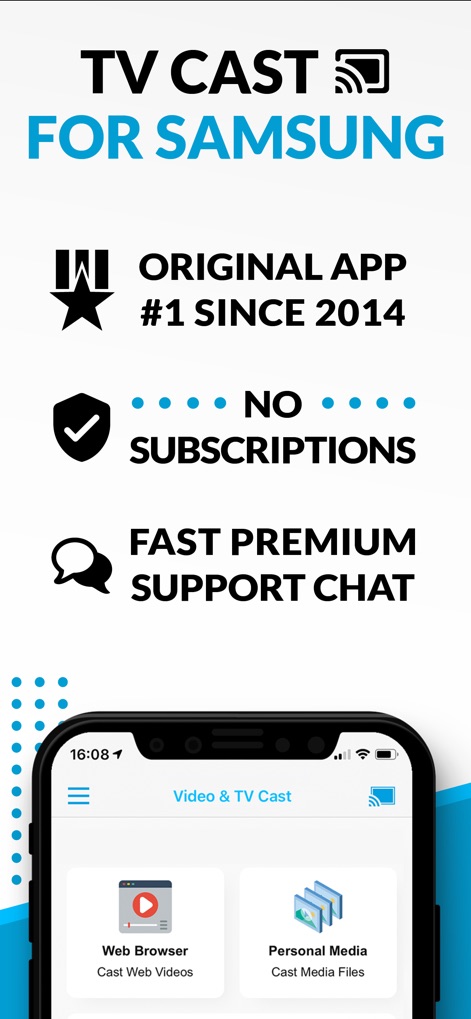
이 앱은 구독 없이 웹 브라우저를 통해 웹 비디오를 시청하고 개인 미디어를 손쉽게 캐스팅할 수 있는 기능을 제공합니다.
최고의 캐스팅 솔루션

사용자는 스마트폰에서 재생되는 온라인 영화와 라이브 TV 쇼를 대형 삼성 TV 화면으로 미러링하여 몰입감 넘치는 시청 경험을 할 수 있습니다.
생생한 대화면 감상

이 도구는 사용자의 개인 사진과 다양한 파일을 큰 화면으로 전송하여 가족이나 친구들과 함께 공유하고 감상하는 것을 가능하게 합니다.
다양한 미디어 공유
설명
Download



이 페이지는 앱이나 개발자의 공식 페이지가 아니며, 정보 제공 및 논평을 목적으로 작성된 독립 편집 간행물입니다. 명시적으로 달리 언급되지 않는 한, 해당 앱이나 개발자는 MWM, Apple, Google Play, 앱 퍼블리셔 또는 앱 개발자와 제휴, 보증, 후원, 승인 또는 공식적으로 연결되어 있지 않으며, 이 페이지의 어떤 내용도 해당 앱이 MWM의 서비스를 사용하여 개발되었음을 의미하지 않습니다. 모든 상표, 로고, 스크린샷 및 기타 콘텐츠는 해당 소유자의 자산입니다.