Unofficial Palia Notebook
다운로드: App Store

이 페이지는 앱이나 개발자의 공식 페이지가 아니며, 정보 제공 및 논평을 목적으로 작성된 독립 편집 간행물입니다. 명시적으로 달리 언급되지 않는 한, 해당 앱이나 개발자는 MWM, Apple, Google Play, 앱 퍼블리셔 또는 앱 개발자와 제휴, 보증, 후원, 승인 또는 공식적으로 연결되어 있지 않으며, 이 페이지의 어떤 내용도 해당 앱이 MWM의 서비스를 사용하여 개발되었음을 의미하지 않습니다. 모든 상표, 로고, 스크린샷 및 기타 콘텐츠는 해당 소유자의 자산입니다.

로고: Unofficial Palia Notebook
다운로드: App Store

Unofficial Palia Notebook

모든 주민 상호 작용을 마스터하고, 인벤토리를 추적하고, 농장 수익을 최적화하세요. 광고가 없고 플레이어가 만든 이 툴킷은 최고의 세컨드 스크린 경험을 위해 설계되었습니다.

주요 수치

다운로드

0

사용자 평점

1.0/5

총 평가 수

0

개발사

Kristina Frye

카테고리

Reference

지원 언어

1

최신 버전

2.0

크기

129.3 MB

출시일

2026년 1월 8일
기능

궁극의 Palidori 동반자

플레이어가 플레이어를 위해 설계한 광고 없는 노트북으로 정리 상태를 유지하고 코지 시간을 극대화하세요.

모든 관계 마스터하기

매일의 선물이나 대화를 잊지 마세요. 주민들의 선호도, 실시간 위치, 일정을 추적하여 친구 관계를 더 빨리 구축하세요.

골드 수익 극대화하기

수익 추측은 그만하세요. 최대 효율을 위해 씨앗 수집기, 병 또는 벌레통을 사용하여 아이템을 처리하는 가장 좋은 방법을 즉시 확인하세요.

다음 스크린샷과 설명은 앱의 공식 스토어 목록에서 직접 가져온 것이며 앱 개발자의 자산입니다.

앱 스토어

스크린샷
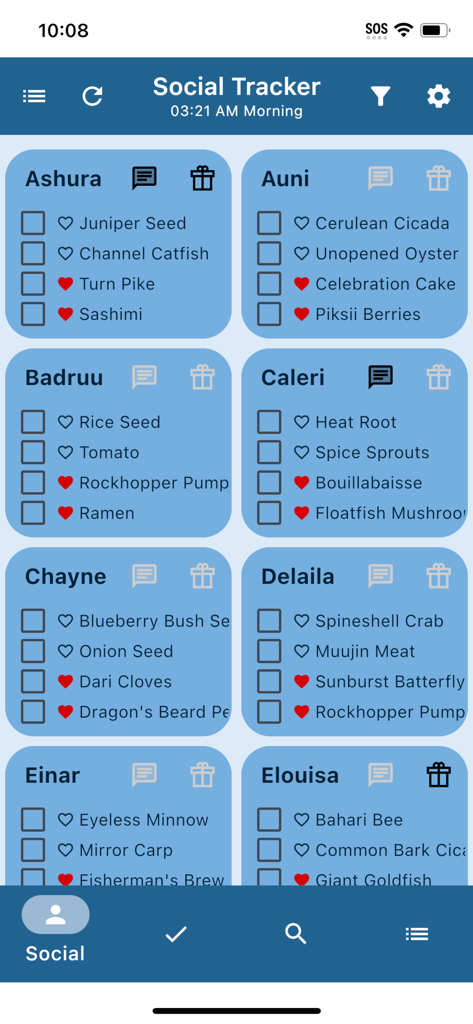
Unofficial Palia Notebook - Palidori Notebook 앱의 소셜 추적기 화면으로, 주민 선물 선호도 및 상호 작용 체크리스트를 보여줍니다.
Palidori Notebook 앱의 소셜 추적기 화면으로, 주민 선물 선호도 및 상호 작용 체크리스트를 보여줍니다.

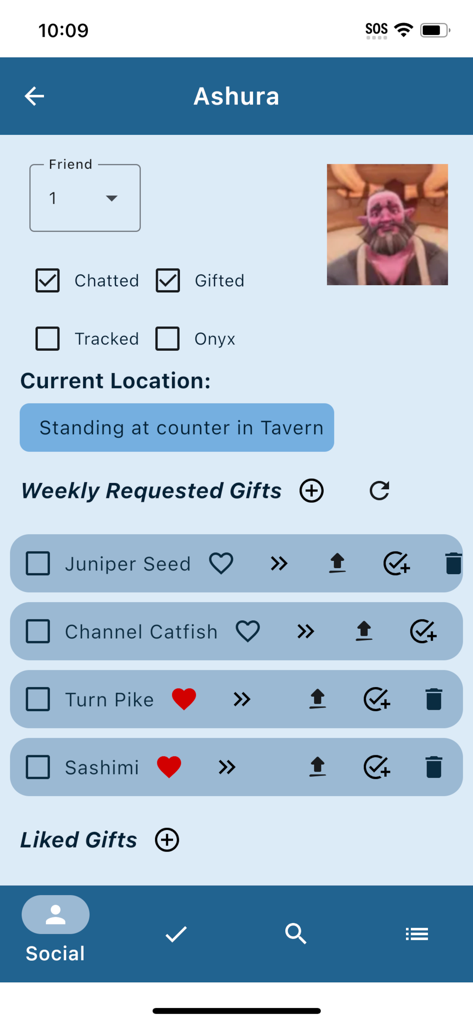
Unofficial Palia Notebook - Palidori Notebook 앱의 인터페이스로 Ashura의 위치와 요청된 선물을 추적합니다.
Palidori Notebook 앱의 인터페이스로 Ashura의 위치와 요청된 선물을 추적합니다.

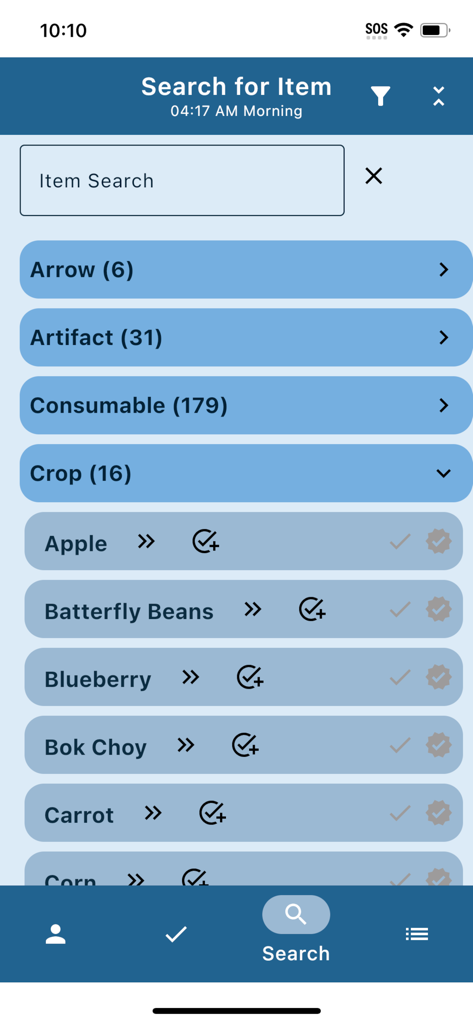
Unofficial Palia Notebook - Palidori Notebook 앱의 검색 화면으로 작물 및 기타 게임 아이템 범주 목록을 표시합니다.
Palidori Notebook 앱의 검색 화면으로 작물 및 기타 게임 아이템 범주 목록을 표시합니다.

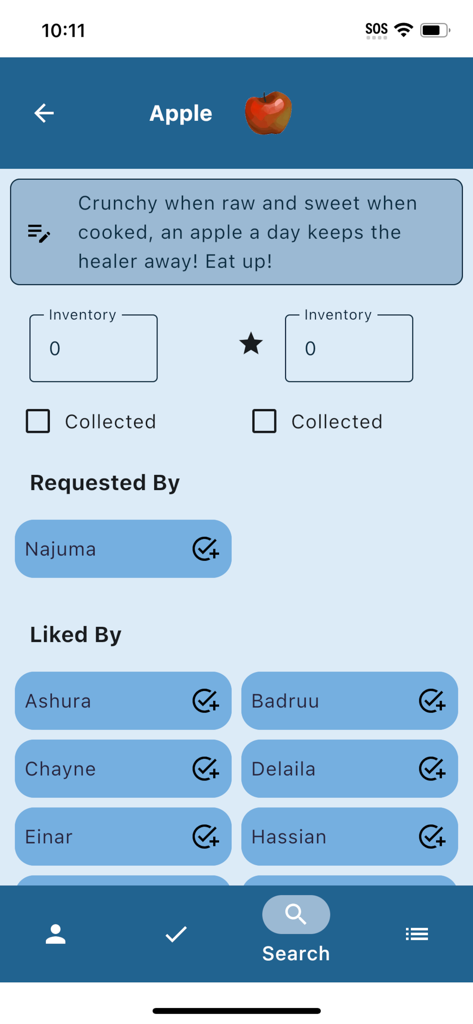
Unofficial Palia Notebook - Unofficial Palidori Notebook 앱의 스크린샷으로, 인벤토리 추적 및 주민 선물 선호도를 포함한 Apple의 아이템 세부 정보를 보여줍니다.
Unofficial Palidori Notebook 앱의 스크린샷으로, 인벤토리 추적 및 주민 선물 선호도를 포함한 Apple의 아이템 세부 정보를 보여줍니다.

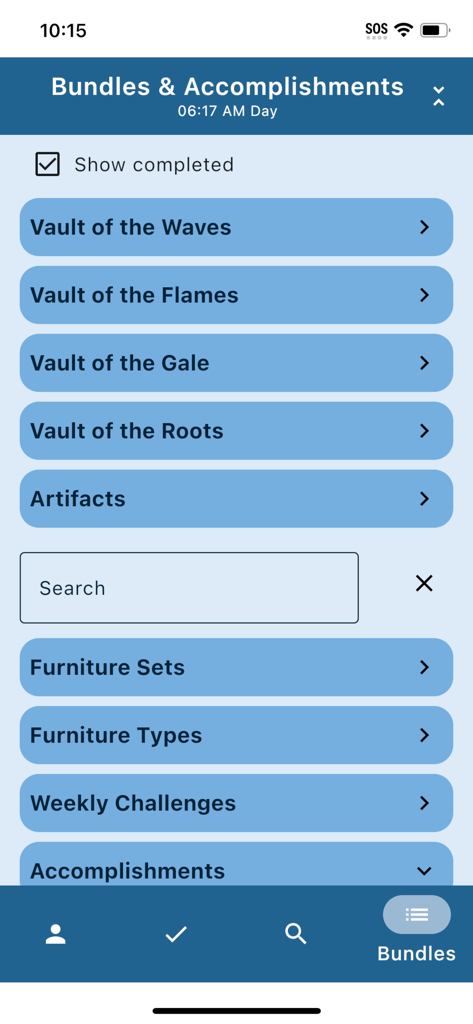
Unofficial Palia Notebook - Palidori의 게임 보관함 및 진행 상황 추적을 보여주는 번들 및 업적 화면
Palidori의 게임 보관함 및 진행 상황 추적을 보여주는 번들 및 업적 화면

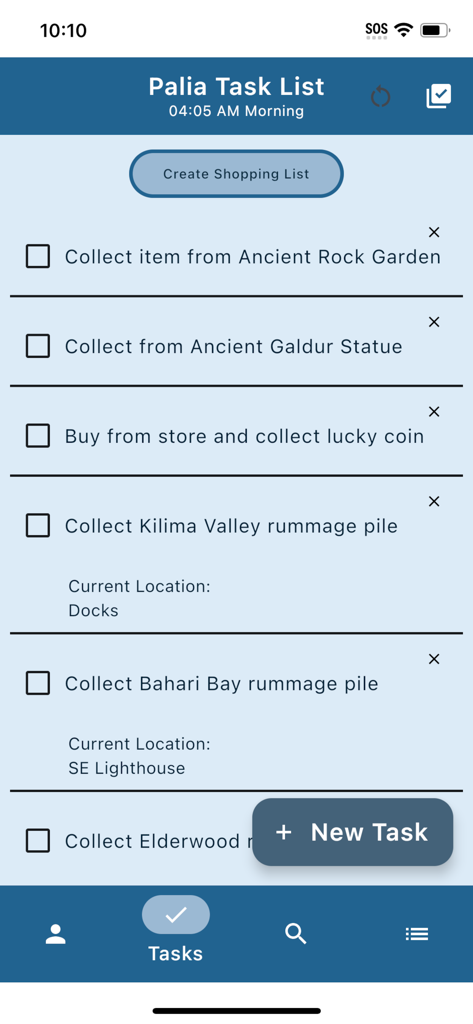
Unofficial Palia Notebook - Palidori Notebook 앱의 일일 작업 목록 인터페이스로 추적된 게임 내 활동을 보여줍니다.

Palidori Notebook 앱의 일일 작업 목록 인터페이스로 추적된 게임 내 활동을 보여줍니다.

설명

Palia Notebook is an ad-free companion application for the video game Palia to help keep track of your daily interactions with Palia villagers including daily chatting, gifts, their schedule, and their current location. You can keep track of your inventory, create tasks, track your preserves, seeds, & worms processing offline, track your achievements, look up which villager likes, and even see the current Palia game time. In the Villager screen, you can keep track of your chats and gifts, see their schedule, discover their current location, look up their likes, and create tasks for obtaining items for them. The villager's chat and gift statuses automatically update with the game time. In the Social Tracker screen, you can view all of the villagers at once, see whether you have chatted or given them a gift, and filter out those who you have already chatted or gifted. You can also search for a particular item and see which villagers have requested or liked it. In the Task Edit screen, you can create a new task or edit an existing one. In the task, you can specify whether a particular item is needed for the task and create a gift to a particular villager for the task. You can also link other tasks as requirements to the current task. In the Item screen, you can check off if you've collected a particular item or its quality counterpart, input your current inventory, and see which villagers like that item. The item properties are also displayed. If the item can be processed by a seed collector, preserves jar, or worm bin, the value you would get per item is also shown, making it easy to figure out the best way to process and sell an item for maximum profit. In the Search screen, you can browse through all the different item categories, search by item name, and filter by location, biome, and time. This helps you figure out what fish, bugs. or assorted items are available at a particular time of day or a particular location. If you are decorating your home, you may really like the feature that allows you to filter all the furniture items by furniture set and furniture type. The Bundles and Accomplishments screens lets you track your bundle, accomplishment, weekly challenge, monthly bulletin board, and quest progress. For accomplishments such as tracking all the fish or bugs, items are listed in the order they are shown in the in-game accomplishments screen. You can easily run through the list and check off all the items you have already collected in game. Then you can easily filter the items in the Search screen to see which ones you still need to find. Palia Notebook is created by an independent developer who is also a Palia player. I created this app as a way to help me track all the things that I wanted to track in the game without needing to wade through all the game screens to find the info I needed. This app is in current development as I find more features that I would really like to exist. I hope they also help your game play too!

Download

다운로드: App Store

이 페이지는 앱이나 개발자의 공식 페이지가 아니며, 정보 제공 및 논평을 목적으로 작성된 독립 편집 간행물입니다. 명시적으로 달리 언급되지 않는 한, 해당 앱이나 개발자는 MWM, Apple, Google Play, 앱 퍼블리셔 또는 앱 개발자와 제휴, 보증, 후원, 승인 또는 공식적으로 연결되어 있지 않으며, 이 페이지의 어떤 내용도 해당 앱이 MWM의 서비스를 사용하여 개발되었음을 의미하지 않습니다. 모든 상표, 로고, 스크린샷 및 기타 콘텐츠는 해당 소유자의 자산입니다.







