Vocal Tune Studio
Vocal Tune Studio
다운로드: App Store

이 페이지는 앱이나 개발자의 공식 페이지가 아니며, 정보 제공 및 논평을 목적으로 작성된 독립 편집 간행물입니다. 명시적으로 달리 언급되지 않는 한, 해당 앱이나 개발자는 MWM, Apple, Google Play, 앱 퍼블리셔 또는 앱 개발자와 제휴, 보증, 후원, 승인 또는 공식적으로 연결되어 있지 않으며, 이 페이지의 어떤 내용도 해당 앱이 MWM의 서비스를 사용하여 개발되었음을 의미하지 않습니다. 모든 상표, 로고, 스크린샷 및 기타 콘텐츠는 해당 소유자의 자산입니다.

로고: Vocal Tune Studio
다운로드: App Store

Vocal Tune Studio

데스크톱급 보컬 프로덕션을 모바일 설정으로 가져오세요. 세밀한 노트 편집 및 포먼트 이동부터 완벽한 타임 스트레칭까지, 좋아하는 AUv3 호스트 또는 독립형 앱에서 직접 스튜디오 품질의 결과물을 얻으세요.

주요 수치

다운로드

26K+

사용자 평점

3.7/5

총 평가 수

0

개발사

Davy Wentzler

카테고리

Music

지원 언어

1

최신 버전

1.4.4

크기

17.3 MB

출시일

2023년 3월 28일
기능

어디서든 스튜디오 품질의 보컬

오늘날의 독립 아티스트를 위해 맞춤 제작된 세밀한 피치, 타임, 포먼트 보정으로 iPhone 또는 iPad를 강력한 보컬 프로덕션 스위트로 변환하세요.

프로급 피치 보정

미묘한 자연스러운 수정부터 상징적인 하드튠 효과까지, 자동 스케일 감지 또는 정교한 수동 제어로 완벽한 보컬을 완성하세요.

원활한 AUv3 통합

다음 스크린샷과 설명은 앱의 공식 스토어 목록에서 직접 가져온 것이며 앱 개발자의 자산입니다.

앱 스토어

스크린샷
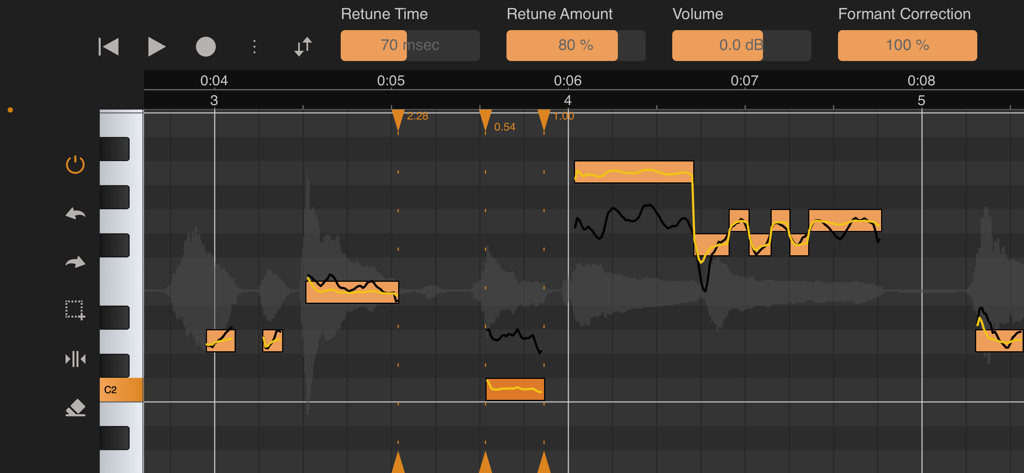
Vocal Tune Studio - 피치 및 포먼트 보정 도구를 보여주는 Vocal Tune Studio 인터페이스
피치 및 포먼트 보정 도구를 보여주는 Vocal Tune Studio 인터페이스

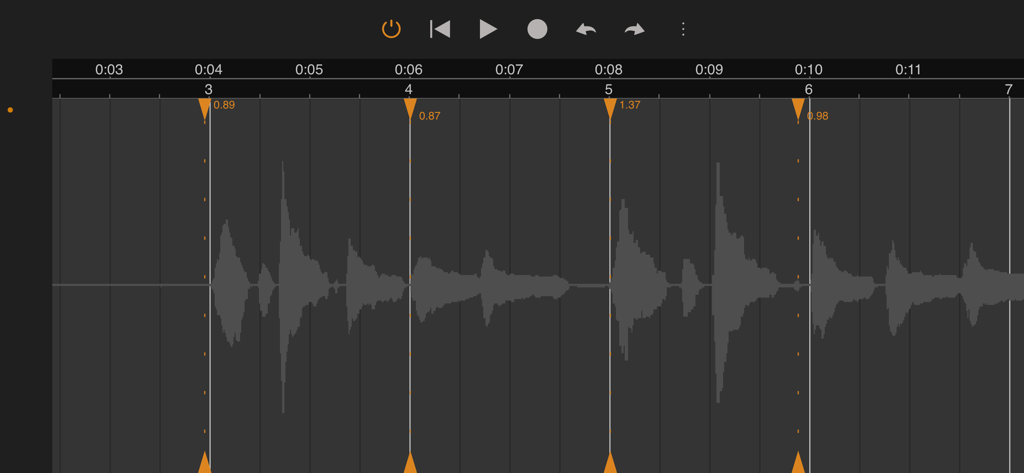
Vocal Tune Studio - 전문적인 음악 프로덕션을 위한 타임 보정 및 스트레칭 마커를 보여주는 Vocal Tune Studio의 오디오 파형 인터페이스
전문적인 음악 프로덕션을 위한 타임 보정 및 스트레칭 마커를 보여주는 Vocal Tune Studio의 오디오 파형 인터페이스

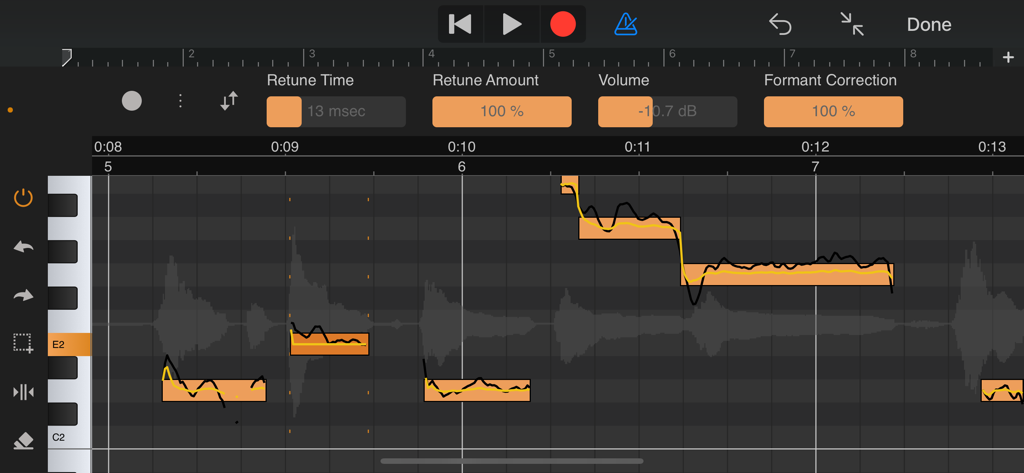
Vocal Tune Studio - 모바일 기기에서 상세한 노트 편집을 보여주는 Vocal Tune Studio의 전문 피치 및 포먼트 보정 인터페이스.

모바일 기기에서 상세한 노트 편집을 보여주는 Vocal Tune Studio의 전문 피치 및 포먼트 보정 인터페이스.

설명

With Vocal Tune Studio, pitch and time correction of vocal recordings is now finally possible on your iPhone or iPad! Use it as an Audio Unit effect inside your favourite DAW or in standalone mode. From popular effects to subtile correction: Retune notes to achieve the popular auto tune effect or apply a more subtile correction. Besides pitch correction, notes can be corrected for timing and volume level as well. Deep editing: Each individual note can be adjusted for retune time, retune amount, volume and the amount of formant correction. Artificial vibrato can also be added and adjusted to taste using the vibrato depth and rate controls and settings to adjust the time when the vibrato kicks in and the time in which it reaches the full vibrato depth to obtain a natural sounding vibrato. Key and scale detection: Vocal Tune Studio can detect the key and scale of a vocal recording automatically or a key and scale can be manually chosen. Two workflows: Choose between two workflows similar to popular desktop vocal tune software: start with either all notes quantised (corrected) or non-quantised. When choosing non-quantised, an additional Pitch Quantisation slider lets you move notes between their original sung pitch and the target pitch within the selected key and scale. Time correction as a bonus for all audio material: Aside from vocal pitch correction, Vocal Tune Studio also features a generic time correction/stretching mode which works on any type of audio material (not only vocals, but also guitars etc.). In this mode, any part of a recording that was played off-beat can be time corrected without affecting parts that were recorded in time. Export MIDI: Besides the host's ability to render the effect to an audio file, the identified notes can also be exported as standard MIDI file. Standalone mode: Besides being a AUv3 plug-in, you can also run the app standalone. Record audio directly, import an audio file or paste an audio file from the iOS clipboard. Auto or manually tune your vocals and correct them for timing errors or apply time correction for any audio material. When finished, export the result to a WAV file. Note: Vocal Tune Studio is also available within our DAW, Audio Evolution Mobile Studio and offers much higher integration there, not requiring to 'record' the audio first into Vocal Tune Studio. User manual: You can find the user manual in PDF and HTML formats here: https://www.audio-evolution.com/manual/vtsau/index.html Tutorial video: Vocal Tune Studio being used inside Audio Evolution Mobile Studio https://www.youtube.com/watch?v=st75zBB4lds PLEASE NOTE: due to a bug in Auria, Vocal Tune Studio stops working when mixing down or freezing tracks. A work-around is to create a new audio track and select the master bus as input to perform bouncing.

Download

다운로드: App Store

이 페이지는 앱이나 개발자의 공식 페이지가 아니며, 정보 제공 및 논평을 목적으로 작성된 독립 편집 간행물입니다. 명시적으로 달리 언급되지 않는 한, 해당 앱이나 개발자는 MWM, Apple, Google Play, 앱 퍼블리셔 또는 앱 개발자와 제휴, 보증, 후원, 승인 또는 공식적으로 연결되어 있지 않으며, 이 페이지의 어떤 내용도 해당 앱이 MWM의 서비스를 사용하여 개발되었음을 의미하지 않습니다. 모든 상표, 로고, 스크린샷 및 기타 콘텐츠는 해당 소유자의 자산입니다.







