
이 페이지는 앱이나 개발자의 공식 페이지가 아니며, 정보 제공 및 논평을 목적으로 작성된 독립 편집 간행물입니다. 명시적으로 달리 언급되지 않는 한, 해당 앱이나 개발자는 MWM, Apple, Google Play, 앱 퍼블리셔 또는 앱 개발자와 제휴, 보증, 후원, 승인 또는 공식적으로 연결되어 있지 않으며, 이 페이지의 어떤 내용도 해당 앱이 MWM의 서비스를 사용하여 개발되었음을 의미하지 않습니다. 모든 상표, 로고, 스크린샷 및 기타 콘텐츠는 해당 소유자의 자산입니다.

Walbum™ - Watch Faces Gallery
Apple Watch를 당신만의 확장된 자아로 만드세요. Walbum은 당신의 손목 위에서 개인화된 표현의 영역을 확장합니다.
다운로드
2.5M+사용자 평점
총 평가 수
31.2K개발사
카테고리
Lifestyle지원 언어
6최신 버전
4.2.0크기
114.9 MB출시일
2019년 4월 4일Apple Watch 사용자 경험을 향상시키는 핵심 기능 평가
Walbum™ - Watch Faces Gallery 주요 기능 분석
맞춤형 DIY 포토 워치 페이스 제작
이 앱은 사용자가 개인적인 사진을 활용하여 자신만의 워치 페이스를 직접 만들고, 스티커, 텍스트, 위젯으로 꾸밀 수 있도록 지원합니다.
상황 기반 스마트 시프트 위젯
이 도구는 시간, 활동, 상황에 따라 자동으로 콘텐츠를 조절하는 스마트 시프트 위젯을 제공하여, 사용자의 일상에 맞춰 필요한 정보를 최적화합니다.
방대한 워치 페이스 및 배경화면 갤러리
이 앱은 광범위한 워치 페이스 및 배경화면 컬렉션을 제공하며, 사용자가 다양한 디자인을 쉽게 탐색하고 Apple Watch에 동기화할 수 있게 합니다.
실시간 데이터 연동 스마트 페이스
이 도구는 임신, 업무-생활, 피트니스 등 실시간 데이터 위젯으로 구동되는 맞춤형 스마트 페이스를 갖추고 있어, 사용자의 라이프스타일에 특화된 정보를 제공합니다.
라이브 스타일 워치 페이스 지원
이 앱은 동적인 라이브 스타일 워치 페이스를 제공하여, Apple Watch 화면에 생동감과 시각적인 매력을 더합니다.
원탭 워치 페이스 간편 추가
이 앱은 사용자가 원하는 워치 페이스를 Apple Watch에 한 번의 탭으로 간편하게 추가할 수 있는 기능을 제공하여, 사용자 편의성을 높입니다.
자주 묻는 질문
에 대해 알아야 할 모든 것 Walbum™ - Watch Faces Gallery
What is Walbum and what does it offer?
Walbum is an Apple Watch application providing a gallery of watch faces and wallpapers. It offers live watch faces, DIY photo faces, smart widgets, and curated albums to personalize your Apple Watch display.
How many watch faces are available in Walbum?
Walbum boasts a vast gallery of nearly 3,000 watch faces. This collection includes various watch wallpapers, background packs, live-style watch faces, and themed albums for diverse styles and seasons.
Can users create custom watch faces with Walbum?
Yes, Walbum allows you to create personalized DIY watch faces in seconds. You can add photo watch face collections that auto-rotate, and customize them with stickers, text labels, widgets, and countdowns for special dates.
What are SmartShift widgets in Walbum?
SmartShift widgets in Walbum automatically adapt their content based on time, activity, and context. Examples include showing countdowns before work ends, displaying weekend weather forecasts, or presenting live stats for steps and activity rings.
Does Walbum offer free watch faces and wallpapers?
Yes, Walbum provides free watch faces and wallpapers through its "Today Free" section. The application continuously updates and adds more free watch faces and recommended content for users.
What is the price of Walbum's Gold Membership?
Walbum's Gold Membership costs $2.99 per month or $13.99 per year, though prices may vary by location. This membership unlocks all premium watch faces, widgets, and advanced features within the app.
What features are included with Walbum's Gold Membership?
Gold Membership in Walbum unlocks all premium watch faces, premium widgets, and advanced features. This includes access to exclusive albums and comprehensive customization options not available in the free version.
What permissions does Walbum require to function?
Walbum requires Health and Activity permissions for steps, heart rate, and activity widgets. It also needs Location access for weather data and Photos permission to save and sync wallpapers to your device.
Does Walbum support Always On Display for Apple Watch?
Yes, Walbum supports the "Always On" display feature for Apple Watch. This ensures that the selected watch face remains visible on your Apple Watch screen, even when your wrist is lowered.
Can custom widgets be added to Walbum watch faces?
Yes, Walbum allows you to add various widgets to watch faces. Available widgets include off-work countdowns, fitness activity trackers, HRV, steps, stickers, holiday countdowns, and news, enabling extensive customization.
다음 스크린샷과 설명은 앱의 공식 스토어 목록에서 직접 가져온 것이며 앱 개발자의 자산입니다.
앱 스토어
스크린샷

이 스크린샷은 다양한 건강 지표와 사용자 정의 가능한 컴플리케이션을 갖춘 정교한 Apple Watch 페이스를 보여주며, 앱 다운로드 350만 회 이상을 강조합니다.
정교한 디자인 워치페이스
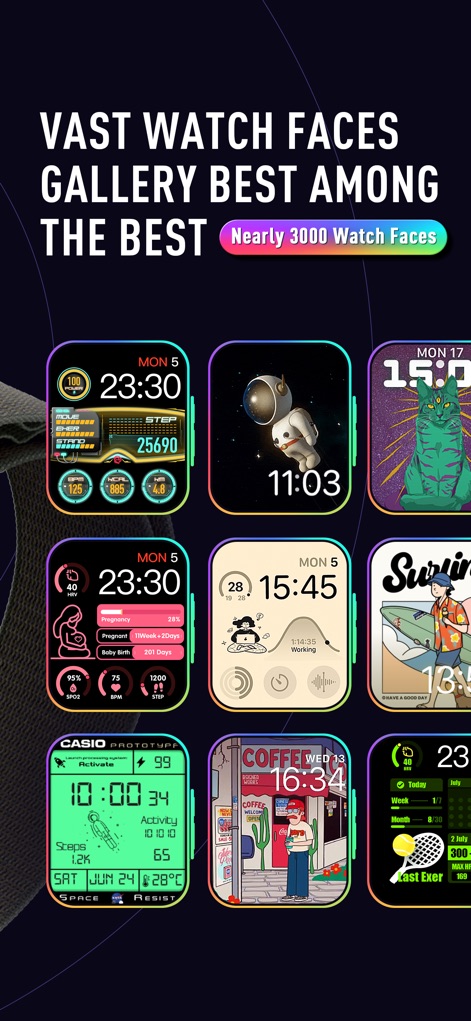
이 스크린샷은 3천 개에 가까운 다양한 워치페이스 컬렉션을 제공하며, 다채로운 그래픽과 유용한 정보 위젯을 한눈에 보여줍니다.
방대한 워치페이스 갤러리
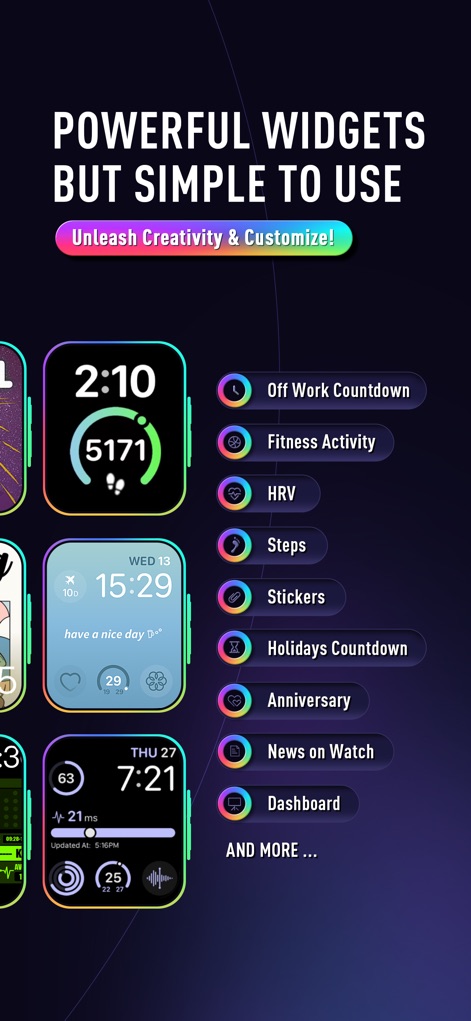
이 스크린샷은 워치페이스와 함께 사용할 수 있는 다양한 위젯 옵션들을 제시하며, 퇴근 카운트다운과 피트니스 활동 추적 기능을 포함합니다.
강력하고 편리한 위젯
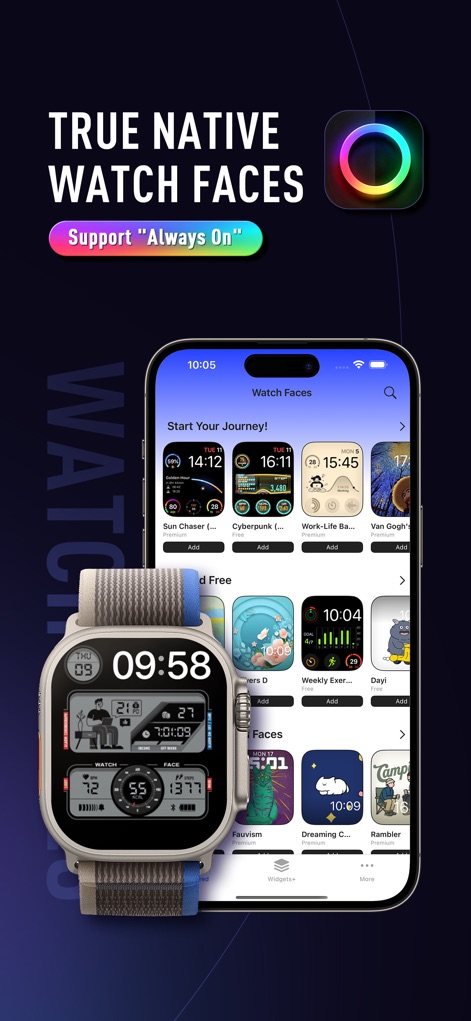
이 스크린샷은 iPhone 앱 내의 워치페이스 갤러리 탐색 화면을 보여주며, Apple Watch에 적용된 세련된 디자인과 'Always On' 디스플레이 지원을 강조합니다.
진정한 네이티브 경험

이 화면은 앱의 '워치페이스' 섹션에서 사용자가 선택할 수 있는 다양한 카테고리를 보여주며, 'Limited Free' 옵션과 'Essential Watch Faces' 컬렉션을 포함합니다.
다양한 워치페이스 탐색

이 스크린샷은 'Work-Life Balance' 워치페이스의 상세 정보를 제공하며, 간편한 '원클릭 추가' 버튼과 Apple Watch 시뮬레이션을 통해 미리 보기를 지원합니다.
맞춤형 워치페이스 상세

이 앱 화면은 다양한 스마트 위젯 카테고리를 소개하며, 퇴근 카운트다운 위젯과 워치 뉴스 기능을 통해 사용자의 일상을 풍요롭게 합니다.
지능형 위젯 라이브러리

이 스크린샷은 원형 및 직사각형 위젯 유형을 제공하여 사용자가 워치페이스를 개인화할 수 있도록 하며, 스티커 추가 및 카운트다운 기능 옵션을 보여줍니다.
위젯 맞춤형 구성
설명
Download
비슷한 앱
유사한 기능과 사용자 경험을 가진 앱

Watchfaces - Watch Wallpaper
亚伦 陈

Watch Faces & Widget Gallery
Hyperday MB
Watch Faces by Facer
Little Labs, Inc.
Watch Faces & Widgets Gallery
GANYMEDES POINT SP Z O O
Buddywatch - Watch Faces
BUDDY SRLS
Watch Faces Gallery & Creator
Artem Vasiliuk
Watch Faces Gallery & Themes
Mikael Melkonyan
Watch Faces Gallery - Widgets.
European apps solutions LTD
Watch Faces Gallery-Widget
Jinan Feiniao culture media Co., Ltd
이 페이지는 앱이나 개발자의 공식 페이지가 아니며, 정보 제공 및 논평을 목적으로 작성된 독립 편집 간행물입니다. 명시적으로 달리 언급되지 않는 한, 해당 앱이나 개발자는 MWM, Apple, Google Play, 앱 퍼블리셔 또는 앱 개발자와 제휴, 보증, 후원, 승인 또는 공식적으로 연결되어 있지 않으며, 이 페이지의 어떤 내용도 해당 앱이 MWM의 서비스를 사용하여 개발되었음을 의미하지 않습니다. 모든 상표, 로고, 스크린샷 및 기타 콘텐츠는 해당 소유자의 자산입니다.