Weekly: Budget Planner App
다운로드: App Store

이 페이지는 앱이나 개발자의 공식 페이지가 아니며, 정보 제공 및 논평을 목적으로 작성된 독립 편집 간행물입니다. 명시적으로 달리 언급되지 않는 한, 해당 앱이나 개발자는 MWM, Apple, Google Play, 앱 퍼블리셔 또는 앱 개발자와 제휴, 보증, 후원, 승인 또는 공식적으로 연결되어 있지 않으며, 이 페이지의 어떤 내용도 해당 앱이 MWM의 서비스를 사용하여 개발되었음을 의미하지 않습니다. 모든 상표, 로고, 스크린샷 및 기타 콘텐츠는 해당 소유자의 자산입니다.


로고: Weekly: Budget Planner App
다운로드: App Store

Weekly: Budget Planner App

월간의 압도감에서 벗어나세요. 은행 계좌를 연동하고, 일일 지출을 손쉽게 추적하며, 지출을 허용하는 아름다운 예산으로 저축 목표를 달성하세요.

주요 수치

다운로드

107K+

사용자 평점

4.8/5

총 평가 수

4K+

개발사

Weekly LLC

카테고리

Finance

지원 언어

1

최신 버전

4.4.6

크기

74.5 MB

출시일

2019년 10월 20일
기능

매주 당신의 재정을 관리하세요

얼마나 지출할 수 있는지 추측하는 것을 멈추세요. Weekly는 청구서, 수입, 목표를 7일 주기의 단일하고 스트레스 없는 숫자로 변환합니다.

안전 지출 금액 확인

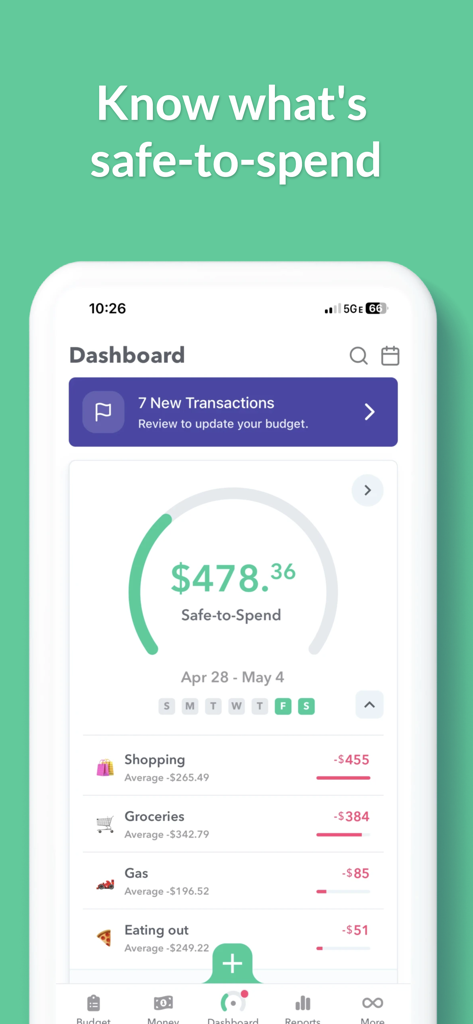
더 이상 암산은 필요 없습니다. 청구서와 저축 목표가 자동으로 반영된 후 여유 자금이 얼마나 남았는지 정확히 확인하세요.

자동 은행 계좌 연동

수동 입력을 건너뛰기 위해 계좌를 안전하게 연결하세요. 원터치 검토로 거래를 분류하고 몇 초 안에 진행 상황을 파악하세요.

FAQ

자주 묻는 질문

에 대해 알아야 할 모든 것 Weekly: Budget Planner App

Weekly: Budget Planner App란 무엇인가요?

Weekly는 사용자가 예산을 계획하고, 과소비를 막고, 주간 주기에 따라 저축하는 데 도움이 되도록 설계된 예산 앱입니다. 예산 계획 도구이자 지출 추적기 역할을 합니다.

Weekly 앱은 주간 안전 지출 한도를 어떻게 계산하나요?

Weekly는 반복되는 청구서, 수입 및 설정된 저축 목표를 고려하여 주간 지출 한도를 계산합니다. 그런 다음 매주 안전하게 지출할 수 있는 금액을 결정합니다.

Weekly 앱에 지출 추적 기능이 포함되어 있나요?

예, Weekly에는 지출 추적 기능이 포함되어 있습니다. 은행 거래 내역을 다운로드하거나 수동 입력을 허용하여 일상적인 지출을 모니터링합니다. 사용자는 구매 항목을 분류할 수 있습니다.

다음 스크린샷과 설명은 앱의 공식 스토어 목록에서 직접 가져온 것이며 앱 개발자의 자산입니다.

앱 스토어

스크린샷
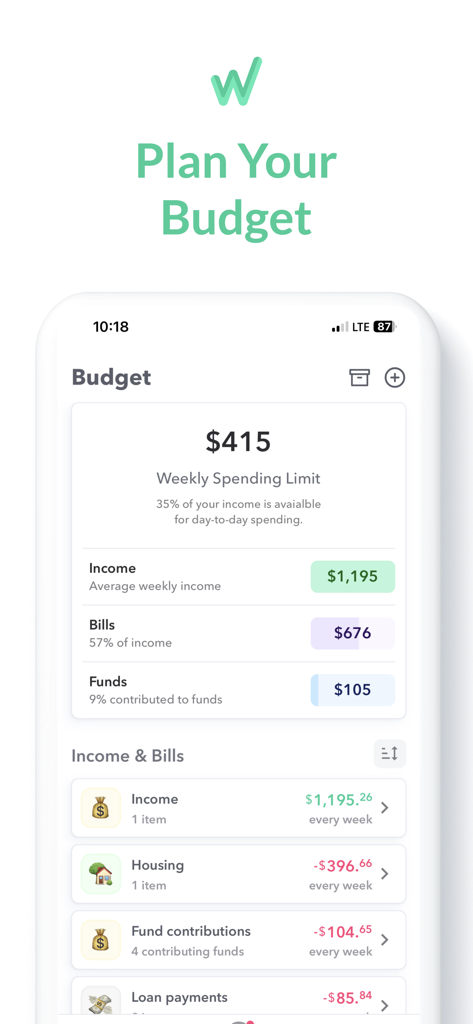
Weekly: Budget Planner App - Weekly 예산 플래너 앱 인터페이스에 수입 및 청구서 내역과 함께 415달러의 주간 지출 한도가 표시되어 있습니다.
Weekly 예산 플래너 앱 인터페이스에 수입 및 청구서 내역과 함께 415달러의 주간 지출 한도가 표시되어 있습니다.

Weekly: Budget Planner App - Weekly 예산 플래너 앱 대시보드에 안전 지출 잔액과 식료품 및 식사 등 분류된 지출이 표시됩니다.
Weekly 예산 플래너 앱 대시보드에 안전 지출 잔액과 식료품 및 식사 등 분류된 지출이 표시됩니다.

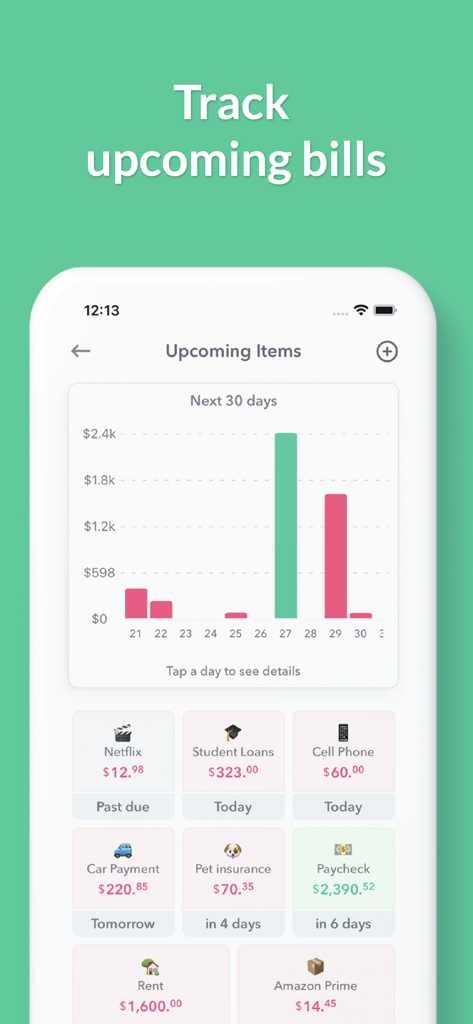
Weekly: Budget Planner App - Weekly 예산 앱의 모바일 스크린샷으로, 지출 예측 차트와 거래 카드가 있는 예정 청구서 대시보드를 보여줍니다.
Weekly 예산 앱의 모바일 스크린샷으로, 지출 예측 차트와 거래 카드가 있는 예정 청구서 대시보드를 보여줍니다.

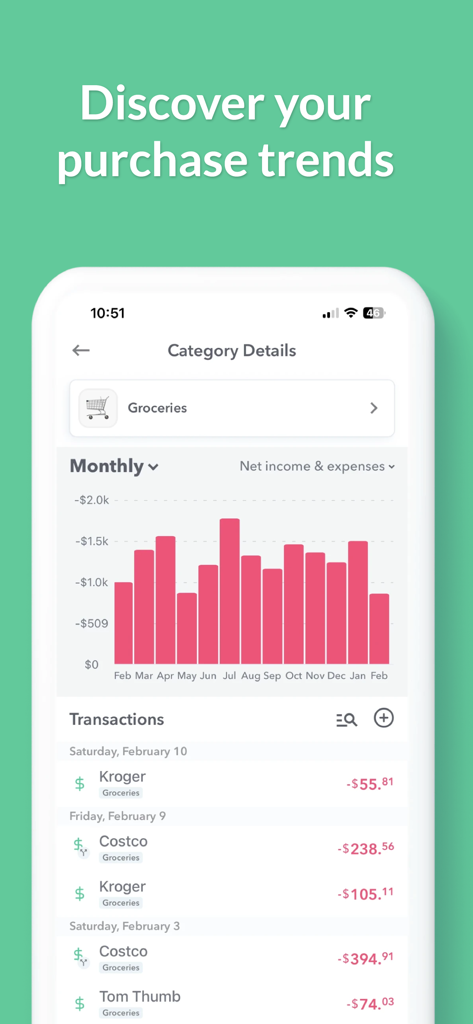
Weekly: Budget Planner App - 식료품 지출 추세에 대한 월간 막대 차트와 거래 목록을 보여주는 모바일 앱 화면입니다.
식료품 지출 추세에 대한 월간 막대 차트와 거래 목록을 보여주는 모바일 앱 화면입니다.

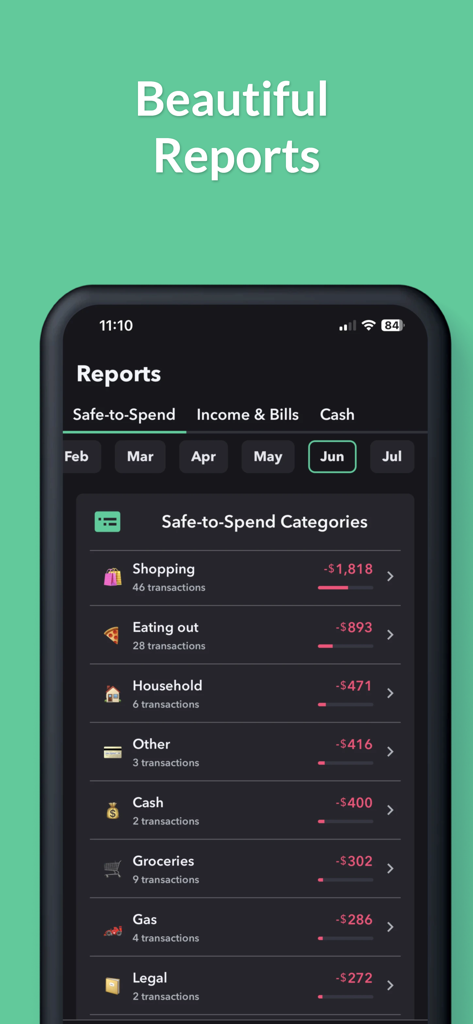
Weekly: Budget Planner App - Weekly 예산 앱에서 월간 지출 보고서 및 안전 지출 카테고리를 표시합니다.
Weekly 예산 앱에서 월간 지출 보고서 및 안전 지출 카테고리를 표시합니다.

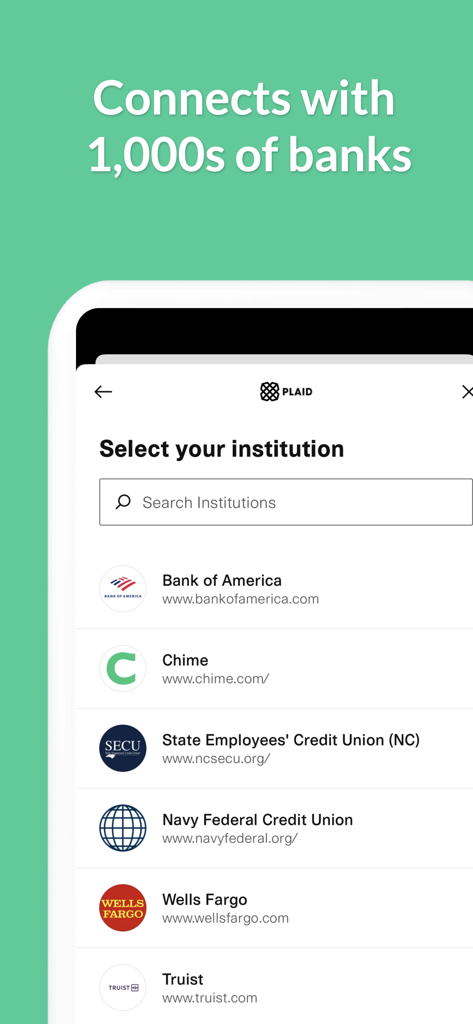
Weekly: Budget Planner App - Weekly 앱에서 Plaid를 사용하여 Bank of America 및 Wells Fargo와 같은 수천 개의 금융 기관을 연결하는 은행 연동 화면입니다.
Weekly 앱에서 Plaid를 사용하여 Bank of America 및 Wells Fargo와 같은 수천 개의 금융 기관을 연결하는 은행 연동 화면입니다.

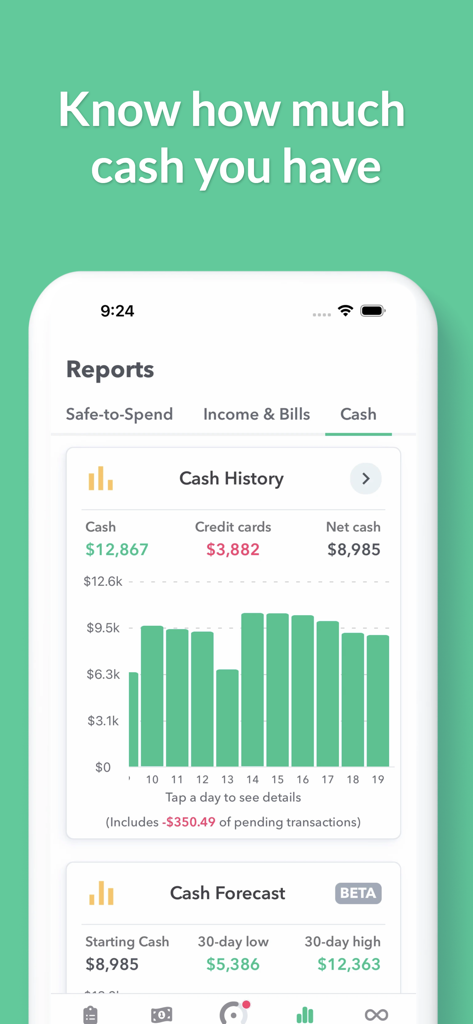
Weekly: Budget Planner App - Weekly 앱의 iPhone 스크린샷으로, 현금 내역 차트와 금융 예측 보고서를 보여줍니다.
Weekly 앱의 iPhone 스크린샷으로, 현금 내역 차트와 금융 예측 보고서를 보여줍니다.

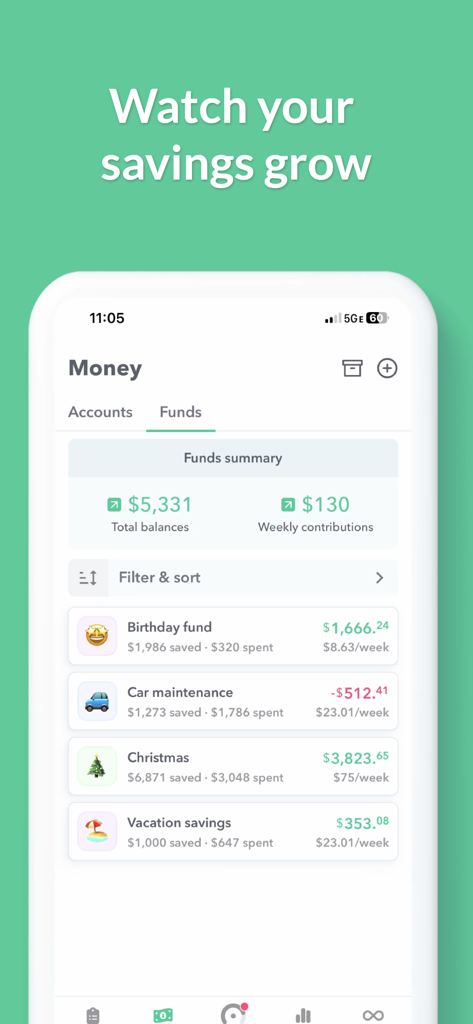
Weekly: Budget Planner App - Weekly 예산 플래너 앱의 저축 자금 대시보드로 휴가 및 차량 유지 보수 목표 진행 상황을 보여줍니다.
Weekly 예산 플래너 앱의 저축 자금 대시보드로 휴가 및 차량 유지 보수 목표 진행 상황을 보여줍니다.

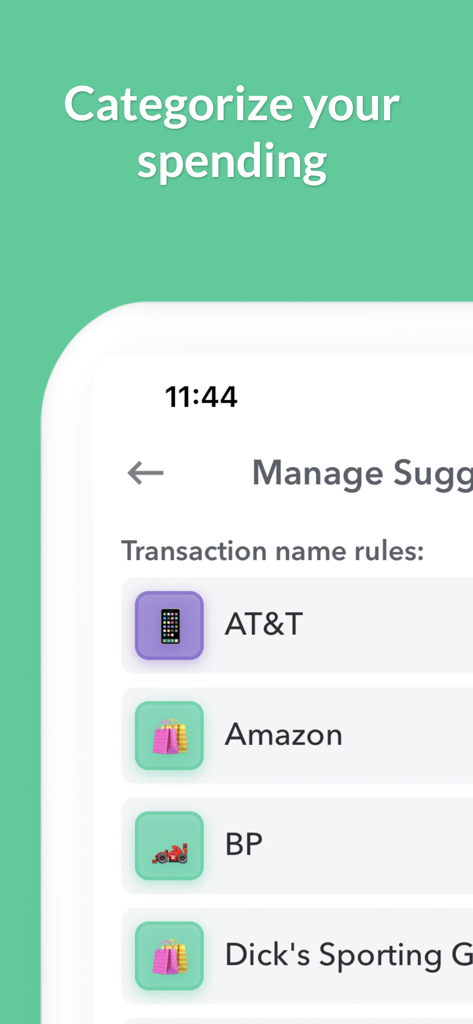
Weekly: Budget Planner App - Weekly 예산 앱의 지출 분류 화면으로, 상점 아이콘이 있는 거래 규칙을 보여줍니다.
Weekly 예산 앱의 지출 분류 화면으로, 상점 아이콘이 있는 거래 규칙을 보여줍니다.

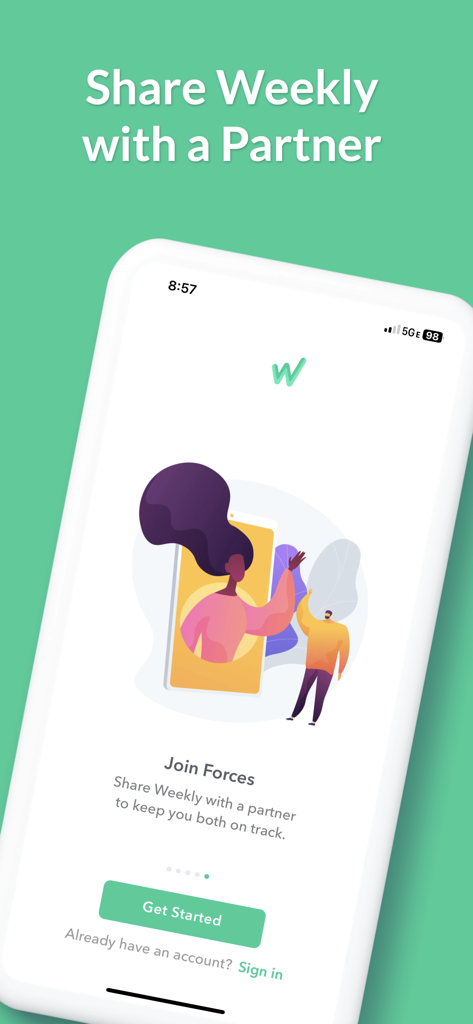
Weekly: Budget Planner App - Weekly 예산 플래너 앱 화면으로, 커플을 위한 공유 예산 옵션인 'Join Forces' 기능이 특징입니다.

Weekly 예산 플래너 앱 화면으로, 커플을 위한 공유 예산 옵션인 'Join Forces' 기능이 특징입니다.

설명

Weekly is a beautiful budget app based on a week. Weekly is the most effective way to plan a budget, stop overspending and save for your money goals. Weekly is both a budget planner and spending tracker. Weekly starts with a simple guided budget setup where you put in all your recurring bills and income. Next, you add in your savings goals. Then based on those budget items, Weekly calculates for you your weekly spending limit. Once your budget is set, our one-of-a-kind spending tracker monitors your day-to-day spending by downloading your transactions from your bank (or you can add them manually). You can then quickly and easily organize your purchases into categories. We will show you how much you are spending on things like “Gas” and “Groceries” or any other category you would like to track. As the weeks go by you can see your average spending by category and challenge yourself to keep your “Safe-to-Spend” balance “in the green”. Weekly is also a great bill organizer. You will see your upcoming bills and whether they have been paid. Weekly will tell you the number of days left until the next bill is due and notify you when bills are due. Connect your banks and credit cards to see all your account balances in one place and stay on top of your personal finances and your budget. Tracking money with Weekly is fun. Use emojis to represent your different recurring bills and safe-to-spend categories. Weekly’s one tap review icons let you quickly confirm your transactions and keep on track with your budget. Weekly is perfect for household & personal budgets. You can also share Weekly to stay on track with your budget with a spouse or partner. The steps to budgeting with Weekly. Step 1: Create Your Budget with the Budget Planner ** Use our guided walkthrough to set up your budget ** Enter your regular income ** Enter your recurring expenses such as your mortgage, car payments, loans, and utilities bills Step 2: Set Up Funds to Save for Your Goals ** Create funds to save for your goals ** Weekly automatically contributes money to your funds each week Step 3: Discover Your Weekly Safe-To-Spend ** Weekly calculates what you can safely spend each week ** The calculation takes into account all recurring bills, income and savings goals in your budget Step 4: Track Your Day-to-Day Spending with our Spending Tracker ** Add in your daily transactions either manually or download them from your bank ** Stay aware of your “Safe-to-Spend” number ** Quickly and easily categorize your day-to-day spending ** See your category spending totals and averages ** Spend worry-free knowing all your bills and savings goals are factored in Step 5: See Your Bills and Account Balances ** See view upcoming bills and whether they have been paid ** View all your account balances in one place ** See how much cash you are saving User Testimonials "Has made budgeting effortless and so easy to follow. For the first time I am able to stay on track. The cost of the subscription is absolutely worth it and has saved me thousands in overspending." AllyCat1217, Oct 12, 2024 “Probably the most important app my wife and I have. It throws our ambiguity around finances out the window and sets us up for success each week with an easy to understand, easy to read budgeting app.” leajere, Jul 10, 2023 Weekly is free to use or you can subscribe to Weekly PRO for our premium features. Weekly PRO subscriptions automatically renew unless auto-renew is turned off at least 24-hours before the end of the current period. Subscriptions may be managed and auto-renewal may be turned off by going to your iPhone Account Settings. Any unused portion of a free trial period will be forfeited if you purchase a subscription to Weekly before your trial expires. Terms and Conditions - https://weeklybudgeting.com/terms Privacy Policy - https://www.privacypolicies.com/privacy/view/6c2c1200579f8307c4080c7f9cd94723

Download

다운로드: App Store

이 페이지는 앱이나 개발자의 공식 페이지가 아니며, 정보 제공 및 논평을 목적으로 작성된 독립 편집 간행물입니다. 명시적으로 달리 언급되지 않는 한, 해당 앱이나 개발자는 MWM, Apple, Google Play, 앱 퍼블리셔 또는 앱 개발자와 제휴, 보증, 후원, 승인 또는 공식적으로 연결되어 있지 않으며, 이 페이지의 어떤 내용도 해당 앱이 MWM의 서비스를 사용하여 개발되었음을 의미하지 않습니다. 모든 상표, 로고, 스크린샷 및 기타 콘텐츠는 해당 소유자의 자산입니다.








