
이 페이지는 앱이나 개발자의 공식 페이지가 아니며, 정보 제공 및 논평을 목적으로 작성된 독립 편집 간행물입니다. 명시적으로 달리 언급되지 않는 한, 해당 앱이나 개발자는 MWM, Apple, Google Play, 앱 퍼블리셔 또는 앱 개발자와 제휴, 보증, 후원, 승인 또는 공식적으로 연결되어 있지 않으며, 이 페이지의 어떤 내용도 해당 앱이 MWM의 서비스를 사용하여 개발되었음을 의미하지 않습니다. 모든 상표, 로고, 스크린샷 및 기타 콘텐츠는 해당 소유자의 자산입니다.


Whiteboard: just draw together
이 앱은 당신의 아이에게 디지털 팔레트와 무한한 캔버스를 건네줍니다. 화면 앞에서 고독한 시간을 보내는 대신, 함께 그림을 그리는 행위는 아이들이 상호작용하고 공유하는 새로운 방식을 발견하게 합니다.
다운로드
2.5M+사용자 평점
총 평가 수
100.2K개발사
카테고리
Business지원 언어
4최신 버전
2.6.2크기
8.1 MB출시일
2019년 9월 10일어린이를 위한 단순하고 안전하며 매력적인 디지털 협업 도구 평가
Whiteboard: just draw together 앱 주요 기능 분석
메시지 앱을 통한 협업 그리기
이 앱은 메시지 앱을 사용하여 친구 및 가족과 함께 그림을 주고받으며 공동으로 작품을 만들 수 있는 독특하고 재미있는 협업 기능을 제공합니다. 이는 함께하는 즐거움을 선사하며, 안전하고 창의적인 디지털 활동을 찾는 가족에게 특히 매력적입니다.
그림 저장
이 도구는 사용자가 완성된 그림을 기기의 사진 라이브러리에 쉽게 저장하여 소중한 창작물을 영구적으로 보관하고 언제든지 다시 볼 수 있도록 합니다. 부모님은 아이들의 작품을 보존하고 공유하는 데 큰 만족감을 얻을 수 있습니다.
특별한 무지개 마커
이 앱은 다채로운 무지개 효과로 그림을 그릴 수 있는 특별한 무지개 마커 기능을 제공하여, 아이들의 상상력을 자극하고 그림 그리는 활동에 마법 같은 재미를 더해줍니다.
그림 공유 기능
이 도구는 사용자가 메시지, 메일 등 다양한 소셜 플랫폼을 통해 자신의 예술 작품을 친구, 가족과 손쉽게 공유할 수 있도록 지원합니다. 이는 아이들의 성취감을 높이고 가족 간의 유대감을 강화하는 데 기여합니다.
사진 가져오기 및 활용
이 앱은 사용자가 사진을 가져와 그 위에 그림을 그리거나, 추적하거나, 주석을 달며 창의적인 활동을 확장할 수 있게 해줍니다. 이는 단순한 그리기를 넘어 새로운 형태의 예술적 표현을 가능하게 합니다.
무지개 색상 팔레트
이 앱은 광범위한 무지개 색상 팔레트를 제공하여 사용자가 제한 없이 자신의 상상력을 펼쳐 다채롭고 생동감 있는 그림을 그릴 수 있도록 지원합니다.
흔들어서 지우기
이 도구는 장치를 가볍게 흔드는 동작만으로 캔버스의 모든 그림을 쉽고 빠르게 지울 수 있는 재미있고 직관적인 방법을 제공하여, 아이들이 실수에 대한 부담 없이 자유롭게 실험하도록 돕습니다.
실행 취소, 다시 실행 및 지우기
이 앱은 사용자가 그림 작업 중 실수를 손쉽게 되돌리거나, 이전 작업을 다시 실행하거나, 캔버스를 깨끗하게 지울 수 있는 필수적인 제어 기능을 제공하여, 아이들의 창작 과정을 더욱 원활하게 만들어 줍니다.
AirPrint 지원 인쇄
이 도구는 사용자가 AirPrint 지원 프린터를 활용하여 디지털 작품을 고품질의 실물 그림으로 인쇄할 수 있는 편리함을 제공합니다. 아이들의 그림을 물리적인 형태로 보관하고 전시하는 데 유용합니다.
사용자 설정 기억
이 앱은 사용자의 마지막 마커 색상, 크기 및 캔버스 배경색을 기억하여, 매번 설정을 다시 할 필요 없이 편리하고 일관된 그리기 경험을 제공합니다. 이는 특히 어린 사용자들에게 매끄러운 사용 환경을 보장합니다.
자주 묻는 질문
에 대해 알아야 할 모든 것 Whiteboard: just draw together
What is Whiteboard: just draw together?
Whiteboard: just draw together is a simple, focused drawing application for kids and adults. It provides a clean whiteboard, multiple colors, and features for collaborative drawing via Messages.
Can users draw collaboratively in Whiteboard: just draw together?
Yes, Whiteboard allows users to draw collaboratively. Drawings are sent via the Messages app, opened for further drawing by a recipient, and then sent back.
What drawing tools does Whiteboard: just draw together provide?
Whiteboard offers drawing with colors of the rainbow, 6 preconfigured marker sizes, and a unique 'Rainbow' marker. Users also have undo, redo, and clear drawing actions.
How do I change the background color in Whiteboard: just draw together?
Users change the background color in Whiteboard by long-pressing on a color within the palette. The app remembers the last used background color.
Does Whiteboard: just draw together support importing photos?
Yes, Whiteboard allows importing photos. Users can trace, annotate, and engage creatively with imported images directly within the app.
How do users erase drawings in Whiteboard: just draw together?
Whiteboard provides several ways to erase drawings. Users can 'shake to erase' the canvas, or utilize the undo and clear drawing action buttons.
Can I save and share drawings from Whiteboard: just draw together?
Yes, users save their Whiteboard drawings to their Photos library. The app also supports sharing drawings through Messages, Mail, and various other integrated applications.
What are the experimental Whiteboard Labs features?
Whiteboard Labs offers opt-in features such as "Draw with Knobs" for a classic drawing experience, "Screen Recording" to capture drawing sessions, and "Draw with Motion" by tilting the device.
Does Whiteboard: just draw together offer printing capabilities?
Yes, Whiteboard supports printing. Users print their creations directly to any AirPrint-enabled printers from within the application.
How can I support the development of Whiteboard: just draw together?
Yes, users support the development of Whiteboard: just draw together by subscribing to Creator Kit. This provides financial backing for ongoing app improvements.
다음 스크린샷과 설명은 앱의 공식 스토어 목록에서 직접 가져온 것이며 앱 개발자의 자산입니다.
앱 스토어
스크린샷
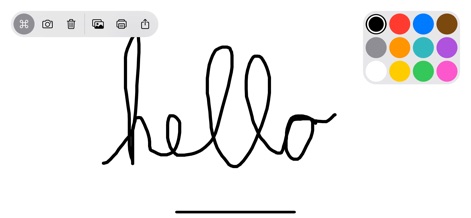
이 앱은 깔끔한 흰색 캔버스에서 사용자가 'hello'라는 글씨를 쓸 수 있게 하며, 상단 바의 공유 아이콘을 통해 창작물을 쉽게 나눌 수 있습니다.
쉬운 그리기 시작
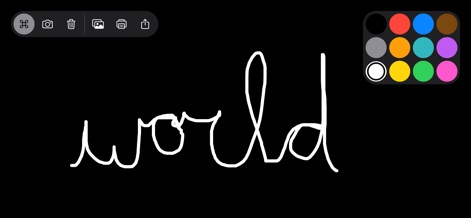
사용자는 캔버스 배경색을 검정색으로 변경하여 시각적 대비를 만들 수 있으며, 팔레트에서 흰색을 선택하여 어두운 배경에 밝은 글씨를 그릴 수 있습니다.
배경색 변경
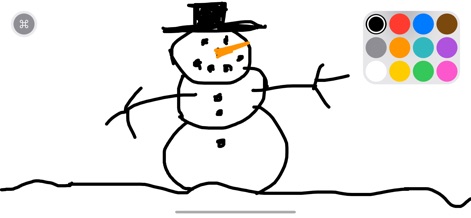
하얀 캔버스 위에 검은색 마커로 귀여운 눈사람을 그릴 수 있으며, 이 앱의 단순한 인터페이스는 아이들이 복잡함 없이 창의력을 발휘하도록 돕습니다.
상상력 펼치기
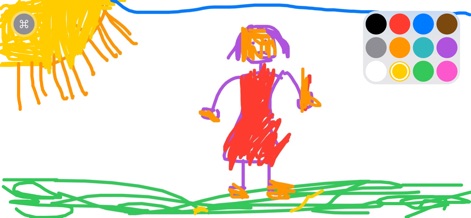
이 도구는 사용자가 노란색 태양과 다양한 색상의 사람을 그릴 수 있도록 지원하며, 직관적인 컬러 팔레트에서 원하는 색상을 손쉽게 선택하여 적용할 수 있습니다.
다채로운 예술
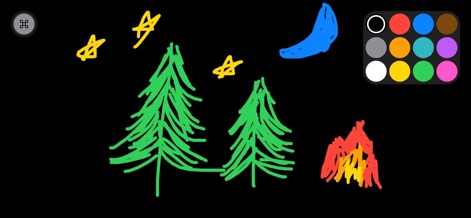
사용자는 검정색 배경 위에 별이 빛나는 밤하늘과 초록색 나무를 그리며 자신만의 상상 속 이야기를 시각적으로 표현할 수 있고, 다양한 색상으로 그림을 풍성하게 채울 수 있습니다.
이야기 만들기
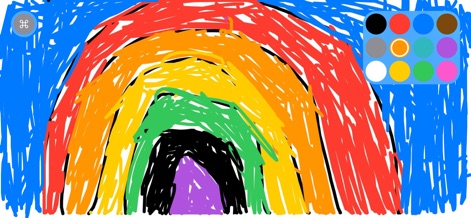
이 앱은 화면 가득 펼쳐진 무지개 그림을 통해 생동감 넘치는 색상을 제공하며, 사용자는 팔레트에서 주황색을 포함한 다채로운 색상을 활용하여 예술적인 표현을 할 수 있습니다.
특별한 무지개
설명
Download
비슷한 앱
유사한 기능과 사용자 경험을 가진 앱

Doodle Magic - Draw, Paint
炳甲 梁

Drawing with Carl
yann le coroller
Coloring with Blippi & Friends
RED GAMES CO, LLC
Moshi Coloring World
Mind Candy
PONY Coloring Pages for Girls
ROMAN SAFRONOV
Kids Coloring Games & Drawing
Budge Studios
Drawing for Kids. Painting Pad
Karaleuski Stanislau

Baby coloring games for girls
Kakadoo

HexaParty - Hexel art for Kids
Marshmallow Games SRL
이 페이지는 앱이나 개발자의 공식 페이지가 아니며, 정보 제공 및 논평을 목적으로 작성된 독립 편집 간행물입니다. 명시적으로 달리 언급되지 않는 한, 해당 앱이나 개발자는 MWM, Apple, Google Play, 앱 퍼블리셔 또는 앱 개발자와 제휴, 보증, 후원, 승인 또는 공식적으로 연결되어 있지 않으며, 이 페이지의 어떤 내용도 해당 앱이 MWM의 서비스를 사용하여 개발되었음을 의미하지 않습니다. 모든 상표, 로고, 스크린샷 및 기타 콘텐츠는 해당 소유자의 자산입니다.