Who's On - Field Hockey
다운로드: App Store

이 페이지는 앱이나 개발자의 공식 페이지가 아니며, 정보 제공 및 논평을 목적으로 작성된 독립 편집 간행물입니다. 명시적으로 달리 언급되지 않는 한, 해당 앱이나 개발자는 MWM, Apple, Google Play, 앱 퍼블리셔 또는 앱 개발자와 제휴, 보증, 후원, 승인 또는 공식적으로 연결되어 있지 않으며, 이 페이지의 어떤 내용도 해당 앱이 MWM의 서비스를 사용하여 개발되었음을 의미하지 않습니다. 모든 상표, 로고, 스크린샷 및 기타 콘텐츠는 해당 소유자의 자산입니다.


로고: Who's On - Field Hockey
다운로드: App Store

Who's On - Field Hockey

필드하키 코치를 위한 궁극의 로테이션 관리자. 출전 시간을 쉽게 균형 맞추고, 통계를 즉시 추적하며, 스톱워치가 아닌 경기에 집중하세요.

주요 수치

다운로드

23K+

사용자 평점

1.0/5

총 평가 수

0

개발사

Left Coast Labs Ltd.

카테고리

Sports

지원 언어

1

최신 버전

2.6.5

크기

36.6 MB

출시일

2014년 3월 24일
기능

벤치에서의 스트레스를 마스터하세요

유소년 코치를 위해 경기 당일 로테이션을 간소화하고, 출전 시간을 추적하며, 물류가 아닌 선수들에게 집중할 수 있도록 제작되었습니다.

공정한 출전 시간 보장

핫-콜드 지표를 사용하여 시간을 추적하고 모든 선수가 필드에서 공정한 몫을 받도록 보장합니다.

스트레스 없는 선수 교체

벤치에서 선수들을 필드로 간단히 드래그 앤 드롭하고 한 번의 탭으로 로테이션하세요. 더 이상 클립보드는 없습니다.

다음 스크린샷과 설명은 앱의 공식 스토어 목록에서 직접 가져온 것이며 앱 개발자의 자산입니다.

앱 스토어

스크린샷
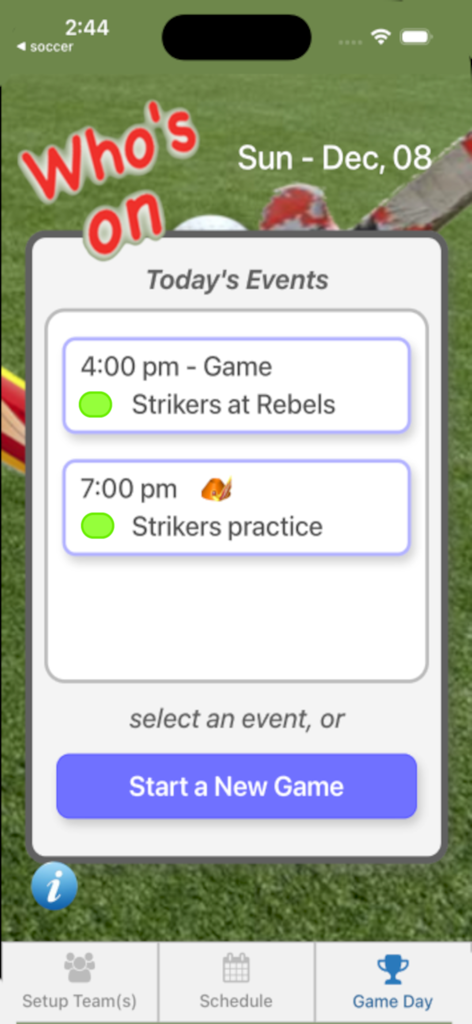
Who's On - Field Hockey - 현재 날짜의 필드하키 경기 및 연습 일정을 보여주는 모바일 앱 인터페이스
현재 날짜의 필드하키 경기 및 연습 일정을 보여주는 모바일 앱 인터페이스

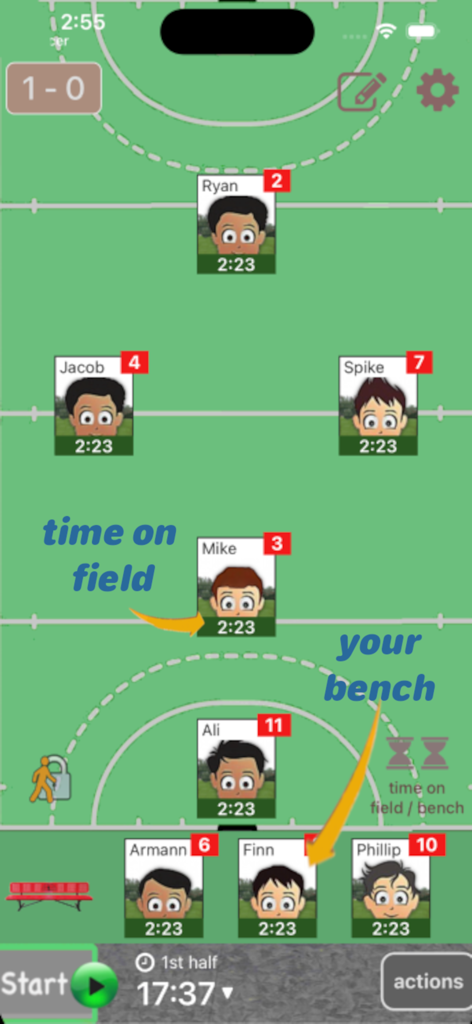
Who's On - Field Hockey - 필드하키 선수 포지션 및 벤치 교체를 추적하는 모바일 앱 인터페이스
필드하키 선수 포지션 및 벤치 교체를 추적하는 모바일 앱 인터페이스

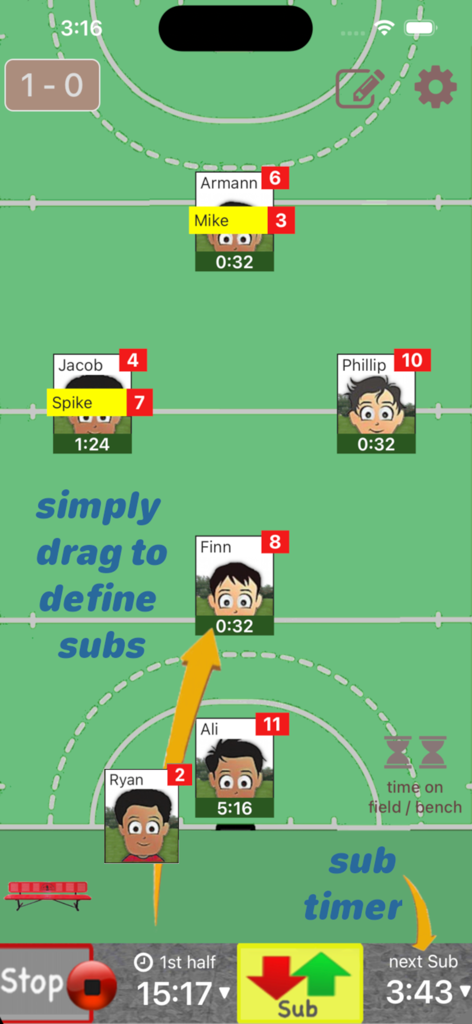
Who's On - Field Hockey - 드래그 앤 드롭 선수 교체 및 경기 타이머를 보여주는 필드하키 코치 앱 인터페이스
드래그 앤 드롭 선수 교체 및 경기 타이머를 보여주는 필드하키 코치 앱 인터페이스

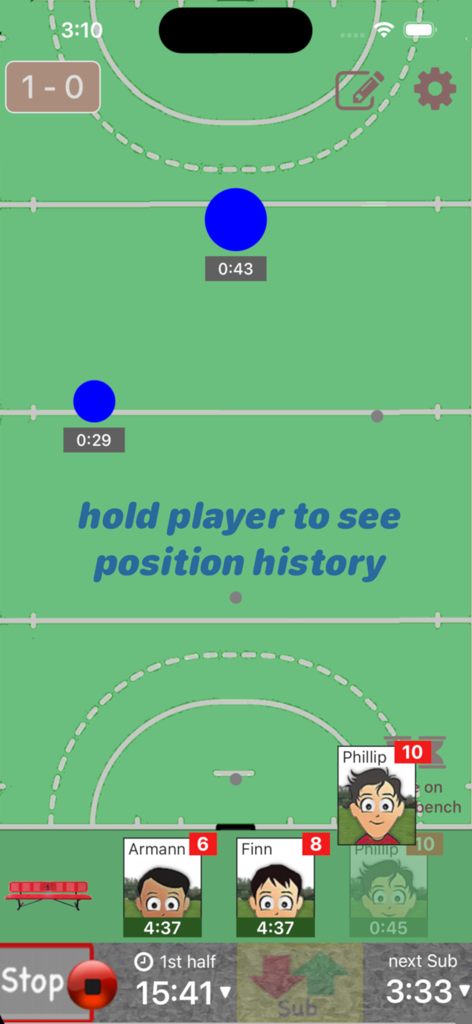
Who's On - Field Hockey - 가상 경기장에서 경기 시계 및 선수 교체 관리를 보여주는 Who's On Field Hockey 앱 인터페이스
가상 경기장에서 경기 시계 및 선수 교체 관리를 보여주는 Who's On Field Hockey 앱 인터페이스

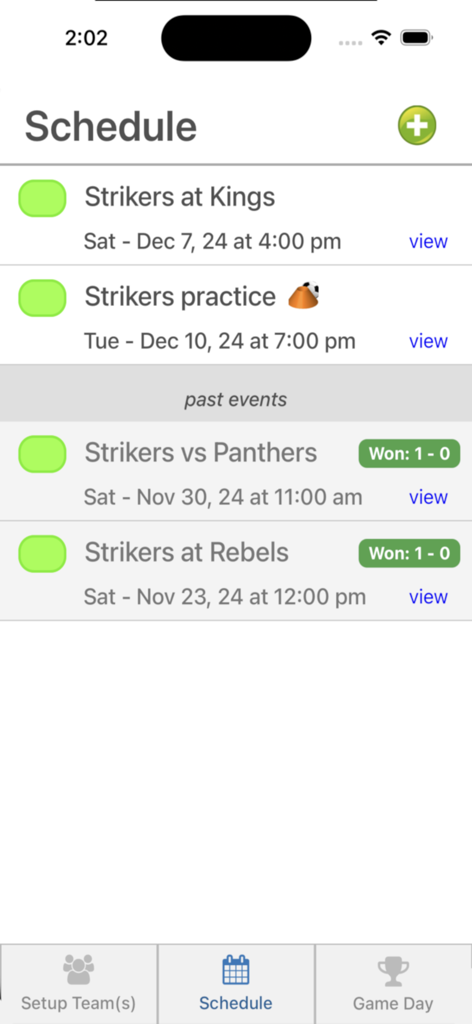
Who's On - Field Hockey - 예정된 경기 및 지난 경기 결과가 표시된 Who's On 필드하키 앱의 일정 화면
예정된 경기 및 지난 경기 결과가 표시된 Who's On 필드하키 앱의 일정 화면

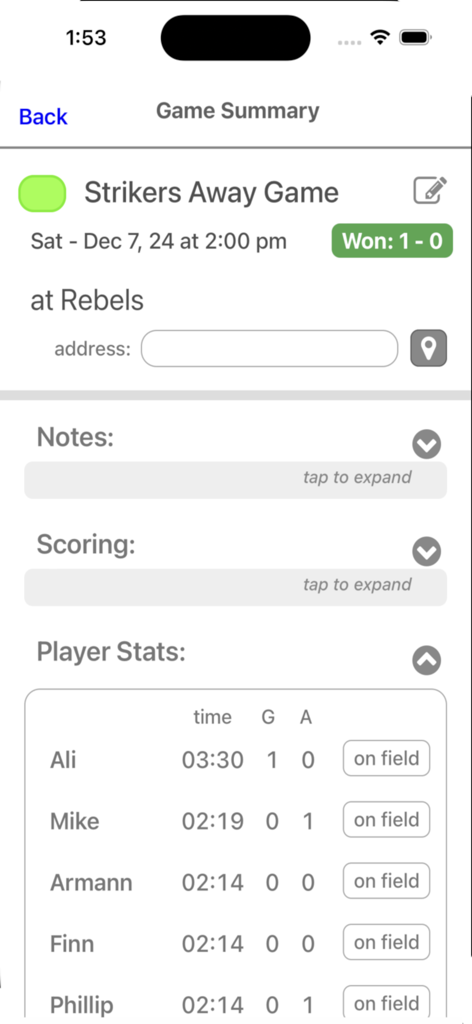
Who's On - Field Hockey - 경기 결과 및 출전 시간, 득점과 같은 개별 선수 통계를 보여주는 필드하키 경기 요약 화면

경기 결과 및 출전 시간, 득점과 같은 개별 선수 통계를 보여주는 필드하키 경기 요약 화면

설명

Who's On-Field Hockey helps youth-field-hockey coaches manage who's on the field and who's going on next. It has been developed for the iPhone and iPad with experienced coaches who find managing rotations and balancing play time awkward and stressful. Watch our feature videos at "http://whos-on.leftcoastlabs.biz/videos/fieldhockey". What coaches have said about Who's On apps... "It's intuitive and easy of use." "It can handle all the unpredictability of coaching youth sports. For instance, I don't know who's going to be there [on game day] until I show up at the game. Players sometimes show up late or leave early. Young players decide at the last minute that they don't want to go on, messing up my planned rotation. This app allows me to handle all this... with ease." "I like how clearly each player's name, number and picture is presented on the screen. I have a lousy memory and remembering new player names at the start of a season is always a problem for me." "The 1-touch Position History is really well done... I wouldn't want to coach again without it!" "I love how easy it is to add player photos to the team." Feature Summary: Simple drag and drop - With Who's On-Field Hockey, you simply drag player icons from the "bench" to "field positions" as you make decisions for your starting lineup or substitutions. The app remembers "who" you've assigned "where" and tracks how long each player has been in each position during the game. 1-screen game information - All game-time information is displayed clearly on one screen (as shown in the screen shots). Bright yellow banners clearly indicate where you've pre-assigned substitutes for your next rotation. 1-button rotation - When it's time to make substitutions, you press one button to indicate that the subs have taken the field and the app records this event. The app then places the icons of the players coming off the field back on the bench ready for their next rotation assignments. Built-in substitution timer - A built-in timer can be used to balance rotation times. Press-and-hold play history (a unique and celebrated feature of Who's On-Field Hockey) – By simply dragging a player's icon to the bottom of the screen, the display will change to show a Position History (graphically indicating where the player has played and for how long). Hot-Cold Indicators - shows which players have significantly more or less play time than the average. Players with significantly more play time are highlighted red (Hot). Similarily, blue (Cold) for less play time. Simple score tracking – Tap the scoreboard and quickly add goals and record who scored and who assisted. All scoring information is automatically stored with the game for post-game review. Fast team setup - We've built Who's On-Field Hockey to allow you to enter a team's information quickly. Typically it only takes a few minutes to enter all your team's information. 1-touch player pictures - Capture player pictures with the app's integrated camera function. 1-touch, point and click. Multiple teams - If you coach or assist with two or more teams, this app supports multiple teams. Simply select the team you want to use from the team list and your ready to go. Flexible field formations - Who's On-Field Hockey supports any field formation. Changing field positions is just another drag and drop activity. You simply "unlock" the field, move, add or remove positions and then "lock" the field. The app will remember the last formation you used for each team you coach. Game / Practice schedules - Who's On-Field Hockey let's you store your team's schedule in your phone if you desire. Game data and notes - Use game notes to track pre-game thoughts and reminders as well as post-game comments. All game data is stored in the team's schedule and game stats can be reviewed at any time or sent to the team's record keeper via email. Supported platforms: - built for iPhone or iPod Touch - runs on iPad as iPhone app

Download

다운로드: App Store

이 페이지는 앱이나 개발자의 공식 페이지가 아니며, 정보 제공 및 논평을 목적으로 작성된 독립 편집 간행물입니다. 명시적으로 달리 언급되지 않는 한, 해당 앱이나 개발자는 MWM, Apple, Google Play, 앱 퍼블리셔 또는 앱 개발자와 제휴, 보증, 후원, 승인 또는 공식적으로 연결되어 있지 않으며, 이 페이지의 어떤 내용도 해당 앱이 MWM의 서비스를 사용하여 개발되었음을 의미하지 않습니다. 모든 상표, 로고, 스크린샷 및 기타 콘텐츠는 해당 소유자의 자산입니다.








