
이 페이지는 앱이나 개발자의 공식 페이지가 아니며, 정보 제공 및 논평을 목적으로 작성된 독립 편집 간행물입니다. 명시적으로 달리 언급되지 않는 한, 해당 앱이나 개발자는 MWM, Apple, Google Play, 앱 퍼블리셔 또는 앱 개발자와 제휴, 보증, 후원, 승인 또는 공식적으로 연결되어 있지 않으며, 이 페이지의 어떤 내용도 해당 앱이 MWM의 서비스를 사용하여 개발되었음을 의미하지 않습니다. 모든 상표, 로고, 스크린샷 및 기타 콘텐츠는 해당 소유자의 자산입니다.


다운로드
1M+사용자 평점
총 평가 수
4.7K개발사
카테고리
Education지원 언어
8최신 버전
3.3크기
59.9 MB출시일
2017년 11월 15일종합적인 손글씨 학습을 위한 교육 도구 평가
앱 분석: Writing Wizard: Learn to Write
정확한 글자 따라쓰기 강제
이 앱은 사용자가 올바른 글자 쓰기 순서와 방향을 학습하도록 안내하고 강제하여 초기 필기 습관을 정확하게 형성하도록 돕습니다.
상세한 학습 진행 보고서
이 앱은 자녀의 추적 활동, 진행 상황 및 어려움을 보여주는 포괄적인 보고서를 제공하여 부모와 교육자가 효과적인 지도를 할 수 있도록 지원합니다.
개별 맞춤 설정 옵션
이 도구는 글자 크기, 난이도, 학습 모드 등 광범위한 맞춤 설정 기능을 제공하여 각 어린이의 고유한 학습 속도와 요구 사항에 맞춰 경험을 조정할 수 있도록 합니다.
사용자 정의 단어 목록 생성 및 오디오 녹음
이 기능은 사용자가 개인화된 단어 목록을 만들고 각 단어에 대한 오디오를 녹음할 수 있게 하여, 자녀의 이름이나 가족 구성원의 이름과 같은 개인적으로 의미 있는 단어로 학습을 강화합니다.
동기 부여를 위한 즐거운 추적 활동
이 앱은 50개 이상의 애니메이션 스티커, 음향 효과 및 대화형 게임을 활용하여 학습 과정을 재미있게 만들고 어린이의 참여와 동기를 유지시킵니다.
대문자, 소문자, 숫자 및 단어 추적
이 앱은 대문자와 소문자, 숫자 및 전체 단어를 포함한 포괄적인 추적 연습을 제공하여 기초 필기 기술의 폭넓은 개발을 보장합니다.
PDF 워크시트 생성 및 인쇄
이 기능은 사용자가 PDF 워크시트를 생성하고 인쇄할 수 있도록 하여 화면 학습을 넘어 종이에 직접 쓰는 연습을 통해 오프라인 학습 자원을 제공합니다.
사용자 정의 가능한 글자 이름 및 파닉스
이 도구는 사용자가 글자 이름과 파닉스 규칙을 사용자 정의할 수 있게 하여 다양한 교육 방식과 언어 배경을 가진 학습자에게 유연성을 제공합니다.
자주 묻는 질문
에 대해 알아야 할 모든 것 Writing Wizard: Learn to Write
What is Writing Wizard: Learn to Write?
Writing Wizard: Learn to Write is an educational app designed to help children learn to trace letters, numbers, and words through a fun and motivating system.
Can I create my own word lists in the Writing Wizard app?
Yes, the Writing Wizard app allows users to create their own word lists and record audio for each word, providing a personalized learning experience.
How many fonts are available in Writing Wizard: Learn to Write?
Writing Wizard offers 16 fonts, including three popular US fonts and 13 international fonts, allowing children to practice with various styles.
Is the Writing Wizard app free to use?
The Writing Wizard app offers free access to all shapes, the first 7 letters, numbers, and words. A one-time purchase unlocks remaining letters and the ability to add custom words.
Does Writing Wizard provide progress reports for children's tracing?
Yes, Writing Wizard provides detailed reports that display what the child has traced, including the ability to replay and export tracings to monitor progress.
Is Writing Wizard suitable for toddlers?
Yes, Writing Wizard includes a shapes tracing activity specifically designed for toddlers, making it suitable for very young children.
Can parents create printable worksheets from the Writing Wizard app?
Yes, Writing Wizard allows users to create PDF Worksheets and print them, enabling children to practice writing on paper.
Does Writing Wizard collect user data or personal information?
No, Writing Wizard does not collect any user information and does not use data collection tools, adhering to privacy best practices for kids' apps.
Can I customize the difficulty in Writing Wizard: Learn to Write?
Yes, Writing Wizard is fully customizable to suit every child’s needs, allowing adjustments for factors such as letter size, difficulty, and tracing speed.
How does Writing Wizard keep children motivated while learning to write?
Writing Wizard keeps children motivated with over 50 animated stickers, sound effects, and interactive games that animate letters after tracing is complete.
다음 스크린샷과 설명은 앱의 공식 스토어 목록에서 직접 가져온 것이며 앱 개발자의 자산입니다.
앱 스토어
스크린샷
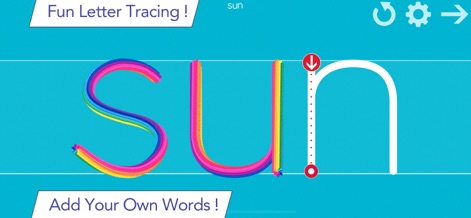
이 앱은 여러 가지 색상의 선으로 "sun"과 같은 단어를 따라 쓰는 기능을 제공하여, 사용자가 시각적으로 매력적인 방법으로 글쓰기 기술을 향상시킬 수 있습니다.
단어 쓰기 연습

15가지 글꼴 옵션을 통해 사용자는 학교에서 사용하는 글꼴을 선택할 수 있으며, 따라 쓰기가 완료되면 'A'와 같은 글자들이 애니메이션 효과와 함께 나타나 학습 동기를 부여합니다.
다양한 글꼴 선택
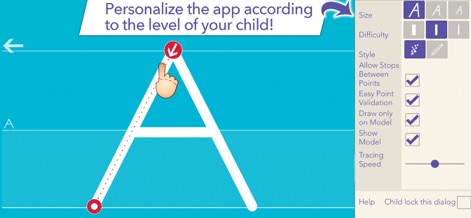
자녀의 수준에 맞춰 난이도와 글자 크기를 조절할 수 있는 상세한 맞춤 설정 기능을 제공하여, 최적의 학습 환경을 조성하고 개인화된 학습 경험을 지원합니다.
맞춤형 학습 설정
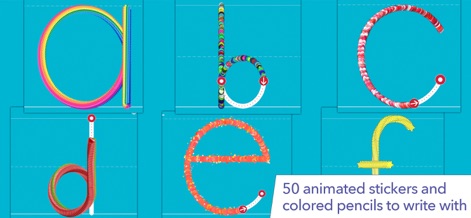
50개 이상의 애니메이션 스티커와 색연필 효과를 사용하여 'a'부터 'f'까지의 소문자를 따라 쓰는 과정이 즐겁게 디자인되어, 학습자의 몰입도를 높입니다.
다채로운 글자 따라 쓰기
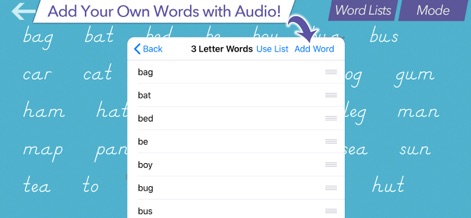
사용자는 "bag"과 같은 자신만의 단어 목록을 추가하고 각 단어에 오디오를 녹음할 수 있어, 개인화된 학습 자료를 손쉽게 만들 수 있습니다.
나만의 단어 추가
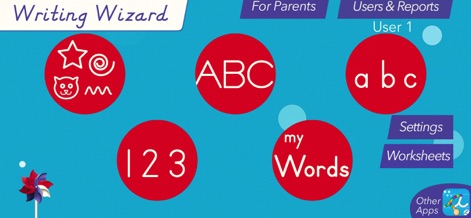
이 앱은 ABC 대문자, abc 소문자, 123 숫자 학습과 같은 핵심 기능으로의 직관적인 접근을 제공하며, 상단의 "For Parents" 및 "Users & Reports" 섹션을 통해 학부모 설정과 학습 진행 상황을 확인할 수 있습니다.
직관적인 메인 메뉴
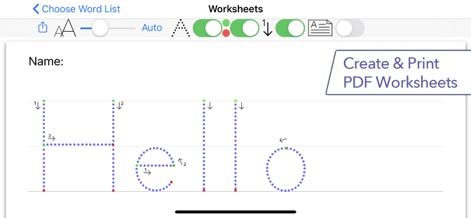
사용자는 "Hello"와 같은 단어의 PDF 워크시트를 생성하고 인쇄하여, 디지털 환경뿐만 아니라 실제 종이 위에서도 글쓰기 연습을 할 수 있습니다.
PDF 워크시트 생성
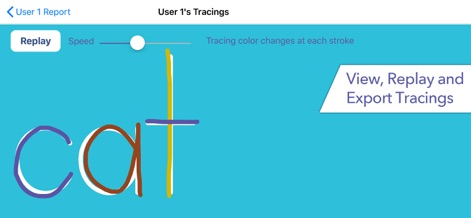
"cat"과 같은 단어의 따라 쓰기 과정을 재생하고 진행 속도를 조절하여 학습 진도를 시각적으로 검토할 수 있으며, 필요에 따라 추적 기록을 내보낼 수 있습니다.
학습 과정 추적
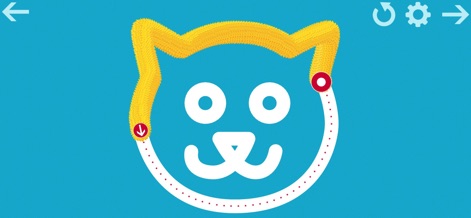
사용자는 귀여운 고양이 얼굴 모양을 따라 그리면서, 재미있는 털 질감 효과와 함께 소근육 발달 및 필기 준비를 위한 기초 학습을 경험할 수 있습니다.
즐거운 모양 따라 쓰기
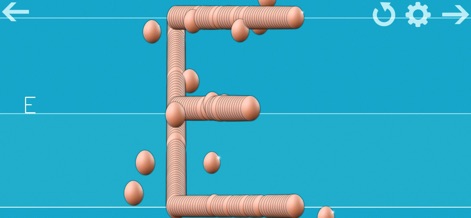
글자 'E'를 따라 쓰는 동안 나타나는 구슬 모양의 입체적인 질감 효과는 학습에 재미를 더하며, 아이들의 시각적 흥미를 유발하여 집중력을 높입니다.
입체적인 글자 학습
설명
Download
비슷한 앱
유사한 기능과 사용자 경험을 가진 앱

iHuman Chinese
Human and Perfect Future Education co.,Ltd
iHuman Pinyin
Human and Perfect Future Education co.,Ltd
ABC Reading-RAZ原版独家授权绘本阅读全系列
Dr. Panda Ltd
适趣AI中文-阅读识字,适合才有趣
Beijing Zhilehuo Technology Co., Ltd.
Sight Words Reading Games ABC
CFC s.r.o.
帮帮识字-儿童喜爱的认字古诗阅读软件
Guangzhou Polar Future Culture Technology Co., Ltd

Endless Alphabet
Originator Inc.
Kidbee Детские Читай Раскраска
Marat Khanbekov

القاعدة النورانية
Furqan Group for Education& IT
이 페이지는 앱이나 개발자의 공식 페이지가 아니며, 정보 제공 및 논평을 목적으로 작성된 독립 편집 간행물입니다. 명시적으로 달리 언급되지 않는 한, 해당 앱이나 개발자는 MWM, Apple, Google Play, 앱 퍼블리셔 또는 앱 개발자와 제휴, 보증, 후원, 승인 또는 공식적으로 연결되어 있지 않으며, 이 페이지의 어떤 내용도 해당 앱이 MWM의 서비스를 사용하여 개발되었음을 의미하지 않습니다. 모든 상표, 로고, 스크린샷 및 기타 콘텐츠는 해당 소유자의 자산입니다.