
이 페이지는 앱이나 개발자의 공식 페이지가 아니며, 정보 제공 및 논평을 목적으로 작성된 독립 편집 간행물입니다. 명시적으로 달리 언급되지 않는 한, 해당 앱이나 개발자는 MWM, Apple, Google Play, 앱 퍼블리셔 또는 앱 개발자와 제휴, 보증, 후원, 승인 또는 공식적으로 연결되어 있지 않으며, 이 페이지의 어떤 내용도 해당 앱이 MWM의 서비스를 사용하여 개발되었음을 의미하지 않습니다. 모든 상표, 로고, 스크린샷 및 기타 콘텐츠는 해당 소유자의 자산입니다.


YouTube Kids
디지털 혼돈 속, 부모는 마침내 자녀의 스크린을 완벽하게 재단하는 지배력을 손에 넣는다.
다운로드
100M+사용자 평점
총 평가 수
6.5M개발사
카테고리
Entertainment지원 언어
73최신 버전
11.13크기
188.3 MB출시일
2015년 2월 23일유아부터 초등학생 자녀를 위한 안전하고 교육적인 콘텐츠 환경 제공
YouTube Kids 앱 기술 분석
포괄적인 자녀 보호 기능
이 앱은 부모가 자녀의 시청 환경을 세밀하게 제어할 수 있는 다양한 자녀 보호 기능을 갖추고 있습니다. 이는 부모가 특정 콘텐츠를 차단하거나 시청 설정을 조절하여 자녀에게 안전하고 적합한 시청 경험을 제공하는 데 기여합니다.
수동 콘텐츠 승인 모드
사용자는 이 기능을 통해 자녀가 시청할 동영상, 채널 및 컬렉션을 직접 선택하고 승인할 수 있습니다. 이는 부모가 자녀에게 허용되는 콘텐츠에 대한 최종적인 통제권을 행사하여, 최적의 안전성과 맞춤성을 보장하는 데 도움을 줍니다.
연령별 맞춤형 콘텐츠 모드
이 앱은 미취학 아동, 어린 자녀, 큰 자녀를 위한 사전 설정된 연령별 모드를 제공하여, 자녀의 발달 단계에 맞는 교육적이고 흥미로운 콘텐츠를 자동으로 선별해줍니다. 이는 자녀가 자신의 속도에 맞춰 안전하게 콘텐츠를 탐색하도록 지원합니다.
스크린 타임 제한 타이머
이 도구는 자녀의 스크린 타임을 효율적으로 관리할 수 있는 타이머 기능을 갖추고 있습니다. 설정된 시청 시간이 종료되면 앱이 자동으로 일시 중지되어, 자녀가 디지털 콘텐츠 외의 활동에도 참여하며 건강한 디지털 습관을 형성할 수 있도록 돕습니다.
콘텐츠 신고 기능
사용자는 앱 내에서 부적절하거나 불쾌한 콘텐츠를 발견했을 때 이를 신고할 수 있습니다. 이 기능은 플랫폼의 콘텐츠 안전성을 유지하고, 부모와 보호자가 안전하다고 신뢰할 수 있는 환경을 조성하는 데 중요한 역할을 합니다.
직관적인 탐색 인터페이스
이 앱은 어린이가 스스로 쉽게 조작하고 콘텐츠를 찾아볼 수 있도록 직관적이고 단순화된 탐색 도구를 제공합니다. 이는 자녀가 부모의 도움 없이도 앱을 독립적으로 사용할 수 있게 하여, 탐구심과 자신감을 길러줍니다.
자주 묻는 질문
에 대해 알아야 할 모든 것 YouTube Kids
What is the YouTube Kids app?
YouTube Kids is an application designed for children to explore video content they love in a safe, curated environment. It features easy navigation tools and parental controls to help kids discover new interests.
How does YouTube Kids provide age-appropriate content?
YouTube Kids ensures age-appropriate content through personalized filters and modes: Preschool (ages 4 and under), Younger (ages 5-7), and Older (ages 8-12). Parents can also hand-pick content with the "Approved Content Only" mode.
Can parents set screen time limits in the YouTube Kids app?
Yes, YouTube Kids includes a Timer feature. Parents can set screen-time limits, and the app freezes once the set time expires, encouraging children to take a break from viewing.
How can parents control content in YouTube Kids?
YouTube Kids offers Parental Control features. Parents can limit content, guide viewing experiences, block unwanted videos or channels, and flag inappropriate content for review by the YouTube Kids team.
Does YouTube Kids allow users to rewatch videos?
Yes, the YouTube Kids app features a "Watch it Again" tab. This allows parents and children to quickly find favorite videos and previously shared content for rewatching.
Does YouTube Kids display advertisements?
Yes, children using YouTube Kids may see commercial content from YouTube creators. This content is not considered paid advertising, as it originates directly from the creators themselves.
What age-specific content modes are available in YouTube Kids?
YouTube Kids offers content modes including Preschool (ages 4 and under), Younger (ages 5-7), Older (ages 8-12), and an "Approved Content Only" mode for parent-selected videos.
Is parental setup necessary for YouTube Kids?
Parental setup is required for YouTube Kids to ensure the best experience for the family. This process allows parents to configure essential settings and content filters for their children.
How can I hand-pick videos for my child on YouTube Kids?
Parents can hand-pick specific videos, channels, and collections for their children using the "Approved Content Only" mode. This feature gives complete control over accessible content.
다음 스크린샷과 설명은 앱의 공식 스토어 목록에서 직접 가져온 것이며 앱 개발자의 자산입니다.
앱 스토어
스크린샷
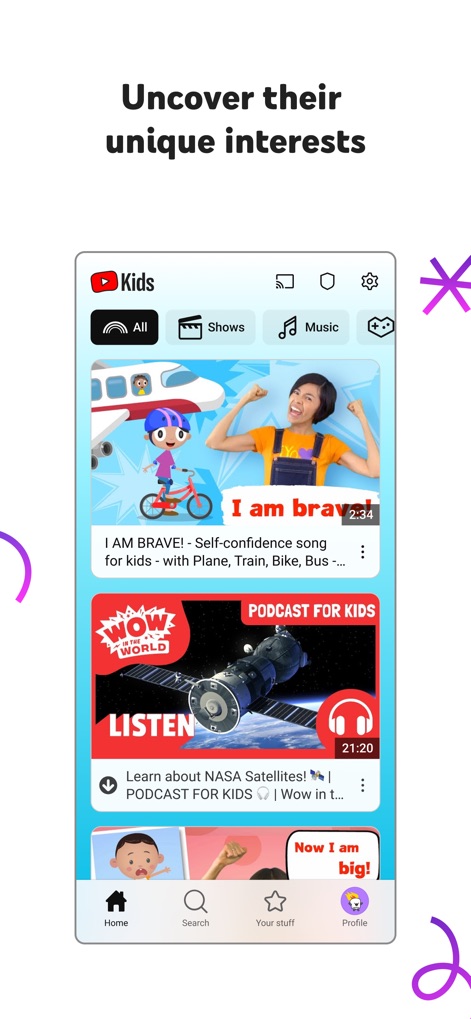
이 앱은 '모두', '프로그램', '음악'과 같은 카테고리 필터와 개인화된 동영상 피드를 통해 아이들의 호기심을 자극하고 새로운 관심사를 탐색하도록 돕습니다.
새로운 흥미 발견
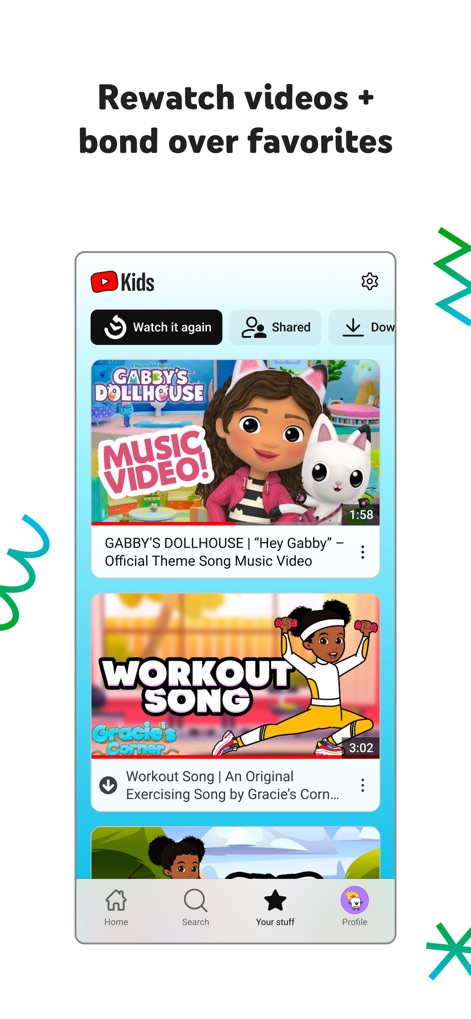
사용자는 '다시 보기' 탭을 통해 아이들이 좋아했던 콘텐츠를 쉽게 찾아볼 수 있으며, 'GABBY'S DOLLHOUSE'나 'WORKOUT SONG'과 같은 다양한 영상을 다시 시청할 수 있습니다.
즐겨찾는 영상 다시 보기
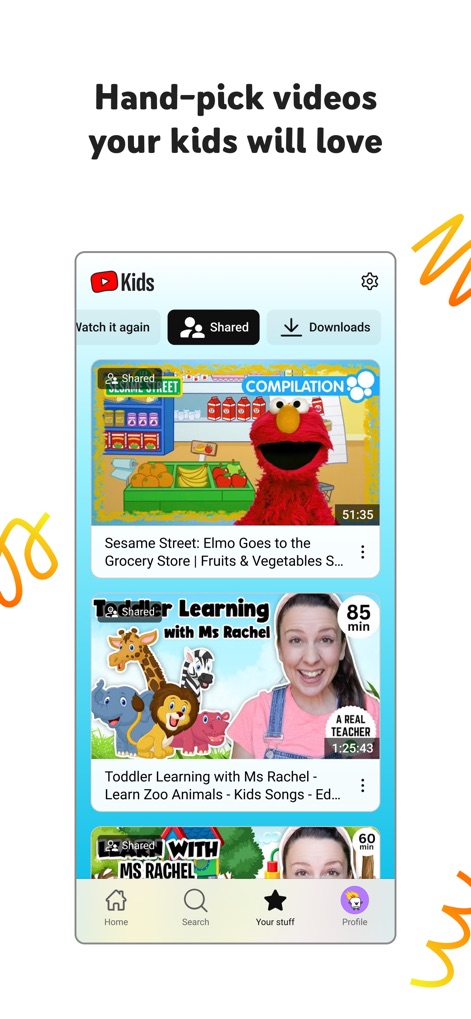
부모는 '공유됨' 탭에서 자녀에게 적합한 콘텐츠를 직접 선택하고 공유하여, 'Sesame Street: Elmo Goes to the Grocery Store' 영상이나 'Toddler Learning with Ms Rachel' 학습 영상과 같이 엄선된 영상을 제공할 수 있습니다.
엄선된 콘텐츠 제공
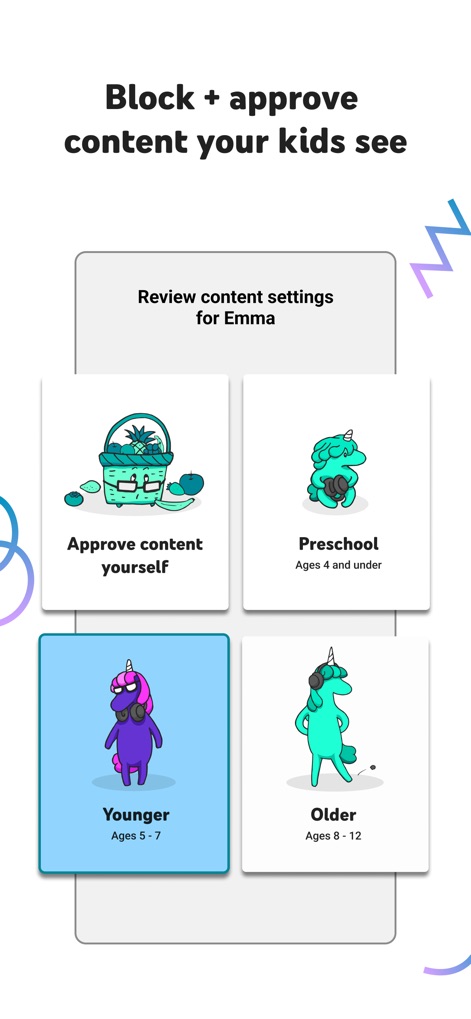
이 앱은 '미취학 아동(4세 이하)', '어린이(5-7세)'와 같은 연령별 콘텐츠 모드를 제공하며, 부모는 이를 통해 자녀의 연령에 맞춰 콘텐츠 설정을 직접 관리할 수 있습니다.
맞춤형 시청 환경
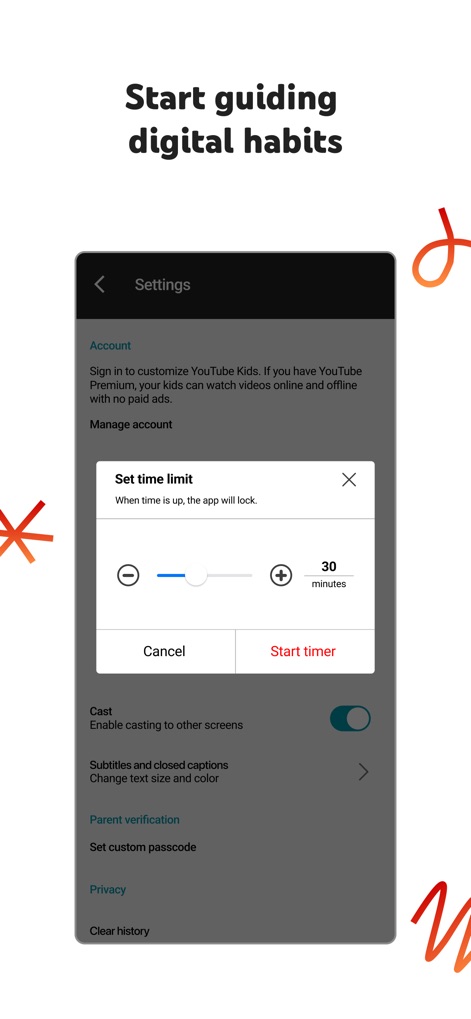
사용자는 '시간 제한 설정' 기능을 통해 자녀의 스크린 타임을 관리할 수 있으며, '30분'과 같은 특정 시간 설정과 '타이머 시작' 버튼을 활용하여 건강한 디지털 습관을 형성할 수 있도록 돕습니다.
디지털 습관 형성
설명
Download
비슷한 앱
유사한 기능과 사용자 경험을 가진 앱

Bounce Patrol Nursery Rhymes!
BOUNCE PATROL PTY. LTD.
贝乐虎儿歌-宝贝儿歌故事童话寓言多多听听
Leqing Network Technology Co., Ltd
儿歌点点-儿歌故事动画片益智启蒙
Beijing Mampod Technology Co. Ltd.

Safe Vision Kids for YouTube
Safe Vision Parental Software Pty Ltd

Kidjo TV: Kids Videos to Learn
Kidjo, INC

Tankee Gaming Videos & More
Tankee Inc.
Cuquin - Baby Songs & Cartoons
COLORCITY LIMITED
One4Kids TV
One 4 Kids Pty Ltd

Video Touch: Wild Animals
SoundTouch Interactive
이 페이지는 앱이나 개발자의 공식 페이지가 아니며, 정보 제공 및 논평을 목적으로 작성된 독립 편집 간행물입니다. 명시적으로 달리 언급되지 않는 한, 해당 앱이나 개발자는 MWM, Apple, Google Play, 앱 퍼블리셔 또는 앱 개발자와 제휴, 보증, 후원, 승인 또는 공식적으로 연결되어 있지 않으며, 이 페이지의 어떤 내용도 해당 앱이 MWM의 서비스를 사용하여 개발되었음을 의미하지 않습니다. 모든 상표, 로고, 스크린샷 및 기타 콘텐츠는 해당 소유자의 자산입니다.