
이 페이지는 앱이나 개발자의 공식 페이지가 아니며, 정보 제공 및 논평을 목적으로 작성된 독립 편집 간행물입니다. 명시적으로 달리 언급되지 않는 한, 해당 앱이나 개발자는 MWM, Apple, Google Play, 앱 퍼블리셔 또는 앱 개발자와 제휴, 보증, 후원, 승인 또는 공식적으로 연결되어 있지 않으며, 이 페이지의 어떤 내용도 해당 앱이 MWM의 서비스를 사용하여 개발되었음을 의미하지 않습니다. 모든 상표, 로고, 스크린샷 및 기타 콘텐츠는 해당 소유자의 자산입니다.


朝暮计划-自律打卡学习计划清单提醒管家
새로운 삶을 위한 올인원 미적 플래너. 학습 일정을 쉽게 관리하고, 건강 관련 이정표를 추적하고, 원하는 삶을 만들어가면서 일일 보상을 수집하세요.
다운로드
467K+사용자 평점
총 평가 수
26K+개발사
카테고리
Productivity지원 언어
2최신 버전
4.6.0크기
349.6 MB출시일
2020년 10월 27일일일 성공을 디자인하세요
Zomoplan은 습관 추적, 일정 관리 및 인생의 이정표를 하나의 미적인 공간으로 결합하여 매일 mindful하고 생산적으로 지낼 수 있도록 도와줍니다.
올인원 라이프 허브
학습 계획, 업무, 개인 건강 주기를 한곳에서 관리하세요. 정리 상태를 유지하기 위해 여러 앱을 전환할 필요가 없습니다.
꾸준함을 보상받으세요
지속적인 습관을 만들고 아름다운 일일 성찰 카드를 획득하세요. 루틴을 자기 계발과 마음챙김의 보람 있는 여정으로 바꾸세요.
자주 묻는 질문
에 대해 알아야 할 모든 것 朝暮计划-自律打卡学习计划清单提醒管家
Zomoplan이란 무엇이며 어떤 기능을 하나요?
Zomoplan은 효율성을 높이고, 자유 시간을 관리하며, 사용자가 목표를 달성하도록 돕기 위해 설계된 앱입니다. 일일 체크인, 습관 추적 및 포괄적인 시간 계획 기능을 제공합니다.
Zomoplan은 사용자가 습관을 추적하고 관리하는 데 도움이 되나요?
네, Zomoplan을 통해 사용자는 다양한 습관을 추적하고 관리할 수 있습니다. 맞춤 설정, 반복 요일 및 실행 시간 설정이 가능하며, 전용 습관 체크인 기능도 제공합니다.
Zomoplan에서 습관 추적을 어떻게 맞춤 설정할 수 있나요?
Zomoplan에서는 습관에 대한 특정 요일을 반복 요일로 설정하여 맞춤 설정할 수 있습니다. 사용자는 각 습관의 실행 시간을 특정 시간대로 정의할 수도 있습니다.
Zomoplan에는 중요한 날짜에 대한 카운트다운 기능이 포함되어 있나요?
네, Zomoplan은 카운트다운 기념일 기능을 제공합니다. 법정 공휴일, 결혼 기념일, 사랑 기념일, 생리 주기, 생일 등에 대한 알림을 설정할 수 있으며 만료 알림도 제공됩니다.
Zomoplan은 업무 효율성을 어떻게 향상시키나요?
Zomoplan은 프로젝트 계획을 수립하고, 회의 알림을 설정하며, 일정을 정리하고, 업무에 집중하여 전반적인 생산성을 향상시킬 수 있도록 지원하여 효율성을 높이는 데 도움을 줍니다.
Zomoplan은 공부를 위한 집중 모드를 제공하나요?
네, Zomoplan은 학습을 돕는 집중 모드를 제공합니다. 집중력 향상, 시험 알림 설정, 학습 순간을 효과적으로 기록하는 기능이 포함되어 있습니다.
사용자는 Zomoplan에서 일정과 계획을 어떻게 볼 수 있나요?
Zomoplan은 캘린더 보기와 전용 '일정 목록'을 통해 일정을 표시합니다. 이를 통해 사용자는 일일 계획, 작업 및 조직 회의를 효과적으로 관리하고 볼 수 있습니다.
Zomoplan은 빠른 접근을 위한 데스크톱 위젯을 제공하나요?
네, Zomoplan은 데스크톱 위젯을 지원합니다. 사용자는 이러한 위젯을 기기의 홈 화면에 추가하여 습관 및 일일 작업에 대한 빠른 접근과 개요를 얻을 수 있습니다.
Zomoplan에서 구독 요금제는 어떻게 되나요?
Zomoplan은 월간 자동 갱신 구독과 연간 자동 갱신 구독이라는 두 가지 자동 갱신 구독 옵션을 제공하며, 둘 다 "Zomoplan 연간 멤버십"으로 불립니다.
Zomoplan 구독료는 어떻게 결제되나요?
Zomoplan 구독료 결제는 사용자의 iTunes 계정을 통해 처리됩니다. 서비스 구매를 확인하면 자동으로 차감됩니다.
Zomoplan 구독 갱신을 취소하려면 어떻게 해야 하나요?
Zomoplan 구독 갱신을 취소하려면 iPhone의 '설정'으로 이동한 다음 'iTunes Store 및 App Store'를 탭하고 'Apple ID'를 탭한 다음 'Apple ID 보기'를 탭하고 '계정 설정'으로 이동한 후 '구독'을 선택하고 'Zomoplan 연간 멤버십'을 선택하여 취소할 수 있습니다.
Zomoplan은 언제 구독을 자동 갱신하나요?
Zomoplan은 현재 구독 기간이 만료되기 24시간 전에 자동으로 갱신됩니다. Apple iTunes 계정에서 차감되며 구독 기간이 다시 연장됩니다.
Zomoplan은 무료 체험 기간을 제공하나요?
Zomoplan은 무료 체험 기간을 제공할 수 있습니다. 무료 체험 기간이 제공되는 경우, 사용자가 전체 서비스를 구매하면 사용하지 않은 부분은 회수됩니다.
Zomoplan의 개인정보처리방침은 어디서 찾을 수 있나요?
Zomoplan의 개인정보처리방침은 다음 URL에서 확인할 수 있습니다: https://www.zomoplan.com/agreement/privacyStatement_iOS.html.
Zomoplan 고객 지원팀에 어떻게 연락할 수 있나요?
kefu@youliangkeji.cn으로 이메일을 보내 Zomoplan 지원팀에 연락할 수 있습니다. 사용자의 의견을 경청하고 피드백을 제공할 준비가 되어 있습니다.
Zomoplan의 '출석 통계' 기능은 무엇인가요?
Zomoplan은 습관 체크인 진행 상황을 시각화하기 위해 "출석 통계"를 제공합니다. 계획된 체크인, 실제 완료 횟수, 놓친 체크인 횟수를 포함한 월별 데이터를 명확한 캘린더 보기로 보여줍니다.
Zomoplan은 일일 개인 성장을 기록하는 데 도움이 되나요?
네, Zomoplan은 사용자가 일일 성장과 변화를 기록하는 데 도움을 줍니다. 개인적인 발전을 기록하기 위한 전용 일일 메모 기능을 제공합니다.
다음 스크린샷과 설명은 앱의 공식 스토어 목록에서 직접 가져온 것이며 앱 개발자의 자산입니다.
앱 스토어
스크린샷
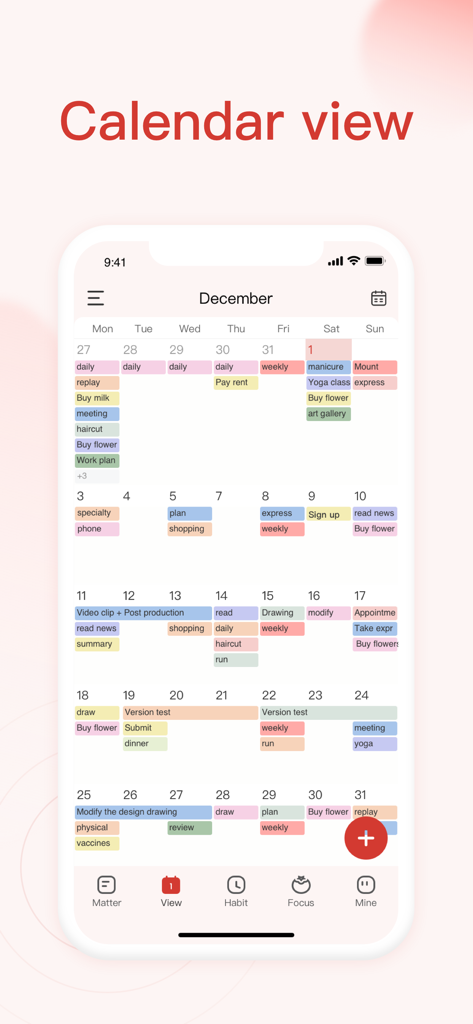
Zomoplan 앱의 월별 캘린더 보기로, 작업 및 습관의 색상으로 구분된 일정이 표시됩니다.
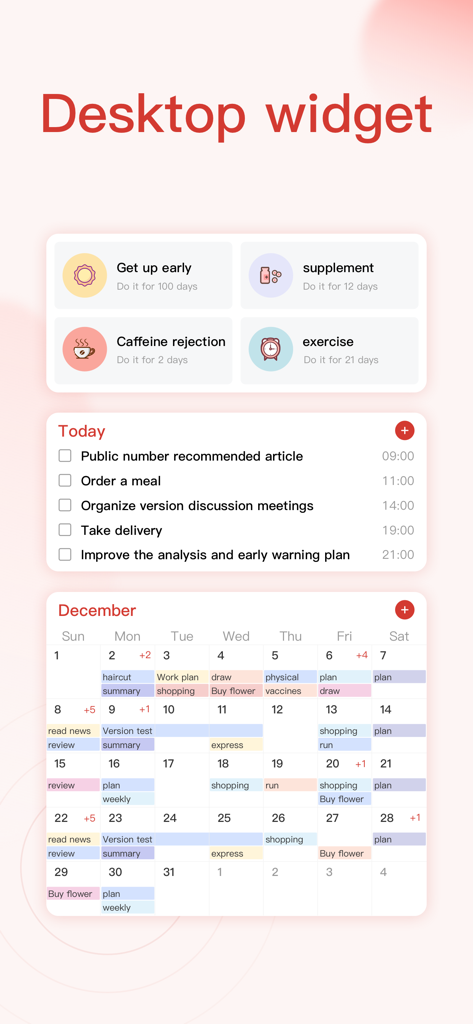
Zomoplan 데스크톱 위젯으로 습관 추적, 일일 작업 목록 및 월별 캘린더 보기를 보여줍니다.
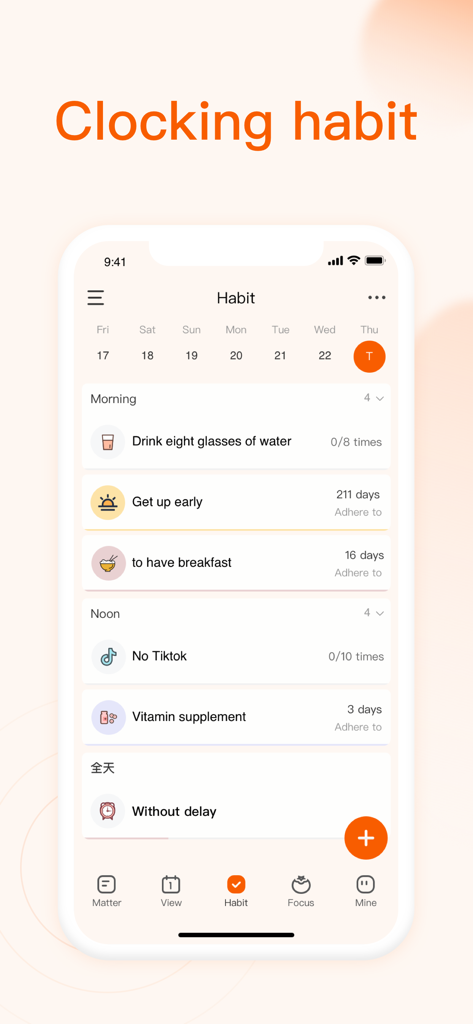
Zomoplan 앱의 습관 추적 화면 스크린샷으로, 웰빙 및 생산성 목표에 대한 일일 체크리스트를 보여줍니다.
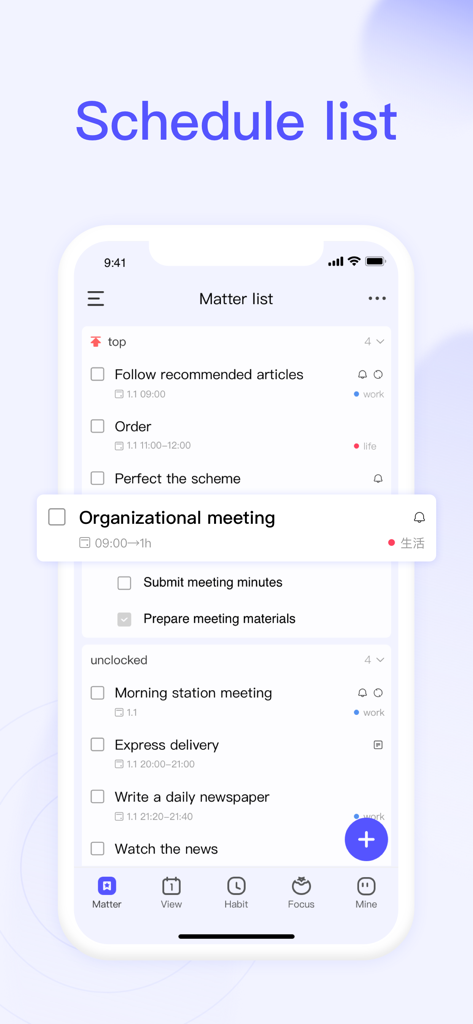
Zomoplan 앱으로 작업 및 생활 관련 작업이 우선 순위 및 시간별로 정리된 일정 목록을 보여줍니다.
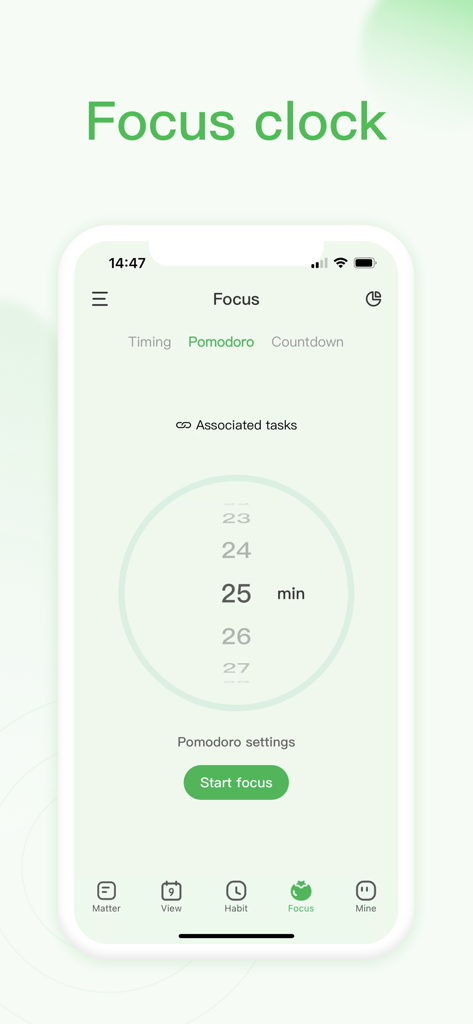
Zomoplan 앱의 집중 시계 화면으로, 25분 뽀모도로 타이머가 표시됩니다.
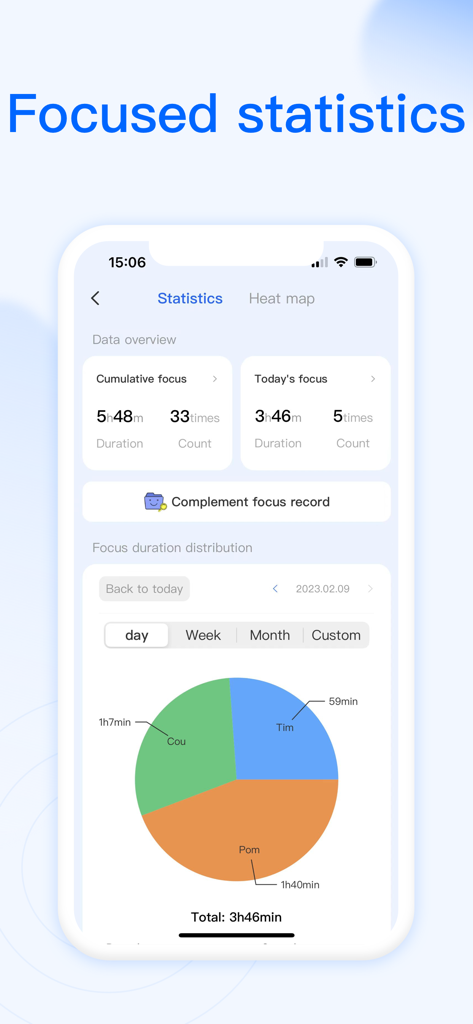
Zomoplan 앱 인터페이스로 일일 생산성 데이터와 집중 시간 파이 차트가 포함된 집중 통계를 보여줍니다.
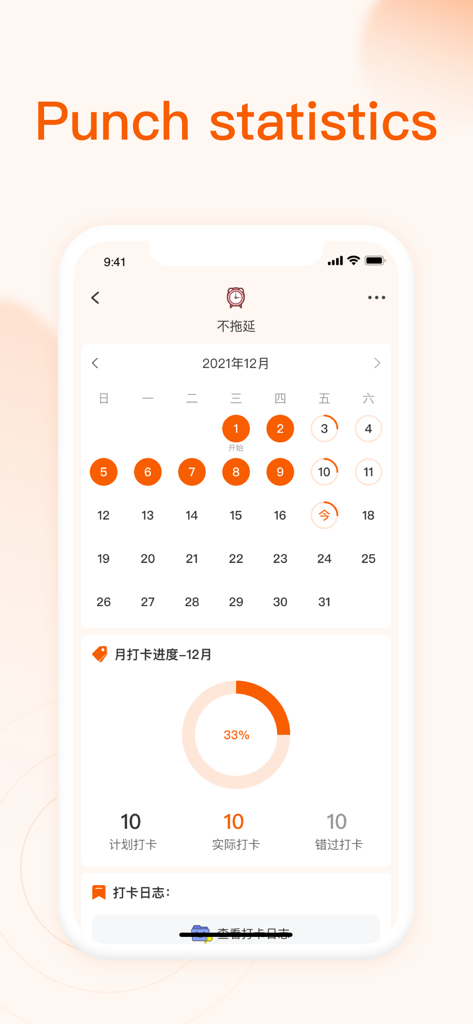
Zomoplan 앱 인터페이스로 월별 캘린더와 33% 진행률 차트가 포함된 습관 달성 통계를 보여줍니다.
설명
Download
비슷한 앱
유사한 기능과 사용자 경험을 가진 앱
Calendar Planner - Reminder
政 王

MarkTimes
Ji Mo

FastLog Counter/ Habit tracker
LexyTech Ltd.

Calflow: Planner & Tracker
Kyovan Ltd.

3x3 minimalist time management
文杰 李

Done! - Happy Productivity
DoneCo, Inc.

Daily Planner with Calendar
KIYO, K.K.

CrabBooks: Expense, Step, Mood
首彦 周

Singularity To Do List, Tasks
Vladimir Zavertaylov
이 페이지는 앱이나 개발자의 공식 페이지가 아니며, 정보 제공 및 논평을 목적으로 작성된 독립 편집 간행물입니다. 명시적으로 달리 언급되지 않는 한, 해당 앱이나 개발자는 MWM, Apple, Google Play, 앱 퍼블리셔 또는 앱 개발자와 제휴, 보증, 후원, 승인 또는 공식적으로 연결되어 있지 않으며, 이 페이지의 어떤 내용도 해당 앱이 MWM의 서비스를 사용하여 개발되었음을 의미하지 않습니다. 모든 상표, 로고, 스크린샷 및 기타 콘텐츠는 해당 소유자의 자산입니다.