Zoho WorkDrive
Zoho WorkDrive
다운로드: App Store

이 페이지는 앱이나 개발자의 공식 페이지가 아니며, 정보 제공 및 논평을 목적으로 작성된 독립 편집 간행물입니다. 명시적으로 달리 언급되지 않는 한, 해당 앱이나 개발자는 MWM, Apple, Google Play, 앱 퍼블리셔 또는 앱 개발자와 제휴, 보증, 후원, 승인 또는 공식적으로 연결되어 있지 않으며, 이 페이지의 어떤 내용도 해당 앱이 MWM의 서비스를 사용하여 개발되었음을 의미하지 않습니다. 모든 상표, 로고, 스크린샷 및 기타 콘텐츠는 해당 소유자의 자산입니다.

로고: Zoho WorkDrive
다운로드: App Store

Zoho WorkDrive

보안 클라우드 스토리지, 스마트 팀 폴더 및 원활한 협업으로 비즈니스를 강화하세요. 워크플로를 간소화하고 언제 어디서든 모든 팀을 동기화 상태로 유지하세요.

주요 수치

다운로드

106K+

사용자 평점

4.2/5

총 평가 수

200

개발사

Zoho Corporation

카테고리

Business

지원 언어

64

최신 버전

2.42

크기

156.6 MB

출시일

2018년 8월 6일
기능

팀의 콘텐츠 수명 주기 강화

모든 팀원이 신뢰할 수 있는 단일 소스로 팀의 작업 방식을 혁신하세요. Zoho WorkDrive는 민첩한 전문가를 위해 보안 파일 관리와 실시간 협업을 결합합니다.

통합 팀 폴더

공유 작업 공간으로 사일로를 허물세요. 추가된 모든 파일은 역할 기반 액세스 제어를 통해 적절한 팀원에게 즉시 제공됩니다.

모바일 오피스 스캐너

스마트폰을 생산성 파워하우스로 바꾸세요. 영수증, 계약서, 화이트보드 세션을 몇 초 안에 클라우드로 직접 스캔하세요.

다음 스크린샷과 설명은 앱의 공식 스토어 목록에서 직접 가져온 것이며 앱 개발자의 자산입니다.

앱 스토어

스크린샷
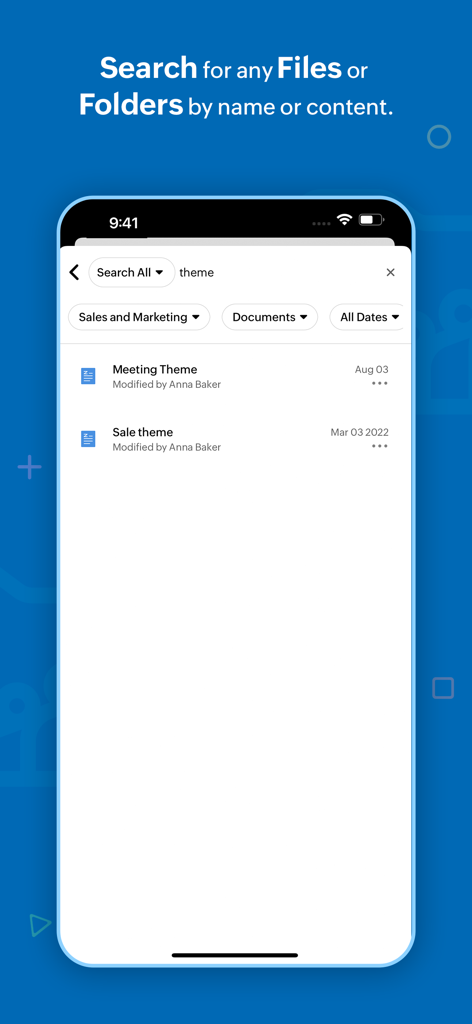
Zoho WorkDrive - 전문 필터가 있는 파일 검색 결과가 표시되는 Zoho WorkDrive의 모바일 앱 화면.
전문 필터가 있는 파일 검색 결과가 표시되는 Zoho WorkDrive의 모바일 앱 화면.

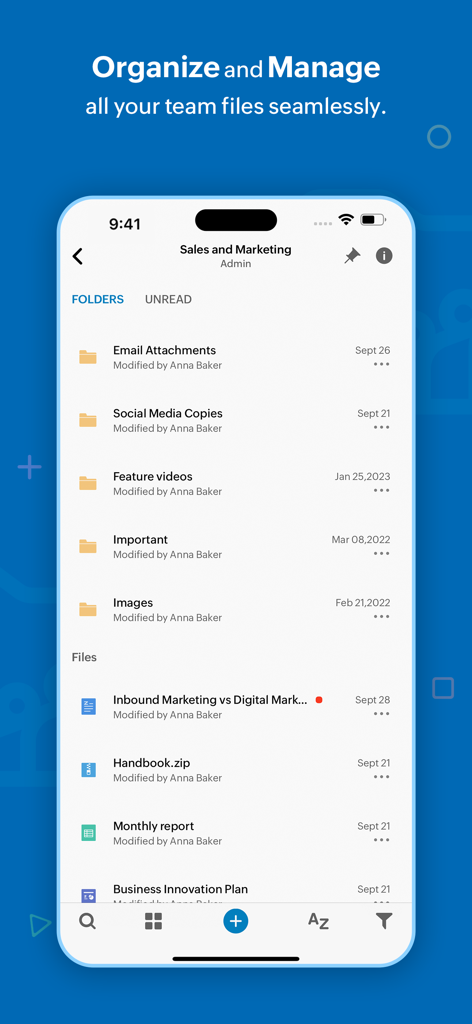
Zoho WorkDrive - 영업 및 마케팅을 위한 팀 폴더 및 파일 관리를 보여주는 Zoho WorkDrive 모바일 앱 화면.
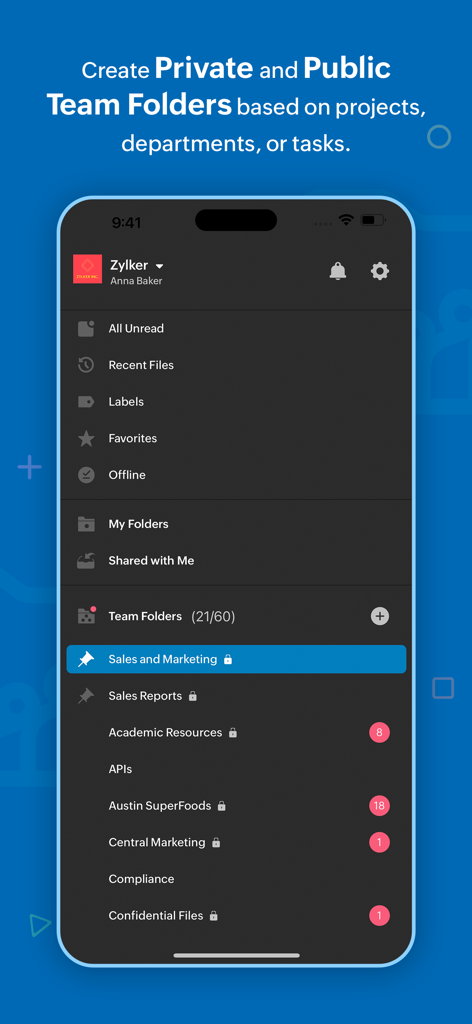
영업 및 마케팅을 위한 팀 폴더 및 파일 관리를 보여주는 Zoho WorkDrive 모바일 앱 화면.

Zoho WorkDrive - 비즈니스 협업을 위한 정리된 팀 폴더를 표시하는 Zoho WorkDrive 앱 인터페이스

비즈니스 협업을 위한 정리된 팀 폴더를 표시하는 Zoho WorkDrive 앱 인터페이스

Zoho WorkDrive - 폴더 생성 및 문서 또는 스프레드시트 업로드 옵션을 보여주는 Zoho WorkDrive 앱 인터페이스.
폴더 생성 및 문서 또는 스프레드시트 업로드 옵션을 보여주는 Zoho WorkDrive 앱 인터페이스.

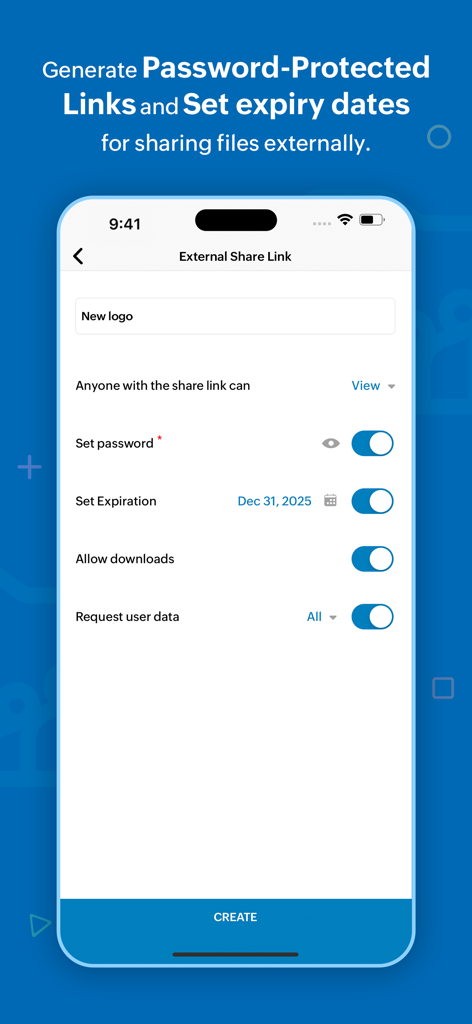
Zoho WorkDrive - 보안 외부 파일 공유를 위한 비밀번호 및 만료일 설정 옵션을 보여주는 Zoho WorkDrive 모바일 앱 인터페이스

보안 외부 파일 공유를 위한 비밀번호 및 만료일 설정 옵션을 보여주는 Zoho WorkDrive 모바일 앱 인터페이스

Zoho WorkDrive - 팀 폴더 정보 및 회원 역할을 보여주는 Zoho WorkDrive 모바일 앱 인터페이스

팀 폴더 정보 및 회원 역할을 보여주는 Zoho WorkDrive 모바일 앱 인터페이스

설명

Zoho WorkDrive is an online file storage and content collaboration platform built for both individuals and teams. You can store, organize, and manage all your files in a single place and access them from any device. Here's what you can do with the WorkDrive mobile app, Upload files faster: Upload photos from your mobile camera or audio recordings and save files from other apps to WorkDrive to manage everything in a single place. You can also scan documents to the cloud using your camera, and to digitalize your bills, whiteboard discussions, and notes. Seamless file sharing: Sharing large files is quick and simple with WorkDrive. Share files via email and assign required permission based on what you want them to do. Locate files quickly: Search and filter files based on location, file types, and time, to locate them faster. Rename, trash, and organize files right from your smartphones. You can also set files as favourite to access them quickly. Preview files and add comments to them to discuss around documents. Categorize your files: Create labels to organize your files right from your mobile. You can tag files and folders to labels and manage existing labels from a single place. Access files anytime: Set files offline to access them even without an internet connection. The following features are exclusively available for WorkDrive's Starter, Team, and Business plans. WorkDrive offers Team Folders—a shared and secure space for teams to work together. You can create Team Folders for a particular project or a department, and add all the relevant members to it. Any file added to the Team Folder will then be automatically available to each team member. Work as a team: Create Team Folders, add members, and assign role-based access to them. You can modify settings, monitor trash, and restore deleted files with a tap. Roles with responsibility: Share files and folders with anyone within your organization. Assign role-based access based on what you want members to do. You can also share WorkDrive files as email attachments. Collaborate with external stakeholders: Create external share links to work with people outside your organization. And you can set a password and an expiry date to the link to ensure secure file access. Always stay updated: Keep track of changes at the Team Folder level using the Unread section, and at the team level using global notifications. Monitor document changes closely: Enable notifications to see when changes are made to a specific file or a folder stored within WorkDrive. You can either choose to see the bell notification within the product, receive an update through email, or enable both. WorkDrive supports 40 plus languages including Hindi, Tamil, Arabic, Japanese, Italian, German, Vietnamese, French, and Portuguese. Join our WorkDrive community (https://help.zoho.com/portal/en/community/zoho-workdrive) and get complete access to product updates and the latest features. If you have any questions, please write to us at support@zohoworkdrive.com.

Download

다운로드: App Store

이 페이지는 앱이나 개발자의 공식 페이지가 아니며, 정보 제공 및 논평을 목적으로 작성된 독립 편집 간행물입니다. 명시적으로 달리 언급되지 않는 한, 해당 앱이나 개발자는 MWM, Apple, Google Play, 앱 퍼블리셔 또는 앱 개발자와 제휴, 보증, 후원, 승인 또는 공식적으로 연결되어 있지 않으며, 이 페이지의 어떤 내용도 해당 앱이 MWM의 서비스를 사용하여 개발되었음을 의미하지 않습니다. 모든 상표, 로고, 스크린샷 및 기타 콘텐츠는 해당 소유자의 자산입니다.