
이 페이지는 앱이나 개발자의 공식 페이지가 아니며, 정보 제공 및 논평을 목적으로 작성된 독립 편집 간행물입니다. 명시적으로 달리 언급되지 않는 한, 해당 앱이나 개발자는 MWM, Apple, Google Play, 앱 퍼블리셔 또는 앱 개발자와 제휴, 보증, 후원, 승인 또는 공식적으로 연결되어 있지 않으며, 이 페이지의 어떤 내용도 해당 앱이 MWM의 서비스를 사용하여 개발되었음을 의미하지 않습니다. 모든 상표, 로고, 스크린샷 및 기타 콘텐츠는 해당 소유자의 자산입니다.


다운로드
10M+사용자 평점
총 평가 수
1.2K개발사
카테고리
Business지원 언어
17최신 버전
7.0.1크기
328.1 MB출시일
2022년 1월 10일통합된 회의실 및 작업 공간 관리 솔루션의 주요 이점
Zoom Rooms 핵심 기능 분석
고품질 화상 및 음성 회의
이 시스템은 모든 유형의 작업 공간에서 고품질 비디오, 오디오 및 화면 공유 기능을 제공하여 원활한 커뮤니케이션을 보장합니다. 다양한 장치(모바일, 데스크톱, 다른 회의실)의 참가자와 쉽게 연결할 수 있습니다.
네이티브 회의실 기기 통합
이 도구는 조명, 프로젝터 등을 제어하기 위한 네이티브 회의실 제어 통합을 지원하여 회의 환경을 최적화합니다. 이는 IT 관리자가 회의실 환경을 효율적으로 통합하고 관리할 수 있도록 돕습니다.
원터치 회의 시작 및 참여
이 앱은 회의에 한 번의 터치로 쉽게 참여하거나 시작할 수 있는 기능을 제공하여 회의 시작의 복잡성을 줄이고 시간을 절약합니다. 이는 사용자의 생산성을 향상시키는 데 기여합니다.
직관적인 회의실 제어 및 관리
이 앱은 오디오, 비디오, 참가자 등을 쉽게 관리할 수 있는 직관적인 회의실 제어 기능을 갖추고 있습니다. 이를 통해 회의 진행자는 원활하게 회의를 운영할 수 있습니다.
회의실 및 작업 공간 스케줄링 디스플레이
이 도구는 회의실 외부에서 현재 가용성을 표시하고 예정된 회의를 보여주며, 사용자가 즉석에서 회의실을 예약할 수 있게 해주는 전용 스케줄링 디스플레이 기능을 제공합니다. 또한 작업 공간 예약 및 체크인 기능도 포함합니다.
다기능 iPad 컨트롤러 모드
사용자는 iPad를 전용 회의실 컨트롤러, 터치 기능 회의실, 스케줄링 디스플레이, 작업 공간 데스크 또는 예약 전용 회의실 모드로 유연하게 활용할 수 있습니다. 이는 다양한 회의실 환경에 대한 맞춤형 솔루션을 가능하게 합니다.
자주 묻는 질문
에 대해 알아야 할 모든 것 Zoom Rooms
What is Zoom Rooms?
Zoom Rooms is a comprehensive video conferencing system designed for high-quality video, audio, and sharing across various workspaces. It connects participants on multiple devices and locations.
What are the key features of the Zoom Rooms app?
The Zoom Rooms app offers one-touch meeting join or start, intuitive room controls for audio/video/participants, and supports native room control integration for external devices like projectors.
Can an iPad function as a Zoom Rooms controller?
Yes, an iPad running the Zoom Rooms app can serve as a dedicated Zoom Rooms Controller. It connects to a Mac, PC, or Zoom Rooms Appliance to manage the room.
What operational modes are available on the Zoom Rooms app for iPad?
The Zoom Rooms app for iPad supports five modes: Controller, for Touch, scheduling display, workspace desk, and reservation only room. Each mode offers distinct functionalities.
How can users join a meeting using the Zoom Rooms app?
Users can join a meeting through the Zoom Rooms app by entering a specific Meeting ID. The app also provides an option to join using a Personal Link Name.
Does Zoom Rooms support inviting new participants to a meeting?
Yes, the Zoom Rooms app supports inviting new participants. Users can select contacts from email, phone, or SIP/H.323 through the in-app invite function.
다음 스크린샷과 설명은 앱의 공식 스토어 목록에서 직접 가져온 것이며 앱 개발자의 자산입니다.
앱 스토어
스크린샷
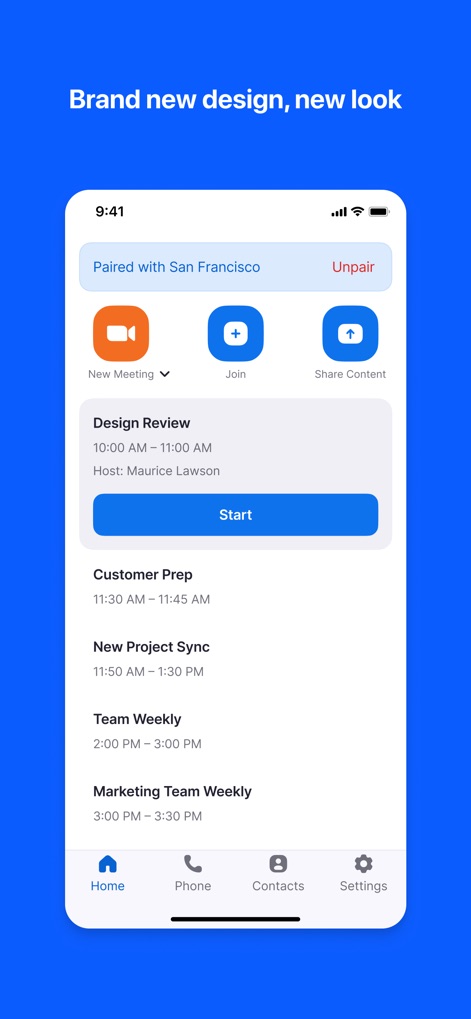
이 화면은 연결된 회의실의 현재 상태를 "Paired with San Francisco"와 같이 명확하게 표시하며, 사용자는 예정된 회의 목록에서("Design Review", "Customer Prep" 등) 다음 회의를 손쉽게 시작할 수 있습니다.
회의실 상태 한눈에

사용자는 이 인터페이스를 통해 마이크 음소거("Mute"), 비디오 시작("Start Video"), 콘텐츠 공유("Share Content") 등 회의 중 주요 기능을 직관적으로 제어할 수 있으며, 볼륨 슬라이더로 오디오 설정을 쉽게 조정합니다.
간편한 회의 제어

이 화면에서 사용자는 "Meeting ID" 입력 필드에 회의 ID를 입력하거나 가상 숫자 키패드를 사용하여 빠르고 간편하게 어떤 회의나 웹 세미나에든 참여할 수 있습니다.
회의에 즉시 참여

이 앱을 통해 사용자는 "Contacts", "Email", "Phone" 등 여러 탭을 활용하여 다양한 방법으로 다른 회의실이나 연락처를 손쉽게 초대할 수 있으며, 즐겨찾는 연락처("Favorites") 목록에서 빠르게 참석자를 선택할 수 있습니다.
손쉬운 초대 관리
설명
Download



이 페이지는 앱이나 개발자의 공식 페이지가 아니며, 정보 제공 및 논평을 목적으로 작성된 독립 편집 간행물입니다. 명시적으로 달리 언급되지 않는 한, 해당 앱이나 개발자는 MWM, Apple, Google Play, 앱 퍼블리셔 또는 앱 개발자와 제휴, 보증, 후원, 승인 또는 공식적으로 연결되어 있지 않으며, 이 페이지의 어떤 내용도 해당 앱이 MWM의 서비스를 사용하여 개발되었음을 의미하지 않습니다. 모든 상표, 로고, 스크린샷 및 기타 콘텐츠는 해당 소유자의 자산입니다.