
이 페이지는 앱이나 개발자의 공식 페이지가 아니며, 정보 제공 및 논평을 목적으로 작성된 독립 편집 간행물입니다. 명시적으로 달리 언급되지 않는 한, 해당 앱이나 개발자는 MWM, Apple, Google Play, 앱 퍼블리셔 또는 앱 개발자와 제휴, 보증, 후원, 승인 또는 공식적으로 연결되어 있지 않으며, 이 페이지의 어떤 내용도 해당 앱이 MWM의 서비스를 사용하여 개발되었음을 의미하지 않습니다. 모든 상표, 로고, 스크린샷 및 기타 콘텐츠는 해당 소유자의 자산입니다.

Zotero
연구 자료의 혼돈 속에서 질서를 부여하는 앱. Zotero는 산더미 같은 정보 더미를 당신의 지적 무기로 바꿉니다.
다운로드
1M+사용자 평점
총 평가 수
1.8K개발사
카테고리
Productivity지원 언어
1최신 버전
2.0.4크기
149.6 MB출시일
2022년 3월 17일학술 연구 및 자료 관리를 위한 필수 도구 심층 분석
Zotero 앱 주요 기능 분석
자동 인용 및 참고문헌 생성
이 앱은 APA, Chicago, MLA 등 10,000가지 이상의 형식과 저널 스타일에 따라 인용 및 참고문헌을 즉시 생성하여, 사용자가 정확하고 효율적으로 학술 문서를 작성할 수 있도록 돕습니다.
문서 편집기 연동 및 참고문헌 자동 삽입
Zotero 데스크톱 앱은 Word, LibreOffice, Google Docs와 같은 문서 편집기와 연동되어 사용자가 주석을 삽입하고 사용한 자료로부터 참고문헌을 자동으로 생성할 수 있게 합니다.
다양한 자료 수집
사용자는 웹페이지, 기사, 책 등 다양한 형식의 연구 자료를 쉽게 수집하고 저장할 수 있습니다. PDF 자동 다운로드 및 바코드/DOI 스캔 기능을 통해 자료 수집의 효율성을 극대화합니다.
PDF 및 자료 주석 기능
사용자는 PDF, EPUB 및 웹페이지 스냅샷을 읽고 하이라이트, 메모 추가는 물론, Apple Pencil을 이용한 자유로운 주석 작성을 통해 자료를 심층적으로 분석할 수 있습니다.
자료 체계적인 정리
이 도구는 사용자가 컬렉션과 태그를 활용하여 연구 자료를 분류하고, 서지 정보를 확인 및 편집할 수 있도록 지원합니다.
그룹 라이브러리 협업
이 플랫폼은 사용자가 동료들과 함께 그룹 라이브러리에서 자료를 공동으로 수집하고 PDF에 주석을 달며 협력적인 연구를 수행할 수 있게 합니다.
기기 간 라이브러리 동기화
사용자는 개인 및 그룹 연구 라이브러리를 Zotero 데스크톱 앱과 웹사이트를 통해 동기화하여 언제 어디서든 자신의 자료에 접근할 수 있습니다.
사용자 데이터 프라이버시 보호
Zotero는 비영리 독립 조직으로서 사용자 데이터를 판매하지 않고, 연구 자료에 대한 사용자 통제권을 보장하여 높은 수준의 프라이버시를 제공합니다.
자주 묻는 질문
에 대해 알아야 할 모든 것 Zotero
What is Zotero?
Zotero is a free, easy-to-use research tool. It helps users collect, organize, annotate, cite, and share their academic work across various types of sources like articles, books, and webpages.
Can Zotero organize my research materials?
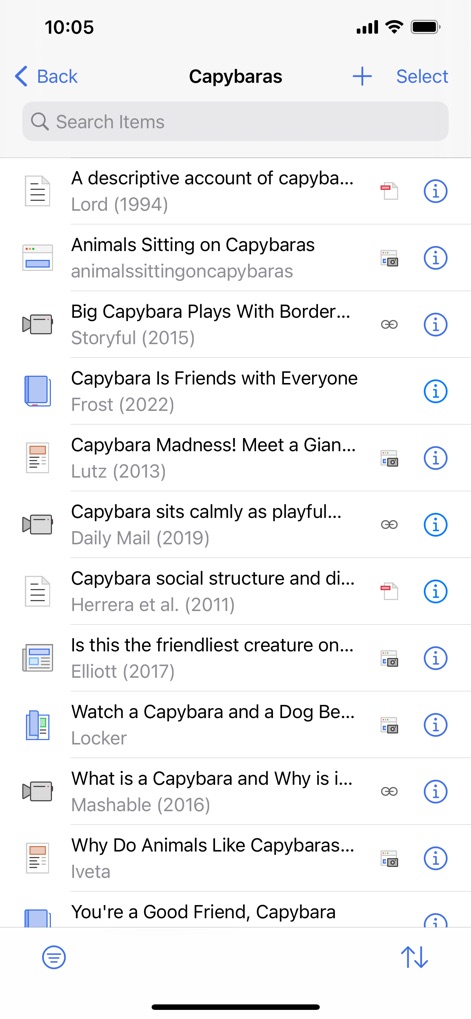
Yes, Zotero helps organize research. Users can utilize collections and tags to categorize materials and view or edit bibliographic information for each item, as shown with the 'Capybaras' collection.
Does Zotero support PDF annotation?
Yes, Zotero supports PDF annotation. Users read PDFs, add highlights and notes, and use an Apple Pencil for freehand annotations directly within the application, as demonstrated in the PDF viewer.
What citation styles does Zotero support?
Zotero generates citations and bibliographies in over 10,000 formats and journal styles. This includes widely used styles such as APA, Chicago, IEEE, MLA, Turabian, and Vancouver for academic writing.
Is Zotero free to use?
Yes, Zotero is a free research tool. It is provided at no cost to assist users in managing their academic and research materials.
Does Zotero sell user data?
No, Zotero does not sell user data. As an independent, nonprofit organization, Zotero is committed to user privacy and control over personal work.
Can I share my research with colleagues using Zotero?
Yes, Zotero allows users to share research collaboratively. You can collect sources and mark up PDFs in group libraries with colleagues, and synchronize libraries with the desktop app.
How does Zotero help collect research materials?
Zotero helps collect research by saving articles and webpages via the Share button. It also automatically downloads PDFs and allows scanning book barcodes or article DOIs with an iPhone or iPad camera.
다음 스크린샷과 설명은 앱의 공식 스토어 목록에서 직접 가져온 것이며 앱 개발자의 자산입니다.
앱 스토어
스크린샷

설명
Download
비슷한 앱
유사한 기능과 사용자 경험을 가진 앱
ResearchGate
ResearchGate GmbH

Read by QxMD
WebMD Health Corporation

Prime: PubMed Journals & Tools
Unbound Medicine, Inc.

Academia.edu
Academia Inc

PubMed PMC Bookshelf Search
FugaPiyo Inc.
PubMed On Tap
Serhiy Duminskyy
Bohrium
Beijing Shenshi Technology Co., Ltd.

YLMSportScience
YLMSportScience

Liner - AI search assistant
Liner Corp.
이 페이지는 앱이나 개발자의 공식 페이지가 아니며, 정보 제공 및 논평을 목적으로 작성된 독립 편집 간행물입니다. 명시적으로 달리 언급되지 않는 한, 해당 앱이나 개발자는 MWM, Apple, Google Play, 앱 퍼블리셔 또는 앱 개발자와 제휴, 보증, 후원, 승인 또는 공식적으로 연결되어 있지 않으며, 이 페이지의 어떤 내용도 해당 앱이 MWM의 서비스를 사용하여 개발되었음을 의미하지 않습니다. 모든 상표, 로고, 스크린샷 및 기타 콘텐츠는 해당 소유자의 자산입니다.