
This page is not an official page of the app or its developer, but an independent editorial publication created for informational and commentary purposes. Unless expressly stated otherwise, neither the app nor its developer is affiliated with, endorsed by, sponsored by, authorized by, or otherwise officially connected with MWM, Apple, Google Play, the app publisher, or the app's developer, and nothing on this page implies that the app was developed using MWM's services. Any trademarks, logos, screenshots, and other content remain the property of their respective owners.

120 FPS GFXSpeedUP
Stop settling for 60 FPS. Experience ultra-smooth gameplay with advanced graphics mods and performance optimizations designed for the competitive edge you need to win.
Downloads
76K+User Rating
Total Ratings
1K+Publisher
Category
EntertainmentLocales
1Latest Version
1.0.1Size
37.6 MBFirst Released
Aug 8, 2025Dominate the Leaderboards with Elite Performance
Unleash the full power of your iPhone. Break past software limitations with 120 FPS unlocking, advanced GFX mods, and pro-level strategies designed for competitive mobile gamers.
Ultra-Smooth 120 FPS Unlocking
Break the 60 FPS barrier and experience fluid, tear-free gameplay. Gain a critical millisecond advantage in high-stakes gunfights and fast-paced action.
Pro-Tier GFX Optimization
Tailor your graphics for peak visibility and performance. Use specialized mods to maintain high frame rates without your device overheating during ranked sessions.
Frequently Asked Questions
Everything you need to know about 120 FPS GFXSpeedUP
What does the 120 FPS GFXSpeedUP app do?
The 120 FPS GFXSpeedUP app optimizes mobile gaming performance. It boosts devices to achieve smooth 90 FPS and 120 FPS gameplay. The app includes FPS unlocking tools and provides gaming tips.
Can 120 FPS GFXSpeedUP unlock 120 FPS?
Yes, the 120 FPS GFXSpeedUP app offers FPS unlocking tools. It enables users to achieve 60 FPS, 90 FPS, and 120 FPS for an enhanced mobile gaming experience.
Does 120 FPS GFXSpeedUP provide gaming tips?
Yes, 120 FPS GFXSpeedUP includes comprehensive gaming tips and strategies. These cover essential skills like crosshair placement, recoil control, and sound awareness, tailored to improve mobile gameplay.
Is dark mode available in 120 FPS GFXSpeedUP?
Yes, the 120 FPS GFXSpeedUP app supports dark mode. This feature provides a comfortable viewing experience and reduces eye strain, especially during prolonged gaming sessions.
Can I save and share tips using 120 FPS GFXSpeedUP?
Yes, users can save and share gaming tips directly within the 120 FPS GFXSpeedUP app. This feature allows for easy access to preferred strategies and collaboration with other gamers.
Does 120 FPS GFXSpeedUP offer graphics mods?
Yes, 120 FPS GFXSpeedUP provides graphics mods. These modifications are part of the FPS unlocking tools, designed to enhance visual quality and gaming focus during gameplay.
The following screenshots and description are sourced directly from the app's official store listing and are the property of the app developer.
App Store
Screenshots
Loading screen of 120 FPS GFXSpeedUP app for mobile gaming performance
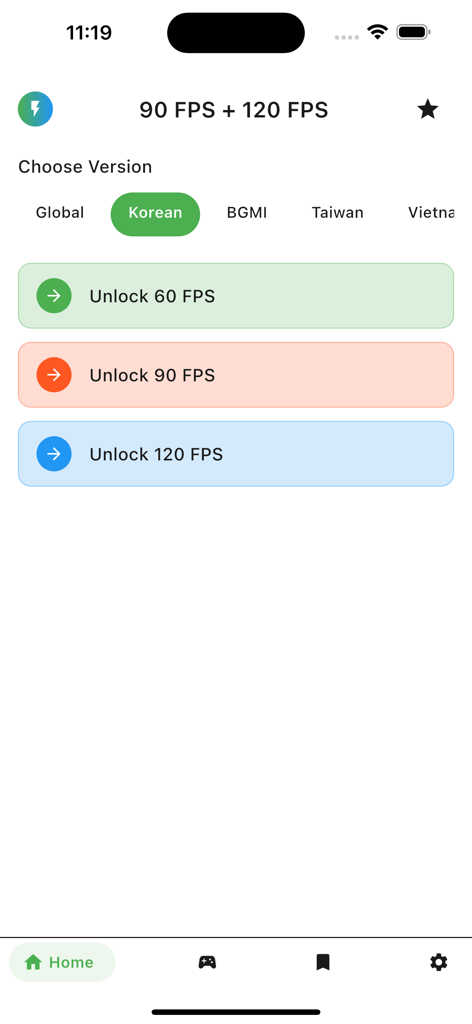
Mobile app interface showing buttons to unlock 60, 90, and 120 FPS for gaming performance
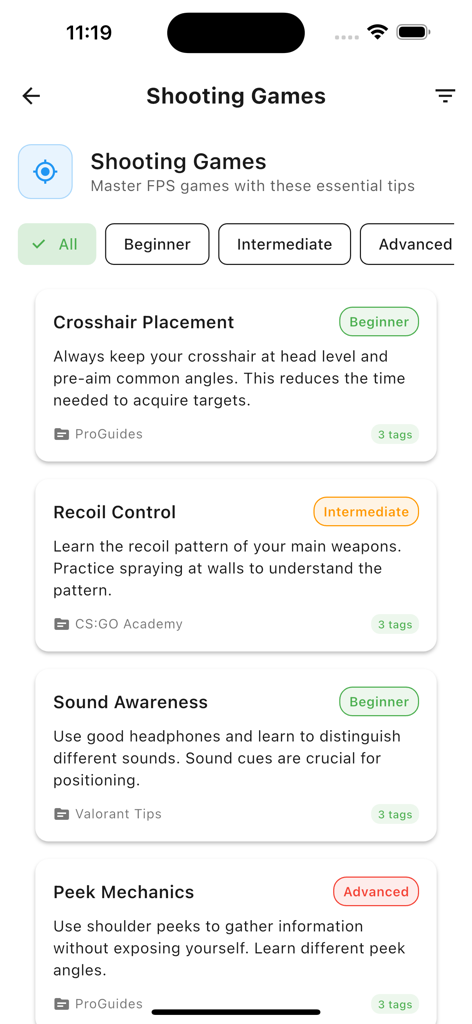
A screen showing shooting game tips categorized by skill level including crosshair placement and recoil control.
Description
Download
More Like This
Top-ranked apps in the same category

TikTok - Videos, Shop & LIVE
TIKTOK PTE. LTD.

Netflix
Netflix, Inc.

Freecash - Get Paid Real Money
256 REWARDS LTD

DramaBox - Stream Drama Shorts
STORYMATRIX PTE. LTD

HBO Max: Stream Movies & TV
WarnerMedia Global Digital Services, LLC

Amazon Prime Video
AMZN Mobile LLC

NetShort - Popular Dramas & TV
NETSTORY PTE. LTD.

ReelShort - Stream Drama & TV
New Leaf Publishing, Inc.

Disney+
Disney Electronic Content, Inc.
This page is not an official page of the app or its developer, but an independent editorial publication created for informational and commentary purposes. Unless expressly stated otherwise, neither the app nor its developer is affiliated with, endorsed by, sponsored by, authorized by, or otherwise officially connected with MWM, Apple, Google Play, the app publisher, or the app's developer, and nothing on this page implies that the app was developed using MWM's services. Any trademarks, logos, screenshots, and other content remain the property of their respective owners.