AllRecipes Meal Planner
Download on App Store

This page is not an official page of the app or its developer, but an independent editorial publication created for informational and commentary purposes. Unless expressly stated otherwise, neither the app nor its developer is affiliated with, endorsed by, sponsored by, authorized by, or otherwise officially connected with MWM, Apple, Google Play, the app publisher, or the app's developer, and nothing on this page implies that the app was developed using MWM's services. Any trademarks, logos, screenshots, and other content remain the property of their respective owners.


Logo of AllRecipes Meal Planner
Download on App Store

AllRecipes Meal Planner

Take the stress out of mealtime. Organize your favorite recipes, plan your weekly menu, and generate instant shopping lists in one beautiful, productive space.

Key Figures

Downloads

4K+

User Rating

4.0/5

Total Ratings

0

Publisher

Evrim Demir

Category

Food & Drink

Locales

2

Latest Version

2.0.0

Size

30.5 MB

First Released

Apr 15, 2023
Features

Master Your Kitchen, Simplify Your Life

From organizing family secrets to automating your weekly grocery run, our tools help you save time, reduce stress, and eat better every day.

Your Private Recipe Vault

Stop losing recipes in browser bookmarks or messy notebooks. Store, tag, and organize every dish you love in one stunning, searchable digital collection.

Effortless Weekly Planning

Eliminate the daily stress of "what’s for dinner?" by mapping out your meals. Stay consistent with your health goals and reclaim your Sunday evenings.

The following screenshots and description are sourced directly from the app's official store listing and are the property of the app developer.

App Store

Screenshots

AllRecipes Meal Planner - Digital recipe book interface showing ingredients for a healthy Brussels sprout recipe over a rustic wooden background.

Digital recipe book interface showing ingredients for a healthy Brussels sprout recipe over a rustic wooden background.

AllRecipes Meal Planner - AllRecipes Meal Planner app interface featuring a personal recipe book and the option to add custom recipes.
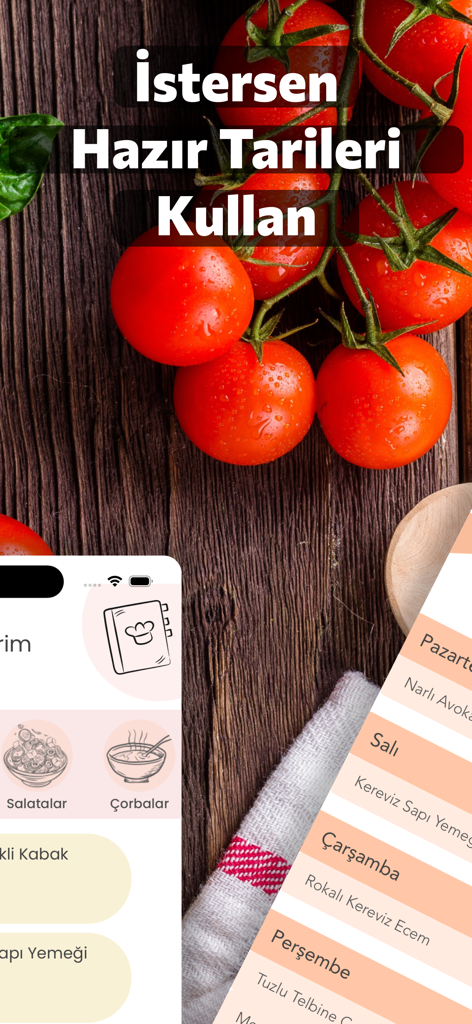
AllRecipes Meal Planner app interface featuring a personal recipe book and the option to add custom recipes.

AllRecipes Meal Planner - AllRecipes Meal Planner app interface showing recipe categories and a weekly meal plan schedule

AllRecipes Meal Planner app interface showing recipe categories and a weekly meal plan schedule

AllRecipes Meal Planner - Interface of AllRecipes Meal Planner showing the weekly meal plan and shopping list

Interface of AllRecipes Meal Planner showing the weekly meal plan and shopping list

AllRecipes Meal Planner - A smartphone screen showing a digital grocery shopping list for meal planning with items like apples and carrots

A smartphone screen showing a digital grocery shopping list for meal planning with items like apples and carrots

Description

My Recipe Book - Personal Recipe Collection, Shopping List, and Meal Planning. My Recipe Book is an easy-to-use and stylish recipe application. Whether you're a beginner or an experienced cook, with My Recipe Book, you can add your own recipes, organize your weekly meal plans, and prepare your shopping list. This application makes your time spent in the kitchen enjoyable and productive, allowing you to carry your recipes and shopping list with you wherever you go and be more creative and free in the kitchen. Key Features: User-friendly interface: With My Recipe Book's simple and understandable interface, you can easily add and manage your recipes. This visually rich and user-friendly interface is suitable for users of all ages. Add your own recipes: Easily add and edit your unique recipes to My Recipe Book. Make them more personal by writing step-by-step instructions, adding photos, and leaving special notes. You can also categorize your recipes for organized storage. Weekly meal plan: Create and organize your personal weekly meal plan by selecting from the recipes you've created. This way, you can acquire healthy eating habits and make the most of your time in the kitchen. Shopping list: Automatically add the ingredients used in your recipes to your shopping list and organize it. This way, you won't forget what you need to buy and avoid unnecessary expenses. Offline access: You can access your recipes, shopping list, and weekly meal plan without an internet connection. This is a useful feature when you're traveling or outside. My Recipe Book is an application that helps you make the most of your time in the kitchen, allowing you to make delicious and healthy meals. With all these features, you can be more creative and free in the kitchen, while making your meal planning and shopping list more organized and efficient. Customizable interface: Customize the My Recipe Book application to your liking by selecting different themes and colors. Category and tag system: You can easily find the recipe you're looking for by organizing your recipes with categories and tags. You can also classify your recipes according to your diet preferences, such as vegan, gluten-free, and low-carb, by using special tags. Smart search: With My Recipe Book's smart search feature, you can quickly find your recipes by keywords, ingredients, categories, and tags. My Recipe Book is an application that makes your time spent in the kitchen more enjoyable, efficient, and organized, making your life easier. Enrich your kitchen experience and make your cooking and planning processes more effective and enjoyable. Plus, all of these features make the application suitable for users of all ages and experience levels. Download My Recipe Book now and start making delicious and healthy meals while expressing your creativity in the kitchen!

Download

Download on App Store

This page is not an official page of the app or its developer, but an independent editorial publication created for informational and commentary purposes. Unless expressly stated otherwise, neither the app nor its developer is affiliated with, endorsed by, sponsored by, authorized by, or otherwise officially connected with MWM, Apple, Google Play, the app publisher, or the app's developer, and nothing on this page implies that the app was developed using MWM's services. Any trademarks, logos, screenshots, and other content remain the property of their respective owners.