
This page is not an official page of the app or its developer, but an independent editorial publication created for informational and commentary purposes. Unless expressly stated otherwise, neither the app nor its developer is affiliated with, endorsed by, sponsored by, authorized by, or otherwise officially connected with MWM, Apple, Google Play, the app publisher, or the app's developer, and nothing on this page implies that the app was developed using MWM's services. Any trademarks, logos, screenshots, and other content remain the property of their respective owners.


ArtLoop: How To Draw Lessons
Forget dry tutorials. The app equips users with the power to transform blank canvases into vibrant creations, no art degree required.
Downloads
1M+User Rating
Total Ratings
57.4KPublisher
Category
GamesLocales
1Latest Version
1.8.42Size
239.9 MBFirst Released
Nov 7, 2024An analysis of key features driving user engagement and creative development.
ArtLoop: How To Draw Lessons - Software Evaluation
Step-by-Step Drawing Tutorials
The app provides clear, guided instructions for drawing various subjects, making learning accessible for all skill levels.
Diverse Drawing Styles & Effects
It features a broad range of artistic styles, including pixel art and neon glow, encouraging experimentation and creative expression.
Gamified Drawing Challenges
The tool incorporates game-like elements such as speed challenges (Draw Rush) and competitive multiplayer battles (Art Battle), transforming learning into an interactive and fun experience.
Stress-Free Learning Environment
It fosters a supportive and pressure-free environment, allowing users to experiment with drawing without the fear of judgment or strict rules.
Dynamic & Animated Brushes
The app provides dynamic brushes with animated strokes that add movement and unique visual effects to drawings, making creations feel more alive.
Offline Access & Practice
It enables users to continue drawing and practicing even without an internet connection, offering flexibility for on-the-go creativity.
Intuitive User Interface
The app features a clean and intuitive interface, ensuring that the focus remains on the creative process rather than navigating complex menus.
Personal Art Gallery
It allows users to create and maintain a personal gallery of their finished artworks, providing a space to showcase progress and creations.
Frequently Asked Questions
Everything you need to know about ArtLoop: How To Draw Lessons
What is ArtLoop?
ArtLoop is a playful drawing game designed to help users learn to draw through fun challenges and experiments. It features step-by-step tutorials, various drawing modes, and a user-friendly interface for all skill levels.
Does ArtLoop offer step-by-step drawing tutorials?
Yes, ArtLoop provides clear, step-by-step tutorials. These guided lessons help users draw characters, objects, food, and animals. Users can practice at their own pace and compile a gallery of completed drawings.
Can I draw pixel art in ArtLoop?
Yes, ArtLoop features a Pixel Art Mode. This mode allows users to create retro-style pictures by drawing pixel by pixel, forming small digital mosaics and experimenting with different looks.
Does ArtLoop support offline drawing?
Yes, ArtLoop supports offline drawing. Most of its tutorials and practice modes function completely without an internet connection, enabling users to sketch and create art anywhere.
What are the multiplayer options in ArtLoop?
ArtLoop offers an "Art Battle" mode where users can join drawing challenges and compete with friends. This feature emphasizes fun, creativity, and friendly competition rather than perfection.
What is Draw Rush in ArtLoop?
Draw Rush in ArtLoop is a dynamic mode where users quickly and accurately copy simple shapes and lines. Players race against a timer to improve precision and beat their own scores in short, intense rounds.
Is ArtLoop suitable for beginners?
Yes, ArtLoop is suitable for beginners. It requires no prior art skills, offering simple guidance to start and varied modes to maintain motivation. It focuses on experimentation in a safe space.
Can I draw glowing neon art with ArtLoop?
Yes, ArtLoop enables users to draw glowing neon art. Its "Neon & Glow Drawings" mode allows creation with bright, luminous lines on a dark canvas, transforming simple sketches into bold, stylized artwork.
Does ArtLoop have dynamic drawing features?
Yes, ArtLoop includes dynamic drawing features with animated strokes. These brushes create lines that wobble, pulse, and move, making every sketch feel alive and fresh with playful effects.
Can I save my drawings in ArtLoop?
Yes, ArtLoop allows users to save their drawings. Users can build their own gallery of finished artworks and browse their masterpieces directly within the app.
How many drawing lessons are available in ArtLoop?
ArtLoop offers a wide variety of drawing lessons. These are categorized into themes such as Art Battle, Body parts, Animals, Art, Anime, Face, Dynamic, and Neon, with new drawings added weekly.
How long does it take to draw in ArtLoop?
ArtLoop provides quick drawing challenges that can be completed in just 5 minutes. The "Draw Rush" mode also offers short, intense rounds for efficient practice and improvement.
The following screenshots and description are sourced directly from the app's official store listing and are the property of the app developer.
App Store
Screenshots
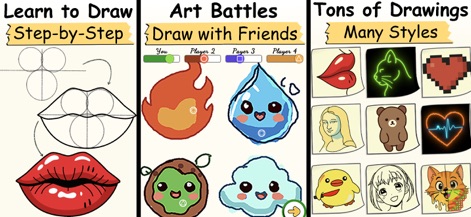
This app combines step-by-step drawing tutorials with engaging Art Battles, offering users a rich variety of artistic experiences and styles.
Diverse Creative Modes
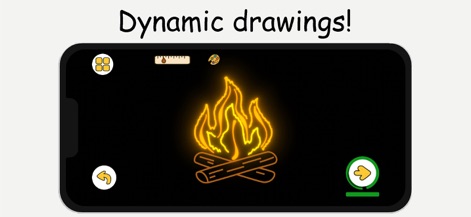
Users can explore dynamic brushes that create animated strokes and experiment with vibrant neon and glow effects to make drawings come alive.
Dynamic Art Effects
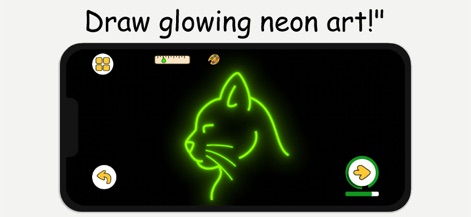
This tool allows artists to draw with bright glowing lines, transforming simple sketches into bold, stylized art with vivid neon effects.
Neon Glow Creations
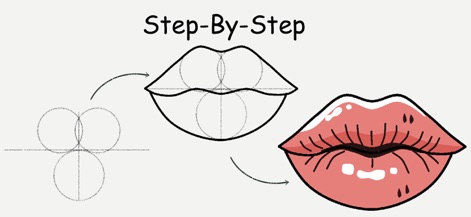
The app provides clear, sequential step-by-step tutorials that guide users through drawing complex shapes, such as these detailed lips, from basic lines to finished artwork.
Guided Drawing Steps
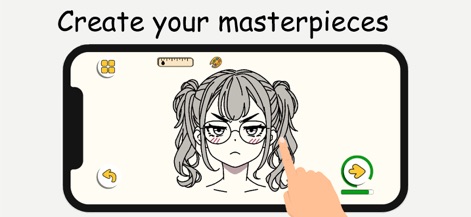
Users can easily create and refine their masterpieces using the intuitive drawing pad, which responds comfortably to both finger and stylus input.
Intuitive Creation Process
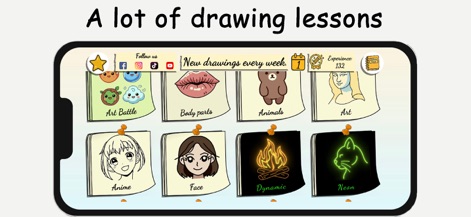
The app offers a vast collection of drawing lessons, categorized by themes like 'Art Battle' and 'Anime', providing endless creative inspiration for all skill levels.
Extensive Lesson Library
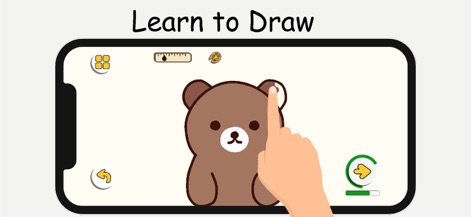
This tool simplifies learning to draw with accessible practice modes, allowing users to trace and color adorable characters like this bear with ease.
Easy Drawing Practice

The app features quick drawing challenges, enabling users to complete a vibrant sunset scene in just minutes, perfect for short creative breaks.
Quick Creative Challenges

Users can browse their saved masterpieces in a dedicated gallery, showcasing a diverse portfolio of completed drawings ranging from cute animals to historical figures.
Personal Art Gallery
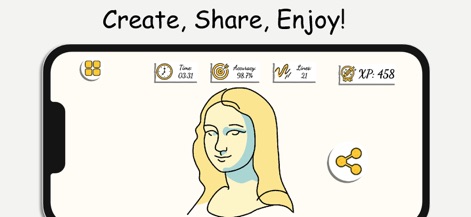
The app encourages sharing completed artworks, displaying key stats like 'Accuracy' and 'XP' to celebrate users' progress and creativity with friends.
Share Your Art
Description
Download
More Like This
Top-ranked apps in the same category

Block Blast!
ARETIS LIMITED

Heartopia
XD Entertainment Co., Ltd.

Solitaire Associations Journey
Hitapps Games LTD

Roblox
Roblox Corporation

Gossip Harbor®: Merge & Story
Microfun Limited

Arrows – Puzzle Escape
Lessmore UG haftungsbeschraenkt

Township
PLR Worldwide Sales Limited

Last War:Survival
FUNFLY PTE. LTD.

Vita Mahjong
VITA STUDIO PTE. LTD.
This page is not an official page of the app or its developer, but an independent editorial publication created for informational and commentary purposes. Unless expressly stated otherwise, neither the app nor its developer is affiliated with, endorsed by, sponsored by, authorized by, or otherwise officially connected with MWM, Apple, Google Play, the app publisher, or the app's developer, and nothing on this page implies that the app was developed using MWM's services. Any trademarks, logos, screenshots, and other content remain the property of their respective owners.