
This page is not an official page of the app or its developer, but an independent editorial publication created for informational and commentary purposes. Unless expressly stated otherwise, neither the app nor its developer is affiliated with, endorsed by, sponsored by, authorized by, or otherwise officially connected with MWM, Apple, Google Play, the app publisher, or the app's developer, and nothing on this page implies that the app was developed using MWM's services. Any trademarks, logos, screenshots, and other content remain the property of their respective owners.


Bingo - Live Video Camera REC.
Stop settling for basic phone cameras. This app hands you the keys to pro-level video and photo creation.
Downloads
100k+User Rating
Total Ratings
1.5KPublisher
Category
ProductivityLocales
1Latest Version
1.0.2Size
6.9 MBFirst Released
Jan 10, 2025An in-depth look at core functionalities for aspiring content creators.
Key Features of Bingo - Live Video Camera REC.
In-App Video Merging & Layouts
It allows users to merge multiple videos into a single clip, offering options to adjust scale, aspect ratio, and create matrix-style layouts, perfect for content creators aiming to combine clips seamlessly for dynamic social media content.
Live Video & Photo Capture
The app provides seamless switching between photo and live video capture, enabling users to record and photograph moments with ease and flexibility.
Advanced Exposure Controls
This tool features advanced control over camera settings including Exposure, ISO, and HDR, empowering users to achieve professional-level image quality and precise photographic results.
Manual Focus & Zoom Control
It allows users to manually control focus and zoom, providing the precision needed to compose the perfect shot and achieve desired visual effects.
Customizable Frame Rate & Resolution
The app provides customizable frame rate and resolution settings, enabling users to tailor video and photo quality to specific needs, whether for high-fidelity capture or optimized sharing across platforms.
Creative Camera Filters
This tool features a variety of camera filters, allowing users to enhance photos and videos with beautiful and expressive styles directly within the app, fostering personal expression.
Frequently Asked Questions
Everything you need to know about Bingo - Live Video Camera REC.
What is Bingo - Live Video Camera REC.?
Bingo - Live Video Camera REC. is a camera app designed for capturing photos and recording live videos. It provides tools for creating visual content easily, supporting both still images and dynamic recordings.
Can I record live videos with the Bingo app?
Yes, the Bingo app allows users to record live videos. It offers effortless switching between photo capture and live video recording, along with customizable settings.
What manual camera controls does Bingo - Live Video Camera REC. provide?
Bingo - Live Video Camera REC. offers manual zoom, focus, and changeable frame rates and resolution. It also includes advanced controls for exposure, ISO, and HDR settings.
Can the Bingo app merge multiple videos?
Yes, the Bingo app can merge multiple videos into one. Users can adjust the scale, aspect ratio, and create matrix-style layouts for combined clips.
Does Bingo - Live Video Camera REC. have camera filters?
Yes, Bingo - Live Video Camera REC. provides camera filters. Users can apply these filters to enhance both their photos and videos with various visual styles.
How do subscriptions work for Bingo - Live Video Camera REC.?
Bingo - Live Video Camera REC. uses subscriptions charged to your Apple ID. They automatically renew unless turned off 24 hours before the current period ends.
Can I cancel my subscription to the Bingo app?
Yes, users can cancel their Bingo app subscriptions at any time. Manage subscriptions and disable auto-renewal through your Apple App Store account settings after purchase.
Does Bingo - Live Video Camera REC. allow screen orientation lock during recording?
Yes, Bingo - Live Video Camera REC. includes a screen orientation lock. This feature prevents the screen from changing orientation while recording, ensuring an uninterrupted experience.
How do I switch between front and back cameras in the Bingo app?
The Bingo app allows seamless switching between front and back cameras. This functionality is available for various capturing occasions, enhancing flexibility.
Is a free trial available for Bingo - Live Video Camera REC.?
Yes, Bingo - Live Video Camera REC. may offer trial subscriptions. If provided, the subscription automatically renews after the 3-day trial period unless canceled beforehand.
The following screenshots and description are sourced directly from the app's official store listing and are the property of the app developer.
App Store
Screenshots
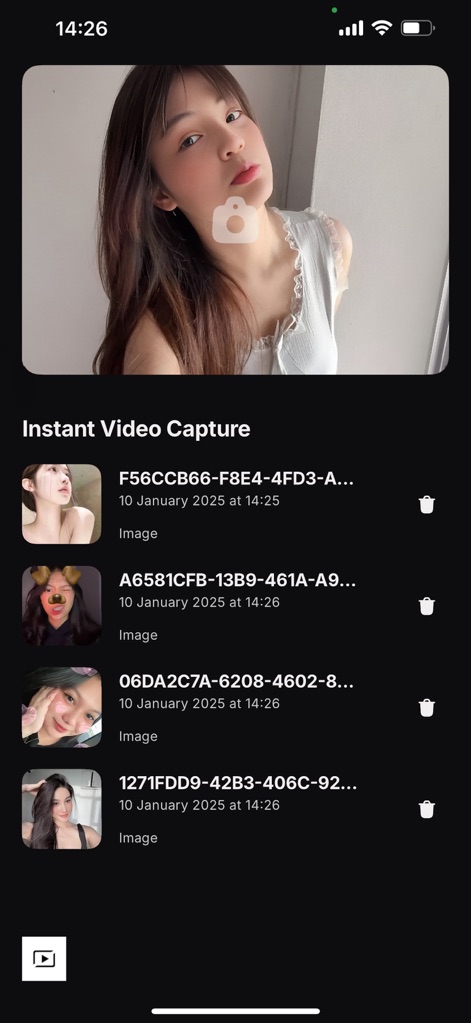
The app provides an intuitive capture interface, allowing users to quickly preview recent moments in a prominent display and manage recordings via an organized thumbnail gallery.
Capture & Review

This tool offers a clean live video camera interface, presenting a large central record button for instant capture and convenient access to the flash and camera switch controls.
Live Camera Control

Users can leverage the app's creative editing features, such as arranging media into a dynamic grid layout and utilizing the 'Merge' option to combine various video clips seamlessly.
Advanced Media Layouts
Description
Download
More Like This
Apps with similar features and user experience


This page is not an official page of the app or its developer, but an independent editorial publication created for informational and commentary purposes. Unless expressly stated otherwise, neither the app nor its developer is affiliated with, endorsed by, sponsored by, authorized by, or otherwise officially connected with MWM, Apple, Google Play, the app publisher, or the app's developer, and nothing on this page implies that the app was developed using MWM's services. Any trademarks, logos, screenshots, and other content remain the property of their respective owners.