
This page is not an official page of the app or its developer, but an independent editorial publication created for informational and commentary purposes. Unless expressly stated otherwise, neither the app nor its developer is affiliated with, endorsed by, sponsored by, authorized by, or otherwise officially connected with MWM, Apple, Google Play, the app publisher, or the app's developer, and nothing on this page implies that the app was developed using MWM's services. Any trademarks, logos, screenshots, and other content remain the property of their respective owners.


Blue Eye
Eliminate paperwork and ensure airworthiness with real-time tracking, digital signatures, and cloud synchronization. Engineered for the modern cockpit on iPhone and iPad.
Downloads
8K+User Rating
Total Ratings
0Publisher
Category
TravelLocales
1Latest Version
8.9Size
8.8 MBFirst Released
Jan 15, 2011Streamline Your Aviation Compliance
The complete Electronic Tech-Log solution designed for professional pilots and fleet managers who demand precision, safety, and real-time aircraft status.
Real-Time Airworthiness Tracking
Never miss an inspection. Monitor engine component life and airworthiness limitations directly from your device before every takeoff.
Digital Technical Logs
Replace heavy binders with a legal ETL. Record flights, fuel, and load sheets with secure digital signatures for total data accuracy.
Frequently Asked Questions
Everything you need to know about Blue Eye
Who can use the Blue Eye electronic tech-log application?
The Blue Eye electronic tech-log application is specifically intended for existing Blue Eye System subscribers. Access requires an active subscription to the main system.
Does Blue Eye support both fixed-wing and rotary-wing aircraft?
Yes, the Blue Eye application supports electronic technical logs for both fixed-wing and rotary-wing aircraft. It accommodates both light and heavy aircraft types.
What information does Blue Eye provide before each flight?
Before each flight, Blue Eye allows users to check the current aircraft status and identify upcoming airworthiness limitations, including inspections, aircraft and engine component life, and discrepancies.
What information can users log in Blue Eye after a flight?
After a flight, users can create a new Technical log entry in Blue Eye to report pre-flight checks, flight details, engine run hours and cycles, discrepancies, load sheets, passenger count, and fuel data.
Can technicians record maintenance operations in the Blue Eye app?
Yes, technicians can record maintenance operations in Blue Eye. They can input details such as the purchase order, tasks performed, date, time, work location, work report, CRS information, workshop, technician, agreement, and signature.
How does Blue Eye manage recorded information?
Blue Eye manages recorded information by sending and updating all data into a distant Blue Eye database. This ensures centralized storage and access, as indicated by the 'Sync. Now' option.
Can Blue Eye manage crew member details and duties?
Yes, Blue Eye allows for crew member management, including adding crew members, assigning roles like PIC and SIC, and tracking their duty status, certificates, experience, and flight limitations.
What kind of experience and limitations does Blue Eye track for crew members?
Blue Eye tracks crew experience and limitations such as landing cycles, monthly flight hours, flights within 90 days, weekly flight duty periods (FDP), and annual flight hours. It shows current values against maximums.
Does Blue Eye allow for electronic signatures for pre-flight checks?
Yes, Blue Eye includes a feature for electronic signatures. Users can provide a Pre-Flight Signature and a Commander Signature directly within the app for pre-flight acceptance.
Can Blue Eye load operational flight plans (OFP)?
Yes, the Blue Eye application provides a 'Load OFP' function. This allows users to import or integrate operational flight plan data directly into a new log entry.
The following screenshots and description are sourced directly from the app's official store listing and are the property of the app developer.
App Store
Screenshots
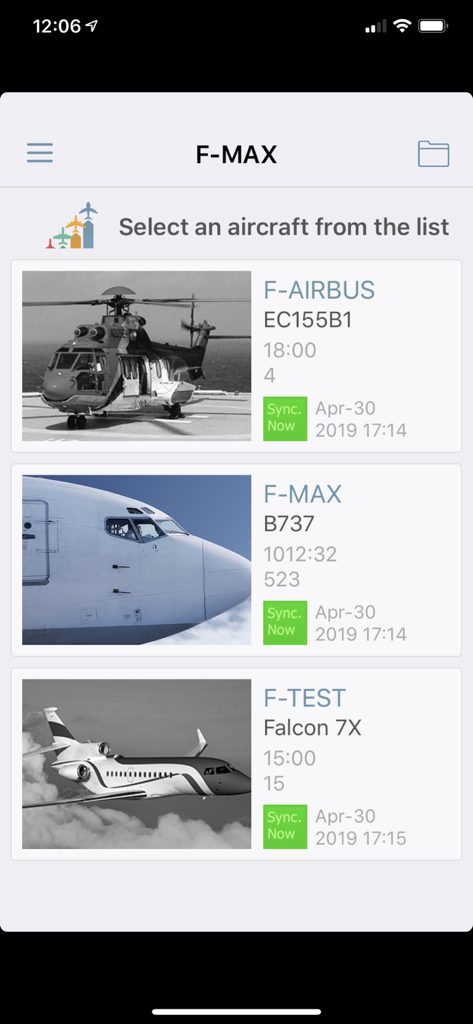
Blue Eye app interface showing a list of aircraft for fleet selection and synchronization
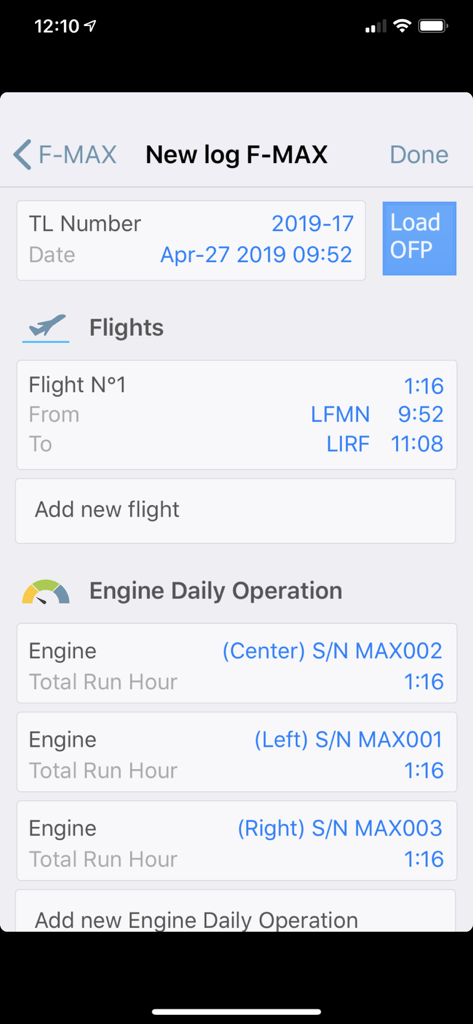
Blue Eye app interface for creating a new technical log entry showing flight details and engine operation hours.
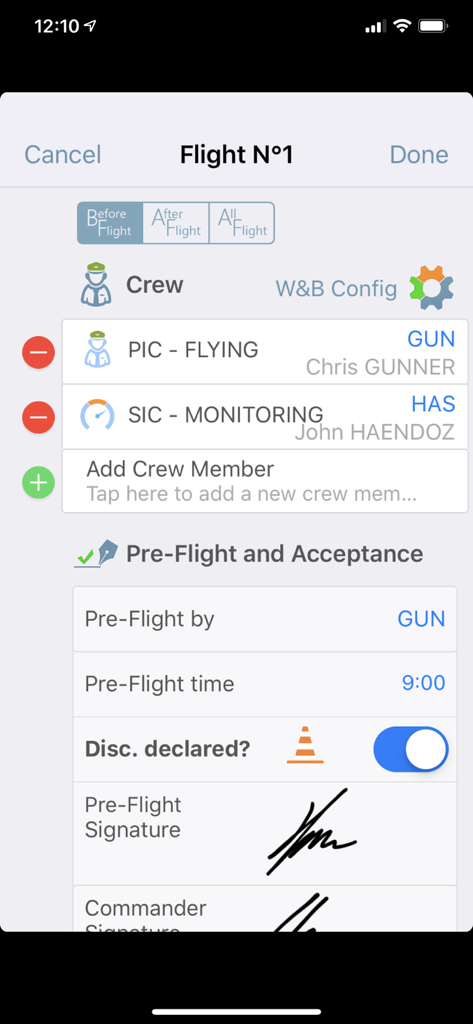
Blue Eye app interface showing crew management and pre-flight acceptance with digital signatures for pilots
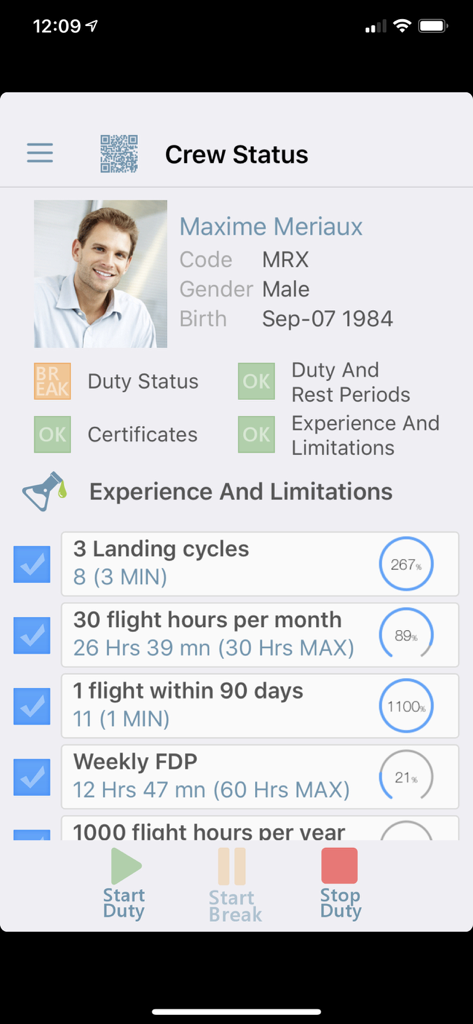
Crew status interface of the Blue Eye aviation app displaying pilot credentials, flight hours limitations, and duty status controls.
Description
Download
More Like This
Top-ranked apps in the same category

Uber - Request a ride
Uber Technologies, Inc.

Airbnb
Airbnb, Inc.

铁路12306
ACADEMY OF RAILWAY SCIENCES CO., ltd.

Booking.com: Hotels & Travel
Booking.com B.V.

Grab: Taxi Ride, Food Delivery
GRABTAXI HOLDINGS PTE. LTD.

Trip.com: Book Flights, Hotels
Trip.com Travel Singapore Pte. Ltd.

DiDi China: Ride Hailing
Didi Chuxing (Beijing) Network Platform Technology Co., Ltd

去哪儿旅行-订酒店机票火车票
Beijing Qunar Information Technology Company Limit

Bolt: Request a Ride
BOLT TECHNOLOGY OU
This page is not an official page of the app or its developer, but an independent editorial publication created for informational and commentary purposes. Unless expressly stated otherwise, neither the app nor its developer is affiliated with, endorsed by, sponsored by, authorized by, or otherwise officially connected with MWM, Apple, Google Play, the app publisher, or the app's developer, and nothing on this page implies that the app was developed using MWM's services. Any trademarks, logos, screenshots, and other content remain the property of their respective owners.