
This page is not an official page of the app or its developer, but an independent editorial publication created for informational and commentary purposes. Unless expressly stated otherwise, neither the app nor its developer is affiliated with, endorsed by, sponsored by, authorized by, or otherwise officially connected with MWM, Apple, Google Play, the app publisher, or the app's developer, and nothing on this page implies that the app was developed using MWM's services. Any trademarks, logos, screenshots, and other content remain the property of their respective owners.


CAIXA
It grants users absolute financial command. CAIXA's design empowers quick, direct control over banking, from transfers to credit. Every transaction, every balance, instantly accessible. No more waiting, just immediate action.
Downloads
25M+User Rating
Total Ratings
303.5KPublisher
Category
FinanceLocales
1Latest Version
5.23.1Size
305.2 MBFirst Released
Jan 11, 2012An evaluation of core functionalities for modern financial management.
CAIXA Mobile App: Key Features Analysis
Pix Instant Payments
It allows users to send and receive money instantly via Pix, including managing favorite contacts for quick transfers.
Comprehensive Account Management
The app provides functionalities to check balances, view statements, and access payment/transfer proofs, with options to share or save them.
Credit Card Management
This tool features options to acquire credit cards, view invoices, check points, unlock new cards, change due dates, and enable international use.
Virtual Debit Card Creation
It enables users to create virtual debit cards for secure online purchases and payments via platforms like WhatsApp.
Loan Application & Management
The app provides access to various loan options, including CDC, Consignado, and Saque Aniversário anticipation.
Open Finance Data Sharing
This tool features Open Finance integration, allowing users to bring their financial data to CAIXA for exclusive advantages.
Frequently Asked Questions
Everything you need to know about CAIXA
Can I open a new account directly through the CAIXA app?
Yes, users can open a new, free digital account directly through the CAIXA app without visiting a physical branch. This functionality is available from the app's welcome screen.
What services are available in the CAIXA app?
The CAIXA app provides access to account management, balance and statement inquiries, credit card services, virtual debit card creation, various loans, Pix transactions, and Open Finance.
How do I check my account balance and statements in the CAIXA app?
Users can consult their account balance, statements, and payment/transfer proofs directly within the CAIXA app. The app also allows sharing and saving these proofs.
Can I manage my credit card through the CAIXA app?
Yes, the CAIXA app allows users to acquire new credit cards, view invoices, check points, unlock new cards, change due dates, and enable international use for their cards.
Does the CAIXA app support Pix transactions?
Yes, the CAIXA app fully supports Pix transactions. Users can send and receive money, register favorite contacts for quick transfers, and manage their Pix keys.
How can I create a virtual debit card using the CAIXA app?
The CAIXA app enables users to create a virtual debit card. This virtual card is designed for secure online purchases and payments, including transactions via WhatsApp.
Can I apply for a loan using the CAIXA app?
Yes, the CAIXA app offers various loan options, including CDC, Consigned, and Birthday Withdrawal Anticipation. Users can access these services directly through the application.
How can I contact support for the CAIXA app?
Users requiring assistance with the CAIXA app can access the FAQ section at caixa.gov.br/atendimento/canais-digitais/app-caixa-internet-banking/perguntas-frequentes/Paginas/default.aspx or contact support via a form at faleconosco.caixa.gov.br.
The following screenshots and description are sourced directly from the app's official store listing and are the property of the app developer.
App Store
Screenshots

Users can easily access their accounts or register for new services directly from the welcoming screen, featuring clear "Entrar" and "Abrir nova conta" options.
Secure Access Entry
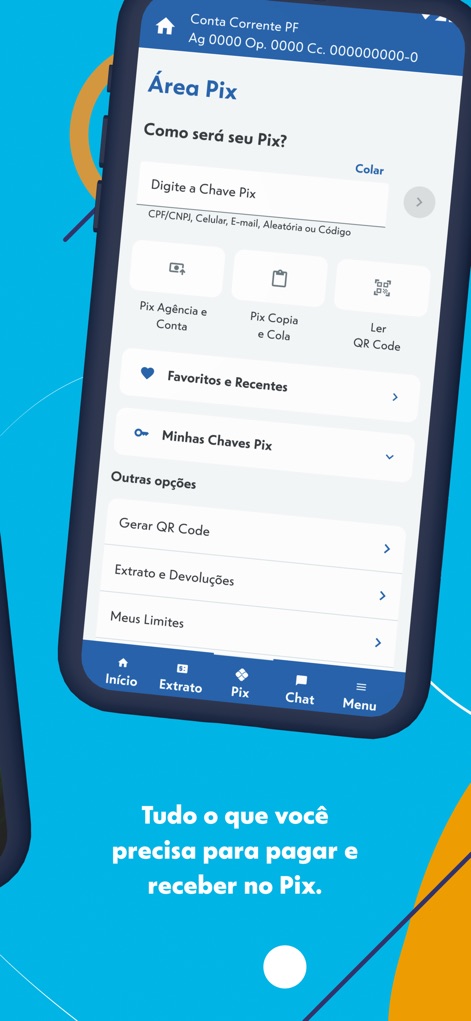
This tool streamlines money transfers with dedicated Pix functionalities like the "Digite a Chave Pix" input field and managing "Favoritos e Recentes" through an intuitive bottom navigation bar.
Effortless Pix Transfers

The app provides users with a clear overview of their financial status, prominently displaying the "Saldo atual" and offering quick access to essential services via categorized icons like "Pagar conta" and "Cartão de crédito".
Centralized Financial Control

New users can initiate their free digital account setup with ease, guided by a straightforward "CPF" input field and a prominent "Continuar" button to accept the terms.
Seamless Account Opening

The app introduces its distinctive branding with the prominent "CAIXA" logo set against a vibrant blue background, showcasing a modern and welcoming aesthetic.
CAIXA Brand Identity
Description
Download
More Like This
Apps with similar features and user experience

PayPal - Pay, Send, Save
PayPal, Inc.

中国农业银行
AGRICULTURAL BANK OF CHINA LIMITED

Mercado Pago: cuenta digital
MercadoLibre S.A.

中国工商银行
Industrial and Commercial Bank of China

Revolut: Send, spend and save
Revolut Ltd

HDFC Bank App (Early Access)
HDFC Bank Ltd

Zalopay - Quét Mọi QR
ZION JOINT STOCK COMPANY

Cash App
Block, Inc.

招商银行
CHINA MERCHANTS BANK CO.,LTD.
This page is not an official page of the app or its developer, but an independent editorial publication created for informational and commentary purposes. Unless expressly stated otherwise, neither the app nor its developer is affiliated with, endorsed by, sponsored by, authorized by, or otherwise officially connected with MWM, Apple, Google Play, the app publisher, or the app's developer, and nothing on this page implies that the app was developed using MWM's services. Any trademarks, logos, screenshots, and other content remain the property of their respective owners.