
This page is not an official page of the app or its developer, but an independent editorial publication created for informational and commentary purposes. Unless expressly stated otherwise, neither the app nor its developer is affiliated with, endorsed by, sponsored by, authorized by, or otherwise officially connected with MWM, Apple, Google Play, the app publisher, or the app's developer, and nothing on this page implies that the app was developed using MWM's services. Any trademarks, logos, screenshots, and other content remain the property of their respective owners.


Calendly Mobile
Forget desktop dependency. This app gives you back your time, wherever business takes you.
Downloads
2.5M+User Rating
Total Ratings
76.4KPublisher
Category
BusinessLocales
5Latest Version
3.5.2Size
39.3 MBFirst Released
Apr 3, 2019An on-the-go scheduling solution for busy professionals.
Calendly Mobile: Key Feature Analysis
Direct Video Call Joining
This tool features the ability to join video calls directly from the app, streamlining the process of attending virtual meetings without needing to switch applications.
Quick Scheduling Link Sharing
It allows users to quickly copy and share scheduling links via email, text, or other apps directly from their mobile device, saving time when away from a computer.
Meeting Rescheduling & Cancellation
The app provides the flexibility to easily reschedule or cancel upcoming meetings, allowing users to adapt their schedule to unforeseen changes or invitee needs.
Upcoming Meeting Details Access
The app provides comprehensive visibility into all upcoming meeting details, enabling users to stay prepared and informed throughout their day, regardless of their location.
Frequently Asked Questions
Everything you need to know about Calendly Mobile
What is the Calendly Mobile app used for?
The Calendly Mobile app is a partner to the desktop application, allowing users to manage scheduling, share links, and view/modify meetings directly from their mobile device.
How can I share my scheduling links from the Calendly Mobile app?
Users can quickly copy their Calendly scheduling links and paste them into email, text, or any other app. The app also uses iOS native sharing for convenience.
Can I manage my scheduled meetings using the Calendly Mobile app?
Yes, the Calendly Mobile app allows users to view upcoming meeting details, invitee questions, look up phone numbers, join video calls, and reschedule or cancel meetings from their device.
How do I set my availability for meetings in the Calendly Mobile app?
Users set their availability for meetings in the Calendly Mobile app through a "Meeting hours" interface. They can define specific working days and time slots easily.
Does the Calendly Mobile app provide notifications for scheduled events?
Yes, the Calendly Mobile app provides notifications for new event schedules, invitee reconfirmations, and event cancellations. This keeps users updated on their meeting status.
Where can I find the privacy policy for the Calendly Mobile app?
The privacy policy for the Calendly Mobile app is publicly available at calendly.com/legal/privacy-notice. This document outlines how user data is handled and protected.
Can I create single-use scheduling links in the Calendly Mobile app?
Yes, the Calendly Mobile app allows users to create single-use scheduling links. This feature generates a unique URL that automatically expires after the first successful booking.
What types of events can I see in the Calendly Mobile app?
The Calendly Mobile app displays your personalized event types, such as "Discovery Call," and also shows events shared with you, like "Product Research Call," on its main screen.
The following screenshots and description are sourced directly from the app's official store listing and are the property of the app developer.
App Store
Screenshots

Users can effortlessly navigate through a comprehensive list of event types and utilize the search bar to quickly locate specific scheduling options.
Event Type Overview
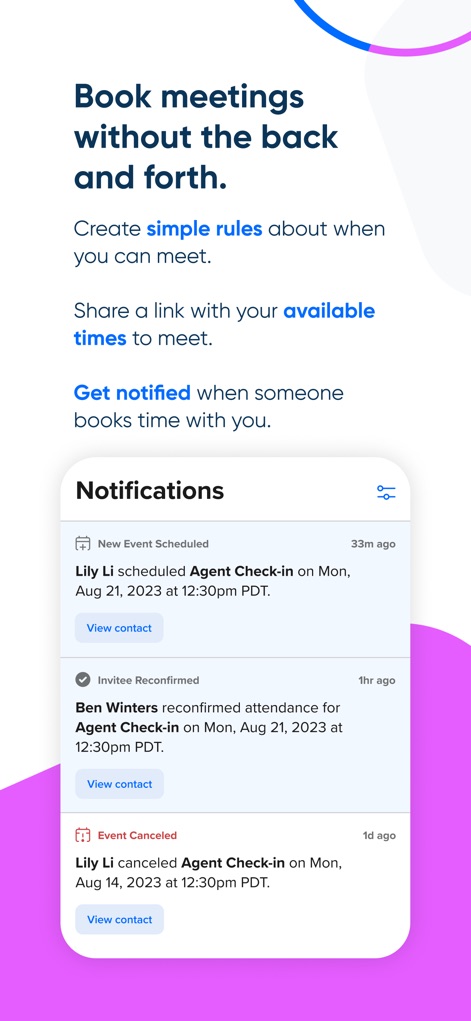
The app simplifies scheduling by allowing users to define 'simple rules' for meeting availability and provides clear notifications for new events and reconfirmations.
Effortless Scheduling Rules

This tool empowers users to precisely set their 'meeting hours' for each day of the week and customize time zone preferences like 'Pacific Time (PST)'.
Availability Configuration
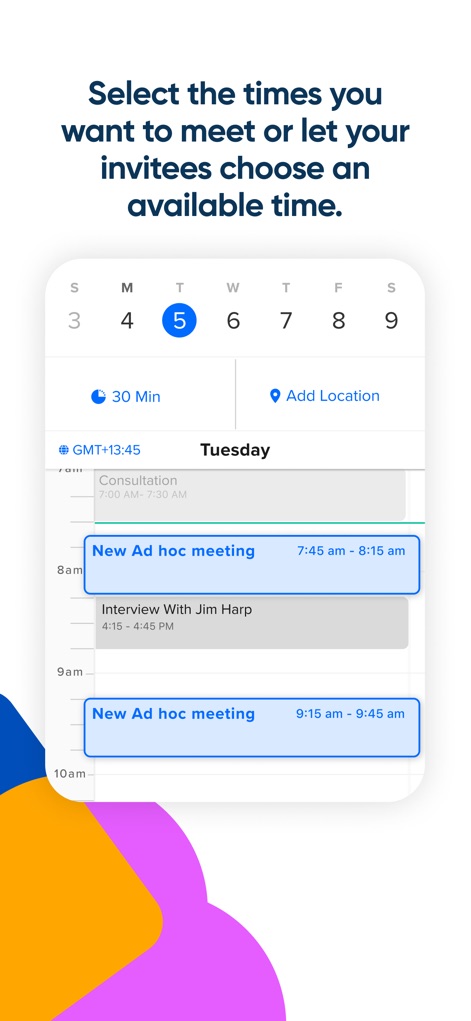
The interface displays a clear calendar view for selecting specific dates and times, alongside the ability to add 'New Ad hoc meeting' slots for spontaneous bookings.
Flexible Time Selection

Users can conveniently share their availability via various methods like 'Send email' or 'Send text', and choose to generate a 'single-use link' for unique booking scenarios.
Seamless Link Sharing

The app provides an at-a-glance view of upcoming appointments on a detailed calendar and presents essential meeting details such as 'Amy Jesser scheduled Consultation'.
Upcoming Meetings Glance
Description
Download
More Like This
Apps with similar features and user experience


This page is not an official page of the app or its developer, but an independent editorial publication created for informational and commentary purposes. Unless expressly stated otherwise, neither the app nor its developer is affiliated with, endorsed by, sponsored by, authorized by, or otherwise officially connected with MWM, Apple, Google Play, the app publisher, or the app's developer, and nothing on this page implies that the app was developed using MWM's services. Any trademarks, logos, screenshots, and other content remain the property of their respective owners.