
This page is not an official page of the app or its developer, but an independent editorial publication created for informational and commentary purposes. Unless expressly stated otherwise, neither the app nor its developer is affiliated with, endorsed by, sponsored by, authorized by, or otherwise officially connected with MWM, Apple, Google Play, the app publisher, or the app's developer, and nothing on this page implies that the app was developed using MWM's services. Any trademarks, logos, screenshots, and other content remain the property of their respective owners.


Carry Campus(キャリーキャンパス)
Stop lugging heavy binders and start studying smarter. Scan your notebooks, master active recall with interactive markers, and turn every commute into a high-impact study session designed for the modern student.
Downloads
499K+User Rating
Total Ratings
1K+Publisher
Category
EducationLocales
1Latest Version
4.0.2Size
228.4 MBFirst Released
Jan 30, 2022Study Smarter, Not Harder
Transform your physical notes into an interactive mobile study hub. Carry your entire backpack in your pocket and turn every gap in your schedule into a productivity win.
Digitalize Your Notebooks
Snap photos of your handwritten notes and handouts to keep them organized in one place. Access your entire library of schoolwork anywhere without the heavy backpack.
Instant Active Recall
Use the digital marker tool to hide key terms and test your memory. Turn any textbook page or lecture note into an interactive quiz to master your subjects faster.
Frequently Asked Questions
Everything you need to know about Carry Campus(キャリーキャンパス)
What is Carry Campus?
Carry Campus is a study app designed to digitize notes, prints, and textbooks, enabling efficient test preparation and study sessions during spare time. It helps students manage all their study materials digitally.
What are the main features of the Carry Campus app?
Carry Campus features note digitization with editing tools like memorization markers and recording, a calendar for test schedules, and a report function to track study time and results, aiding efficient learning.
How do I digitize my study materials using Carry Campus?
Yes, Carry Campus allows users to digitize study materials by photographing notes, prints, or textbooks directly through the app. This converts physical documents into editable smartphone notes.
Does Carry Campus offer tools for test preparation?
Yes, Carry Campus supports test preparation with a calendar function to input test schedules and countdowns. It also includes editing tools like memorization markers for effective study.
Can I track my study progress with Carry Campus?
Yes, Carry Campus includes a report function that allows users to check their app usage time and test results. This feature helps visualize study efforts and boosts motivation.
What subjects can be managed using Carry Campus?
Carry Campus supports various subjects including English, Mathematics, Japanese, Physics, Chemistry, Biology, Social Studies, and History. It is suitable for a wide range of academic disciplines.
Is Carry Campus associated with the Campus notebook brand?
Yes, Carry Campus is a study app that originated from Kokuyo's Campus notebook series. It supports students in their learning challenges, aligning with the brand's heritage.
Can Carry Campus search handwritten notes?
Yes, Carry Campus allows users to search the content of their handwritten notes once digitized. It also supports searching English terms within notes.
What editing functions are available for digitized notes in Carry Campus?
Carry Campus provides diverse editing functions for digitized notes, including memorization markers, a 'Just now pen,' and a recording feature. These tools enhance the learning experience.
The following screenshots and description are sourced directly from the app's official store listing and are the property of the app developer.
App Store
Screenshots

Carry Campus app displaying digitized notebooks textbooks and study materials for students
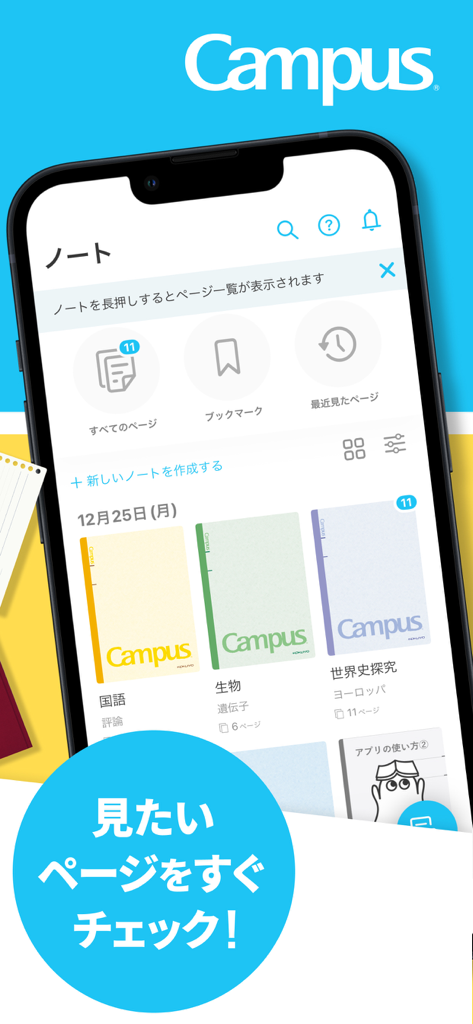
Carry Campus mobile app interface showing a collection of organized digital notebooks for different study subjects on a smartphone screen.

Two students sitting on a giant smartphone using the Carry Campus app to review digital school notebooks.

Carry Campus app showing digitized handwritten notes with active recall markers and study tools on two iPhones

Mobile app interface showing search functionality for text within scanned handwritten study notes.

Three students using their smartphones to study in various daily locations like a train and a cafe
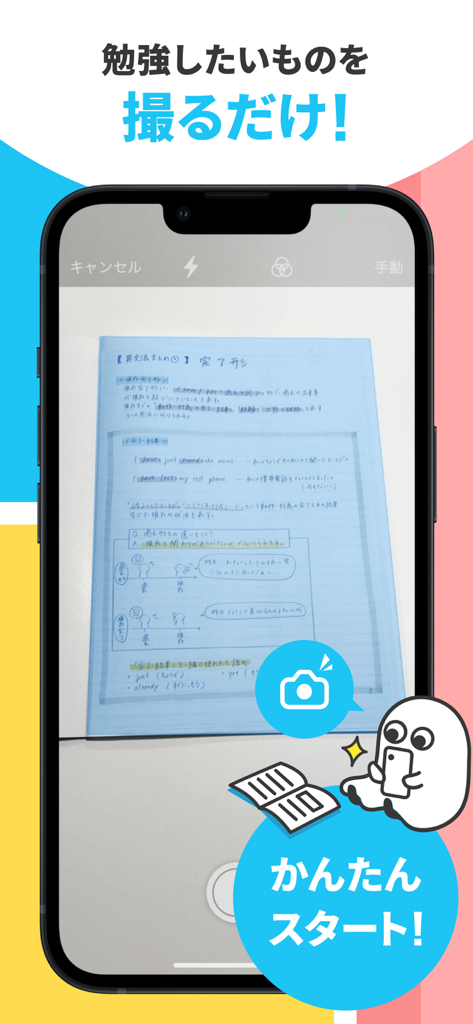
Smartphone scanning a handwritten study notebook using the Carry Campus app camera feature
Description
Download
More Like This
Apps with similar features and user experience



This page is not an official page of the app or its developer, but an independent editorial publication created for informational and commentary purposes. Unless expressly stated otherwise, neither the app nor its developer is affiliated with, endorsed by, sponsored by, authorized by, or otherwise officially connected with MWM, Apple, Google Play, the app publisher, or the app's developer, and nothing on this page implies that the app was developed using MWM's services. Any trademarks, logos, screenshots, and other content remain the property of their respective owners.