
This page is not an official page of the app or its developer, but an independent editorial publication created for informational and commentary purposes. Unless expressly stated otherwise, neither the app nor its developer is affiliated with, endorsed by, sponsored by, authorized by, or otherwise officially connected with MWM, Apple, Google Play, the app publisher, or the app's developer, and nothing on this page implies that the app was developed using MWM's services. Any trademarks, logos, screenshots, and other content remain the property of their respective owners.


Coinamatic CP Mobile
Skip the coin hunt and take control of laundry day. Pay securely via Bluetooth, check machine availability in real-time, and get notified the moment your cycle ends.
Downloads
484K+User Rating
Total Ratings
9K+Publisher
Category
UtilitiesLocales
3Latest Version
2.27.6Size
42.7 MBFirst Released
Nov 30, 2017Laundry Day, Upgraded
Forget the stress of finding change. CleanPay Mobile turns your iPhone into the ultimate laundry assistant with cashless payments and smart machine tracking.
100% Cashless Payments
Securely load credit and pay for cycles via Bluetooth. No more hunting for quarters or carrying physical laundry cards.
Real-Time Status & Alerts
Check machine availability from your apartment and get a push notification the exact moment your laundry is done.
Frequently Asked Questions
Everything you need to know about Coinamatic CP Mobile
What is Coinamatic CP Mobile?
Coinamatic CP Mobile is an iPhone application for participating Coinamatic laundry locations. It enables users to pay for laundry, manage their account, and check machine availability via Bluetooth for a complete solution.
How do I pay for laundry using the Coinamatic CP Mobile app?
Users pay for laundry cycles by purchasing credit within the Coinamatic CP Mobile app. After adding funds, the app communicates with machines via Bluetooth to initiate cycles, either by scanning a QR code or entering a machine number.
Can I check my account balance in the Coinamatic CP Mobile app?
Yes, users can check their card or account balance directly within the Coinamatic CP Mobile app. The main screen displays the current balance, and an option to "Add Funds" is readily available.
How do I start a laundry machine with Coinamatic CP Mobile?
To start a machine, users open Coinamatic CP Mobile and select "Machine Number" or "Scan QR Code" on the main screen. The app then allows users to confirm the payment amount to start or add time for the selected machine.
Does Coinamatic CP Mobile show machine availability?
Yes, for participating laundry rooms, the Coinamatic CP Mobile app displays real-time machine availability. Users can access the "Room Status" section to view which washers are available for use.
Can Coinamatic CP Mobile notify me when my laundry cycle finishes?
Yes, for participating laundry rooms, Coinamatic CP Mobile can receive alerts when a laundry cycle is complete. This feature provides users with timely notifications regarding their machine's status.
How do I add funds to my Coinamatic CP Mobile account?
Users add funds to their Coinamatic CP Mobile account by purchasing credit directly within the app. An "Add Funds" button is clearly visible on the main screen, allowing easy top-ups to the balance.
Can I view my transaction history in Coinamatic CP Mobile?
Yes, Coinamatic CP Mobile provides a full accounting feature. Users can access their transaction purchase history within the app's side menu to review all past payments and credit additions.
Is Bluetooth required to use the Coinamatic CP Mobile app?
Yes, Bluetooth is required for Coinamatic CP Mobile. The app uses Bluetooth to communicate with the laundry machines, enabling users to pay for and start washer or dryer cycles.
How do I scan a QR code with Coinamatic CP Mobile?
Coinamatic CP Mobile uses QR codes for initial laundry room setup and to start machines. Users scan the laundry room's QR code once, and then scan individual machine QR codes to begin a cycle.
The following screenshots and description are sourced directly from the app's official store listing and are the property of the app developer.
App Store
Screenshots
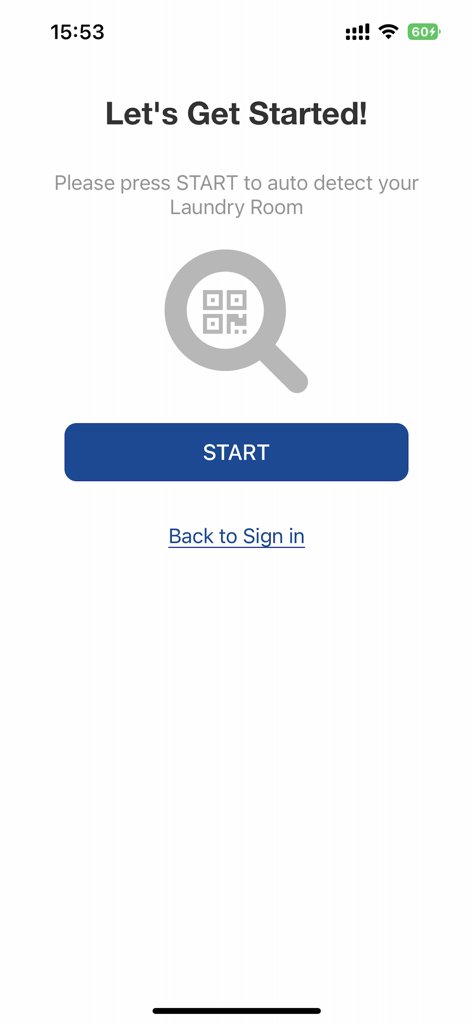
Coinamatic CP Mobile app screen to start auto detecting a laundry room with a QR code scan
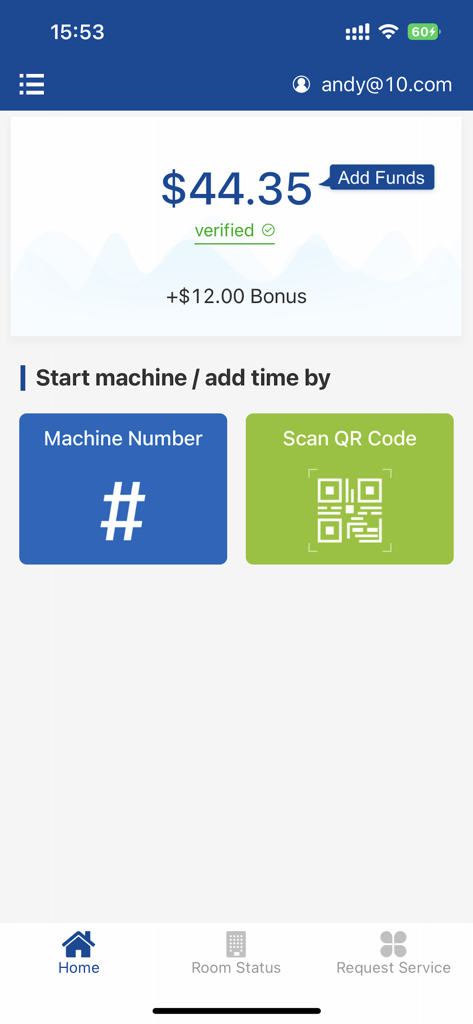
Coinamatic laundry app dashboard showing account balance and machine start options via QR code or machine number
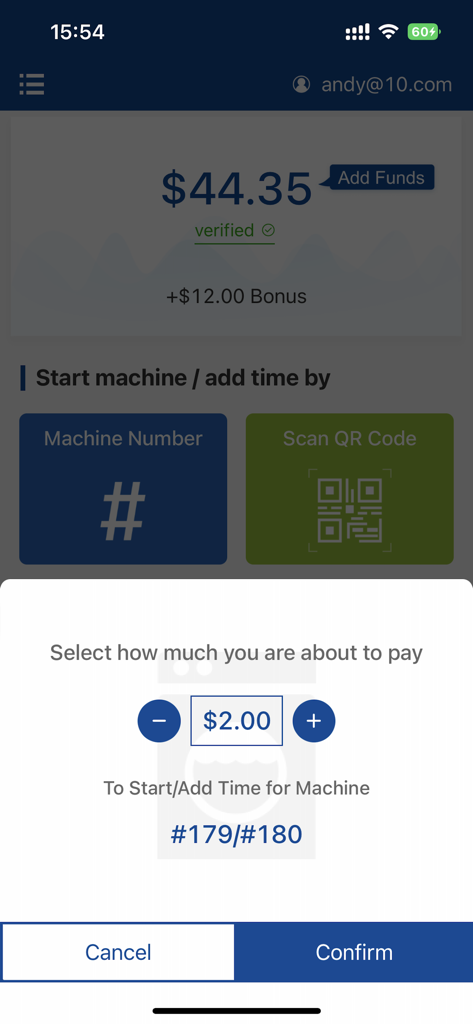
Coinamatic CleanPay Mobile app payment confirmation screen showing a two dollar charge for a laundry machine
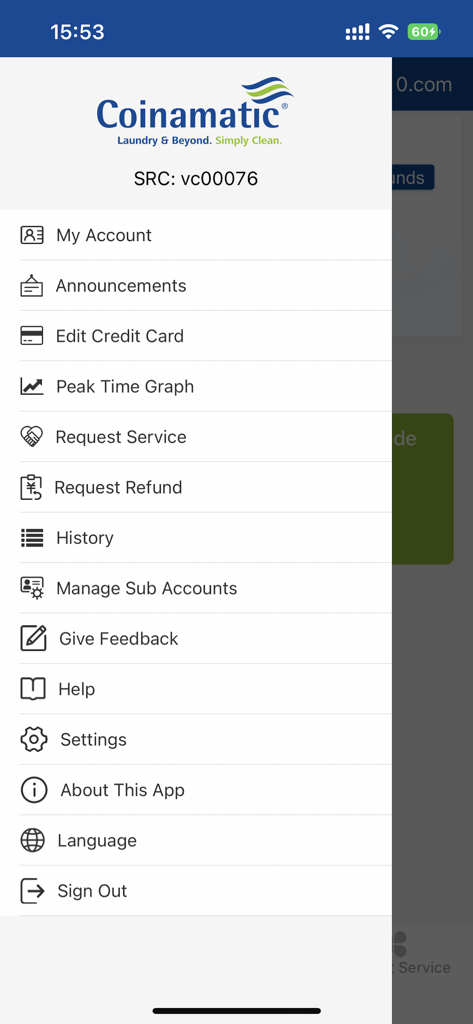
Side navigation menu of the Coinamatic CP Mobile laundry app showing account and settings options.
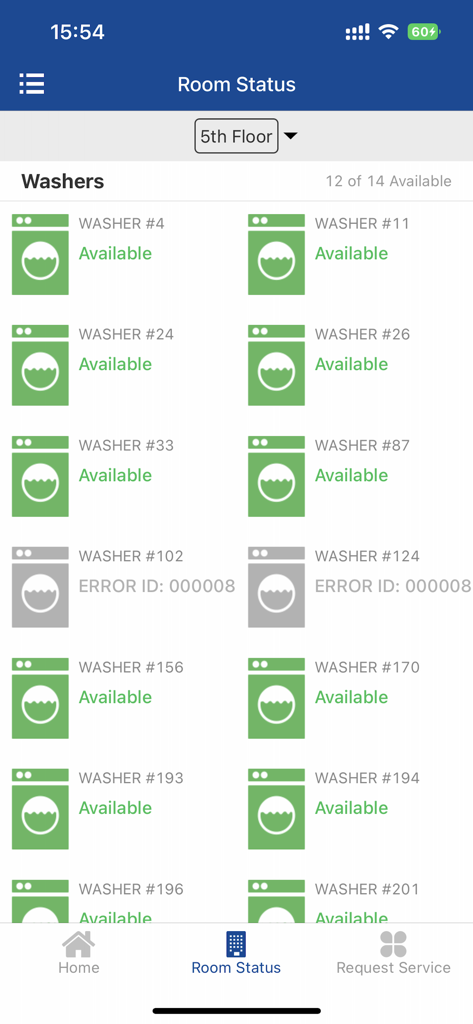
A mobile interface for the Coinamatic app showing real-time availability of washing machines on a specific floor of a building.
Description
Download
More Like This
Apps with similar features and user experience

Speed Queen
Alliance Laundry Systems, LLC

toreluna - トレルナで生理用ナプキンが無料
NEXT INNOVATION INC.

WashXpress
LAUNDRY YOU PUBLIC COMPANY LIMITED

VMmarket
VM TECNOLOGIA LTDA

Foodles
La Boite a Encas

PayRange
PayRange Inc.

CSC GO
CSC ServiceWorks Holdings, INC.

MatiPay
Matipay S.r.l.

Connect & Pay
365 Retail Markets, LLC
This page is not an official page of the app or its developer, but an independent editorial publication created for informational and commentary purposes. Unless expressly stated otherwise, neither the app nor its developer is affiliated with, endorsed by, sponsored by, authorized by, or otherwise officially connected with MWM, Apple, Google Play, the app publisher, or the app's developer, and nothing on this page implies that the app was developed using MWM's services. Any trademarks, logos, screenshots, and other content remain the property of their respective owners.