
This page is not an official page of the app or its developer, but an independent editorial publication created for informational and commentary purposes. Unless expressly stated otherwise, neither the app nor its developer is affiliated with, endorsed by, sponsored by, authorized by, or otherwise officially connected with MWM, Apple, Google Play, the app publisher, or the app's developer, and nothing on this page implies that the app was developed using MWM's services. Any trademarks, logos, screenshots, and other content remain the property of their respective owners.

Comeback Kid - Baby Audio
Ditch the menu-diving and sculpt pro-grade repeats with 14 intuitive knobs. Bring analog soul and lofi grit to your iPad music production with full AUv3 support.
Downloads
1K+User Rating
Total Ratings
0Publisher
Category
MusicLocales
-Latest Version
1.0Size
24.3 MBFirst Released
Nov 24, 2024Pro-Grade Delay for Mobile Studios
Transform sterile mixes into warm, vibey soundscapes with a vintage-inspired layout designed specifically for the iPad musician's workflow.
Intuitive Analog Workflow
Forget hidden sub-menus. Use 14 'shaping knobs' to instantly sculpt your sound with the tactile feel of classic studio hardware.
Timeless Vintage Character
From crunchy lo-fi echoes to lush tape delay, add authentic analog warmth and grit to your synths, vocals, and guitars.
Frequently Asked Questions
Everything you need to know about Comeback Kid - Baby Audio
What is Comeback Kid?
Comeback Kid is a vintage-inspired delay effect plugin by Baby Audio. It delivers warm and vibey repeats to enrich sterile mixes, offering 14 flexible controls for sound sculpting.
Does Comeback Kid support iOS devices?
Yes, Comeback Kid is available on iOS with full AUv3 support. This allows it to function as a plugin within compatible audio host applications on iOS devices.
How many controls does Comeback Kid have?
Comeback Kid features 14 flexible 'shaping knobs' for instantly sculpting the wet signal. It provides a simple, hardware-like layout without sub-menus or hidden features.
What kind of sound variety does Comeback Kid offer?
Comeback Kid can create diverse sounds, including tape delay vibes for lead synths, modern slap for vocals, and crunchy lofi echoes for guitars. It ranges from subtle reflections to hypnotic echoes.
What are the primary effect sections in Comeback Kid?
The main effect sections in Comeback Kid are Shaper, Stereo, Delay, Flavor, and Output. Each section provides dedicated controls to customize the delay effect.
What does the 'Shaper' section do in Comeback Kid?
The 'Shaper' section in Comeback Kid sculpts delay repeats to fit your mix. It includes controls such as LO-CUT, HI-CUT, ATTACK, and SUSTAIN for precise tonal adjustments.
Can Comeback Kid create ultra-wide echoes?
Yes, Comeback Kid’s 'Stereo' section adds depth and dimension for ultra-wide echoes. It features controls like WIDER, RICHER, PAN, and MONO to manipulate the stereo field.
What vintage effects are available in Comeback Kid's 'Flavor' section?
Comeback Kid's 'Flavor' section enhances repeats with analog saturation and vintage-style effects. It offers controls including CHEAP, TAPE, and SAUCE to add character.
Does Comeback Kid include a ducking feature?
Yes, Comeback Kid’s 'Output' section features a ducking function for a cleaner sound. This section also blends wet and dry signals for optimal mix integration.
The following screenshots and description are sourced directly from the app's official store listing and are the property of the app developer.
App Store
Screenshots
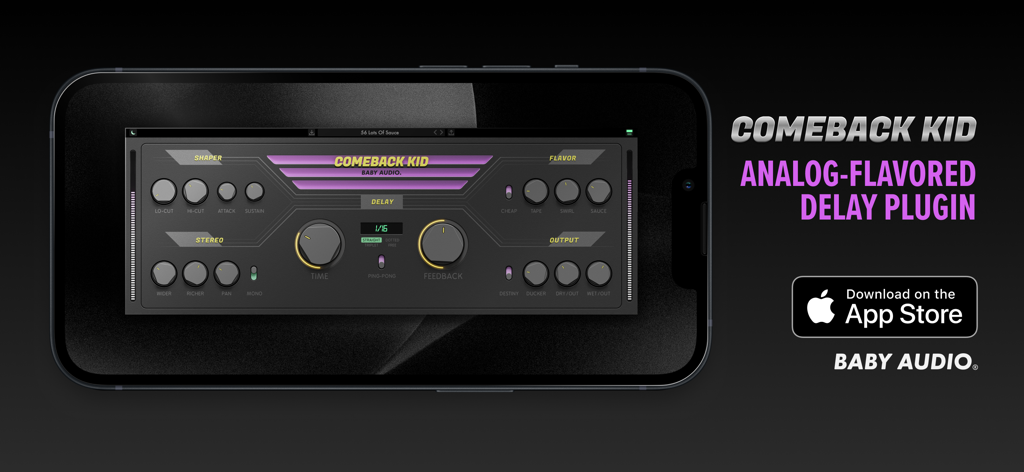
Comeback Kid analog flavored delay plugin interface on a smartphone
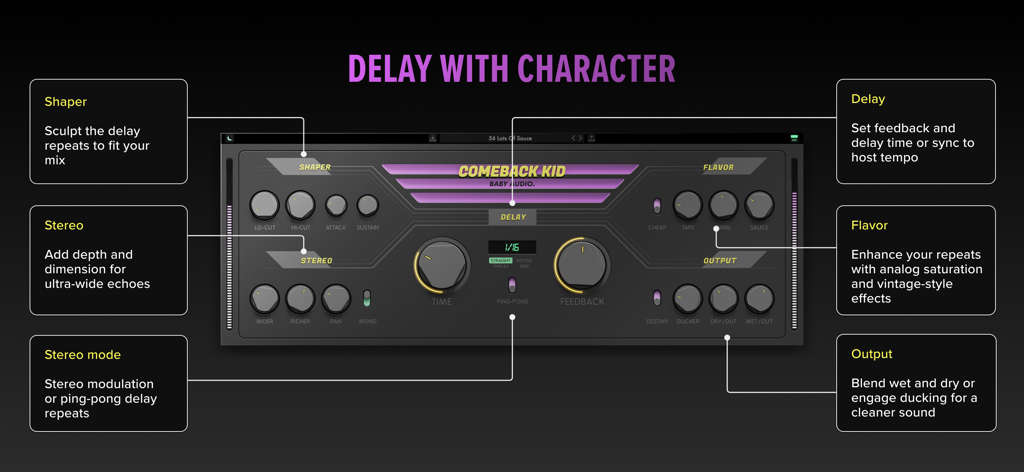
User interface of Comeback Kid delay plugin showing controls for shaper stereo delay flavor and output
Description
Download
More Like This
Top-ranked apps in the same category

Spotify: Music and Podcasts
Spotify

YouTube Music
Google LLC

Shazam: Find Music & Concerts
Apple Inc.

SoundCloud: The Music You Love
SoundCloud Global Limited & Co KG

Suno - AI Songs & Music
Suno Inc.

QQ音乐 - 听我想听
Tencent Technology (Shenzhen) Company Limited

Audiomack - Play Music Offline
Audiomack, Inc.

GuitarTuna: Tune & Play Guitar
Yousician Ltd

BandLab – Music Maker & Beats
BandLab Singapore Pte Ltd
This page is not an official page of the app or its developer, but an independent editorial publication created for informational and commentary purposes. Unless expressly stated otherwise, neither the app nor its developer is affiliated with, endorsed by, sponsored by, authorized by, or otherwise officially connected with MWM, Apple, Google Play, the app publisher, or the app's developer, and nothing on this page implies that the app was developed using MWM's services. Any trademarks, logos, screenshots, and other content remain the property of their respective owners.