Control Panel for Twitter

Control Panel for Twitter

Download on App Store
Logo of Control Panel for Twitter

Control Panel for Twitter: Take back control of your timeline.

Reclaim your focus with a chronological feed, no algorithms, and a distraction-free interface. The ultimate Safari extension for power users who want the classic, information-first experience back.

Download on App Store

Publisher

J BUCHANAN & L.J BUCHANAN

Category

Social Networking

Downloads

83K+

User Rating

4.4/5

Total Ratings

200

Locales

1

Your Feed, Reclaimed

Discover the interface used by 83K+ users.
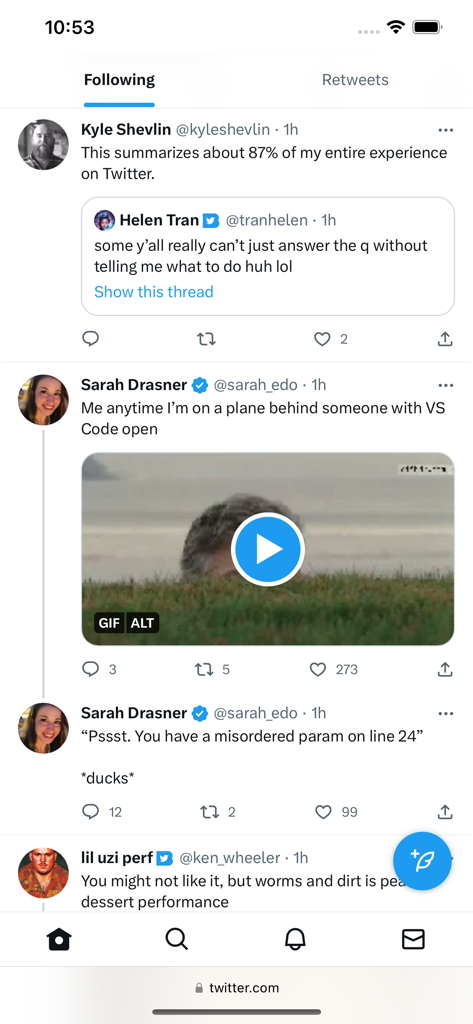
Twitter mobile web interface displaying a chronological Following feed and a custom Retweets tab.

Twitter mobile web interface displaying a chronological Following feed and a custom Retweets tab.

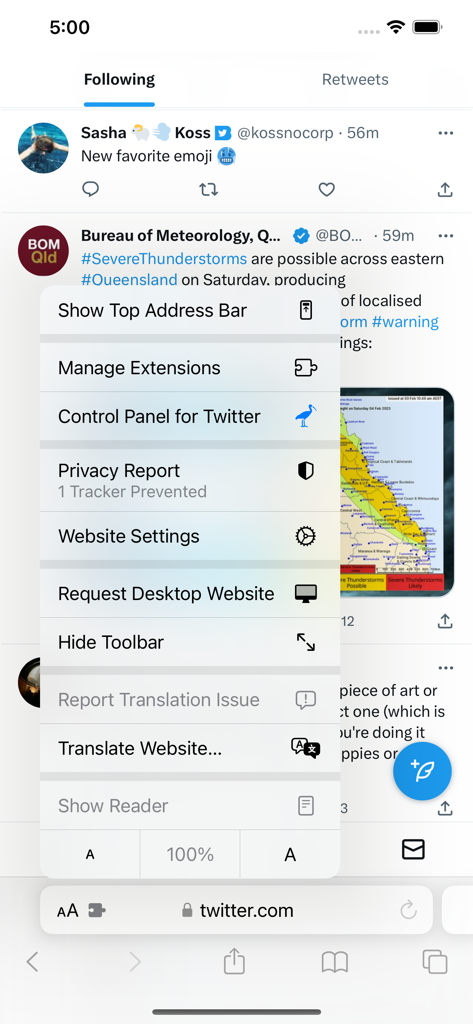
Safari menu showing Control Panel for Twitter extension on iPhone

Safari menu showing Control Panel for Twitter extension on iPhone

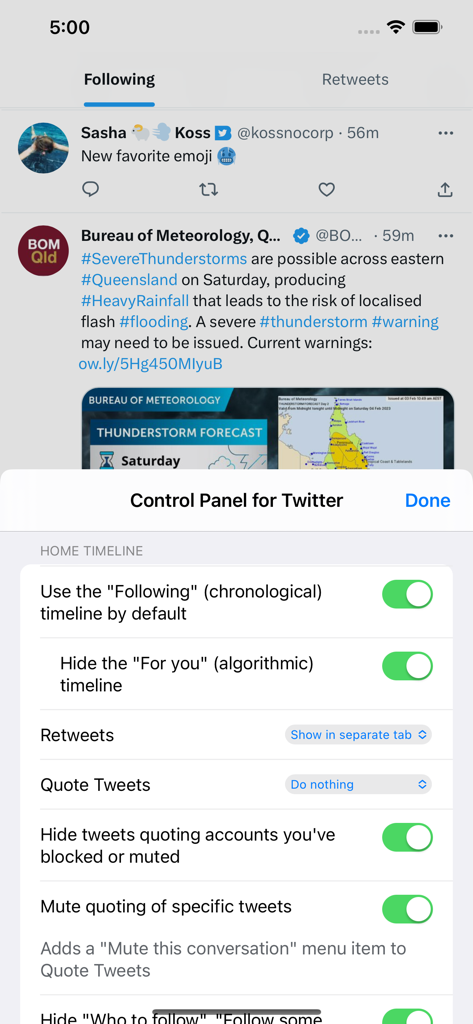
Settings menu of Control Panel for Twitter extension on iPhone showing options to customize the home timeline and hide algorithmic content.

Settings menu of Control Panel for Twitter extension on iPhone showing options to customize the home timeline and hide algorithmic content.

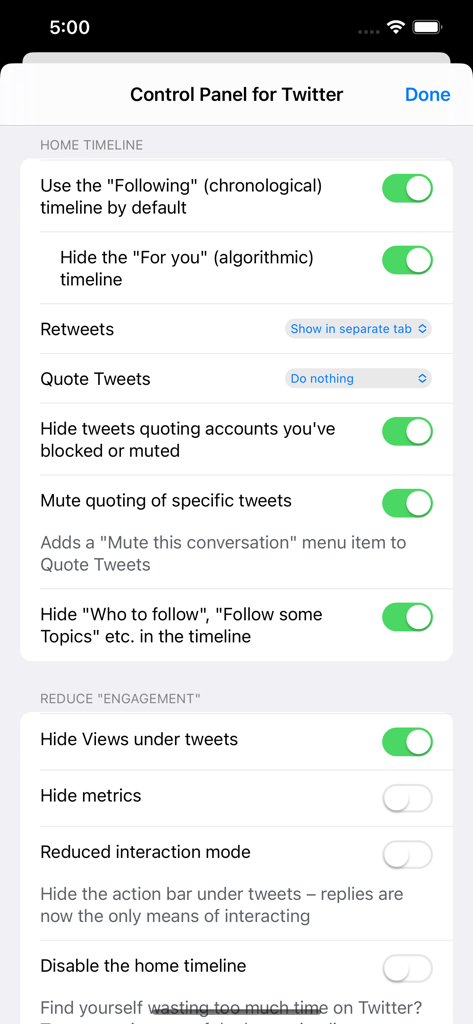
Settings screen of Control Panel for Twitter showing options to use chronological timeline and hide engagement metrics.

Settings screen of Control Panel for Twitter showing options to use chronological timeline and hide engagement metrics.

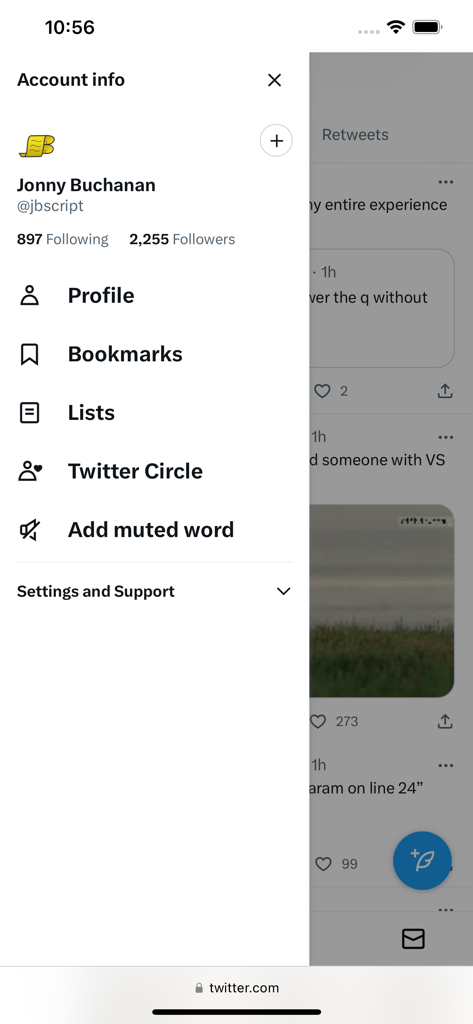
Mobile view of the customized Twitter account sidebar featuring the Add muted word shortcut added by the extension

Mobile view of the customized Twitter account sidebar featuring the Add muted word shortcut added by the extension

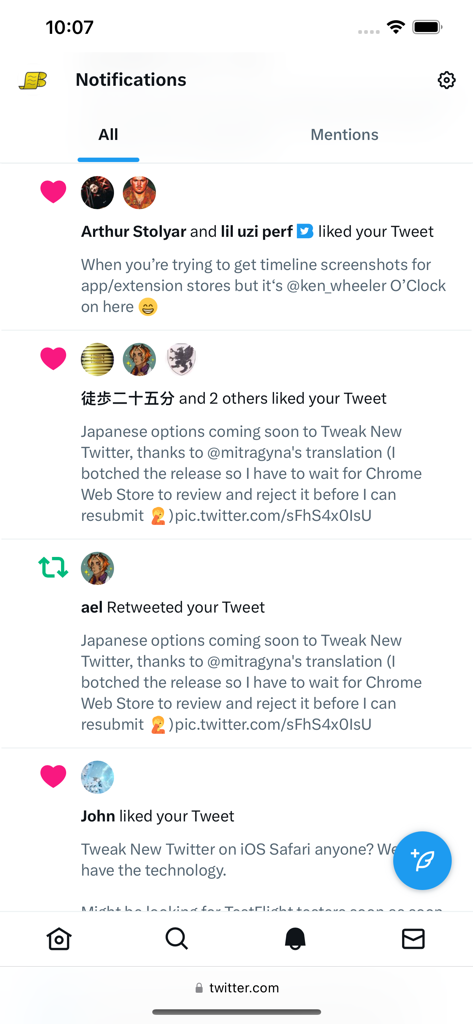
A minimalist Twitter notifications feed in mobile Safari using the Control Panel extension

A minimalist Twitter notifications feed in mobile Safari using the Control Panel extension

Reclaim Your Timeline

The tools that make this app stand out, trusted by 83K+ users.

Strictly Chronological

Force your timeline to stay on 'Following' by default. Eliminate the 'For You' algorithm and see every post from the people you actually follow, exactly when they happen.

🧹

Total Visual De-clutter

Sanitize your UI by removing Grok, Blue checkmarks, 'Who to follow' prompts, and intrusive ads. Transform X into a clean, professional-grade news wire.

🧠

Intentional Consumption

Protect your mental space by hiding engagement metrics, disabling video autoplay, and removing 'viral' signals that trigger mindless scrolling.

About the app

Everything you need to know about Control Panel for Twitter.

Description

Control Panel for Twitter is a Safari extension to improve your experience on Twitter.com by adding new features and options Twitter is missing. By default, your Home timeline will be the chronological "Following" timeline, which will only contain tweets and quote tweets from the people you follow. The algorithmic "For you" timeline will be hidden, and Control Panel for Twitter will keep you on "Following" if Twitter tries to put you back on "For you". Everything is configurable, so start by opening the extension options and customizing to your liking. Features: Home timeline • Use the "Following" (chronological) timeline by default • Hide the "For you" (algorithmic) timeline • Retweets • Show in separate tab / Hide • Quote Tweets • Show in separate tab / Hide • Enable muting of Quote Tweets • Hide "See new Tweets" • Hide "Who to follow", "Follow some Topics" etc. in the timeline • Hide inline prompts in the timeline • Full-width timeline content (desktop version) • Hide the sidebar and let timeline content go full-width UI improvements • Prevent next video autoplaying (mobile version) • Add "Add muted word" to the "More" menu • Fast blocking (skips confirm dialog) • Hide quotes and replies to blocked and muted accounts • Hide Retweets in user profiles • Retweets in Lists • Default to "Latest" tab in Search • Hide the quoted tweet when viewing Quote Tweets X fixes • Redirect to twitter.com • Tweak new layout • Hide Toggle navigation • Replace X branding changes • Hide Views under tweets • Hide "Verified" Notifications and Followers tabs • Restore headlines under external links • Restore Quote Tweets link under Tweets • Restore other links under Tweets • Default sorting of replies • Latest / Likes • Premium blue checks • Replace with Twitter Blue logo / Hide • Hide Premium blue check replies • Hide Premium upsells • Hide Grok • Hide Jobs • Hide Subscriptions UI tweaks • Don't use the Chirp font • Disable bold and italic text in tweets • Use normal text font style in navigation bar (desktop version) • Navigation density (desktop version) • Comfortable / Compact • Use normal font weight in dropdown menus • Uninvert Follow / Following buttons • Monochrome / Themed • Unblur sensitive content Remove algorithmic content • Hide sidebar contents (desktop version) • Hide Explore page contents and use it only for searching • Hide "Discover" suggestions Reduce "engagement" • Hide metrics • Reduced interaction mode • Hide the action bar under tweets – replies are now the only means of interacting • Hide the Compose Tweet button • Disable the home timeline • Find yourself wasting too much time on Twitter? Try preventing use of the home timeline • Notifications • Hide badges only / Hide Hide UI items you don't use • Bookmark button under tweets • Share button under tweets • "View post engagements" under your tweets • Tweet box in timeline (desktop version) • Account switcher (desktop version) • Messages drawer (desktop version) • Explore (desktop version) • Communities • Hide "More" menu items you don't use TWITTER, TWEET and RETWEET are trademarks of Twitter Inc. or its affiliates

Latest Version

4.19.3

Size

1.1 MB

First Released

Feb 3, 2023

Take Back Your Timeline

Join 83,000+ power users and digital minimalists reclaiming their focus. Download the Safari extension to silence the noise and restore the chronological, clutter-free experience you deserve.

Download on App Store
FAQ

Frequently Asked Questions

Everything you need to know about Control Panel for Twitter

How does Control Panel for Twitter improve my Twitter experience?

Yes, Control Panel for Twitter significantly improves your Twitter.com experience by adding new features and options, such as defaulting to the chronological "Following" timeline and hiding algorithmic content.

Can I set the chronological "Following" timeline as default with Control Panel for Twitter?

Yes, Control Panel for Twitter allows you to use the chronological "Following" timeline by default. It also hides the algorithmic "For you" timeline and keeps you on "Following" if Twitter tries to switch it.

Does Control Panel for Twitter hide the algorithmic "For you" timeline?

Yes, Control Panel for Twitter can hide the "For you" algorithmic timeline. It ensures your home timeline remains the chronological "Following" feed, preventing Twitter from reverting it.

Can Control Panel for Twitter add muted words to the 'More' menu?

Yes, the Control Panel for Twitter extension includes an option to add muted words directly to the "More" menu for convenience. This feature is part of its UI improvements.

Does Control Panel for Twitter help reduce engagement on the platform?

Yes, Control Panel for Twitter offers options to reduce engagement. You can hide metrics, utilize a reduced interaction mode, and even disable the home timeline to manage your time on Twitter.

What platform does Control Panel for Twitter support?

Control Panel for Twitter supports Safari on devices compatible with Safari extensions, as it is listed as a Safari extension in its description and shown in the screenshots.

Does Control Panel for Twitter modify X branding elements?

Yes, Control Panel for Twitter replaces X branding changes, including hiding views under tweets, restoring headlines under external links, and modifying premium blue check displays.

App information, icons, screenshots, and descriptions displayed on this page are sourced from the Apple App Store and are the property of their respective developers. Download estimates and rankings are based on MWM's proprietary models and may not reflect actual figures. This page is provided for informational and analytical purposes only.

Believe this page infringes your intellectual property? File a dispute