Dashpivot
Dashpivot
Download on App Store

This page is not an official page of the app or its developer, but an independent editorial publication created for informational and commentary purposes. Unless expressly stated otherwise, neither the app nor its developer is affiliated with, endorsed by, sponsored by, authorized by, or otherwise officially connected with MWM, Apple, Google Play, the app publisher, or the app's developer, and nothing on this page implies that the app was developed using MWM's services. Any trademarks, logos, screenshots, and other content remain the property of their respective owners.


Logo of Dashpivot
Download on App Store

Dashpivot

Replace paper forms and manual data entry with the all-in-one app for industrial teams. Capture photos, automate workflows, and sync from the field to the office—even offline.

Key Figures

Downloads

34K+

User Rating

4.7/5

Total Ratings

700

Publisher

Sitemate Technologies Holdings Pty Ltd

Category

Business

Locales

1

Latest Version

25.10.1

Size

156.6 MB

First Released

Apr 5, 2016
Features

Master Your Site Operations

Replace messy clipboards and manual data entry with a rugged, all-in-one platform designed specifically for civil, construction, and industrial professionals.

Smart Digital Forms

Complete safety inspections, quality checklists, and daily diaries on your device. Eliminate double-handling and ensure your records are professional and compliant.

Real-Time Photo & PDF Markup

Capture site progress and annotate drawings instantly. Bridge the gap between field and office with visual proof and automatic cloud organization.

The following screenshots and description are sourced directly from the app's official store listing and are the property of the app developer.

App Store

Screenshots
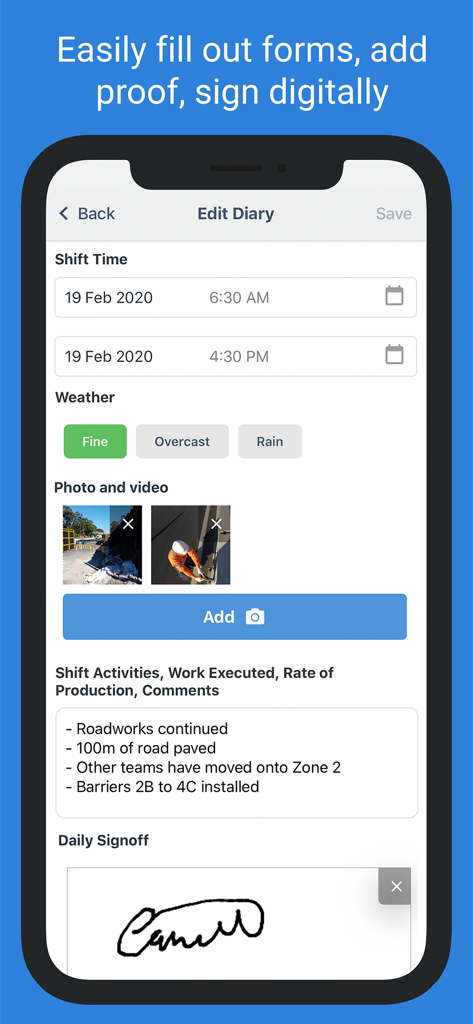
Dashpivot - Dashpivot mobile app showing a digital site diary with construction photos and a digital signature.
Dashpivot mobile app showing a digital site diary with construction photos and a digital signature.

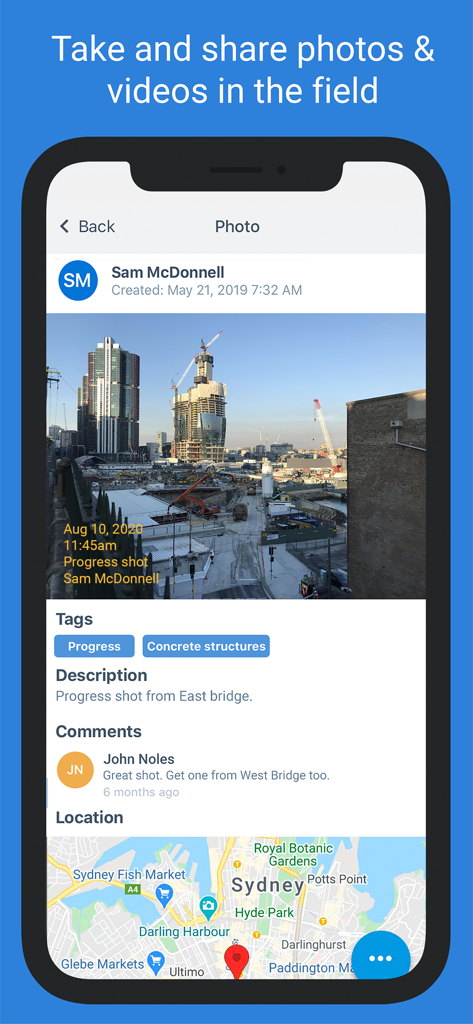
Dashpivot - Dashpivot app interface showing a construction site progress photo with tags and location map
Dashpivot app interface showing a construction site progress photo with tags and location map

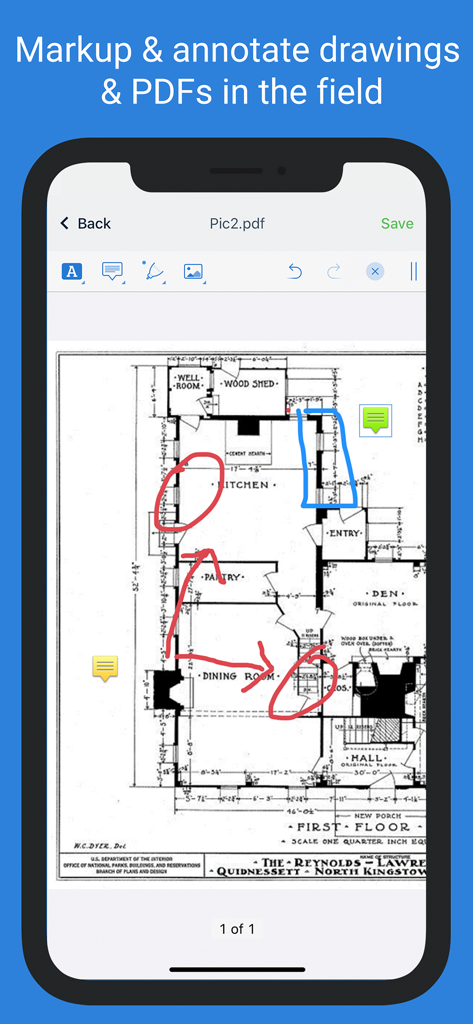
Dashpivot - Dashpivot mobile app screen showing architectural drawing markup and annotation tools
Dashpivot mobile app screen showing architectural drawing markup and annotation tools

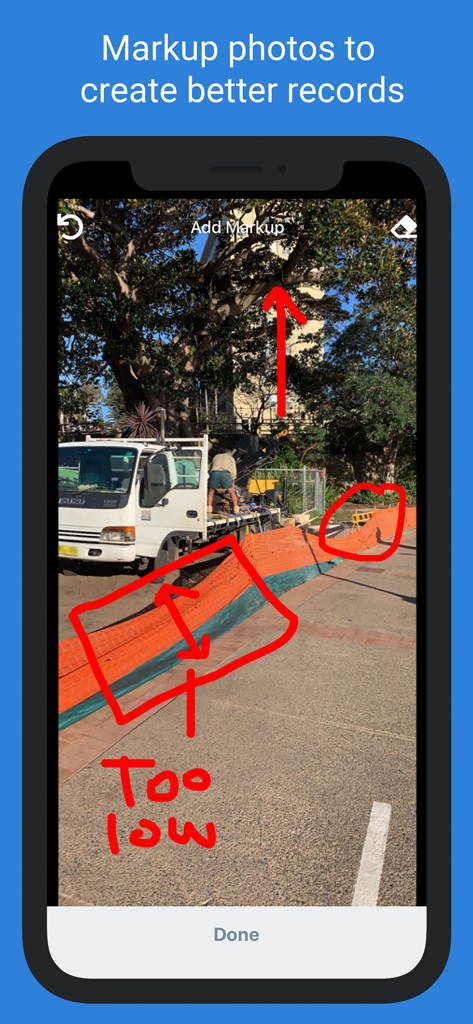
Dashpivot - Dashpivot mobile app screen showing red annotations and notes on a construction site photo for better record keeping
Dashpivot mobile app screen showing red annotations and notes on a construction site photo for better record keeping

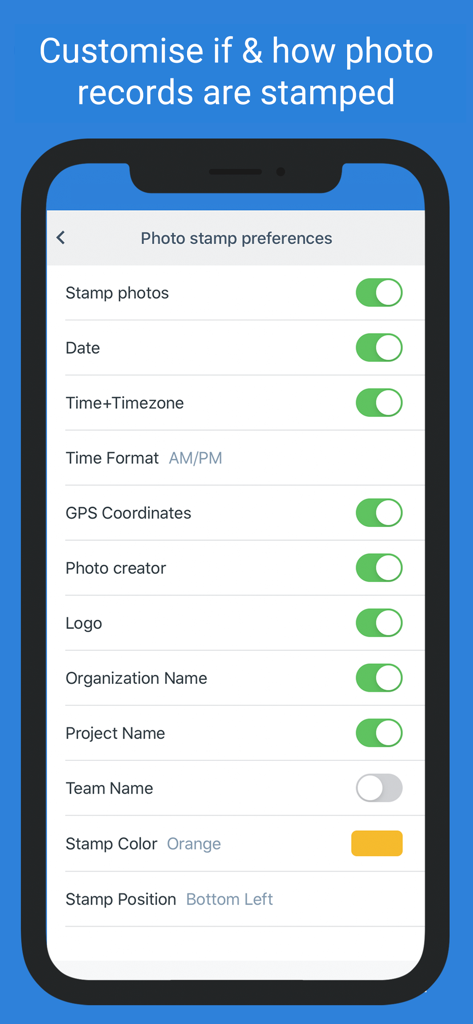
Dashpivot - Dashpivot app screen displaying customizable photo stamp settings for construction site records including GPS and timestamps
Dashpivot app screen displaying customizable photo stamp settings for construction site records including GPS and timestamps

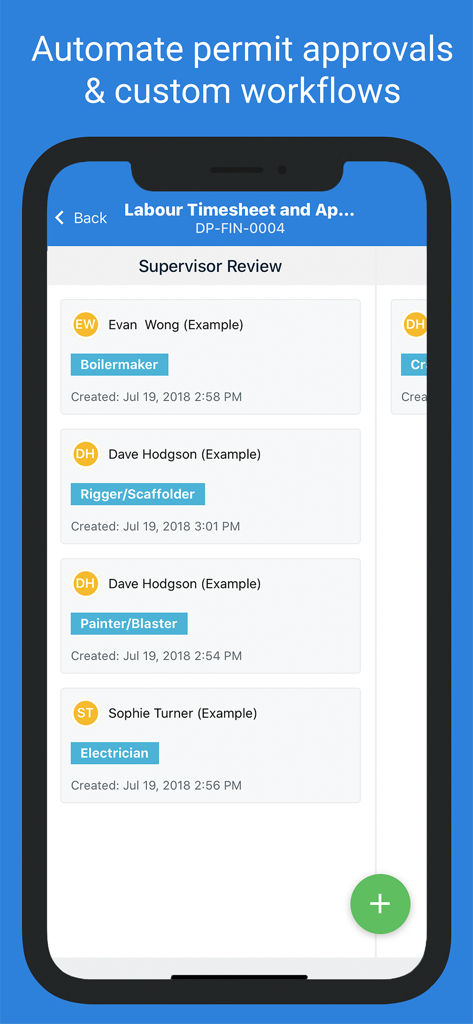
Dashpivot - Dashpivot app screen displaying a supervisor review list for labor timesheets and automated permit approvals
Dashpivot app screen displaying a supervisor review list for labor timesheets and automated permit approvals

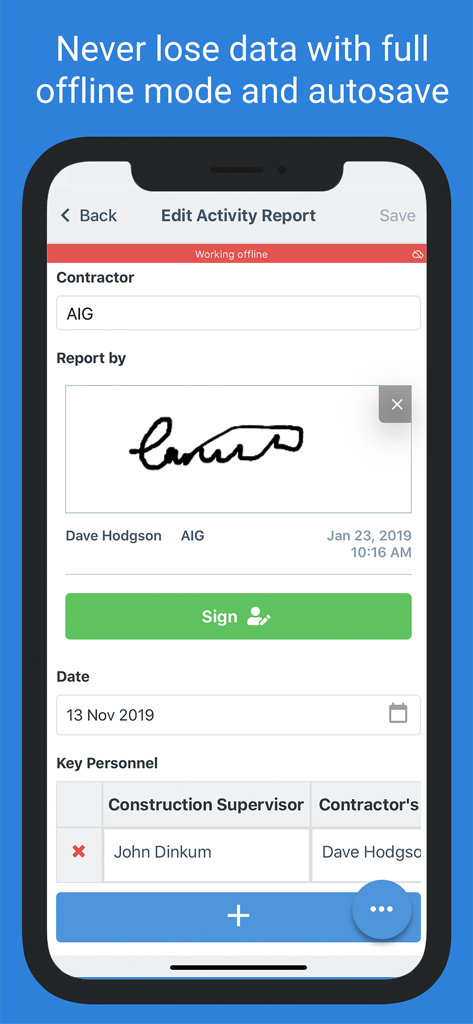
Dashpivot - Dashpivot app screen showing a construction activity report being edited in offline mode with a digital signature.
Dashpivot app screen showing a construction activity report being edited in offline mode with a digital signature.

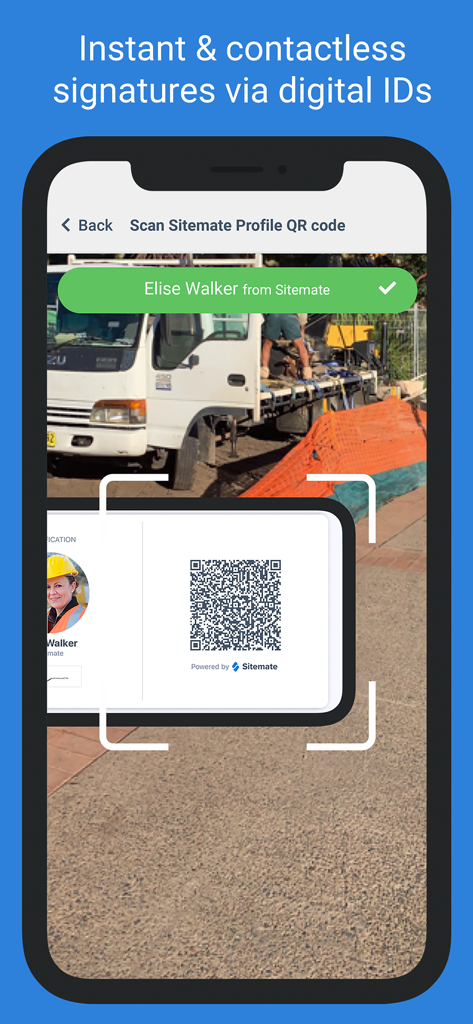
Dashpivot - Smartphone scanning a digital ID QR code for a contactless signature in the Dashpivot app
Smartphone scanning a digital ID QR code for a contactless signature in the Dashpivot app

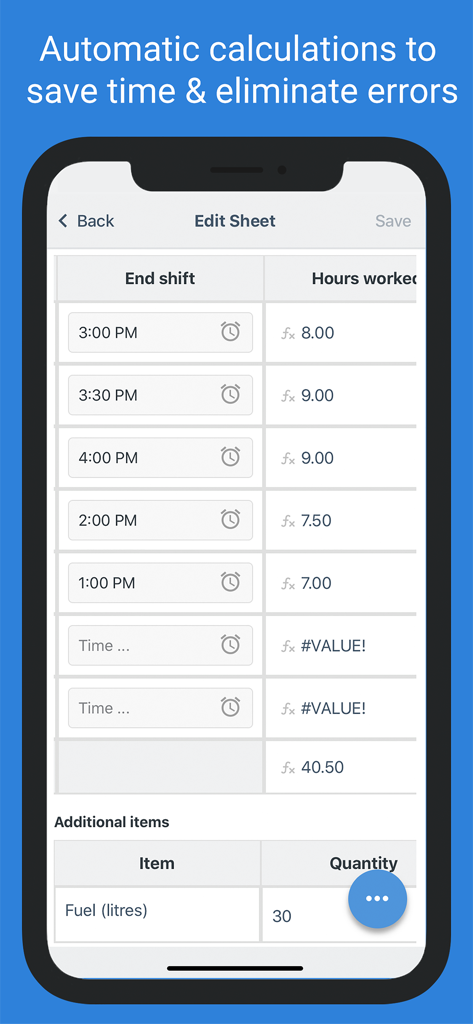
Dashpivot - Dashpivot app mobile interface showing automated shift hour calculations and additional site resource tracking like fuel quantities.

Dashpivot app mobile interface showing automated shift hour calculations and additional site resource tracking like fuel quantities.

Dashpivot - Dashpivot real time automatic sync between mobile devices and industrial field workers

Dashpivot real time automatic sync between mobile devices and industrial field workers

Description

Dashpivot enables thousands of industrial companies and their field workers, engineers, foremen and project managers to easily streamline their documents and forms, photos, drawings and workflows - making them smarter and more productive on site and in the office, every day. Improve your daily work and remove unnecessary admin from your schedule with Dashpivot’s user friendly app: - Job site photo collection and recording: Take photos and videos directly in the app which are instantly uploaded to your cloud-based library and organised by simple tags for easy traceability - Form management and completion: Choose, edit and complete smart forms which are always accessible, easy to fill out, instantly clonable, and can be signed off on tablet or mobile - Workflow automation: Automate workflows like permits and approvals with digital signatures to keep work moving along quickly and keep everyone on projects informed - Photo and PDF markup: Markup and annotate your drawings, PDFs and photo records directly from the field to connect the office and site in real-time and improve your project management Dashpivot works online and offline (when you don’t have the internet) so that you can get your work done more efficiently from anywhere. Capture and create new information if you're underground or out of service, and it will automatically sync when you return to data or wifi. Built for the industries (civil, construction, infrastructure, power, mining, oil and gas, landscaping, manufacturing, transport and logistics & more) and designed to work for and across all functions (commercial, production, quality, safety, environmental, financial, plant & equipment), Dashpivot enables engineers, foremen, and project managers and their companies to get their jobs done more efficiently: Your quality management app: - Quality inspections - Site inspections - Defect reports - Punch lists - RFIs - Quality toolbox talks Your safety management app: - Safety checklists - Safety reports - Safety incident reporting - Safety inspections - Safety observations - Safety reports - Safety toolbox talks - Safety inductions - Safety meetings, briefings and pre starts - Safety Permit workflows Your commercial management app: - Record and organise meeting minutes - Daily construction reports - Daily construction management and records - Punch lists and snag lists - Markup photos and record videos - Site diary or site diaries - Site instructions Your production management app: - Daily and monthly progress reports - Shift handover reports - Time and materials summary - Shift reports Your plant, equipment and asset management app: - Field service reports - Pre start checklists - Equipment sign outs - Equipment inspections - Maintenance checks - Tool and equipment tracking Your environmental management app: - Environmental inspections - Environmental observations - Environmental reports - Environmental toolbox talks - Environmental meetings - Environmental Permit workflows Your geotech management app: - Geotech permit workflows - Test results - Inspection report - Geotech camera with detailed image markup and video Dashpivot software is also available on the web (website), where you have even more powerful functionality: - An easy-to-use drag-and-drop document builder to create any kind of form - A massive library of free forms to choose from - See a real-time feed of all of you and your team's activity - Get new insights from custom dashboards and automated charts showing you personal progress, productivity and other insights Dashpivot is structured around the daily jobs of people, projects and teams - not bulky document repositories. Get started with the industries first vertically connected project management app for free, and start saving yourself time, money, paper, and a bunch of headaches. Have a question or want to learn more? Email us at info@sitemate.com, or visit our website to chat live now

Download

Download on App Store

This page is not an official page of the app or its developer, but an independent editorial publication created for informational and commentary purposes. Unless expressly stated otherwise, neither the app nor its developer is affiliated with, endorsed by, sponsored by, authorized by, or otherwise officially connected with MWM, Apple, Google Play, the app publisher, or the app's developer, and nothing on this page implies that the app was developed using MWM's services. Any trademarks, logos, screenshots, and other content remain the property of their respective owners.








