Digital Photo Frame Slideshow

Digital Photo Frame Slideshow

Download on App Store
Logo of Digital Photo Frame Slideshow

Digital Photo Frame Slideshow: Transform Your iPad into a Stunning Memory Hub

Breathe new life into your iOS devices with an elegant, automated photo frame. Connect iCloud, Google Photos, or Flickr to showcase your cherished moments in high-resolution cinematic style.

Publisher

Digital Photo Frame Slideshow Maker - Picture & Video Creator App LLC

Category

Photo & Video

Downloads

46K+

User Rating

4.3/5

Total Ratings

1K+

Locales

13

Your Memories, Reimagined

Discover the interface used by 46K+ users.

Promotional banner for Digital Photo Frame app showing App Store Apps We Love badge and user reviews

Promotional banner for Digital Photo Frame app showing App Store Apps We Love badge and user reviews

iPhone screen displaying a black and white wedding photo within the Digital Photo Frame Slideshow app

iPhone screen displaying a black and white wedding photo within the Digital Photo Frame Slideshow app

Smartphone displaying a family photo with icons for iCloud Google Photos Flickr and Unsplash integration.

Smartphone displaying a family photo with icons for iCloud Google Photos Flickr and Unsplash integration.

Smartphone displaying a family photo with information overlays for weather and calendar events.

Smartphone displaying a family photo with information overlays for weather and calendar events.

iPhone screen showing a mother holding a baby with text about staying close to favorite memories

iPhone screen showing a mother holding a baby with text about staying close to favorite memories

iPhone screen showing a photo of two children with text about slideshows auto-updating from shared albums

iPhone screen showing a photo of two children with text about slideshows auto-updating from shared albums

A smartphone and a wall mounted TV displaying the same photo of children using the digital photo frame app
A smartphone and a wall mounted TV displaying the same photo of children using the digital photo frame app

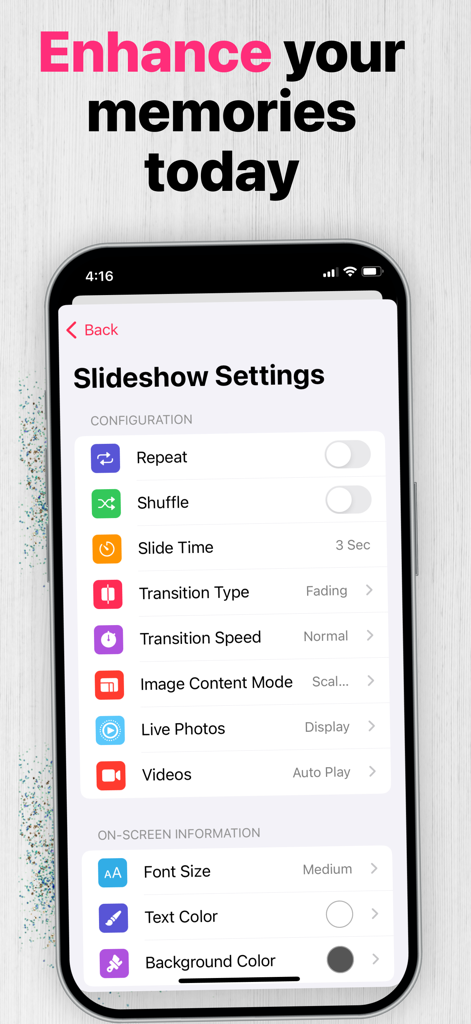
Slideshow settings menu showing customization options for photo transitions and display.

Slideshow settings menu showing customization options for photo transitions and display.

iPad displaying a family photo slideshow with text explaining universal compatibility for iPhone iPad and Mac

iPad displaying a family photo slideshow with text explaining universal compatibility for iPhone iPad and Mac

Relive Every Moment on Your Best Screen

The tools that make this app stand out, trusted by 46K+ users.

☁️

Unified Cloud Hub

Eliminate the hassle of manual uploads by streaming memories directly from iCloud, Google Photos, and Flickr in high resolution.

♻️

Give Tech a Second Life

Upcycle your older iPad into a premium home accessory with smart timer controls that match your daily schedule automatically.

🖼️

Cinematic Home Decor

Elevate your living space with elegant Ken Burns transitions, artistic background blurs, and helpful real-time weather and clock overlays.

About the app

Everything you need to know about Digital Photo Frame Slideshow.

Description

*Digital picture frames are great because it's a whole lot easier to swap out photos of your loved ones, rotating images keep your living room or corridor feeling fresh, and you can showcase a themed group of photos that fit the occasion like childhood photos of your uncle on his 70th birthday. Get the best from your IOS device and turn it into a powerful photo frame with Digital Photo Frame! NEW: Improved version with a lot of features requested by our users. DISPLAY PHOTOS FROM • Your device Camera Roll, Albums, Smart Albums, Moments and any folder in your phone like WhatsApp images • Your Images from iCloud and Shared Streams • Your synced albums from iTunes • Public photos from Flickr • Photos from Unsplash • Photos from Google Photos MAIN FEATURES • Blur background effect mode or default mode • Various resize/fit modes to avoid borders or crop • Shuffle mode • Several slide effect options (transitions types including random mode and Ken Burns transation) • Slideshow interval can be chosen (from 3 second to 24 hours) • Showtime and date on screen (choose between 12-hour time format or 24-hour time format) • Show Weather on screen (Weather, temperature, location, IV Index, Air Pollution Index) • Timer Control (Choose when you want to start and end the slideshow and the slideshow will start and end at the desired times) • Display Photos, Live Photos & Videos ADDITIONAL FEATURES • Optimized for a large number of images • Thumbnails view • Full screen • Slideshow mode or manual navigation • Option to select manually which photos or albums to be displayed • Option to display all albums or moments. • Share the photos on Facebook, Flickr, E-mail, AirPrint... • Landscape or portrait orientation • Photo captions • Dark mode EXAMPLE OF USE CASES • Display memories with ease • A professional way to showcase your images to clients Digital Photo Frame uses all the most important capabilities of an iOS device to turn your iPad or iPhone into a high-quality photo frame to feature your chosen photos in a slideshow. No doubt that powerful performance and visual effects, screen quality and touchscreen controls of the all-purpose iOS device are definitely better than similar features of the specialized cheap analogs at the stores. Digital Photo Frame extends active life of any iOS device allowing them to serve as a great photo frame and remind the perfect moments of your life. SUBSCRIPTIONS • Yearly Premium Subscription (Enjoy all features for 1 year) Cancel subscription any time. Subscription automatically renews unless auto-renew is turned off at least 24-hours before the end of the current period by going to your iOS Account Settings after purchase. Payment will be charged to iTunes Account. Any unused portion of free trial period, if offered, will be forfeited when you purchase a subscription. Terms and conditions - https://www.digitalphotoframeapp.com/terms/ Privacy Policy - https://www.digitalphotoframeapp.com/privacy/ For more information or questions, please contact at info@digitalphotoframeapp.com

Latest Version

6.3

Size

64.3 MB

First Released

Mar 28, 2017

Ready to Rescue Your Memories from Your Camera Roll?

Join over 46,000 users and give your iPad a second life. Transform your device into a premium, high-definition digital frame and start showcasing your favorite moments today.

Download on App Store

App information, icons, screenshots, and descriptions displayed on this page are sourced from the Apple App Store and are the property of their respective developers. Download estimates and rankings are based on MWM's proprietary models and may not reflect actual figures. This page is provided for informational and analytical purposes only.

Believe this page infringes your intellectual property? File a dispute