
This page is not an official page of the app or its developer, but an independent editorial publication created for informational and commentary purposes. Unless expressly stated otherwise, neither the app nor its developer is affiliated with, endorsed by, sponsored by, authorized by, or otherwise officially connected with MWM, Apple, Google Play, the app publisher, or the app's developer, and nothing on this page implies that the app was developed using MWM's services. Any trademarks, logos, screenshots, and other content remain the property of their respective owners.


Drawing for Kids. Painting Pad
The app hands control to the youngest artists, transforming screens into endless creative playgrounds. It skips the mess, fuels imagination, and sharpens skills.
Downloads
500k+User Rating
Total Ratings
12.3KPublisher
Category
EducationLocales
34Latest Version
2.2.2Size
13.6 MBFirst Released
Mar 29, 2020An evaluation of key functionalities impacting young users and caregivers.
App Feature Analysis: Drawing for Kids. Painting Pad
Safe & Ad-Free Digital Canvas
The app ensures a secure, distraction-free environment for children, devoid of advertisements, external links, or intrusive content, allowing parents peace of mind.
Holistic Skill Development
This tool supports the development of crucial skills such as hand-eye coordination, fine motor abilities, and recognition of colors and shapes, alongside fostering imagination and creativity.
Intuitive Interface & Creative Tools
It provides a simple, intuitive interface specifically designed for young children, along with a variety of brushes, markers, stamps, and stickers to foster artistic expression without complexity.
Mess-Free Artistic Exploration
It facilitates a completely mess-free art experience, eliminating the need for physical art supplies and clean-up, while allowing limitless experimentation with undo and erase functions.
Eye-Care Optimized Display Modes
The app incorporates a special pastel color palette and offers day and night drawing modes, prioritizing children's vision health during extended use.
Diverse Templates for Inspiration
It offers a rich selection of ready-made templates featuring animals, vehicles, flowers, and other fun themes, providing children with inspiration and a starting point for their creations.
Frequently Asked Questions
Everything you need to know about Drawing for Kids. Painting Pad
What is the "Drawing for Kids. Painting Pad" app?
"Drawing for Kids. Painting Pad" is an educational drawing app for children aged 2-8. It transforms devices into a digital art studio, fostering creativity and fine motor skill development through fun drawing activities.
Is "Drawing for Kids. Painting Pad" designed for young children?
Yes, "Drawing for Kids. Painting Pad" is specifically designed for toddlers, preschoolers, and young children aged 2-8. It offers a simple, intuitive interface tailored for early learners.
Can children draw using templates in "Drawing for Kids. Painting Pad"?
Yes, the "Drawing for Kids. Painting Pad" app includes ready-made templates. Children can choose from various themes like animals, cars, and flowers to inspire their coloring and drawing.
Does the "Drawing for Kids. Painting Pad" app have different display modes?
Yes, the "Drawing for Kids. Painting Pad" app features both day and night drawing modes. It also includes a vision care mode, ensuring a comfortable and eye-friendly creative experience at any time.
What creative tools are available in "Drawing for Kids. Painting Pad"?
"Drawing for Kids. Painting Pad" provides various creative tools. Children can use brushes, markers, stamps, and stickers to create unique and colorful artwork within the app, encouraging artistic expression.
Does "Drawing for Kids. Painting Pad" contain ads or distractions?
No, "Drawing for Kids. Painting Pad" is completely free of ads, links, or external distractions. This ensures a safe and focused environment for children to immerse themselves fully in drawing.
Is an internet connection required to use "Drawing for Kids. Painting Pad"?
No, "Drawing for Kids. Painting Pad" works offline. An internet connection is not necessary, allowing children to enjoy drawing and painting activities anywhere, anytime without interruption.
How does "Drawing for Kids. Painting Pad" support learning?
"Drawing for Kids. Painting Pad" supports early learning by strengthening hand-eye coordination, improving fine motor skills, and teaching colors and shapes. It boosts imagination and emotional expression.
Can parents save artwork created in "Drawing for Kids. Painting Pad"?
Yes, parents can save their child's artwork within "Drawing for Kids. Painting Pad." The app allows storing these creations as a digital gallery, preserving creative memories.
The following screenshots and description are sourced directly from the app's official store listing and are the property of the app developer.
App Store
Screenshots

This tool showcases its intuitive interface for drawing simple shapes like a house and sun, utilizing a vibrant pastel color palette for engaging creations.
Daytime Canvas Fun

Users can explore drawing in a comfortable night mode, creating whimsical scenes featuring elements like a crescent moon and stars, and a cute rabbit character.
Nighttime Artistry

The app provides a diverse selection of ready-made templates or stamps, enabling children to easily add elements such as a house outline and a butterfly to their artwork.
Template Exploration
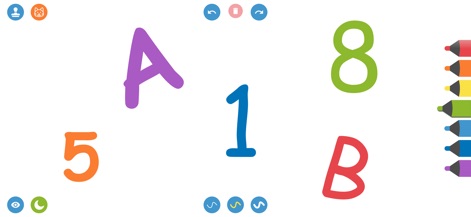
This digital pad supports early learning by allowing children to practice drawing letters and numbers, enhancing recognition and fine motor skills on a clear white canvas.
Learning Letters & Numbers
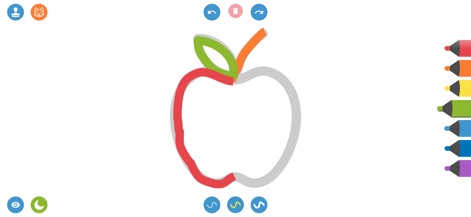
The tool assists in developing fine motor skills through guided tracing activities, as seen with the multi-colored apple outline and segment-based coloring.
Tracing & Coloring
Description
Download
More Like This
Apps with similar features and user experience

Whiteboard: just draw together
Whiteboard LLC(TX)

Doodle Magic - Draw, Paint
炳甲 梁

Drawing with Carl
yann le coroller

Coloring with Blippi & Friends
RED GAMES CO, LLC
Moshi Coloring World
Mind Candy

PONY Coloring Pages for Girls
ROMAN SAFRONOV
Kids Coloring Games & Drawing
Budge Studios

Baby coloring games for girls
Kakadoo

HexaParty - Hexel art for Kids
Marshmallow Games SRL
This page is not an official page of the app or its developer, but an independent editorial publication created for informational and commentary purposes. Unless expressly stated otherwise, neither the app nor its developer is affiliated with, endorsed by, sponsored by, authorized by, or otherwise officially connected with MWM, Apple, Google Play, the app publisher, or the app's developer, and nothing on this page implies that the app was developed using MWM's services. Any trademarks, logos, screenshots, and other content remain the property of their respective owners.