
This page is not an official page of the app or its developer, but an independent editorial publication created for informational and commentary purposes. Unless expressly stated otherwise, neither the app nor its developer is affiliated with, endorsed by, sponsored by, authorized by, or otherwise officially connected with MWM, Apple, Google Play, the app publisher, or the app's developer, and nothing on this page implies that the app was developed using MWM's services. Any trademarks, logos, screenshots, and other content remain the property of their respective owners.


Drawing ▫
Unleash your inner artist. It turns casual strokes into digital masterpieces.
Downloads
2.5M+User Rating
Total Ratings
17.2KPublisher
Category
ProductivityLocales
1Latest Version
4.13.1Size
177.8 MBFirst Released
Nov 29, 2019An evaluation of core functionalities and user benefits.
Key Features Analysis: Drawing ▫
Extensive Handcrafted Brush Collection
The app provides over 40 handcrafted brush tools, allowing users to imitate real paintbrushes and achieve diverse artistic styles.
Advanced Stylus and Touch Sensitivity
The app supports Apple Pencil for iPad Pro and 3D Touch sensitivity for iPhones, offering enhanced pressure and angle control for a more natural drawing experience.
Precision Zoom for Fine Details
It allows users to zoom in for painting fine details, ensuring precision and intricate work on smaller screens.
Dedicated Kids Desk with Educational Content
It features a "Kids Desk" with over 10 drawing tools, magical pattern brushes, and more than 50 educational coloring pages, offering a fun and engaging creative space for children.
Adjustable Brush Size and Opacity
The app provides settings for adjusting brush size and opacity, giving users fine control over their strokes and effects.
Image and Photo Import
This tool features the ability to import pictures and photos, enabling users to draw directly on images or incorporate them into their artwork.
Customizable Color Palette
It allows users to customize colors as they wish, providing limitless possibilities for their artistic palette.
Unlimited Undo and Redo Functionality
The app offers unlimited undo and redo options, providing flexibility and encouraging experimentation without fear of permanent mistakes.
Diverse Coloring Tools and Palettes
This tool provides various coloring tools, including over 40 beautiful preset solid and gradient color palettes, along with custom palette creation for personalized artwork.
Artwork Saving and Instant Sharing
It enables users to save artworks to their gallery and share them instantly across various social networks.
Frequently Asked Questions
Everything you need to know about Drawing ▫
What is DrawingApp?
DrawingApp is a mobile application for iPhone and iPad designed for creating drawing art. It offers tools for sketching, typing, painting, and drawing, enabling users to bring creative ideas to life.
Which devices does DrawingApp support?
DrawingApp supports both iPhone and iPad devices. It also offers support for Apple Pencil on iPad Pro and 3D Touch sensitivity for iPhones.
Can I use Apple Pencil with DrawingApp?
Yes, DrawingApp supports Apple Pencil for iPad Pro. It provides angle and pressure sensitivity with tools like Water Color, Pencil, and Pen.
How many brushes are available in DrawingApp's Sketch Desk?
DrawingApp's Sketch Desk offers over 40 handcrafted style paintbrushes and various tools like a ruler and eraser. It also provides millions of colors.
Can I import photos into DrawingApp?
Yes, DrawingApp allows users to import pictures and photos to enhance their drawings in the Sketch Desk and to draw on photos in the Doodle Desk.
What features does DrawingApp's Doodle Desk include?
DrawingApp's Doodle Desk allows users to draw, sketch, paint, customize colors, import and rotate photos, adjust brush size/opacity, and utilize undo/redo options. Users can also record and share artwork.
Does DrawingApp offer custom color options?
Yes, DrawingApp provides extensive color customization. In Doodle Desk, users can customize colors, and in Coloring Desk, they can create custom palettes by combining any colors.
Can I create custom mandalas in DrawingApp?
Yes, DrawingApp features a Coloring Desk with a specific mandala creation mode. This allows users to bring their unique designs to life as custom mandalas.
How many coloring pages are in DrawingApp's Kids Desk?
DrawingApp's Kids Desk includes over 50 educational coloring pages. It also provides more than 10 drawing tools, shapes, and magical pattern brushes for children.
What are the subscription options for DrawingApp Premium?
DrawingApp Premium offers a weekly subscription at $4.99 USD (with a 3-day free trial), a monthly subscription for $7.99 USD, or a yearly subscription for $29.99 USD. A one-time lifetime purchase is $35.99.
Does DrawingApp Premium include a free trial?
Yes, DrawingApp Premium offers a 3-day free trial with its weekly subscription option. Subscription payments begin after the trial unless canceled at least 24-hours prior.
What benefits does DrawingApp Premium provide?
Upgrading to DrawingApp Premium grants unlimited access to Sketch Desk, Coloring Desk, Kids Desk, and Doodle Desk. Premium also removes all ads and watermarks from the app.
Can I adjust brush opacity in DrawingApp?
Yes, DrawingApp allows users to change brush opacity settings. This feature is available in the Doodle Desk, and visually confirmed by an opacity slider.
Where can I find DrawingApp's Privacy Policy?
DrawingApp's Privacy Policy is available at the link provided in the app description: http://drawingapp.me/privacy-policy.html.
Can I share my artwork created with DrawingApp?
Yes, DrawingApp enables users to save artworks to their gallery and share them instantly to any social network. The Doodle Desk also includes a record and share artwork option.
The following screenshots and description are sourced directly from the app's official store listing and are the property of the app developer.
App Store
Screenshots
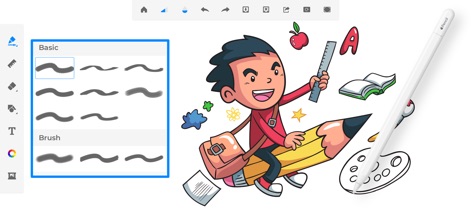
Discover the app's extensive collection of 40+ handcrafted brush tools and how they seamlessly integrate with Apple Pencil for precise artistry.
Brush Tool Variety

Users can explore a full spectrum of colors with the intuitive color picker, offering customizable RGB and HSB adjustments for perfect shade matching.
Dynamic Color Selection
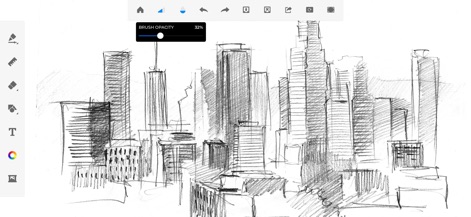
This tool allows for meticulous adjustments, showcasing a brush opacity slider for detailed shading and realistic sketch rendering.
Fine-Tune Your Art

Explore an array of unique brush textures and custom shape brushes, enabling artists to add intricate details and dynamic patterns to their creations.
Creative Brush Textures

The dedicated Kids Desk offers a funkiest canvas with 10+ engaging drawing tools and a selection of 50+ educational coloring pages for young artists.
Kids Creative Zone

The innovative Doodle Desk empowers users to create dazzling sketches and illustrations, supported by a minimalistic set of tools including the precision ruler.
Unleash Your Doodles

Users can unwind with a wide variety of coloring pages, choosing from 40+ beautiful preset solid and gradient color palettes to bring their designs to life.
Relaxing Coloring Pages

This tool allows users to enhance personal photos by importing them directly and drawing playful doodles and sketches onto images.
Photo Enhancement Fun

The Photo Pad feature enables users to personalize images with a rich collection of stickers and apply magical pattern brushes for creative flair.
Enrich Photos with Stickers
Description
Download
More Like This
Apps with similar features and user experience

Sketchbook®
Sketchbook, Inc.

Mental Canvas Draw
Mental Canvas, Inc.

ibis Paint
ibis inc.

ibis Paint X
ibis inc.

Paper: Sketch, Draw & Create
Evernote Corporation

Adobe Fresco: Draw & Paint App
Adobe Inc.

Art Set 4
Lofopi Ltd

MediBang Paint – Drawing & Art
MediBang inc.

Tayasui Sketches
SKETCHES SRL
This page is not an official page of the app or its developer, but an independent editorial publication created for informational and commentary purposes. Unless expressly stated otherwise, neither the app nor its developer is affiliated with, endorsed by, sponsored by, authorized by, or otherwise officially connected with MWM, Apple, Google Play, the app publisher, or the app's developer, and nothing on this page implies that the app was developed using MWM's services. Any trademarks, logos, screenshots, and other content remain the property of their respective owners.