
This page is not an official page of the app or its developer, but an independent editorial publication created for informational and commentary purposes. Unless expressly stated otherwise, neither the app nor its developer is affiliated with, endorsed by, sponsored by, authorized by, or otherwise officially connected with MWM, Apple, Google Play, the app publisher, or the app's developer, and nothing on this page implies that the app was developed using MWM's services. Any trademarks, logos, screenshots, and other content remain the property of their respective owners.


Drive Weather with Live Radar
Road conditions lie. This app ensures you see the truth, minute by minute, mile by mile.
Downloads
750k+User Rating
Total Ratings
12.2KPublisher
Category
WeatherLocales
7Latest Version
12.1.1Size
195.4 MBFirst Released
Nov 17, 2018An Analytical Review for Professional Drivers and Road Travelers
Key Features of Drive Weather with Live Radar
Integrated CarPlay Navigation & Weather
This tool features exclusive split-screen CarPlay integration, allowing users to simultaneously view live weather conditions and turn-by-turn navigation without app switching.
Route-Specific Weather Forecasting
The app provides precise, route-specific weather forecasts directly on the app or CarPlay, enabling proactive decision-making for long journeys.
Real-Time Severe Weather Alerts
It delivers timely severe weather alerts, including warnings, watches, and advisories, ensuring users are informed of hazardous conditions directly affecting their route.
Icy Pavement Prediction
This tool includes an Icy Pavement Indicator, providing an advanced warning for potential ice formation on roads, significantly enhancing safety for drivers in cold conditions.
Departure Time Optimization
It offers a 'Time Tweaker' feature, allowing users to adjust their departure time to visualize and plan their travel to avoid or minimize exposure to adverse weather patterns.
Granular Weather Data Coverage
The app leverages a high density of forecast weather locations, providing exceptionally precise and granular insights into upcoming weather conditions along the entire route.
Multi-Route Weather Comparison
It allows users to compare different potential routes, enabling them to choose the safest and most efficient path based on detailed, forecasted weather conditions.
Intuitive Timeline Interface
This tool presents complex weather data through a clean, intuitive interface and a glanceable timeline, simplifying quick assessment of conditions while driving.
Frequently Asked Questions
Everything you need to know about Drive Weather with Live Radar
What is Drive Weather with Live Radar?
Drive Weather with Live Radar is an app providing real-time route-based weather forecasts. It visualizes hazardous conditions, radar, and National Weather Service alerts directly on your driving route to help users plan safer trips.
Does Drive Weather with Live Radar offer Apple CarPlay integration?
Yes, Drive Weather with Live Radar offers Apple CarPlay integration, including split-screen functionality. This enables users to view live weather conditions and turn-by-turn navigation simultaneously on their dashboard.
What weather conditions does the Drive Weather with Live Radar app track?
The Drive Weather with Live Radar app tracks snow, rain, fog, freezing rain, tornados, thunderstorms, hail, smoke, haze, wind, temperature, and icy pavement. It also displays animated live radar and NWS alerts.
Can users compare multiple routes in Drive Weather with Live Radar?
Yes, the Pro version of Drive Weather with Live Radar allows users to compare different routes. This feature helps in identifying the safest and most efficient path based on detailed weather forecasts.
What is the forecast duration in the free version of Drive Weather with Live Radar?
The free version of Drive Weather with Live Radar provides a two-day weather forecast. Users who subscribe to the Pro version receive an extended seven-day forecast.
Does Drive Weather with Live Radar display wind speed and direction?
Yes, Drive Weather with Live Radar displays wind speed and direction, including both gusts and sustained winds. This detailed wind information is available as a Pro feature.
Is Drive Weather with Live Radar available internationally?
Yes, Drive Weather with Live Radar is available in the United States, Canada, Mexico, South America, the UK, and Europe. This provides extensive international coverage for travelers.
Does the Drive Weather with Live Radar app contain advertisements?
Yes, the free version of the Drive Weather with Live Radar app contains advertisements. The Pro version offers an ad-free experience for subscribers.
Does Drive Weather with Live Radar provide severe weather alerts?
Yes, Drive Weather with Live Radar provides National Weather Service alerts. The Pro version further includes specific Severe Weather Alerts, warnings, watches, and advisories to keep drivers informed.
What makes Drive Weather with Live Radar different from other weather apps?
Drive Weather with Live Radar offers richer weather data from more forecast locations, a clean interface, and exclusive split-screen CarPlay integration for simultaneous navigation and weather viewing.
Is Drive Weather with Live Radar suitable for truckers and RVers?
Yes, Drive Weather with Live Radar is ideal for truckers, RVers, bikers, and road trippers. It helps avoid headwinds, reduce fuel costs, and navigate dangerous conditions effectively.
The following screenshots and description are sourced directly from the app's official store listing and are the property of the app developer.
App Store
Screenshots
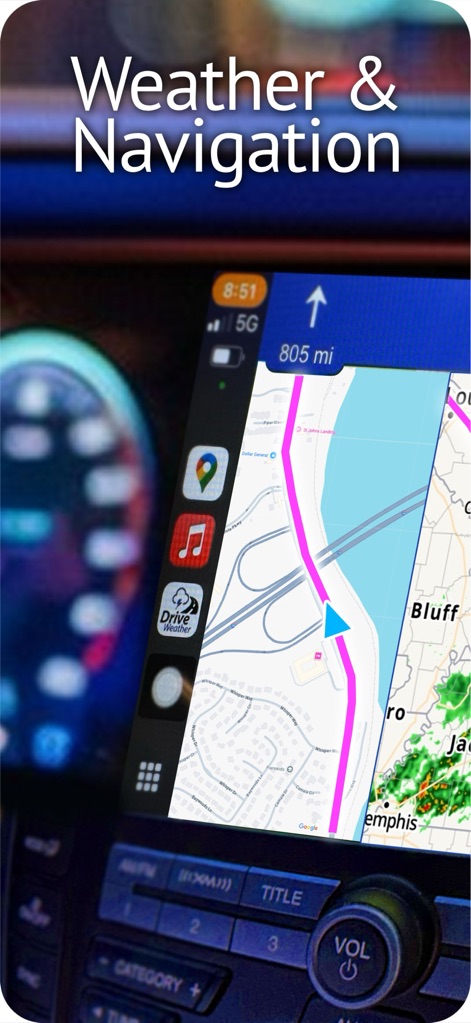
The app's exclusive split-screen CarPlay integration displays live weather conditions alongside turn-by-turn navigation, providing critical information directly on the dashboard.
Seamless CarPlay Integration
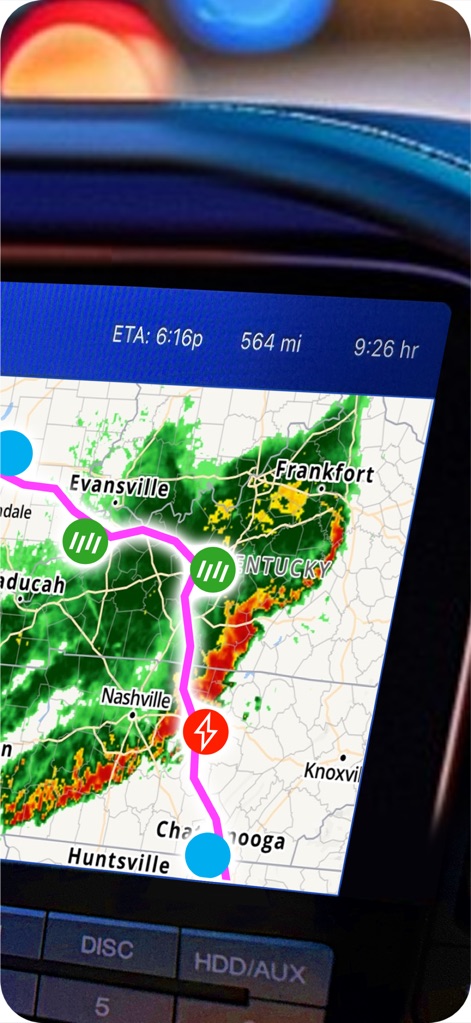
This tool offers dynamic real-time radar overlays and route-specific weather icons, ensuring users are aware of hazardous conditions like thunderstorms directly on their journey path.
Real-Time Route Radar

The app provides a comprehensive legend of road conditions, clearly categorizing specific weather events like snow and freezing rain with distinct visual icons for quick understanding.
Comprehensive Condition Legend
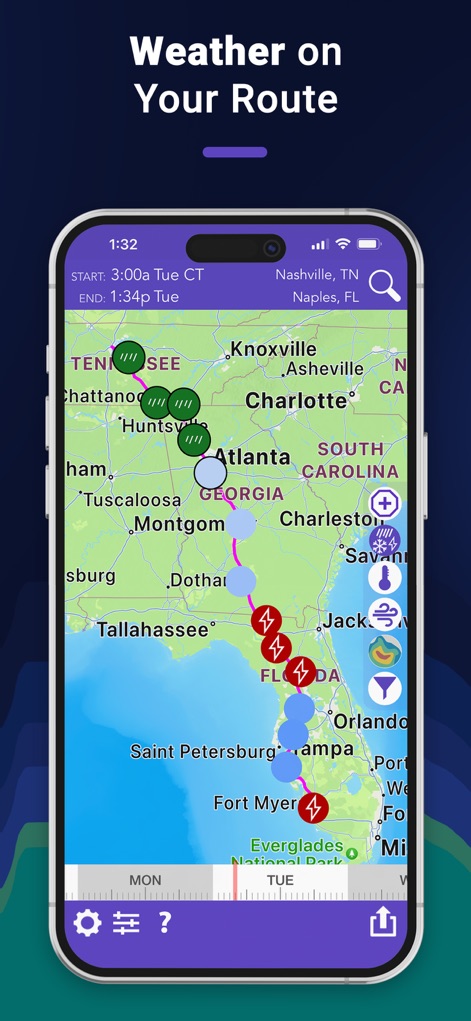
Users can preview weather conditions along their entire route on a mobile device, observing forecasted events like rain and thunderstorms, alongside a flexible time tweaker at the bottom.
Detailed Mobile Forecast

This tool visualizes extensive radar coverage for precipitation patterns and flags severe weather alerts, providing critical insights into potential hazards like heavy storms along the route.
Critical Weather Alerts

The app meticulously displays crucial wind data, showing both sustained wind speeds and gusts directly on the route map to help users anticipate impacts on their journey.
In-Depth Wind Analysis

Users can efficiently compare multiple route options, identifying variations in weather conditions such as precipitation and severe alerts, to select the safest and most efficient path.
Optimal Route Selector
Description
Download
More Like This
Apps with similar features and user experience


This page is not an official page of the app or its developer, but an independent editorial publication created for informational and commentary purposes. Unless expressly stated otherwise, neither the app nor its developer is affiliated with, endorsed by, sponsored by, authorized by, or otherwise officially connected with MWM, Apple, Google Play, the app publisher, or the app's developer, and nothing on this page implies that the app was developed using MWM's services. Any trademarks, logos, screenshots, and other content remain the property of their respective owners.