
This page is not an official page of the app or its developer, but an independent editorial publication created for informational and commentary purposes. Unless expressly stated otherwise, neither the app nor its developer is affiliated with, endorsed by, sponsored by, authorized by, or otherwise officially connected with MWM, Apple, Google Play, the app publisher, or the app's developer, and nothing on this page implies that the app was developed using MWM's services. Any trademarks, logos, screenshots, and other content remain the property of their respective owners.


Easy Money Manager
Budgeting just got real. This app transforms financial chaos into crystal-clear control.
Downloads
100k+User Rating
Total Ratings
490Publisher
Category
FinanceLocales
5Latest Version
0.0.430Size
65.5 MBFirst Released
Aug 14, 2023An evaluation of core functionalities designed for personal and household financial management.
Key Features Analysis: Easy Money Manager
Budget Creation & Monitoring
It allows users to set up personalized budgets for various categories, helping them track spending against limits and maintain financial discipline.
Real-time Expense Tracking
The app provides a straightforward way to log daily expenditures quickly, offering immediate insight into spending habits and where money is going.
Savings Goal Management
This tool features the ability to define specific savings goals, monitor progress towards them, and stay motivated to achieve financial objectives.
Bill Reminders & Management
It helps users organize and track recurring monthly bills, offering timely reminders to prevent late payments and manage household obligations effectively.
Financial Reporting & Insights
The app provides visual reports and analytical tools, enabling users to understand spending patterns, identify areas for improvement, and make informed financial decisions.
Income Tracking
It allows users to log all sources of income, providing a comprehensive overview of their financial inflow to balance against expenditures.
Frequently Asked Questions
Everything you need to know about Easy Money Manager
What is Easy Money Manager?
Easy Money Manager is an application designed to help users manage their home monthly bills, track expenses, revenue, and create budgets for comprehensive financial oversight.
Can I track my income and expenses with Easy Money Manager?
Yes, Easy Money Manager allows users to track both revenue and expenses. The application displays transaction lists with items like 'Wage' for revenue and 'Home Rent' for expenses.
How do I manage my monthly bills using Easy Money Manager?
Easy Money Manager enables users to record monthly bills as expenses, monitor their payment status, and view financial summaries. It also allows categorization of expenses and tracking of the 'Still have to pay' balance.
Does Easy Money Manager provide budgeting features?
Yes, Easy Money Manager provides budgeting features. Users can set budgets for specific categories like 'Domestic accounts' and 'Rent,' track spending against these budgets, and view forecast values.
Can I export my financial data from Easy Money Manager?
Yes, Easy Money Manager supports exporting financial data. Users can export their transaction records in standard formats, specifically PDF and XLS, for convenient external use or record-keeping.
How can I categorize transactions in Easy Money Manager?
Easy Money Manager allows users to categorize transactions. Categories like 'Rent' and 'Domestic accounts' are assigned to expenses and revenue, enabling organized financial tracking. The app also features a 'Categories' option in its settings.
Does Easy Money Manager offer a password protection feature?
Yes, Easy Money Manager offers a password protection feature. Users can set a password to log in, which helps secure their financial information within the application.
What currency formats does Easy Money Manager support?
Easy Money Manager supports customizable currency formats. The settings menu includes a 'Currency format - USD' option, indicating that users can select their preferred currency for all financial records.
How do I remove advertisements in Easy Money Manager?
Easy Money Manager allows users to remove advertisements by becoming a Premium member. This option is accessible within the application's settings menu under 'Become Premium'.
Where can I find the Terms of Use for Easy Money Manager?
The Terms of Use (EULA) for Easy Money Manager are available via the provided Apple legal link: https://www.apple.com/legal/internet-services/itunes/dev/stdeula/.
Can I filter my financial records in Easy Money Manager?
Yes, Easy Money Manager allows filtering of financial records. Users can filter by month, search for specific records, and apply filters based on expenses/revenues or by category and status (Paid/Pending).
The following screenshots and description are sourced directly from the app's official store listing and are the property of the app developer.
App Store
Screenshots

See how the app provides a clear monthly overview, detailing individual categorized entries and a real-time financial summary at the bottom.
Monthly Overview

Discover how this tool offers insightful budget analytics through its interactive donut chart for expense distribution and customizable filtering options for records.
Spending Insights

Explore the app's robust report generation capabilities, showcasing a comprehensive transaction table and direct export functionality to PDF and XLS formats.
Data Portability

Witness how users can easily manage multiple custom profiles or categories, alongside the option to set a personalized default start screen for streamlined access.
Custom Profiles

Observe the app's granular control over individual expenses, featuring comprehensive transaction details and flexible management actions like duplication and status changes.
Granular Control
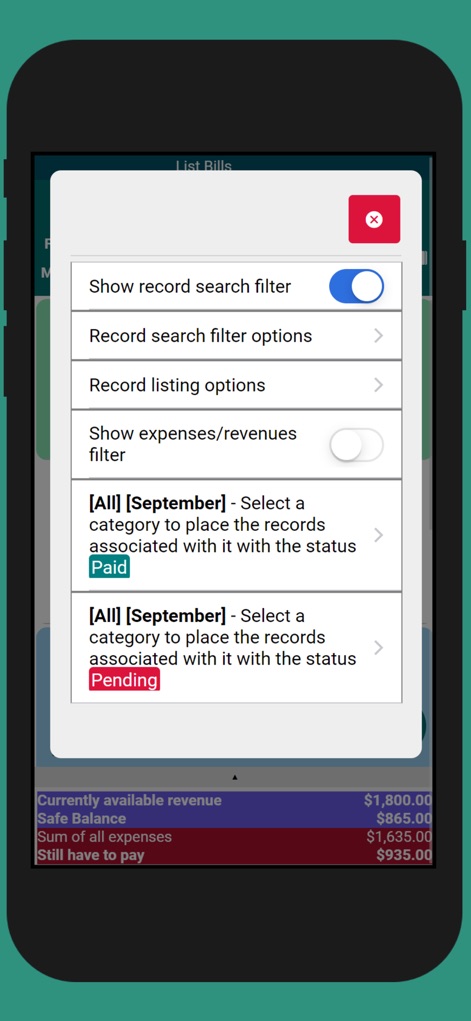
Understand how the app empowers users with refined search capabilities, offering advanced search and filter toggles, alongside detailed category and status-based filtering.
Refined Search

Delve into the app's extensive personalization settings, revealing numerous customization options for currency and layout, and robust security features like password login.
App Personalization

Glimpse the app's powerful budget tracking features, displaying category-specific budget progress bars and a comprehensive budget summary for effective financial planning.
Budget Tracking
Description
Download
More Like This
Apps with similar features and user experience

CRED: UPI, Bills, Credit Cards
Dreamplug Technologies Private Limited

Квартплата.Онлайн
OOO JilfondService

DOMO (HGT) – Kommunal ilova
HUMAN GENERATED TECHNOLOGIES, MCHJ

Domuso Resident Portal
Domuso Inc.

iCsekk
Magyar Posta Zartkoruen Mukodo Reszvenytarsasag

Billpoint
Flexgreen Concept Ltd

DACARD by Bank SinoPac
SinoPac Holdings.

Bill Letter
SK Telecom

繳費靈手機服務 PPS on Mobile
EPS Company Hong Kong Limited
This page is not an official page of the app or its developer, but an independent editorial publication created for informational and commentary purposes. Unless expressly stated otherwise, neither the app nor its developer is affiliated with, endorsed by, sponsored by, authorized by, or otherwise officially connected with MWM, Apple, Google Play, the app publisher, or the app's developer, and nothing on this page implies that the app was developed using MWM's services. Any trademarks, logos, screenshots, and other content remain the property of their respective owners.