
This page is not an official page of the app or its developer, but an independent editorial publication created for informational and commentary purposes. Unless expressly stated otherwise, neither the app nor its developer is affiliated with, endorsed by, sponsored by, authorized by, or otherwise officially connected with MWM, Apple, Google Play, the app publisher, or the app's developer, and nothing on this page implies that the app was developed using MWM's services. Any trademarks, logos, screenshots, and other content remain the property of their respective owners.


FL Studio Mobile
Unleash your sound, anywhere. The app delivers a studio-grade experience straight to your device, empowering instant music creation.
Downloads
1M+User Rating
Total Ratings
3.5KPublisher
Category
MusicLocales
1Latest Version
4.9.6Size
348.9 MBFirst Released
Jun 21, 2011An Analytical Overview for Mobile Music Producers
FL Studio Mobile: Key Production Features
Comprehensive Sound Synthesis & Sampling
The app provides a comprehensive suite of high-quality synthesizers, samplers, drum kits, and sliced-loop beats, including instruments like GMS, MiniSynth, and SuperSaw, enabling users to create rich and diverse soundscapes directly on their mobile device.
Professional Mixing & Effects Suite
This tool features an advanced mixing console with per-track mute, solo, effect bus routing, pan, and volume adjustments, complemented by a wide array of professional effects such as compressors, EQs, reverbs, and delays, essential for refining audio projects.
Intuitive MIDI Sequencing & Input
It allows users to sequence and edit MIDI data with precision via a versatile piano roll, a dedicated step sequencer, and virtual on-screen piano-keyboards and drumpads for intuitive performance capture and composition.
Multi-Track Audio Recording & Import
The app supports multi-track audio recording from external and internal sources, alongside flexible import of WAV, MP3, and other audio file formats, facilitating the seamless integration of live instruments, vocals, and pre-recorded stems.
Desktop Project Compatibility
This tool features seamless project loading into the FL Studio FREE Plugin version on desktop, allowing producers to effortlessly transition their mobile creations to a full-fledged studio environment for advanced editing and mastering.
Versatile File Management & Export
It allows users to save and load projects and individual audio/MIDI files in various industry-standard formats, including WAV, MP3, FLAC, and multi-track MIDI, ensuring broad compatibility and easy sharing across different platforms.
External MIDI & Automation Support
The app provides comprehensive support for class-compliant MIDI controllers, alongside robust automation capabilities, offering music producers enhanced expressive control over instrument parameters and effect modulation.
Inter-App Audio Connectivity
This tool features robust connectivity with other iOS audio applications through Inter-App Audio (IAA) and Audiobus, expanding creative possibilities by integrating a vast ecosystem of third-party effects and instruments.
Frequently Asked Questions
Everything you need to know about FL Studio Mobile
What is FL Studio Mobile?
FL Studio Mobile is a comprehensive music production app for iPad, iPhone, and Mac, allowing users to record, sequence, edit, mix, and render multi-track songs.
Does FL Studio Mobile support audio recording?
Yes, FL Studio Mobile supports audio recording from external and internal sources, and track-length stem/WAV file import.
Can I use MIDI controllers with FL Studio Mobile?
Yes, FL Studio Mobile offers support for class-compliant MIDI controllers and also includes automation support.
What file formats does FL Studio Mobile support for saving and loading?
FL Studio Mobile saves and loads WAV, MP3, AAC, FLAC, and MIDI files, allowing flexible project management.
Are there in-app purchases within FL Studio Mobile?
Yes, FL Studio Mobile has in-app purchases for the DirectWave sample player. However, users can install their own samples without additional purchases.
Is there a trial version of FL Studio Mobile available?
Yes, users can try FL Studio Mobile by installing FL Studio 20 for macOS/Windows and using its identical free FL Studio Mobile Plugin.
Which effects modules are included in FL Studio Mobile?
FL Studio Mobile includes Analyzer, Auto Ducker, Auto-Pitch, Chorus, Compressor, Limiter, Distortion, Equalizers, Flanger, Reverb, Tuner, Filters, Delays, Phaser, and Stereoizer.
What instrument modules are available in FL Studio Mobile?
FL Studio Mobile provides Drum Sampler, DirectWave Sample Player, GMS (Groove Machine Synth), Transistor Bass, MiniSynth, and SuperSaw instrument modules.
Can I transfer FL Studio Mobile projects to desktop FL Studio?
Yes, FL Studio Mobile projects load into the FL STUDIO FREE Plugin version on macOS or Windows, allowing seamless transfer to the desktop environment.
Does FL Studio Mobile have a mixing console?
Yes, FL Studio Mobile features a mixer with per-track controls including mute, solo, effect bus, pan, and volume adjustment.
Is a piano roll available for editing in FL Studio Mobile?
Yes, FL Studio Mobile offers a piano roll interface to edit notes or capture recorded musical performances.
How do I share my music from FL Studio Mobile?
FL Studio Mobile allows sharing songs via Wi-Fi or Cloud to other Mobile 3 installations, and synchronization across other Mobile 3 devices.
Where can I find support for FL Studio Mobile?
Users access support via the in-app 'Help > Users & Support Forums' after registering FL Studio Mobile to their Image-Line account, enabling bug reports and feature requests.
The following screenshots and description are sourced directly from the app's official store listing and are the property of the app developer.
App Store
Screenshots
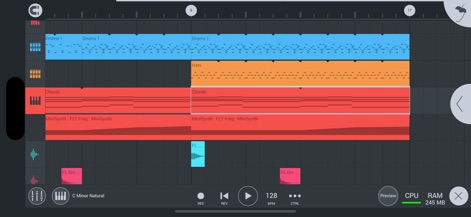
Witness the comprehensive multi-track sequencer, showcasing distinct instrument tracks and integrated transport controls for seamless project management.
Multi-track Production Hub

Explore the dedicated drum pad interface for crafting rhythmic patterns and the real-time FX Analyzer, offering comprehensive visual feedback on audio dynamics.
Rhythmic Precision & Analysis

Observe the detailed audio waveform editor with precise volume and pan controls, alongside the powerful FX Pitcher 2 module for advanced pitch manipulation.
Vocal Tuning & Waveform

Experience the intuitive piano roll for precise note sequencing and the versatile DW Sampler module, allowing in-depth manipulation of sample characteristics.
Sampler & Piano Roll

Delve into the comprehensive mixer interface, featuring individual faders for precise level control and adjustable rotary knobs for fine-tuning effect parameters.
Dynamic Mixing Console

Discover the visual automation curve editor for dynamic parameter changes and the unique FX Tape Stop module, enabling creative control over audio playback effects.
Creative Automation FX
Description
Download
More Like This
Apps with similar features and user experience

Loopy Pro: Looper DAW Sampler
A Tasty Pixel

AUM - Audio Mixer
Kymatica AB

Drambo
Jaroslaw Jacek

Groove Rider 2
Dmitrij Pavlov

BandLab – Music Maker & Beats
BandLab Singapore Pte Ltd

Medly
Medly Labs Inc.

Cubasis 3 - DAW & Music Studio
Steinberg Media Technologies GmbH

KORG Gadget 3
KORG INC.
iMPC Pro 2 for iPhone
Akai Professional
This page is not an official page of the app or its developer, but an independent editorial publication created for informational and commentary purposes. Unless expressly stated otherwise, neither the app nor its developer is affiliated with, endorsed by, sponsored by, authorized by, or otherwise officially connected with MWM, Apple, Google Play, the app publisher, or the app's developer, and nothing on this page implies that the app was developed using MWM's services. Any trademarks, logos, screenshots, and other content remain the property of their respective owners.