
This page is not an official page of the app or its developer, but an independent editorial publication created for informational and commentary purposes. Unless expressly stated otherwise, neither the app nor its developer is affiliated with, endorsed by, sponsored by, authorized by, or otherwise officially connected with MWM, Apple, Google Play, the app publisher, or the app's developer, and nothing on this page implies that the app was developed using MWM's services. Any trademarks, logos, screenshots, and other content remain the property of their respective owners.


Flir One
Heat signatures reveal all: The app grants users x-ray vision for the unseen world.
Downloads
2.5M+User Rating
Total Ratings
11.6KPublisher
Category
Photo & VideoLocales
21Latest Version
6.4.9Size
177.6 MBFirst Released
Aug 4, 2014An evaluation of essential functionalities tailored for tradespeople and advanced DIYers requiring precise thermal inspection.
FLIR ONE App: Key Feature Analysis for Professional Diagnostics
Dynamic Hot & Cold Spot Tracking
This tool features automatic tracking of the hottest and coldest spots, enabling rapid identification of critical thermal anomalies for efficient troubleshooting.
Precision Spot Temperature Readouts
It allows users to perform precise temperature spot measurements, providing quantitative data essential for detailed fault analysis and validation.
High-Resolution Thermal Capture
The app provides core thermal imaging capabilities, allowing users to scan for faults and capture crucial photos and videos for documentation.
Integrated Cloud Collaboration & Reporting
This tool features seamless integration with FLIR Ignite™ cloud services, facilitating instant file uploads, organization, reporting, and secure sharing with clients and co-workers.
Customizable IR Sensitivity Range
The app provides an adjustable IR scale, empowering users to fine-tune thermal sensitivity and highlight subtle temperature differences, revealing elusive problems.
On-Image Text Annotation
It allows users to add detailed text notes directly to captured thermal images, ensuring thorough documentation of findings for future reference and reporting.
Guided Thermal Inspection Workflows
The app offers FLIR ONE Inspection Guides, providing step-by-step instructions and tips to confidently identify common issues like moisture, insulation, and air leaks.
Diverse Thermal Color Palettes
It provides a variety of selectable color palettes, allowing users to optimize thermal visualization for different environments and enhance problem identification.
Frequently Asked Questions
Everything you need to know about Flir One
What is the main purpose of the Flir One app?
The Flir One app connects FLIR ONE® series Thermal Cameras to smartphones for efficient troubleshooting and inspection. It helps users find hidden problems like electrical faults, HVAC failures, or water damage with precision.
Does the Flir One app require a thermal camera?
Yes, the Flir One app requires a FLIR ONE® series Thermal Camera connected to your smartphone to see the thermal view. Users can still explore the app's interface and features without a connected device.
Can the Flir One app capture thermal photos and videos?
Yes, the Flir One app enables users to scan for faults with the thermal camera view and capture both photos and videos. These media files are saved directly to the user's gallery for documentation.
How does the Flir One app enhance thermal imagery?
The Flir One app uses advanced image enhancement features like FLIR MSX® and FLIR VividIR™. These deliver best-in-class thermal imagery for smartphones, ensuring problems are detected with high precision.
Can users adjust color palettes in the Flir One app?
Yes, the Flir One app offers a variety of color palettes. Users can choose different palettes for optimal visualization, which aids in analyzing thermal images and highlighting specific problem areas effectively.
What is FLIR Ignite™ integration in the Flir One app?
FLIR Ignite™ allows the Flir One app to instantly upload files to the cloud. Users can then access, organize, edit images, create reports, and share findings with clients and co-workers from any device.
Does the Flir One app offer inspection guides?
Yes, the Flir One app includes FLIR ONE Inspection Guides, a paid feature. These provide step-by-step instructions and tips to confidently identify issues such as moisture, insulation, and air leak problems.
Can I add notes to thermal images using the Flir One app?
Yes, the Flir One app allows users to add text notes directly to photos. This feature helps in accurately documenting specific findings and observations from captured thermal images for later reference.
Does the Flir One app automatically track hot and cold spots?
Yes, the Flir One app automatically tracks the hottest and coldest spots within the thermal view. This feature is specifically available for FLIR ONE Edge Series and Pro Series cameras to aid in troubleshooting.
The following screenshots and description are sourced directly from the app's official store listing and are the property of the app developer.
App Store
Screenshots

This tool instantly highlights temperature anomalies via a localized thermal overlay, making it easy to identify hidden issues within the visual field.
Detect Hidden Problems

Users can capture detailed thermal images, displaying precise spot temperature measurements and an intuitive temperature scale for immediate interpretation.
Capture Thermal Insights
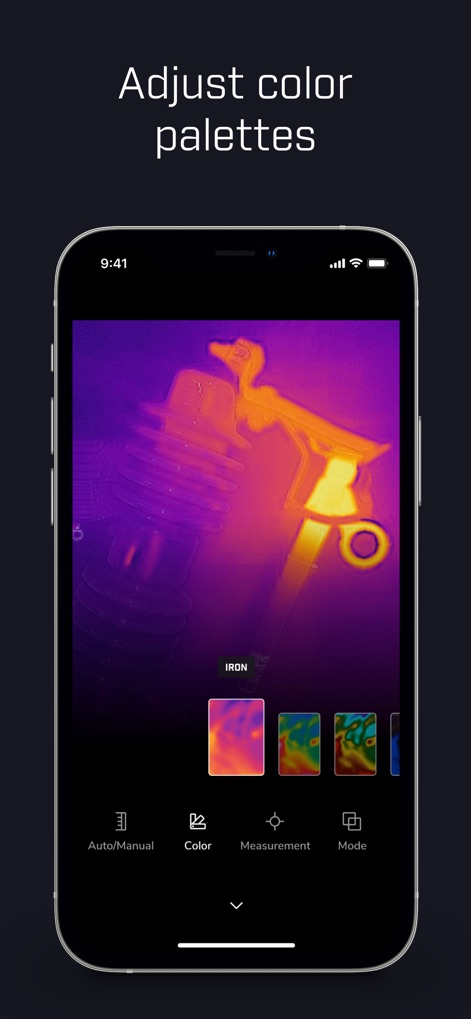
The app offers diverse color palettes, such as the 'Iron' mode, allowing users to optimize thermal visualization for specific diagnostic needs.
Customize Visual Modes
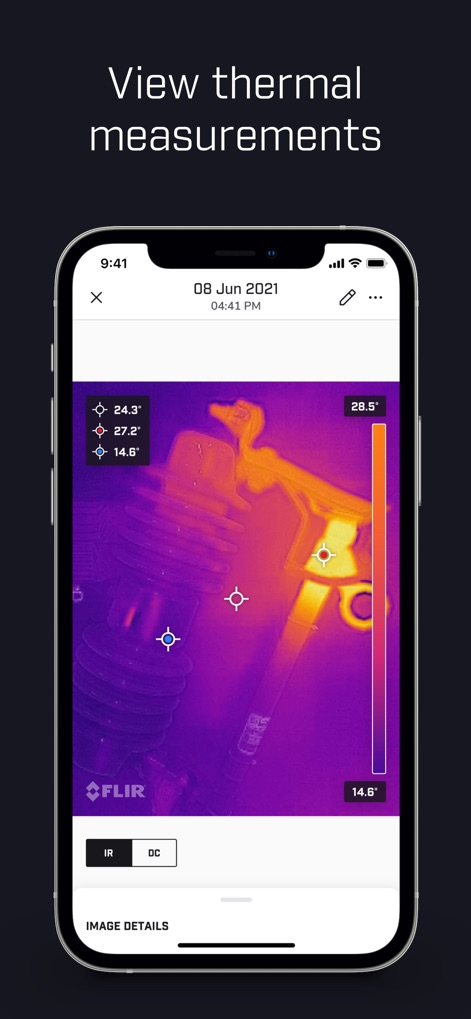
Review saved thermal images with automatically tracked hottest/coldest spots and additional custom spot measurements for in-depth fault analysis.
Analyze Detailed Metrics
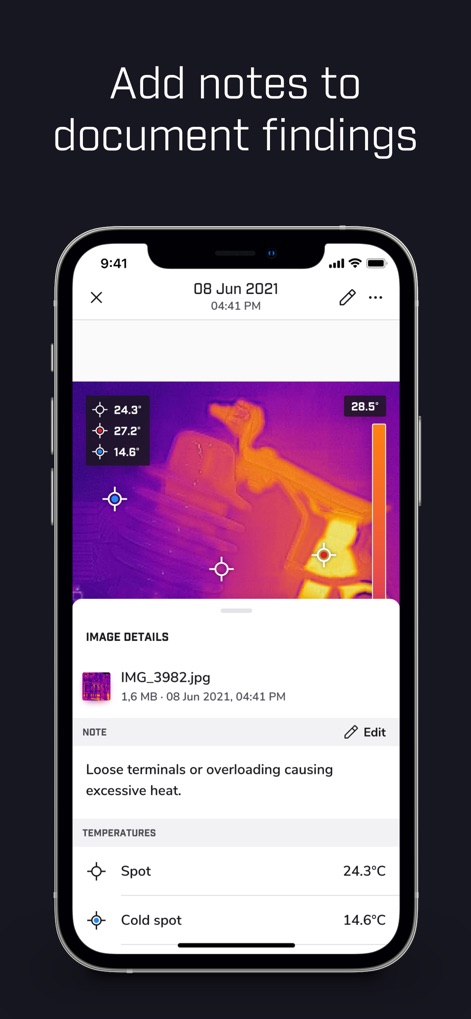
This feature allows users to add descriptive text notes and view comprehensive image details, facilitating thorough documentation of all findings.
Document & Organize
Description
Download
More Like This
Apps with similar features and user experience

Doximity
Doximity

PrepWizard
CyberDynamite LLC

MaintainX Work Orders
MAINTAINX INC.

WAGO
WAGO Kontakttechnik GmbH & Co. KG

Flash.It
Structured Steel Pty Ltd

iCoder CPT RVU ICD10 HCPCS
StarInix Corporation

Summons Partner+
n.u. logistics

OneClick Code - Building Codes
One Click Reports

德馨ּּ维修
小东 何
This page is not an official page of the app or its developer, but an independent editorial publication created for informational and commentary purposes. Unless expressly stated otherwise, neither the app nor its developer is affiliated with, endorsed by, sponsored by, authorized by, or otherwise officially connected with MWM, Apple, Google Play, the app publisher, or the app's developer, and nothing on this page implies that the app was developed using MWM's services. Any trademarks, logos, screenshots, and other content remain the property of their respective owners.