
This page is not an official page of the app or its developer, but an independent editorial publication created for informational and commentary purposes. Unless expressly stated otherwise, neither the app nor its developer is affiliated with, endorsed by, sponsored by, authorized by, or otherwise officially connected with MWM, Apple, Google Play, the app publisher, or the app's developer, and nothing on this page implies that the app was developed using MWM's services. Any trademarks, logos, screenshots, and other content remain the property of their respective owners.


Go Viral: AI Creator Assistant
Stop wasting hours on videos that don't perform. Use AI to analyze your TikToks, Reels, and Shorts, predict your views, and get actionable tips to dominate the algorithm.
Downloads
102K+User Rating
Total Ratings
1K+Publisher
Category
UtilitiesLocales
5Latest Version
2.5Size
62.9 MBFirst Released
Apr 8, 2025Predict Your Success, Stop Guessing
Leverage advanced AI to analyze engagement factors, predict your views, and get the actionable insights you need to dominate the feed.
Predictive View Counter
Know your reach before you post. Our AI analyzes your video's potential to forecast performance on TikTok, Reels, and Shorts.
AI Content Audit
Get instant, actionable tips on your hooks, lighting, and pacing to ensure every video is optimized for maximum engagement.
Frequently Asked Questions
Everything you need to know about Go Viral: AI Creator Assistant
What is Go Viral: AI Creator Assistant?
Go Viral is an AI Creator Assistant that analyzes videos for platforms like TikTok, Reels, and Shorts. It predicts view potential and offers actionable tips to optimize content for virality.
How does Go Viral analyze videos?
Go Viral's AI analyzes engagement factors within an uploaded video. It then predicts potential views and provides insights to improve the content for platforms like TikTok, Reels, or Shorts.
What kind of feedback does Go Viral provide?
Go Viral provides AI feedback before posting, identifying areas for improvement like "Hook," "Visual Engagement," "Storytelling," and "Call To Action" to help optimize video content.
Can Go Viral predict video views and likes?
Yes, Go Viral predicts various metrics including views, likes, comments, and shares for uploaded videos. It displays a "Virality Potential" score and predicted metric ranges.
Is Go Viral a free app?
No, Go Viral requires a paid subscription for use. Prices may vary by country and are subject to change, with clear display within the app.
How do I manage my Go Viral subscription?
Users can manage their Go Viral subscriptions and turn off auto-renewal by accessing their Account Settings within the iTunes Store.
Where can I find the terms and conditions for Go Viral?
The terms and conditions for Go Viral are available online at the provided URL: https://go-viral.solveware.de/terms.
What is Go Viral's privacy policy?
Go Viral's privacy policy can be reviewed online. The official URL for the privacy policy is: https://go-viral.solveware.de/privacy.
The following screenshots and description are sourced directly from the app's official store listing and are the property of the app developer.
App Store
Screenshots
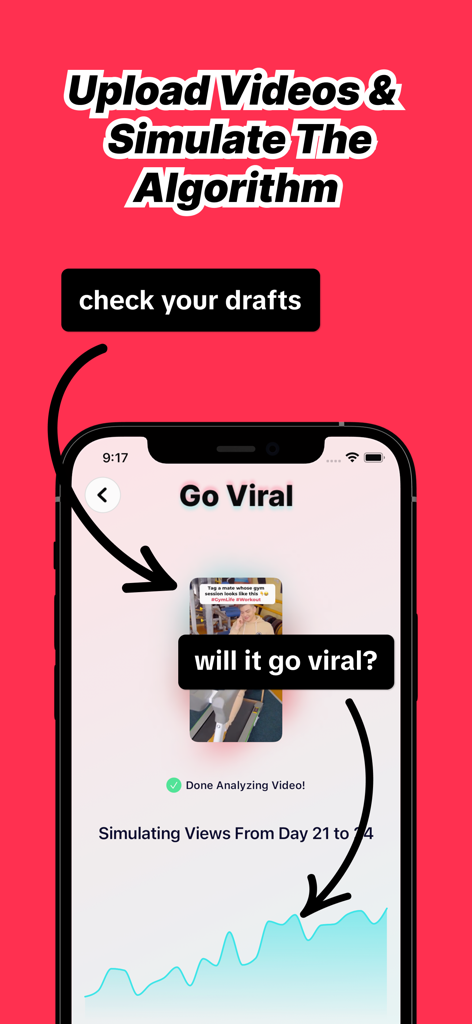
Smartphone screen showing Go Viral app predicting video performance with an algorithm simulation graph
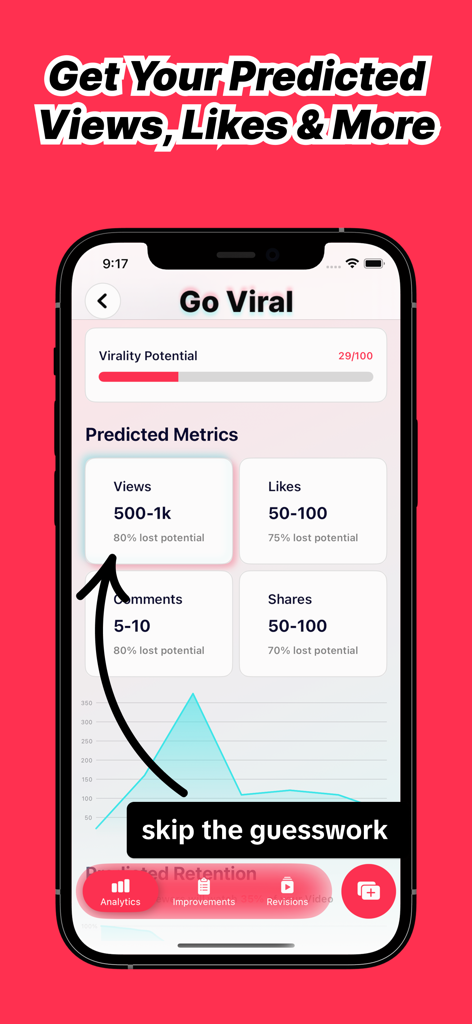
Interface of the Go Viral app showing predicted views likes and virality potential for a social media video
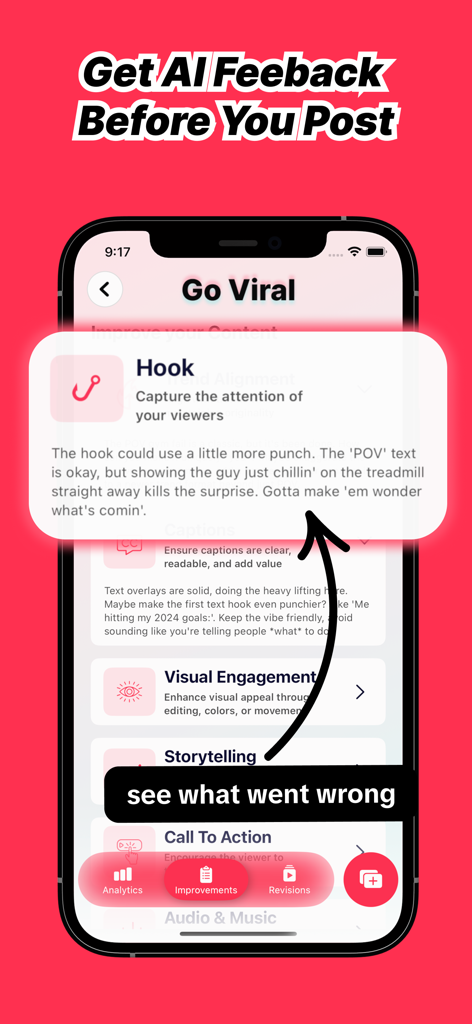
AI assistant providing actionable feedback to improve video hooks.
Description
Download
More Like This
Apps with similar features and user experience

TikTok Studio
TIKTOK PTE. LTD.

TikSave - Save TikTok Video
Nodes Tree

Blow Up: Go Viral With AI
Mountains Studio LLC

Hashtag Expert: AI Captions
WL Online Marketing LLC

My Followers Tracker
William Bianco

创作猫
广旭 刘
Go Viral: AI Video Analysis
raza umar

Blaze AI
Almanac Labs, Inc.
This page is not an official page of the app or its developer, but an independent editorial publication created for informational and commentary purposes. Unless expressly stated otherwise, neither the app nor its developer is affiliated with, endorsed by, sponsored by, authorized by, or otherwise officially connected with MWM, Apple, Google Play, the app publisher, or the app's developer, and nothing on this page implies that the app was developed using MWM's services. Any trademarks, logos, screenshots, and other content remain the property of their respective owners.