
This page is not an official page of the app or its developer, but an independent editorial publication created for informational and commentary purposes. Unless expressly stated otherwise, neither the app nor its developer is affiliated with, endorsed by, sponsored by, authorized by, or otherwise officially connected with MWM, Apple, Google Play, the app publisher, or the app's developer, and nothing on this page implies that the app was developed using MWM's services. Any trademarks, logos, screenshots, and other content remain the property of their respective owners.


Google TV: Watch Movies & TV
Streaming chaos ends here. This app gives users absolute command over their sprawling entertainment library.
Downloads
25M+User Rating
Total Ratings
34.2KPublisher
Category
EntertainmentLocales
38Latest Version
3.30.00001Size
82.0 MBFirst Released
Jan 15, 2014Evaluating key features for the multi-platform streaming consumer.
Google TV: A Unified Entertainment Hub Analysis
Universal Content Search
This tool features a powerful search function that identifies which streaming apps host specific movies or TV shows, saving users time and effort.
Unified Content Discovery & Browsing
The app provides a centralized hub to browse movies and TV episodes from various streaming applications, organized by topics and genres for easy navigation.
Personalized Recommendations
It delivers tailored recommendations for new content based on user preferences and trending titles across all integrated streaming services.
Cross-Device Watchlist
It allows users to create and manage a synchronized Watchlist across all their devices, enabling them to track and plan their viewing seamlessly.
Mobile Streaming & Offline Access
The app enables users to stream content directly on their mobile devices and download previously purchased titles for offline viewing, ensuring entertainment on the go.
Enhanced Text Input for TV
It allows users to leverage their phone's keyboard for quick and easy input of search terms, passwords, or movie titles on their connected Google TV or Android TV OS device.
Frequently Asked Questions
Everything you need to know about Google TV: Watch Movies & TV
What is the Google TV app?
The Google TV app, previously Play Movies & TV, consolidates entertainment from all your streaming apps into one place. It helps users find and enjoy content efficiently.
How does Google TV help me find content?
Google TV allows users to browse movies and TV episodes across their streaming apps, organized by topics and genres. It provides recommendations based on preferences and trending content. Users can also search for specific titles.
Can I create a watchlist in Google TV?
Yes, the Google TV app allows users to create a Watchlist for new discoveries. This Watchlist syncs across all devices, including TV, phone, and laptop via Search on any browser.
Can I watch my purchased content offline using the Google TV app?
Yes, the Google TV app allows users to download previously purchased entertainment from their Library. This enables watching content even when not connected to the internet.
Does the Google TV app function as a remote control?
Yes, the Google TV app includes a built-in remote control function. Users can use their phone to navigate Google TV or other Android TV OS devices and type with the phone's keyboard.
Does Google TV offer personalized recommendations?
Yes, Google TV offers recommendations based on what users love and what's trending across their accessible services. These recommendations are part of the "For you" section.
Is my Watchlist shared across devices in Google TV?
Yes, the Watchlist in Google TV is shared across all your devices. Users can add items from their TV, phone, or laptop via Search on any browser.
Can I resume watching content from where I left off in Google TV?
Yes, Google TV enables users to jump right back into content from where they left off. The app features a dedicated "Continue watching" section for this purpose.
Does Google TV integrate with Chromecast?
Yes, the Google TV app integrates with Chromecast. Users can get Google TV content on a big screen using a Chromecast device, as shown in the app's promotional material.
The following screenshots and description are sourced directly from the app's official store listing and are the property of the app developer.
App Store
Screenshots
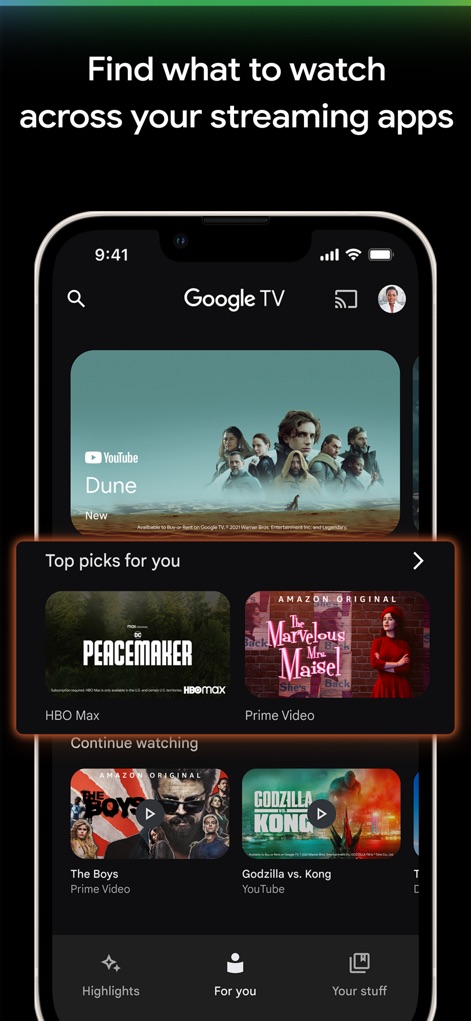
Users can effortlessly discover new content through the personalized "Top picks for you" section and quickly jump back into previously watched shows via the "Continue watching" row.
Personalized Discovery Hub

The app allows users to meticulously organize desired movies and series using the "Watchlist" feature and conveniently access their purchased content within the "Library" tab.
Organized Content Tracking

This tool ensures uninterrupted entertainment with its prominent "Continue watching" section, allowing users to resume playback instantly within the intuitive "For you" tab.
Seamless Playback Continuity

Users benefit from flexible viewing options, effortlessly streaming on the mobile app interface or casting content to larger screens through seamless integration with Chromecast.
Multi-Device Viewing
Description
Download
More Like This
Apps with similar features and user experience

JioHotstar
JIOSTAR INDIA PRIVATE LIMITED

百搜视频-原百度视频
Xiaodu TV Co., Ltd

MagentaTV: TV & Streaming
Telekom Deutschland GmbH

今日影视大全 - 电影电视剧视频大全
Mertkan YASA

百搜视频HD-原百度视频HD 电影电视剧影视大全
Xiaodu TV Co., Ltd
Apple TV
Apple Inc.

MEGOGO: TV, Movies, Audiobooks
MEGOGO LLC

OTTplay
HT Media Ltd.

KPN TV+ App
KPN B.V.
This page is not an official page of the app or its developer, but an independent editorial publication created for informational and commentary purposes. Unless expressly stated otherwise, neither the app nor its developer is affiliated with, endorsed by, sponsored by, authorized by, or otherwise officially connected with MWM, Apple, Google Play, the app publisher, or the app's developer, and nothing on this page implies that the app was developed using MWM's services. Any trademarks, logos, screenshots, and other content remain the property of their respective owners.