
This page is not an official page of the app or its developer, but an independent editorial publication created for informational and commentary purposes. Unless expressly stated otherwise, neither the app nor its developer is affiliated with, endorsed by, sponsored by, authorized by, or otherwise officially connected with MWM, Apple, Google Play, the app publisher, or the app's developer, and nothing on this page implies that the app was developed using MWM's services. Any trademarks, logos, screenshots, and other content remain the property of their respective owners.


Intuit QuickBooks for Business
Complexity, demystified. This app grants users the clarity to run their business from anywhere, streamlining finances and customer interactions without the typical headache.
Downloads
10M+User Rating
Total Ratings
334.5KPublisher
Category
BusinessLocales
4Latest Version
26.04.0Size
558.6 MBFirst Released
Feb 14, 2013An Analytical Overview of Intuit QuickBooks for Business's Core Offerings
Key Feature Analysis
AI-Driven Transaction Automation
The app utilizes Intuit AI to automatically categorize and reconcile transactions, combine data, identify inconsistencies, and proactively suggest next steps, significantly streamlining financial management.
Mobile Payment Acceptance
The app provides the ability to accept in-person contactless payments via Tap to Pay on iPhone and send invoices that customers can pay with a tap, coupled with real-time payment tracking.
Automated Mileage Tracking
The app automatically tracks mileage via GPS with enhanced accuracy, allowing users to categorize trips easily to maximize tax deductions.
Real-time Expense Management
This tool provides Accounting AI that intelligently matches transactions with expenses, proactively prompting users to upload receipts for credit card transactions requiring them.
Invoice & Estimate Generation
It allows users to create and send professional invoices and estimates, capturing project details and even generating documents from handwritten notes or photos.
Digital Receipt Capture
It allows users to easily capture receipts by taking photos, ensuring they are stored digitally and automatically matched to corresponding transactions.
Cloud Synchronization
This tool ensures that the mobile app seamlessly syncs with the QuickBooks Online account, providing users with continuously updated financial data for informed decision-making from any location.
AI-Powered Lead Capture & Estimates
This tool features Intuit AI and Customer Hub to identify qualified leads from emails and integrate written or recorded voice notes into auto-generated estimates, which can be reviewed and sent from a mobile device.
Frequently Asked Questions
Everything you need to know about Intuit QuickBooks for Business
What is Intuit QuickBooks for Business?
Intuit QuickBooks for Business is an app designed to help businesses manage accounting, payments, and customers on the go. It integrates Intuit AI in Essentials and Plus plans.
Can I accept contactless payments using the Intuit QuickBooks app?
Yes, the Intuit QuickBooks app supports Tap to Pay on iPhone for in-person contactless payments. It also allows sending invoices that customers can pay with a tap.
How does Intuit QuickBooks for Business help with invoicing?
The Intuit QuickBooks app enables users to create and send invoices and estimates. It supports adding customer details and generating documents from photos of handwritten notes.
Does the Intuit QuickBooks app track business mileage automatically?
Yes, Intuit QuickBooks for Business automatically tracks mileage via GPS for accurate tax deductions. Users can categorize trips by swiping within the app to stay organized.
Can I capture and manage leads with Intuit QuickBooks for Business?
Yes, the Intuit QuickBooks app features a Customer Hub [Beta] that works with Intuit AI to surface qualified leads from emails. It also incorporates voice notes into auto-generated estimates.
How does Intuit QuickBooks automate accounting tasks?
Intuit QuickBooks AI automates categorizing and reconciling transactions. It also combines data, spots inconsistencies for review, and proactively recommends next steps for users.
Is the Intuit QuickBooks mobile app compatible with QuickBooks Desktop?
No, the Intuit QuickBooks mobile app is not compatible with QuickBooks Desktop for Windows or Mac. It syncs with your QuickBooks Online account instead.
How do I manage my Intuit QuickBooks app subscription?
Users manage their Intuit QuickBooks app subscription through their Apple account settings after purchase. Auto-renewal can be turned off there at least 24 hours before the current period ends.
Does Intuit QuickBooks for Business help manage expenses?
Yes, the Intuit QuickBooks app's Accounting AI matches transactions and expenses. It can also prompt users to upload receipts for credit card transactions requiring them, ensuring accurate expense tracking.
Can I digitize receipts using the Intuit QuickBooks app?
Yes, the Intuit QuickBooks app allows users to take photos of receipts. These digital receipts are then stored and automatically matched to relevant transactions, simplifying expense management.
The following screenshots and description are sourced directly from the app's official store listing and are the property of the app developer.
App Store
Screenshots
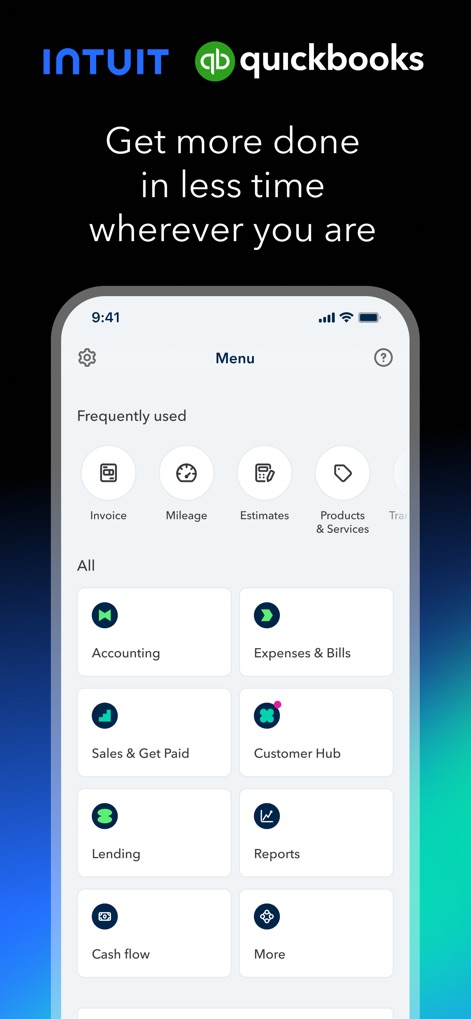
Explore the app's intuitive main menu, featuring quick access to "Frequently used" functions and clearly categorized "All" services like Accounting and Customer Hub.
Dashboard Overview

See how users can easily generate invoices, detailing customer information and specific product or service entries with clear pricing.
Effortless Invoicing
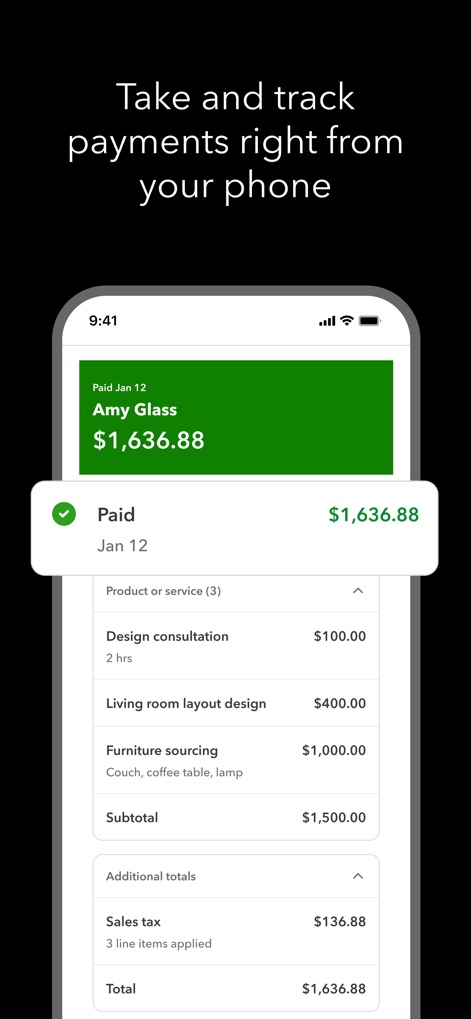
Witness the app's capability to track payments instantly, displaying clear "Paid" confirmations and a detailed breakdown of included products or services.
Instant Payment Tracking
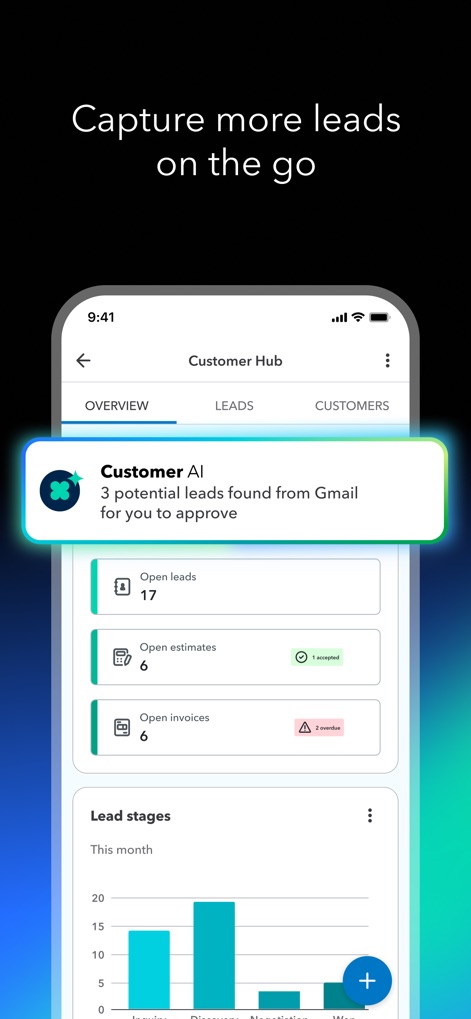
Discover the Customer Hub's power to capture leads, showing AI-driven notifications for potential leads and a visual "Lead stages" bar chart.
Lead Generation Intelligence

Observe how Intuit AI automates financial tasks, presenting "Accounting AI" transaction matching and a personalized "Business Feed" for timely insights.
Smart Automation

Examine the app's real-time expense management, showcasing "Accounting AI" categorizing transactions and a clear view of "Pending" and "Posted" financial activities.
Real-time Expense Management

Explore the convenient digital receipt capture feature, allowing users to instantly photograph receipts and store them, with a clear "Capturing" progress indicator.
Digital Receipt Capture

Understand how the app automatically tracks mileage, displaying a "Potential Deduction" value and a detailed map of the recorded routes for tax purposes.
Mileage Tracking
Description
Download
More Like This
Apps with similar features and user experience

Invoice Maker - PDF Creator
Decodation LLC

Invoice Maker + Estimate App
Daniel Bitton

Invoice Maker - Invoice Fly
Labhouse Mobile SL

Invoice Maker ▸ Estimate App
GetPaid Inc.

Invoice Simple: Invoice Maker
Zenvoice Inc.
Zoho Invoice Maker App
Zoho Corporation

Accounting App - Zoho Books
Zoho Corporation

Invoice2go: Easy Invoice Maker
Invoice2go.com

Invoice Maker & Estimate App
Bookipi Pty Ltd
This page is not an official page of the app or its developer, but an independent editorial publication created for informational and commentary purposes. Unless expressly stated otherwise, neither the app nor its developer is affiliated with, endorsed by, sponsored by, authorized by, or otherwise officially connected with MWM, Apple, Google Play, the app publisher, or the app's developer, and nothing on this page implies that the app was developed using MWM's services. Any trademarks, logos, screenshots, and other content remain the property of their respective owners.