
This page is not an official page of the app or its developer, but an independent editorial publication created for informational and commentary purposes. Unless expressly stated otherwise, neither the app nor its developer is affiliated with, endorsed by, sponsored by, authorized by, or otherwise officially connected with MWM, Apple, Google Play, the app publisher, or the app's developer, and nothing on this page implies that the app was developed using MWM's services. Any trademarks, logos, screenshots, and other content remain the property of their respective owners.


Mobile VOCALOID Editor
Transform your melodies and lyrics into stunning vocal performances. Access legendary AI voices, 32-track mixing, and precision editing right from your pocket.
Downloads
70K+User Rating
Total Ratings
500Publisher
Category
MusicLocales
2Latest Version
2.0.3Size
188.4 MBFirst Released
Oct 19, 2025Create Without Limits
Everything you need to produce professional vocal tracks from your smartphone. From AI-driven voices to advanced mixing tools, the studio is wherever you are.
Instant Virtual Vocalists
Access world-famous AI voicebanks including Hatsune Miku. Just enter your lyrics and melody to hear them come to life instantly.
Precision Pitch Control
Fine-tune every nuance with intuitive parameter editing. Adjust pitch bends and vibrato using touch-optimized tools for professional results.
Frequently Asked Questions
Everything you need to know about Mobile VOCALOID Editor
What is Mobile VOCALOID Editor?
Mobile VOCALOID Editor is a smartphone application designed for creating vocal tracks by inputting melody and lyrics. It operates on a monthly subscription model.
Does Mobile VOCALOID Editor offer a free trial?
Yes, Mobile VOCALOID Editor provides a 14-day free trial, allowing users to experience the application's features before committing to a subscription.
How do I create vocal tracks with Mobile VOCALOID Editor?
You create vocal tracks in Mobile VOCALOID Editor by simply entering a melody and lyrics. The app instantly generates the vocal track using an intuitive, touch-optimized interface.
Which voicebanks are included with Mobile VOCALOID Editor?
Mobile VOCALOID Editor includes two voicebanks: 'asa,' an AI-powered voice known for its delicate style, and 'VY1 Lite,' which is a standard female voice.
What languages do AI voicebanks in Mobile VOCALOID Editor support?
AI voicebanks within Mobile VOCALOID Editor, such as 'asa,' support three languages: Japanese, English, and Chinese for vocal track creation.
Can I buy additional voicebanks for Mobile VOCALOID Editor?
Yes, additional voicebanks, including popular characters and AI voices, are available as in-app purchases directly within Mobile VOCALOID Editor. An active subscription is required to use them.
What audio formats can Mobile VOCALOID Editor export?
Mobile VOCALOID Editor can export mixed-down audio tracks into two distinct file formats: WAV or AAC, for versatile use.
Does Mobile VOCALOID Editor support multi-track editing?
Yes, Mobile VOCALOID Editor supports multi-track editing, allowing users to combine up to 32 tracks, including VOCALOID, VOCALOID:AI, and audio tracks.
Is a subscription required to use Mobile VOCALOID Editor?
Yes, from Version 2.0, Mobile VOCALOID Editor's core features are accessible via a monthly subscription. An active subscription is also mandatory for using purchased voicebanks.
What are the iOS requirements for Mobile VOCALOID Editor?
Version 2.0 of Mobile VOCALOID Editor requires iOS 17 or later to ensure compatibility and full functionality on your device.
The following screenshots and description are sourced directly from the app's official store listing and are the property of the app developer.
App Store
Screenshots
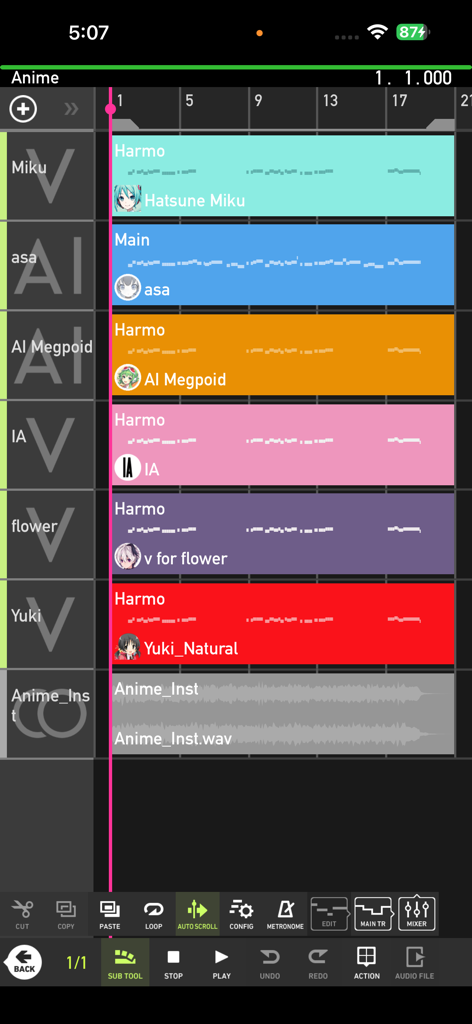
Multi track editing interface of the Mobile VOCALOID Editor showing vocal tracks for Hatsune Miku and AI Megpoid
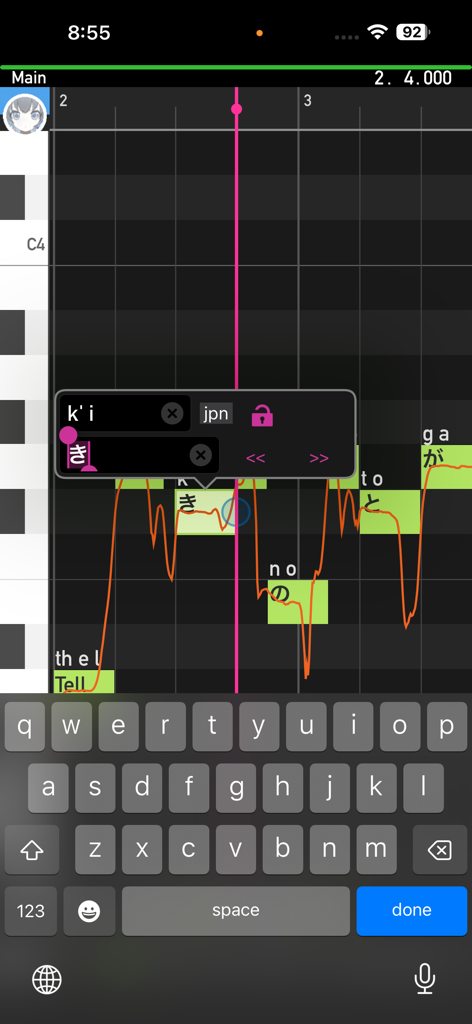
A smartphone interface of the Mobile VOCALOID Editor showing a piano roll with MIDI notes, Japanese lyrics, and a pitch curve.
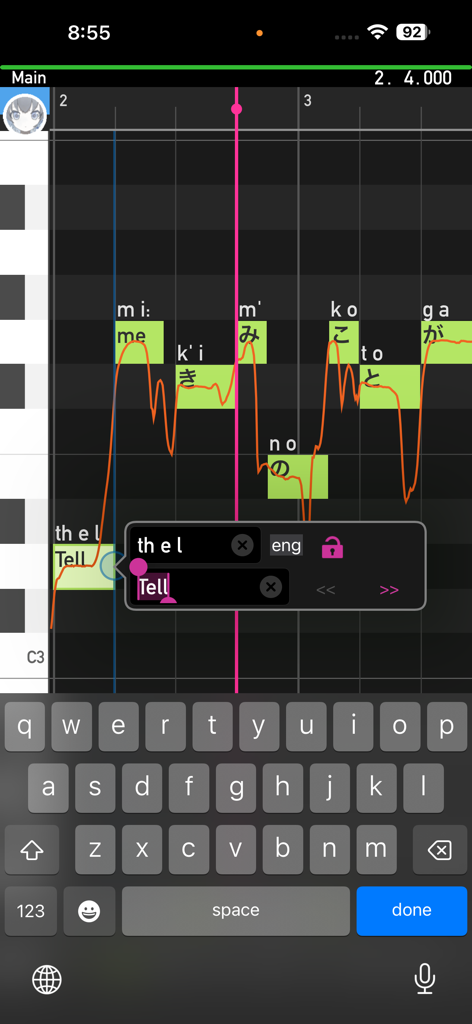
Mobile VOCALOID Editor interface showing piano roll and lyrics editing for synthesized vocal tracks.
Description
Download
More Like This
Apps with similar features and user experience

Loopy Pro: Looper DAW Sampler
A Tasty Pixel

AUM - Audio Mixer
Kymatica AB

Drambo
Jaroslaw Jacek

Groove Rider 2
Dmitrij Pavlov

BandLab – Music Maker & Beats
BandLab Singapore Pte Ltd

Medly
Medly Labs Inc.

Cubasis 3 - DAW & Music Studio
Steinberg Media Technologies GmbH

KORG Gadget 3
KORG INC.
iMPC Pro 2 for iPhone
Akai Professional
This page is not an official page of the app or its developer, but an independent editorial publication created for informational and commentary purposes. Unless expressly stated otherwise, neither the app nor its developer is affiliated with, endorsed by, sponsored by, authorized by, or otherwise officially connected with MWM, Apple, Google Play, the app publisher, or the app's developer, and nothing on this page implies that the app was developed using MWM's services. Any trademarks, logos, screenshots, and other content remain the property of their respective owners.