
This page is not an official page of the app or its developer, but an independent editorial publication created for informational and commentary purposes. Unless expressly stated otherwise, neither the app nor its developer is affiliated with, endorsed by, sponsored by, authorized by, or otherwise officially connected with MWM, Apple, Google Play, the app publisher, or the app's developer, and nothing on this page implies that the app was developed using MWM's services. Any trademarks, logos, screenshots, and other content remain the property of their respective owners.


Music | Bowers & Wilkins
Command your premium sound experience. This app gives users unparalleled authority over their Bowers & Wilkins ecosystem, from setup to playback.
Downloads
1M+User Rating
Total Ratings
17.7KPublisher
Category
MusicLocales
13Latest Version
2.12.1Size
74.9 MBFirst Released
Feb 10, 2021An Analytical Overview for Discerning Audiophiles
Bowers & Wilkins Music App: Core Capabilities
Unified Streaming Integration
The app consolidates various music streaming services, podcasts, and online radio stations into a single, cohesive platform for seamless access.
High-Fidelity Service Support
This tool features direct integration with leading high-resolution audio streaming services like TIDAL and Qobuz, alongside popular radio platforms.
Centralized Multi-Room Control
It provides comprehensive control and setup capabilities for Bowers & Wilkins Formation-enabled multi-room audio products, including Zeppelin and Panorama 3.
Elegant & Intuitive Interface
The app offers an intuitive, user-friendly interface designed for easy navigation, searching, and browsing of music and radio content.
Exclusive Content & Discovery
Users gain access to personalized music recommendations and exclusive, curated content from Bowers & Wilkins, enhancing their discovery experience.
Wireless Headphone Management
It allows for the setup, management, and control of Bowers & Wilkins wireless headphones, ensuring an integrated experience within the ecosystem.
Streamlined System Configuration
The app facilitates an easy and guided setup process for Formation-enabled products, from initial connection to Wi-Fi to configuring listening spaces.
Advanced Headphone Noise Control
This feature enables precise adjustment of active noise cancellation and ambient sound pass-through on compatible headphones for tailored listening.
Frequently Asked Questions
Everything you need to know about Music | Bowers & Wilkins
What is the primary function of the Bowers & Wilkins Music app?
The Bowers & Wilkins Music app sets up and controls Bowers & Wilkins Formation-enabled products like Zeppelin and Panorama 3. It also manages Bowers & Wilkins wireless headphones.
Can I set up Bowers & Wilkins headphones with the Music app?
Yes, the Bowers & Wilkins Music app supports the setup and management of Bowers & Wilkins wireless headphones, including models like PX7 S2.
What streaming services does the Bowers & Wilkins Music app support?
The Bowers & Wilkins Music app aggregates music streaming services such as TIDAL, Qobuz, TuneIn, NTS Radio, and Dash Radio. More services are added regularly.
Does the Bowers & Wilkins Music app offer ANC control for headphones?
Yes, once Bowers & Wilkins Headphones are set up via the Music app, users can adjust active noise cancelling and allow ambient sound.
How do I set up Formation-enabled products using the Bowers & Wilkins Music app?
Users power up their Formation products, connect to Wi-Fi, choose a 'Space', and start listening. The app guides the configuration.
Can the Bowers & Wilkins Music app manage headphone battery life?
Yes, the Bowers & Wilkins Music app allows users to check battery levels for their headphones and preserve power via a standby timer.
Does the Bowers & Wilkins Music app provide curated music content?
Yes, the Bowers & Wilkins Music app gives users exclusive access to curated Bowers & Wilkins content and personalized music recommendations.
Which Bowers & Wilkins products are compatible with the Music app?
The app supports Formation Audio, Bar, Bass, Duo, Flex, Wedge, Panorama 3, Zeppelin, and various PI and PX series headphones.
Does the Bowers & Wilkins Music app offer high-quality audio playback?
Yes, the Bowers & Wilkins Music app supports high-resolution audio playback, indicated by '16-bit 44.1 kHz' within the player interface.
Does the Music app support Bluetooth streaming for Formation products?
Yes, the Bowers & Wilkins Music app enables extra capabilities for Formation-enabled products, such as Bluetooth streaming.
The following screenshots and description are sourced directly from the app's official store listing and are the property of the app developer.
App Store
Screenshots
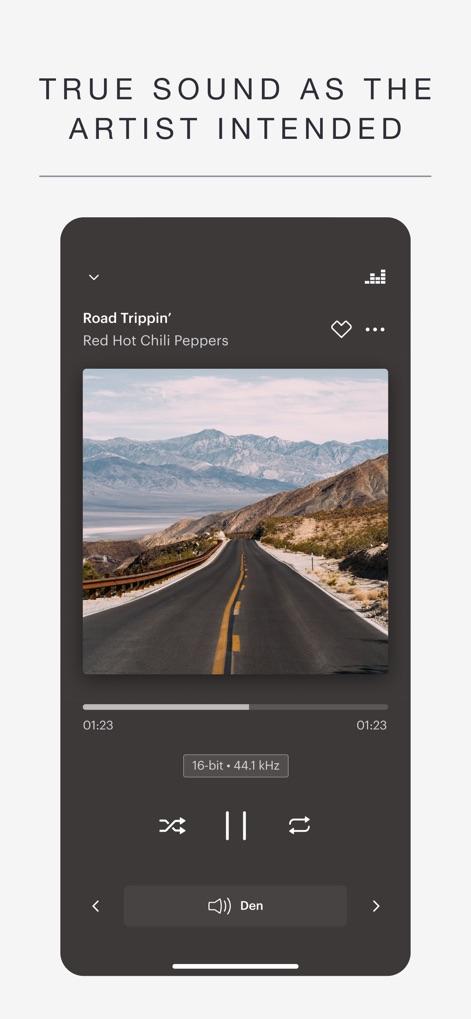
The app showcases high-fidelity audio details like the "16-bit · 44.1 kHz" indicator and features an intuitive player interface with dynamic album art.
Pure Audio Playback

This tool simplifies device integration by automatically detecting new products such as the "PX7 S2" headphones and "ZEPPELIN" speaker for quick configuration.
Seamless Setup

The app unifies content discovery across various streaming services like TIDAL and Qobuz, allowing users to browse effectively through categorized search results.
Centralized Music Hub

Users can dive into unique Bowers & Wilkins curated playlists, complete with engaging cover art and direct "Play" and "Shuffle" options.
Exclusive Playlists
Description
Download
More Like This
Apps with similar features and user experience

PianoStream Piano MIDI Player
B&T Entertainment Inc

JBL One
Harman International Industries

Harman Kardon One
Harman International Industries

Sonos S1 Controller
Sonos, Inc.
Bose SoundTouch
Bose Corporation
Connect Speaker & Headphones ‣
BREEZY PATH LTD

Sonos
Sonos, Inc.
Sonos S1・S2 Speaker Controller
Lily Anderson
Headphones & Speaker connect +
Web Titans Limited
This page is not an official page of the app or its developer, but an independent editorial publication created for informational and commentary purposes. Unless expressly stated otherwise, neither the app nor its developer is affiliated with, endorsed by, sponsored by, authorized by, or otherwise officially connected with MWM, Apple, Google Play, the app publisher, or the app's developer, and nothing on this page implies that the app was developed using MWM's services. Any trademarks, logos, screenshots, and other content remain the property of their respective owners.