MusicClock: Alarm for Spotify

MusicClock: Alarm for Spotify

Download on App Store
Logo of MusicClock: Alarm for Spotify

MusicClock: Wake Up to Your Favorite Spotify Songs

Ditch the stressful beeps and start your morning with the music you love. No Spotify Premium required, no login needed, and works even in Airplane Mode.

Publisher

Topanga Technologies, LLC

Category

Music

Downloads

1K+

User Rating

4.5/5

Total Ratings

100

Locales

1

Your Morning, Visualized

Discover the interface used by 1K+ users.

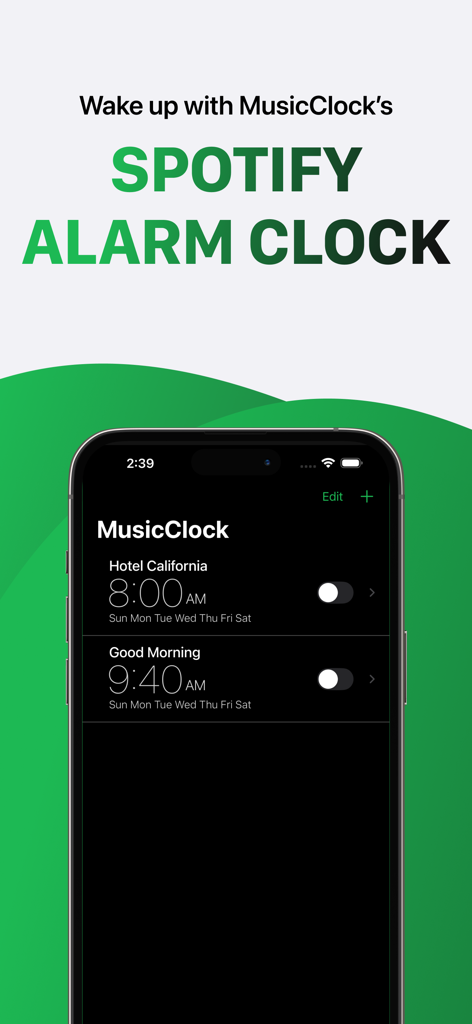
Screenshot of the MusicClock app showing multiple alarms set to Spotify songs on an iPhone.
Screenshot of the MusicClock app showing multiple alarms set to Spotify songs on an iPhone.

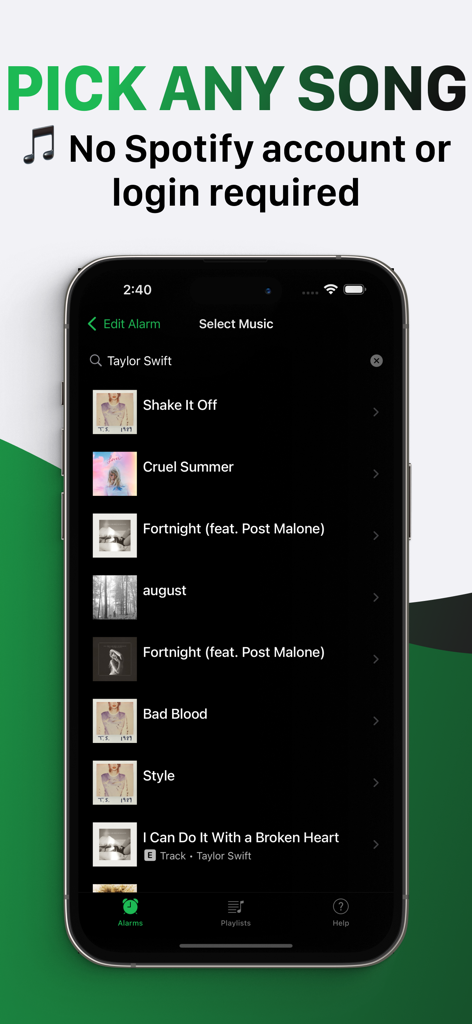
MusicClock app interface showing a list of songs to select as a personalized morning alarm.
MusicClock app interface showing a list of songs to select as a personalized morning alarm.

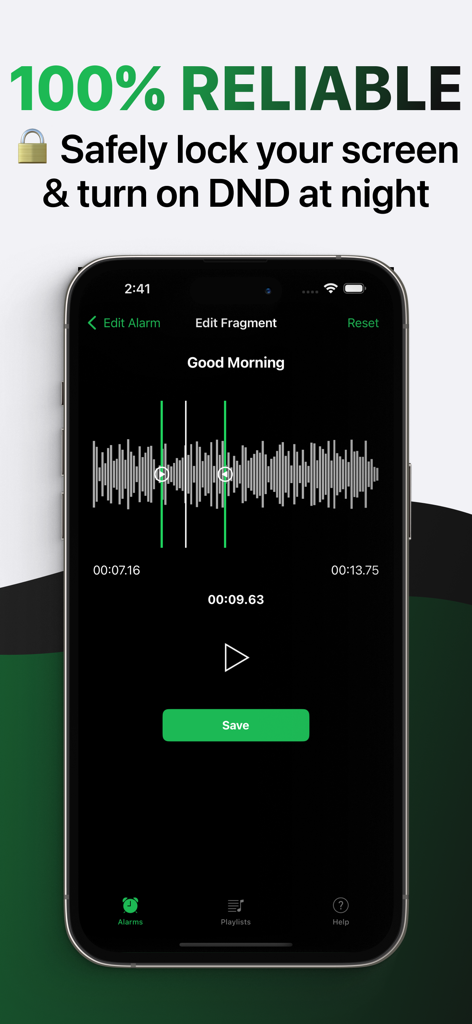
Reliable Spotify alarm app interface showing music fragment selection tool

Reliable Spotify alarm app interface showing music fragment selection tool

Your Morning, Your Vibe

The tools that make this app stand out, trusted by 1K+ users.

🔓

No Premium? No Problem

Wake up to any song or playlist even with a free Spotify account. We believe a better morning should not come with a monthly subscription.

✈️

Reliable Offline Alarms

Sleep soundly in Airplane Mode. Our tech ensures your music plays exactly on time, even without Wi-Fi or cellular data.

🛡️

Privacy-First Setup

No Spotify login or password required. Set your perfect morning soundtrack in seconds without sharing your private account data.

About the app

Everything you need to know about MusicClock: Alarm for Spotify.

Description

MusicClock – Spotify Alarm Clock Wake up to music, not noise. Use your favorite Spotify songs as your alarm clock! MusicClock is the #1 music alarm clock for Spotify users. Whether you're looking for a Spotify alarm clock, a music alarm clock Spotify fans love, or a simple and effective alarm clock for Spotify, MusicClock delivers the most seamless way to rise and shine with your favorite tunes. It’s your personalized song alarm clock, designed for music lovers who want to start their day the right way. Key Features: - Set any Spotify song or Spotify playlist as your alarm - Create shuffling playlists or choose a single track - Works with free Spotify accounts – no Premium needed - No Spotify login or password required - The Spotify app is not needed on your device - Internet connection is not required at the time of alarm - Supports Bluetooth, AirPods, speakers, and more - Includes snooze, repeat, and all standard alarm clock features - Wake up with music even in airplane mode - Clean, intuitive design built for iOS Whether you call it a Spotify alarm, a music alarm, or an alarm clock with music selection, this is the app you’ve been searching for. Why Choose MusicClock as Your Spotify Alarm Clock? If you've ever typed “Spotify alarm clock,” “alarm clock for Spotify,” or “alarm clock music” into the App Store search bar, you know the struggle of finding a music-based alarm that actually works. MusicClock is the solution. This isn’t just another alarm – it’s a fully functional music alarm clock that syncs with your Spotify account and plays exactly what you want, when you want it. Stop waking up to annoying beeps and generic tones. With MusicClock, your alarm becomes your favorite part of the morning. Whether it's classical, hip hop, lo-fi beats, or a motivational playlist, MusicClock – the alarm clock Spotify fans trust – gives you full control over your wake-up routine. Perfect for those who are tired of basic alarm clocks, MusicClock turns your iPhone into a music alarm clock Spotify fans will love. And yes, it works even if you have a free Spotify account! Top Use Cases: - Morning motivation with upbeat Spotify playlists - Sleep cycle syncing with calming music - Fun alarms for kids and teens - Gentle wake-up for light sleepers - Use as a party or event timer with music Whether you're searching for a Spotify music alarm clock, a song alarm clock for iPhone, or just a better way to start your morning, MusicClock is the best alarm clock for Spotify on the App Store. Common Searches This App Supports: spotify alarm clock alarm clock for spotify music alarm clock alarm clock spotify alarm music alarm clock spotify morning alarm for spotify song alarm clock alarm clock with music selection alarmfy alarm clock music If any of these sound like what you’re looking for, MusicClock is your answer. Built for Simplicity: MusicClock works in 3 easy steps: 1. Set your alarm 2. Choose a song or playlist from Spotify 3. Sleep peacefully and wake up to music No Spotify login. No premium requirement. No internet needed at the time of alarm. Just great music every morning, exactly how you want it. Disclaimer: This app is not affiliated with or endorsed by Spotify. It uses Spotify’s official API to provide functionality. MusicClock respects your privacy and does not store login information. Support & Contact: Need help? Visit our FAQ via the “Developer Website” link below or email us directly at hello@topanga.tech Download MusicClock today – the best Spotify alarm clock and music alarm clock for iOS! Make your morning better with MusicClock – the alarm clock with music selection and total Spotify integration. — Terms of Use: https://topanga.tech/musicclock_terms/ Privacy Policy: https://topanga.tech/musicclock_privacy/ Disclaimer: This app is not sponsored, endorsed, or administered by Spotify. Spotify is a trademark of Spotify AB.

Latest Version

3.0

Size

27.5 MB

First Released

Sep 12, 2025

Ditch the Stressful Beeps. Wake Up to Your Vibe.

Join thousands of Spotify fans who’ve traded annoying alarms for their favorite playlists. Download MusicClock now and start tomorrow morning on a high note—no Premium or login required.

Download on App Store

App information, icons, screenshots, and descriptions displayed on this page are sourced from the Apple App Store and are the property of their respective developers. Download estimates and rankings are based on MWM's proprietary models and may not reflect actual figures. This page is provided for informational and analytical purposes only.

Believe this page infringes your intellectual property? File a dispute