
This page is not an official page of the app or its developer, but an independent editorial publication created for informational and commentary purposes. Unless expressly stated otherwise, neither the app nor its developer is affiliated with, endorsed by, sponsored by, authorized by, or otherwise officially connected with MWM, Apple, Google Play, the app publisher, or the app's developer, and nothing on this page implies that the app was developed using MWM's services. Any trademarks, logos, screenshots, and other content remain the property of their respective owners.


MyCar Widgets - PlayLyrics
Finally, an app that lets you reclaim your dashboard's visual identity, transforming mundane displays into a personal statement of automotive passion.
Downloads
750k+User Rating
Total Ratings
575Publisher
Category
LifestyleLocales
12Latest Version
1.1.2Size
144.1 MBFirst Released
Sep 25, 2025An Analytical Overview for OS 26 Compatible In-Car Systems
Key Features of MyCar Widgets - PlayLyrics
OS 26 Optimization & Early Adopter Support
The app provides comprehensive optimization for OS 26, establishing itself as one of the pioneering applications to support the innovative in-car screen widgets on this platform, catering directly to early adopters.
Personalized Digital Dashboard Aesthetics
This tool features a unique blend of automotive culture with desktop-level aesthetics, allowing users to create a highly customized and visually appealing digital dashboard display that reflects their personal style and passion.
Extensive Car Model & Brand Library
It allows users to choose from an extensive library featuring thousands of car models, continuously expanding to include everything from classic luxury vehicles to futuristic designs, ensuring comprehensive brand and model coverage.
High-Definition Visual Ambiance
The app offers high-definition visual ambiance, utilizing official car images and precise brand colors to deliver a fresh and immersive aesthetic experience on compatible in-car screens.
Dynamic 'My Garage' Personalization
This tool includes a 'My Garage' feature, enabling users to freely switch between their selected vehicle displays to match their mood, the car they are currently driving, or simply for variety.
Minimalist & Driver-Focused Design
The app is designed with a lightweight interaction model and a minimalist interface, ensuring that the focus remains on driving while still providing a visually enhanced experience without distractions.
Frequently Asked Questions
Everything you need to know about MyCar Widgets - PlayLyrics
What is MyCar Widgets - PlayLyrics?
MyCar Widgets - PlayLyrics is an innovative application optimized for OS 26 in-car screens. It provides personalized widgets that blend automotive culture with desktop aesthetics, featuring high-definition visuals of car models, brand logos, and custom backgrounds.
Does MyCar Widgets - PlayLyrics support OS 26?
Yes, MyCar Widgets - PlayLyrics is specifically designed and fully optimized for OS 26. It is one of the first apps to support the new in-car screen widget capabilities of OS 26.
What car models are available in MyCar Widgets - PlayLyrics?
MyCar Widgets - PlayLyrics offers thousands of car models, continuously expanding from classic luxury to futuristic tech. It provides full brand and model coverage, allowing users to choose freely.
How much does MyCar Widgets - PlayLyrics cost?
MyCar Widgets - PlayLyrics offers a Standard PRO subscription at ¥6.8/week and a Premium PRO subscription at ¥9.9/week, with the first week of Premium PRO priced at ¥2.8.
How do I cancel my MyCar Widgets - PlayLyrics subscription?
To cancel your MyCar Widgets - PlayLyrics subscription, navigate to your device's Settings, tap Apple ID, select Subscriptions, locate the app's subscription, and turn off Auto-Renewal at least 24 hours before the current cycle ends.
Does MyCar Widgets - PlayLyrics access my location data?
MyCar Widgets - PlayLyrics accesses location data only when you are using its weather widgets. It does not access location data for any other functionality.
Can I customize backgrounds in MyCar Widgets - PlayLyrics?
Yes, MyCar Widgets - PlayLyrics allows for personalized backgrounds and custom covers. Photo access is enabled specifically for setting or saving these custom visual elements.
Does MyCar Widgets - PlayLyrics display lyrics?
Yes, MyCar Widgets - PlayLyrics displays lyrics on the in-car screen widget. This feature is indicated by the app's name "PlayLyrics" and visually confirmed in its interface.
The following screenshots and description are sourced directly from the app's official store listing and are the property of the app developer.
App Store
Screenshots
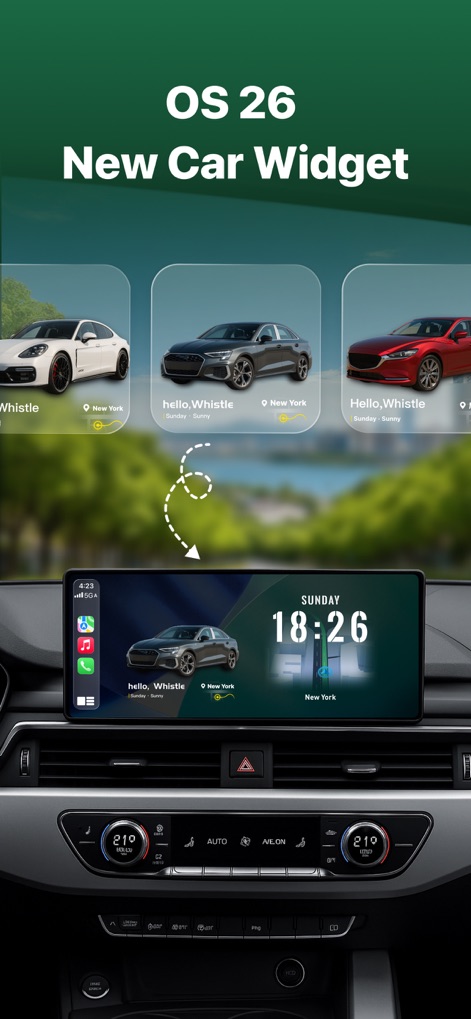
This tool demonstrates the fluid integration of OS 26 widgets, showcasing customizable car model displays and real-time dashboard information.
Dynamic Dashboard Mastery
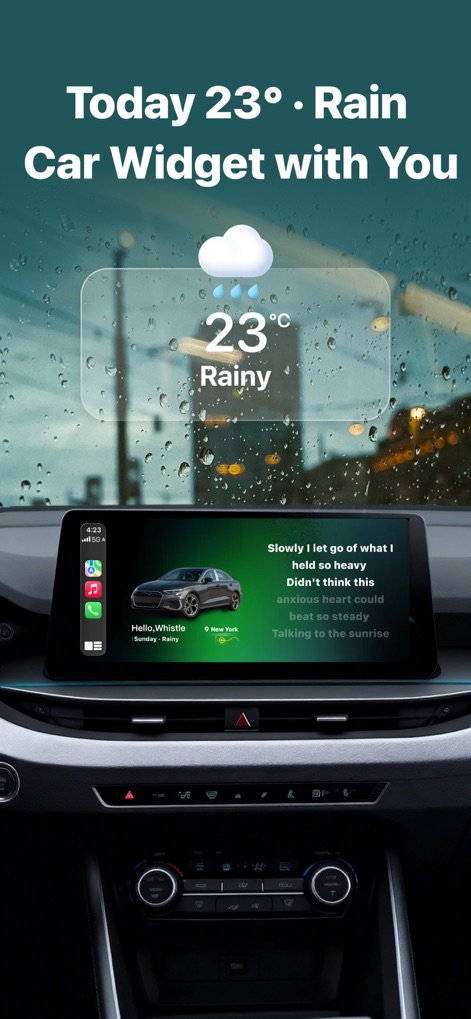
Users can experience a richer drive with the app's real-time lyrics display and integrated weather updates, seamlessly blending entertainment and utility.
Enhanced Journey Insights

The app presents a highly personalized car interface, featuring custom vehicle imagery and a clean, intuitive information display to match individual preferences.
Ultimate Personalization
Description
Download
More Like This
Apps with similar features and user experience
Mody : AI Car Modifications
SCATE DIJITAL PAZARLAMA ANONIM SIRKETI

BimmerCode for BMW and MINI
SG Software GmbH & Co. KG
AutoLab - Customize Your Car
TalkUp LLC
Car Editor & AI Car Designer
Shenzhen Yunduoduo Technology Co., Ltd

Bleo - Discover, Chat & Enjoy
欢 张

Formacar: Buy Car & Customize
FORMACAR LLC
Scooter Tools
Juan Gomez Mateos

Suspension Master
Katsutoshi Kato
Car Designer: AI Tuning
SMART MOBILE TECH - FZCO
This page is not an official page of the app or its developer, but an independent editorial publication created for informational and commentary purposes. Unless expressly stated otherwise, neither the app nor its developer is affiliated with, endorsed by, sponsored by, authorized by, or otherwise officially connected with MWM, Apple, Google Play, the app publisher, or the app's developer, and nothing on this page implies that the app was developed using MWM's services. Any trademarks, logos, screenshots, and other content remain the property of their respective owners.