
This page is not an official page of the app or its developer, but an independent editorial publication created for informational and commentary purposes. Unless expressly stated otherwise, neither the app nor its developer is affiliated with, endorsed by, sponsored by, authorized by, or otherwise officially connected with MWM, Apple, Google Play, the app publisher, or the app's developer, and nothing on this page implies that the app was developed using MWM's services. Any trademarks, logos, screenshots, and other content remain the property of their respective owners.


OTO Navi - Sound Navigator
No more CDs. It unlocks your textbook's audio, turning passive learning into active mastery.
Downloads
250k+User Rating
Total Ratings
250Publisher
Category
EducationLocales
2Latest Version
1.1.7Size
29.9 MBFirst Released
Dec 16, 2019An essential tool for Japanese language learners using Japan Times Publishing textbooks.
Key Features of OTO Navi - Sound Navigator
Advanced Playback Controls for Language Study
The app provides dedicated playback functionalities such as 3-second skipping (back/forward) and repeating options for single tracks, sections, or entire audio sets, specifically designed to aid language learning.
Mobile Access to Textbook Audio
This tool allows users to access audio materials from The Japan Times Publishing, Ltd. textbooks directly on their smartphone or tablet, eliminating the need for traditional CDs or MP3 downloads.
Flexible Textbook Identification
It allows users to easily locate audio materials for their textbooks by searching with keywords (title, author, ISBN) or by scanning the book's barcode, streamlining the setup process.
Selective Audio Material Download
The app features the ability to download either an entire audio set for a book or specific sections, giving users control over storage and allowing them to focus on particular study areas.
Frequently Asked Questions
Everything you need to know about OTO Navi - Sound Navigator
What is OTO Navi and what does it do?
OTO Navi is an app for listening to audio material provided with books published by The Japan Times Publishing, Ltd. It enables users to access content on smartphones or tablets, replacing traditional CDs or MP3 downloads.
How do I use the OTO Navi app?
Using OTO Navi involves three easy steps: first, search for the target book; second, download the desired audio material; and third, play the audio using the app's features.
How can I search for books within OTO Navi?
You can find books in OTO Navi by entering a keyword (title, author, or ISBN) or by scanning the upper barcode on the physical book's back cover.
Can I download audio content using the OTO Navi app?
Yes, OTO Navi allows users to download either the full set of audio material for a book or specific sections. A WiFi connection is recommended for downloading full sets.
What playback features are available in OTO Navi?
OTO Navi offers playback features such as 3-second skipping back/forward and repeating a single track, a single section, or all sections. It also supports variable playback speeds.
Do I need to buy books to use the audio material in OTO Navi?
Yes, users must purchase the corresponding physical books at bookstores. The OTO Navi app provides the audio material that accompanies these purchased books.
Does OTO Navi offer adjustable playback speeds for audio?
OTO Navi supports variable playback speeds. Users can adjust the audio speed, with options shown ranging from x0.7 to x2.0 to suit their learning pace.
The following screenshots and description are sourced directly from the app's official store listing and are the property of the app developer.
App Store
Screenshots
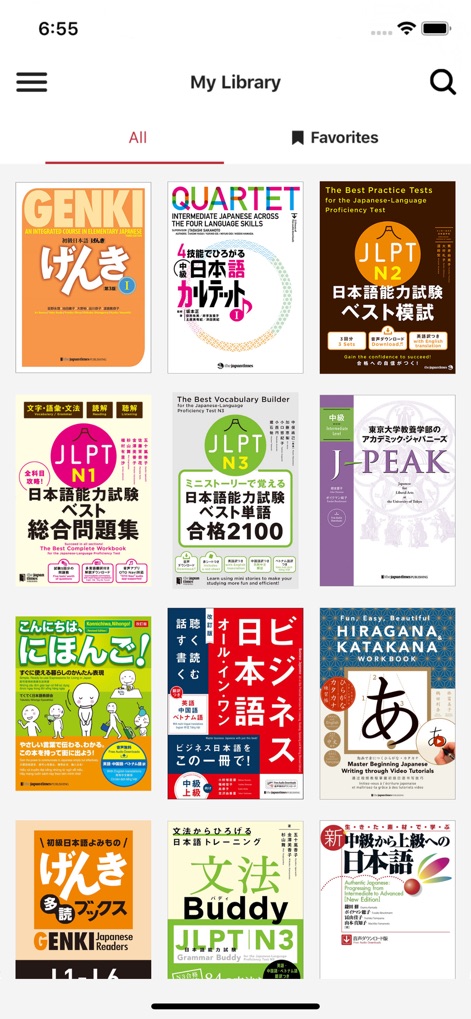
This screen showcases the extensive library of Japanese language learning materials, allowing users to browse various 'book covers' and easily switch between 'All' titles or their 'Favorites'.
Extensive Book Library
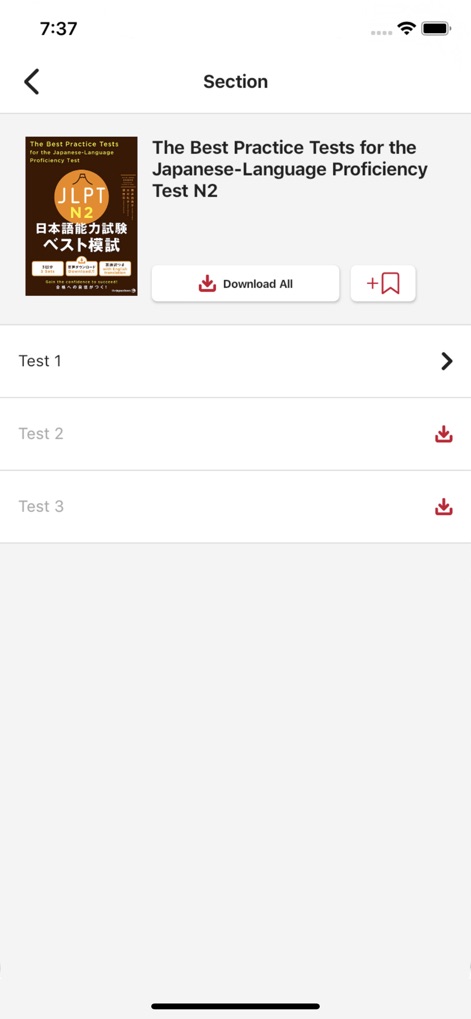
This view allows users to manage their audio content, offering the option to 'Download All' material for a selected book or selectively download individual 'sections' for focused study.
Granular Content Control
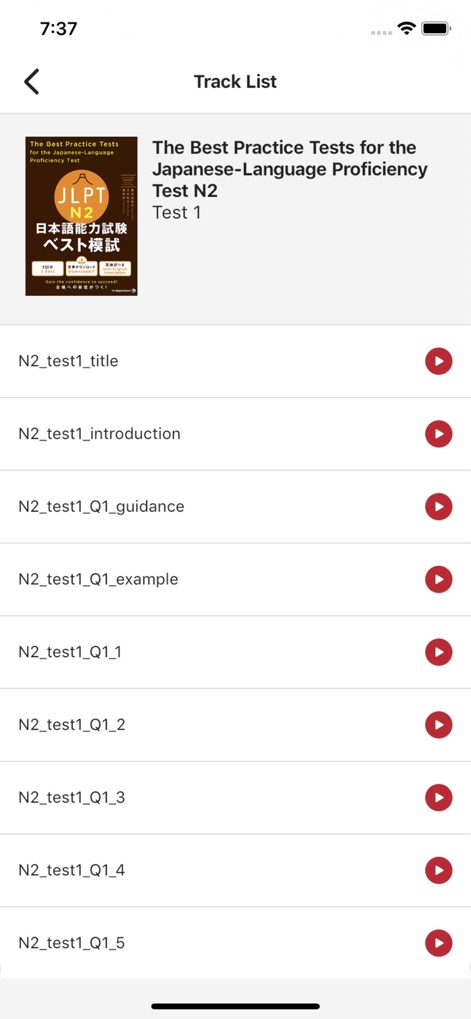
This screen presents a detailed 'Track List' for each section, enabling users to view and select individual audio segments, such as specific 'test questions' or 'introductions', for precise listening practice.
Precise Track Selection
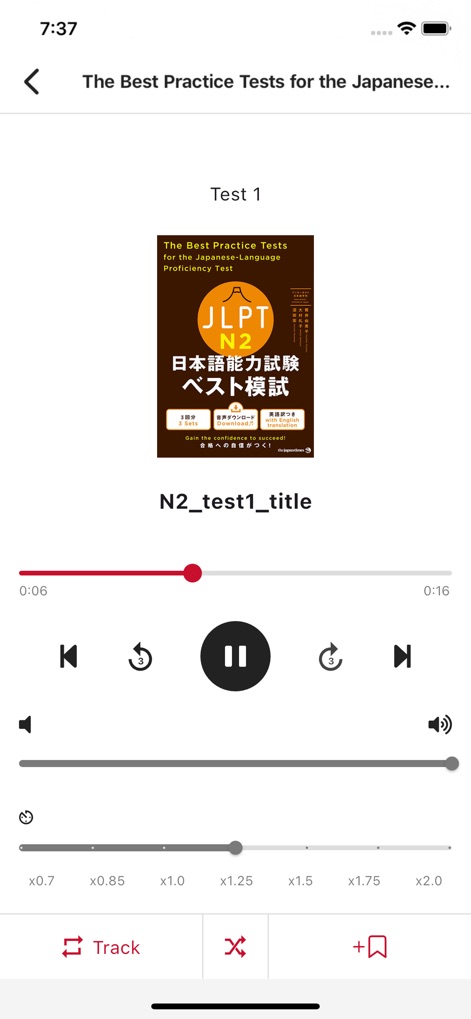
The app's advanced player provides essential tools for language learners, featuring precise 3-second 'skip back/forward' buttons and adjustable 'playback speed' options to optimize comprehension.
Optimized Playback Tools
Description
Download
More Like This
Apps with similar features and user experience

AnatomyMapp
Books of Discovery

Sharpen - College Exam Prep
McGraw-Hill Higher Education

my-oto-mo
Gakken CO.,LTD

3D Mobil
Muhammet Karakok

PagePlayer - Cornelsen
Cornelsen Verlag GmbH

伴学课堂
Jiangxi Doubanjiang Technology Co., Ltd

学而思HD-学生端
Beijing Xueersi Education Technology Co., Ltd.

Video Cepte
FERNUS BILISIM HIZMETLERI EGI.DAN. ve TIC.LTD.STI.

标准日本语(日语教材)
PEP Digital Publishing Corporation Limited
This page is not an official page of the app or its developer, but an independent editorial publication created for informational and commentary purposes. Unless expressly stated otherwise, neither the app nor its developer is affiliated with, endorsed by, sponsored by, authorized by, or otherwise officially connected with MWM, Apple, Google Play, the app publisher, or the app's developer, and nothing on this page implies that the app was developed using MWM's services. Any trademarks, logos, screenshots, and other content remain the property of their respective owners.