
This page is not an official page of the app or its developer, but an independent editorial publication created for informational and commentary purposes. Unless expressly stated otherwise, neither the app nor its developer is affiliated with, endorsed by, sponsored by, authorized by, or otherwise officially connected with MWM, Apple, Google Play, the app publisher, or the app's developer, and nothing on this page implies that the app was developed using MWM's services. Any trademarks, logos, screenshots, and other content remain the property of their respective owners.


Owll: AI Note Taker & Record
Stop drowning in notes. This app hands you the power to capture everything, effortlessly.
Downloads
1M+User Rating
Total Ratings
2.6KPublisher
Category
UtilitiesLocales
8Latest Version
3.13.1Size
144.1 MBFirst Released
Jul 18, 2023An Analytical Overview of Its Core Capabilities for Enhanced Productivity and Organization
Key Features of Owll: AI Note Taker & Record
AI-Powered Automation
The app provides AI-driven recording, voice-to-text transcription, and intelligent summarization, automatically generating concise takeaways and actionable to-do lists to ensure no detail is missed.
Seamless Multi-Device Sync
It ensures instant synchronization of recordings and notes across Apple Watch, iPhone, iPad, and the Web, offering a truly seamless workflow and accessibility from any device within the Apple ecosystem.
Intelligent Note Review
This tool features an AI assistant that highlights main points, answers questions based on transcripts and recordings, and provides clear summaries, enhancing comprehension and information retrieval.
Comprehensive AI Study Aid
The app transforms audio into precise AI transcriptions, smart summaries, lecture notes, flashcards, and practice quizzes, serving as an effective study companion for students and professionals alike.
Real-time Meeting Transcription
It offers real-time transcription for popular online meeting platforms like Zoom, Google Meet, and Microsoft Teams, allowing users to remain focused on discussions while clear meeting notes are automatically captured.
Global Language Support
The app supports transcription and translation for over 100 languages, breaking down communication barriers for global meetings, online classes, and diverse team collaborations.
Flexible Import & OCR
Users can import audio from various apps or YouTube videos for instant transcription, and utilize OCR to convert PDFs into searchable text, centralizing diverse information sources.
Smart Organization & Sharing
It allows for the creation of custom folders to organize recordings and notes efficiently, alongside easy sharing of key takeaways with teammates or classmates to facilitate collaboration.
Frequently Asked Questions
Everything you need to know about Owll: AI Note Taker & Record
What is Owll:AI Note Taker & Assistant?
Owll AI is a smart assistant for AI note-taking, offering voice-to-text, real-time transcription, and AI summaries for meetings, lectures, and study sessions. It records audio, uploads files, and saves online calls.
How does Owll:AI Note Taker & Assistant transcribe online meetings?
Owll AI transcribes Zoom, Google Meet, and Microsoft Teams sessions in real-time. It provides clear meeting notes, allowing users to stay focused during the call.
Does Owll:AI Note Taker & Assistant provide AI-powered summaries?
Yes, Owll AI generates smart AI summaries and concise takeaways from transcripts, recordings, documents, or new topics in seconds. It highlights main points and answers questions.
What file types can Owll:AI Note Taker & Assistant import for transcription?
Owll AI imports audio from any app or device, supporting all formats for speech-to-text. It also imports YouTube videos for transcripts and summaries, and uses OCR for PDFs.
Does Owll:AI Note Taker & Assistant offer multilingual transcription?
Yes, Owll AI supports multiple languages for enhanced transcription and translation. This feature is ideal for global meetings, online classes, and cross-team collaboration.
What are the subscription options for Owll:AI Note Taker & Assistant?
Owll Plus offers subscription options including 1-Year, 1-Month, and 1-Week plans. Payments are billed via the App Store Account upon purchase.
How do users manage their Owll:AI Note Taker & Assistant subscriptions?
Users manage subscriptions through their Account Settings. Subscriptions auto-renew unless canceled 24 hours before the period ends.
Can Owll:AI Note Taker & Assistant create flashcards and quizzes?
Yes, Owll AI transforms notes into flashcards and study cards. Its AI quizzes generate practice questions to reinforce key ideas and prepare for exams.
Is Owll:AI Note Taker & Assistant compatible across multiple devices?
Yes, Owll AI offers multi-device compatibility. It works on iPhone, iPad, and the web, providing synced notes across all platforms.
Does Owll:AI Note Taker & Assistant include an AI Coach feature?
Yes, Owll AI includes a built-in AI Coach. This feature assists users by generating concise takeaways and to-do lists from recordings.
Where can I find the privacy policy for Owll:AI Note Taker & Assistant?
The Privacy Policy for Owll AI is available at https://owll.ai/user-agreement/#/privacy-policy/. This ensures transparency regarding data handling.
How does Owll:AI Note Taker & Assistant ensure data security and privacy?
Owll AI emphasizes that data is private and secure, with all user data always encrypted. Users own their data.
The following screenshots and description are sourced directly from the app's official store listing and are the property of the app developer.
App Store
Screenshots

This tool offers seamless recording options, visible with the 'Instant Recorder' interface on the iPhone and the dedicated 'Record Audio' button on the Apple Watch.
Multi-Device Productivity

Experience immediate voice-to-text conversion, showcasing the intuitive microphone input visual and the detailed 'Transcription' block with speaker identification.
Precision AI Transcription
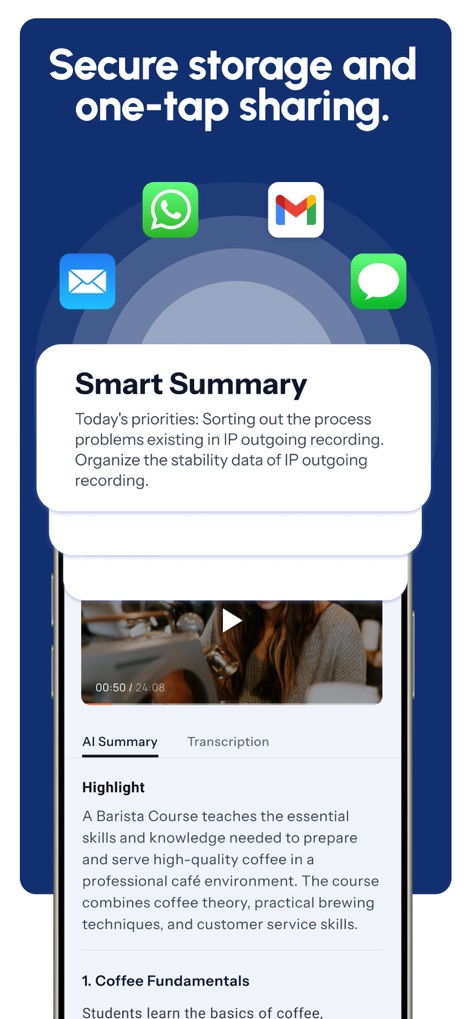
The app generates concise 'Smart Summary' insights, which users can easily share via integrated icons for platforms like WhatsApp and Gmail.
Intelligent Summaries, Sharing

Engage with the app's intelligent assistant through the 'Hi, I'm Owll' chat interface and leverage the suggested prompt for the 'Global AI Coach' feature.
Your Personal AI Coach

The app helps users stay organized by generating a 'To Do List' and allowing them to highlight key phrases directly within the transcription interface.
Actionable Insights Highlighted

The platform ensures data privacy, represented by the shield icon, while supporting '100+ languages' for transcription and translation, as indicated by the diverse country flags.
Secure, Global Communication

The tool supports diverse content types, from 'Sales Calls' and 'Study Notes' to direct integration with platforms like YouTube and Zoom.
Comprehensive Workflow Integration

This tool provides consistent functionality across Apple devices, demonstrating its presence on the iPhone, iPad, and Apple Watch for a truly integrated user experience.
Ecosystem Sync & Access
Description
Download
More Like This
Apps with similar features and user experience

Bible Note Taker & Recorder
TOPMUSE PTE. LTD.

Thea: Study Smart
Theaai Corporation

HyNote: AI Note Taker, Summary
Tuling Network Limited

Melonote:AI Voice to Text Note
Yan Cheng Cheok

StudyOS: Study with AI
DANIEL PONCELAS VARGAS

Genio AI: College Smart Tutor
Genio Tech, LLC

Nerdmask: Study Games
Supersmart LLC
Amazing Flash Cards
Erik Wegener

Studi - Learning Companion
Wesam Alzahir
This page is not an official page of the app or its developer, but an independent editorial publication created for informational and commentary purposes. Unless expressly stated otherwise, neither the app nor its developer is affiliated with, endorsed by, sponsored by, authorized by, or otherwise officially connected with MWM, Apple, Google Play, the app publisher, or the app's developer, and nothing on this page implies that the app was developed using MWM's services. Any trademarks, logos, screenshots, and other content remain the property of their respective owners.