
This page is not an official page of the app or its developer, but an independent editorial publication created for informational and commentary purposes. Unless expressly stated otherwise, neither the app nor its developer is affiliated with, endorsed by, sponsored by, authorized by, or otherwise officially connected with MWM, Apple, Google Play, the app publisher, or the app's developer, and nothing on this page implies that the app was developed using MWM's services. Any trademarks, logos, screenshots, and other content remain the property of their respective owners.


Phone
Finally, reclaim your attention from unwanted calls and communication chaos. The app offers comprehensive control, turning your phone into a communication fortress.
Downloads
250k+User Rating
Total Ratings
25.6KPublisher
Category
UtilitiesLocales
33Latest Version
2.7Size
4.9 MBFirst Released
Oct 25, 2021Evaluating core functionalities and advanced features for Apple ecosystem users
Comprehensive Analysis of the iOS Phone Application
Advanced Call Screening
It provides a robust call screening feature that intercepts incoming calls from unknown numbers, asking for identification before the phone even rings, thereby safeguarding user privacy and preventing unwanted interruptions.
Real-time Live Voicemail
This tool features real-time transcription of incoming voicemails, allowing users to read messages as they are being left and decide whether to pick up the call immediately, significantly enhancing call management and efficiency.
Automated Hold Assist
The app provides an innovative Hold Assist functionality that allows the phone to wait on hold on behalf of the user, alerting them only when a live agent becomes available, thereby maximizing efficiency and reducing unproductive waiting time.
Intelligent Voicemail Summaries
It incorporates Apple Intelligence to generate concise summaries of voicemails, presenting key information directly alongside missed calls to enable rapid understanding and prioritization of communications.
Integrated Call Recording
This tool enables users to record live calls and FaceTime audio calls directly from the app, with automatic transcription stored in the Notes app, providing essential documentation capabilities for professional and personal use, along with an announcement to ensure privacy compliance.
Dynamic Microphone Modes
The app intelligently adjusts microphone settings, offering Voice Isolation to suppress background noise for clear communication in busy environments and Wide Spectrum to capture all surrounding sounds when desired, ensuring optimal audio quality for various scenarios.
Centralized Communication Platform
It seamlessly integrates traditional phone calls, FaceTime audio, and FaceTime video calls into a single, intuitive interface, streamlining communication for a cohesive user experience within the Apple ecosystem.
Siri Voice Control
The app allows users to leverage Siri for hands-free call management, including placing and returning calls, and checking voicemails, which enhances accessibility and multitasking capabilities.
Advanced Visual Voicemail
This tool provides visual voicemail with written transcripts, enabling users to quickly scan messages without listening, and offers options to save or share voicemails as notes, voice memos, or through other Apple services.
Automated Unknown Caller Silence
The app offers an option to automatically send calls from unknown numbers directly to voicemail, ensuring that the phone only rings for contacts, recent outgoing calls, or Siri Suggestions, thus enhancing focus and reducing spam interruptions.
Frequently Asked Questions
Everything you need to know about Phone
Does the Phone app support FaceTime audio and video calls?
Yes, the Phone app unifies phone calls, FaceTime audio, and FaceTime video calls into a single, convenient application.
How does the Phone app manage recent calls?
The Phone app displays recent conversations and missed calls in its Recents section. Users can also search for previous calls, transcribed voicemails, and contacts there.
Can I search for contacts using the keypad in the Phone app?
Yes, the Phone app features Keypad search. This allows users to quickly find and call existing contacts by typing their name or number directly on the alphanumeric keypad.
Can the Phone app record calls?
Yes, the Phone app allows users to record live calls or FaceTime audio calls. Transcripts of these recordings are then available for review within the Notes app.
What is Live Voicemail in the Phone app?
Live Voicemail in the Phone app provides a real-time transcription of messages as they are being left. This enables users to pick up the call immediately if desired.
What microphone modes are available in the Phone app?
The Phone app offers Automatic Mic Mode, Voice Isolation to block ambient noise, and Wide Spectrum to capture all surrounding sounds during a call.
Can the Phone app silence unknown callers automatically?
Yes, the Phone app's "Silence Unknown Callers" feature automatically sends calls from unknown numbers to voicemail, ensuring the phone only rings for known contacts.
Does the Phone app support making calls over Wi-Fi?
Yes, the Phone app enables Wi-Fi Calling, allowing users to make or receive phone calls over a Wi-Fi connection. This is useful in areas with limited or no cellular coverage.
The following screenshots and description are sourced directly from the app's official store listing and are the property of the app developer.
App Store
Screenshots
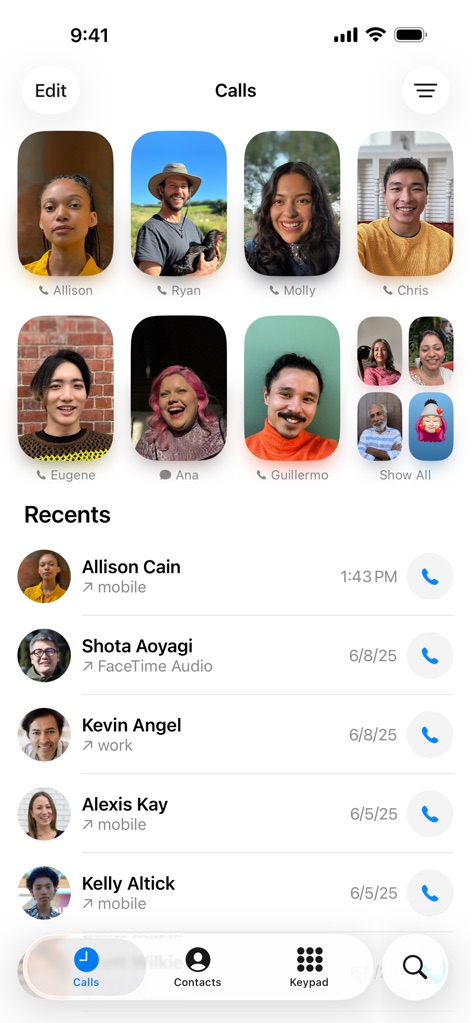
The app streamlines communication with personalized contact cards for quick dialing and a detailed recents list to track all interactions.
Unified Call Hub
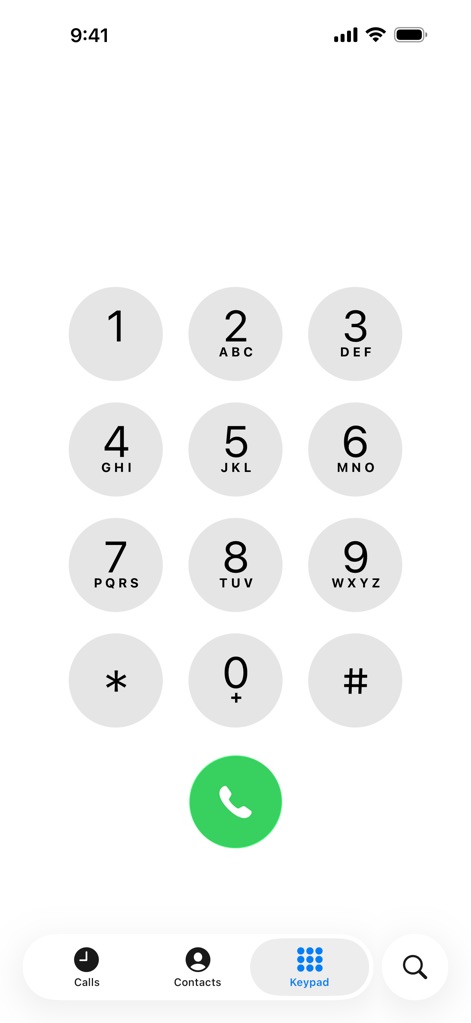
Users can swiftly initiate calls using the intuitive numeric keypad for direct number entry and access quick contact search via alphanumeric labels.
Instant Dial Pad
Description
Download
More Like This
Apps with similar features and user experience




This page is not an official page of the app or its developer, but an independent editorial publication created for informational and commentary purposes. Unless expressly stated otherwise, neither the app nor its developer is affiliated with, endorsed by, sponsored by, authorized by, or otherwise officially connected with MWM, Apple, Google Play, the app publisher, or the app's developer, and nothing on this page implies that the app was developed using MWM's services. Any trademarks, logos, screenshots, and other content remain the property of their respective owners.