
This page is not an official page of the app or its developer, but an independent editorial publication created for informational and commentary purposes. Unless expressly stated otherwise, neither the app nor its developer is affiliated with, endorsed by, sponsored by, authorized by, or otherwise officially connected with MWM, Apple, Google Play, the app publisher, or the app's developer, and nothing on this page implies that the app was developed using MWM's services. Any trademarks, logos, screenshots, and other content remain the property of their respective owners.


Photo Editor-Add, Replace Text
Go beyond basic overlays. Seamlessly swap words, fix typos, and create viral content with professional-grade precision and AI-powered blending that looks 100% natural.
Downloads
5K+User Rating
Total Ratings
0Publisher
Category
Graphics & DesignLocales
15Latest Version
2.0.3Size
14.5 MBFirst Released
Oct 7, 2025Transform Every Word in Your Photos
Experience the power of true point-and-edit technology. Whether you are fixing a typo on a flyer or creating the next viral meme, we make text editing feel like magic.
Seamless Text Replacement
Do not just overlay text—replace it. Our engine blends your new words with original textures, lighting, and shadows for a professional finish.
Pixel-Perfect Precision
Edit contracts, posters, or menus with surgical accuracy. Select individual characters and adjust fonts, spacing, and layout with total freedom.
Frequently Asked Questions
Everything you need to know about Photo Editor-Add, Replace Text
What is Photo Editor-Add, Replace Text?
Photo Editor-Add, Replace Text is an ultimate text editing tool that enables precise "point-and-edit" text manipulation on images. It features advanced text recognition, pixel-level accuracy, and seamless integration of new text.
Can Photo Editor-Add, Replace Text recognize different languages and handwriting?
Yes, Photo Editor-Add, Replace Text recognizes over 100 languages. It can accurately detect and edit messy handwriting, cursive notes, and even ancient blurry text within images.
How does Photo Editor-Add, Replace Text handle text editing accuracy?
Photo Editor-Add, Replace Text offers pixel-level editing accuracy, making single-word selection smooth. After editing, the app seamlessly blends the texture, lighting, and shadows back into the image.
What text customization options are available when adding text to images in Photo Editor-Add, Replace Text?
Photo Editor-Add, Replace Text provides tons of fonts, a sea of colors, and flexible options for size, position, and layout. Users can drag and adjust text freely to achieve eye-catching results.
Can Photo Editor-Add, Replace Text be used for professional tasks like editing contracts?
Yes, Photo Editor-Add, Replace Text is suitable for professional situations including editing contracts with discreet, flawless precision. It also fixes posters and helps with note digitization.
Does Photo Editor-Add, Replace Text offer options to customize text appearance beyond basic editing?
Yes, Photo Editor-Add, Replace Text allows extensive customization. Users can modify color, size, thickness, spacing, shadows, outlines, and import custom fonts. This transforms text editing into "text magic."
How do users restore their purchase in the Photo Editor-Add, Replace Text app?
Users can restore their subscription in Photo Editor-Add, Replace Text via the "Restore Purchase" option. This is applicable if they have re-downloaded the app or installed it on another device.
Does Photo Editor-Add, Replace Text support a dark mode interface?
Yes, Photo Editor-Add, Replace Text includes a dark mode interface. Users can enable or disable this feature in the General Settings section of the app.
Where can users find the Privacy Policy for Photo Editor-Add, Replace Text?
The Privacy Policy for Photo Editor-Add, Replace Text is available at https://dongdajieohyeah.github.io/ReText/retext_privacy.html. This link is provided in the app's description and accessible via the "About" section.
The following screenshots and description are sourced directly from the app's official store listing and are the property of the app developer.
App Store
Screenshots
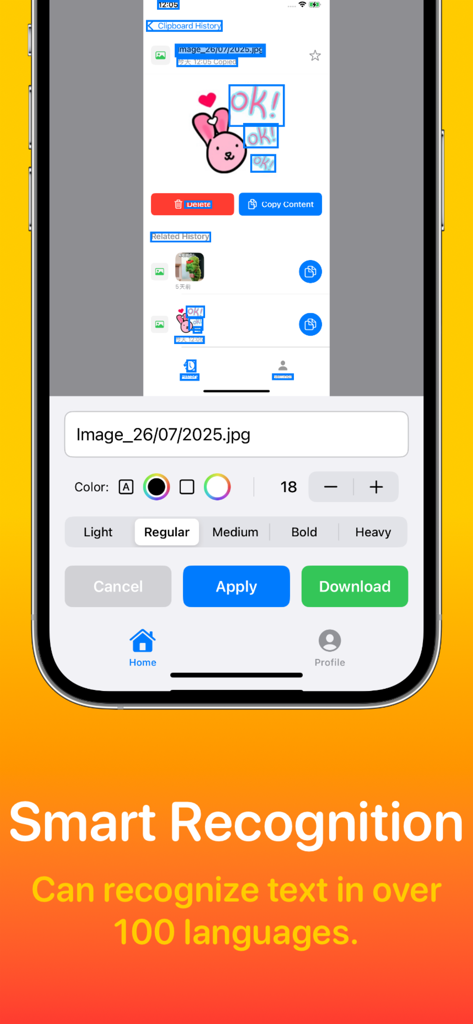
Screenshot of the Photo Editor app showing smart text recognition and editing options on a mobile device
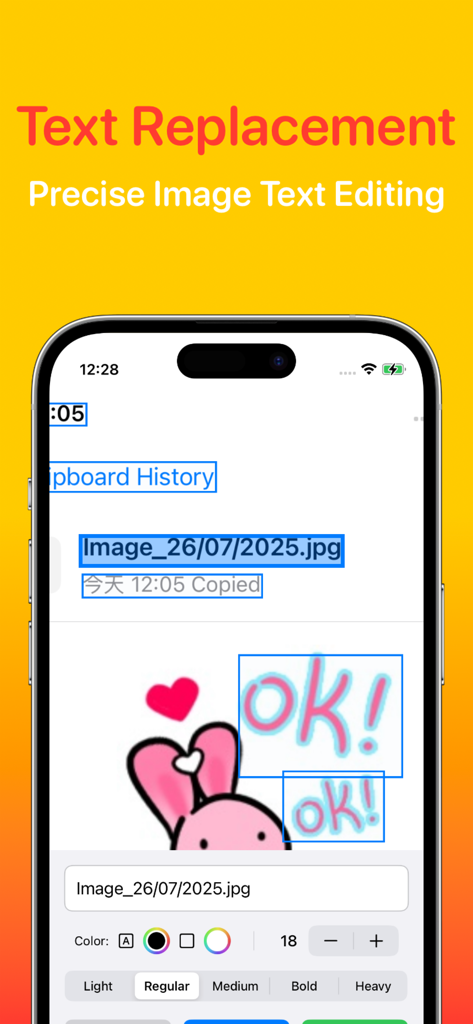
Smartphone screen showing a mobile app interface for precise text replacement and image editing with font customization tools
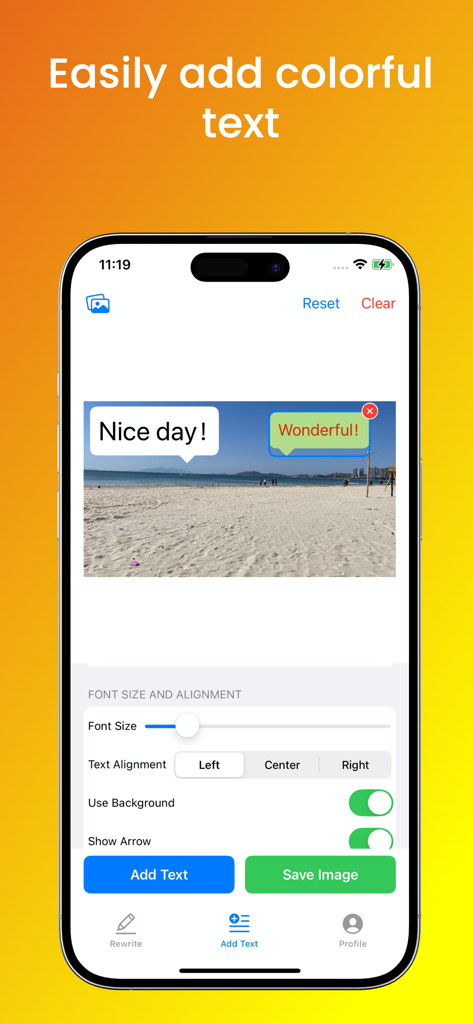
Interface of the Photo Editor app showing colorful text bubbles added to a beach photo with font settings

A mobile app profile screen showing OCR recognition settings, dark mode toggle, and VIP member status.
Description
Download
More Like This
Top-ranked apps in the same category

Kling AI: AI Image&Video Maker
LOHAS GAMES PTE. LTD.

iScreen - Widgets & Wallpaper
Xiamen ShenZhuo Information Technology Co., Ltd.

Dreamina AI: Image&Video Maker
BYTEDANCE PTE. LTD.

Home AI - AI Interior Design
HUBX YAZILIM HIZMETLERI ANONIM SIRKETI

ibis Paint X
ibis inc.

ThemeKit: Widget & Icon Themes
Woohoo Tech. Ltd.

Sketchbook®
Sketchbook, Inc.

Colorful Widget- Widget&Themes
Guangzhou ZHIFENG Information Technology Co.,Ltd.

ReRoom AI: Interior Design
GM UniverseApps Limited
This page is not an official page of the app or its developer, but an independent editorial publication created for informational and commentary purposes. Unless expressly stated otherwise, neither the app nor its developer is affiliated with, endorsed by, sponsored by, authorized by, or otherwise officially connected with MWM, Apple, Google Play, the app publisher, or the app's developer, and nothing on this page implies that the app was developed using MWM's services. Any trademarks, logos, screenshots, and other content remain the property of their respective owners.