
This page is not an official page of the app or its developer, but an independent editorial publication created for informational and commentary purposes. Unless expressly stated otherwise, neither the app nor its developer is affiliated with, endorsed by, sponsored by, authorized by, or otherwise officially connected with MWM, Apple, Google Play, the app publisher, or the app's developer, and nothing on this page implies that the app was developed using MWM's services. Any trademarks, logos, screenshots, and other content remain the property of their respective owners.


Photo Splash photo editor app
It hands users the power to transform ordinary photos into striking visual statements, effortlessly. The app offers a robust suite for selective colorization, turning mundane into magnificent with AI-driven precision. Users gain immediate control over their imagery, making every shareable moment pop.
Downloads
2.5M+User Rating
Total Ratings
11.5KPublisher
Category
Photo & VideoLocales
31Latest Version
3.21.44Size
102.8 MBFirst Released
Feb 5, 2011An evaluation of core functionalities and their impact on creative social media content creation.
Photo Splash App: Feature Analysis
AI-Powered Auto Splash
This tool features advanced AI technology that automatically detects subjects and applies various splash styles with a single tap, offering quick and professional-looking results.
Selective Colorization (Photo Splash Effect)
It allows users to create stunning selective color photos, highlighting specific elements with vibrant color against a desaturated background for a dramatic visual impact.
Extensive Collage & Social Templates
The app provides access to thousands of creative collages and social media templates, allowing users to effortlessly design visually appealing and trendy content for sharing.
Integrated Social Sharing
This tool features direct sharing options to popular social media platforms like Facebook and Twitter, as well as email and clipboard, simplifying the process of showcasing creations.
Creative Enhancement Tools
It allows users to personalize images with a variety of recoloring options, expressive stickers, and diverse fonts, adding unique touches to their designs.
Advanced Photo Editing & Special Effects
The app provides comprehensive photo editing capabilities, including the application of movie-like effects and stylistic enhancements such as beard and hairstyle filters.
Ad-Free & Watermark-Free Experience
It allows users to enjoy an uninterrupted creative workflow and produce polished, professional-looking images free from advertisements and watermarks.
Real-time Preview Window
This tool features a real-time preview window, enabling users to accurately see the effects of their edits as they happen, ensuring precision and control.
Intuitive Gesture Controls
The app provides intuitive gesture controls, such as pinch-to-zoom and pan, allowing for detailed and precise adjustments during the editing process.
Free Style Card Creation
It allows users to unleash their creativity by designing unique freestyle cards for various occasions.
The following screenshots and description are sourced directly from the app's official store listing and are the property of the app developer.
App Store
Screenshots

See how the app instantly applies selective colorization, transforming images with vibrant hues, clearly demonstrated by the intuitive 'Before/After' view and the 'Auto' feature.
Dynamic Color Pop
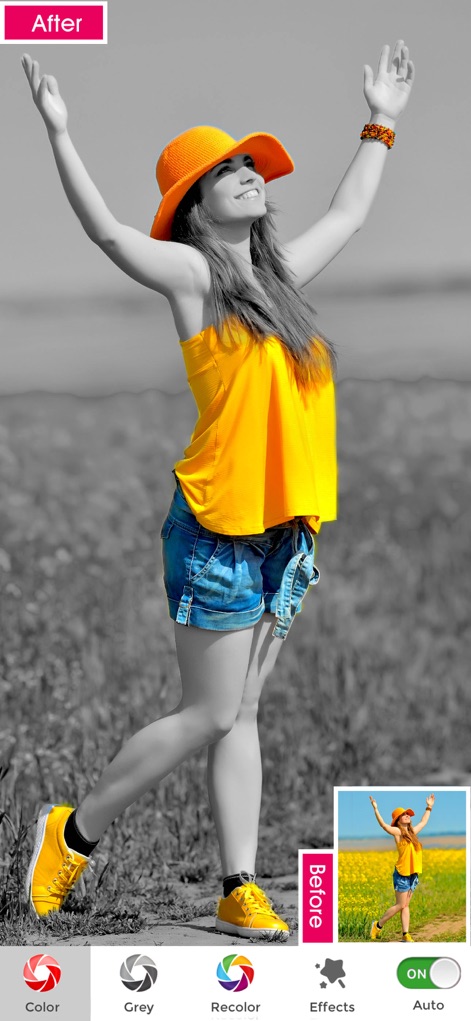
Discover how users can easily isolate and colorize key elements like clothing and accessories, showcased alongside a convenient 'Before/After' comparison to highlight the transformation.
Effortless Splash Effects

Observe the app's capability to meticulously isolate and enhance specific colors, such as the vibrant rainbow umbrella and the teal dress, with a clear 'Before/After' visual instantly showing the effect.
Isolate & Enhance
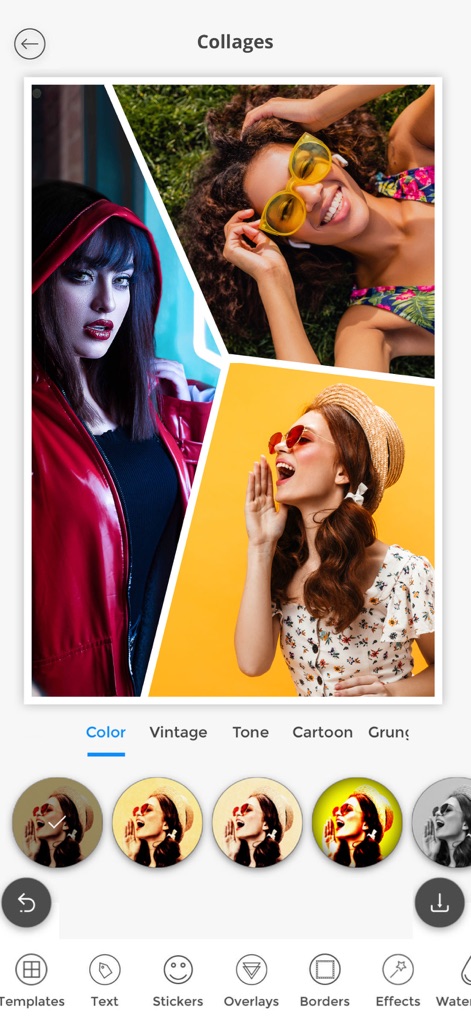
Explore the robust collage creator, allowing users to combine multiple photos into engaging layouts and apply a variety of artistic filter options, including 'Vintage' and 'Cartoon' styles.
Creative Collage Creator

Witness the app's advanced selective colorization combined with an array of artistic filters such as 'Lucky' and 'Haas', enabling users to create unique and stylized photos.
Stylish Splash Filters

This view highlights the stunning selective colorization effects achievable with the app and the seamless integration for sharing masterpieces directly to platforms like 'Instagram' and 'Whatsapp'.
Share Your Art

Discover the versatile 'Card Maker' feature, empowering users to create custom greetings for any occasion with options ranging from festive holiday designs to personalized 'Happy Holidays' messages.
Personalized Card Studio

Delve into the 'Free style' section, offering a rich collection of ready-to-use templates for creative compositions and stylish text overlays like 'Less Is More' and 'Summer Fashion' to enhance visual storytelling.
Dynamic Design Templates

Explore the extensive range of 'Editing Tools' and specialized collage categories, from 'Facebook Cover' designs to tailored 'Instagram' layouts, providing endless possibilities for visual content creation.
Comprehensive Creative Hub
Description
Download
More Like This
Apps with similar features and user experience

Color Splash for iPad
Pocket Pixels Inc.

Color Lab – Recolor Your Photos
MULIAN LI

Photo Collage Maker - PhotoPop
out thinking electronics private limited

Change color of photos Auto
out thinking electronics private limited

KingSplash - Photo color and recolor splash effect
pixel force private limited

Color Splurge Pro - Pic Editor
out thinking electronics private limited
This page is not an official page of the app or its developer, but an independent editorial publication created for informational and commentary purposes. Unless expressly stated otherwise, neither the app nor its developer is affiliated with, endorsed by, sponsored by, authorized by, or otherwise officially connected with MWM, Apple, Google Play, the app publisher, or the app's developer, and nothing on this page implies that the app was developed using MWM's services. Any trademarks, logos, screenshots, and other content remain the property of their respective owners.