
This page is not an official page of the app or its developer, but an independent editorial publication created for informational and commentary purposes. Unless expressly stated otherwise, neither the app nor its developer is affiliated with, endorsed by, sponsored by, authorized by, or otherwise officially connected with MWM, Apple, Google Play, the app publisher, or the app's developer, and nothing on this page implies that the app was developed using MWM's services. Any trademarks, logos, screenshots, and other content remain the property of their respective owners.


Piano - Simple Piano Recording
Unleash your inner maestro, no sheet music required. This app puts 128 instruments and a full 88-key piano at your fingertips, transforming casual taps into compositions.
Downloads
750k+User Rating
Total Ratings
29.4KPublisher
Category
MusicLocales
14Latest Version
5.2.10Size
59.6 MBFirst Released
Dec 18, 2017An Analytical Overview for Beginners and Casual Music Enthusiasts
Key Features of 'Piano - Simple Piano Recording'
Beginner-Friendly Note Labels
The app provides optional note labels (CDEFGAB or Do Re Mi) directly on the virtual keys, significantly aiding beginners in identifying and learning notes without requiring prior sheet music knowledge.
Integrated Metronome and Rhythm Patterns
This tool features an adjustable metronome (20-240 BPM) with various time signatures and 8 diverse rhythm patterns, enabling users to practice timing, develop rhythm, and enjoy a band-like experience.
Diverse 128-Instrument Sound Library
It allows users to choose from 128 different instrument sounds, including various pianos, organs, guitars, and orchestral instruments, offering extensive creative exploration beyond a standard piano.
Full 88-Key Virtual Piano
The app provides a realistic 88-key virtual piano interface, with adjustable key sizes to accommodate both children's small hands and adults, simulating a grand piano experience on mobile devices.
Performance Recording and Tracking
This tool features the ability to record musical performances and play them back, allowing users to objectively review their progress, identify areas for improvement, and maintain motivation in their practice.
Simple, Intuitive User Interface
The app features a simple and intuitive design, ensuring ease of use for beginners, casual players, and children, which lowers the barrier to entry and promotes immediate engagement.
Accessible Free-to-Use Core Features
It offers all its basic and essential features completely free of charge, enabling beginners and casual enthusiasts to start their musical journey without any initial financial commitment.
Customizable Aesthetic Themes
The app provides 8 distinct color themes for the keyboard interface, allowing users to personalize their visual experience to match their mood or preference.
Frequently Asked Questions
Everything you need to know about Piano - Simple Piano Recording
Does the Piano - Simple Piano Recording app have a full piano keyboard?
Yes, the Piano - Simple Piano Recording app features a full 88-key piano keyboard. Users can adjust key size and scroll to access all keys on their smartphone or tablet.
How many instruments are available in the Piano - Simple Piano Recording app?
The Piano - Simple Piano Recording app offers 128 different instrument sounds. These include various pianos, organs, guitars, strings, brass, percussion, bass, and harmonica, allowing for diverse musical performance.
Can users record their performances with the Piano - Simple Piano Recording app?
Yes, the Piano - Simple Piano Recording app allows users to record their performances. Users can play back recordings anytime and save multiple sessions to track their daily practice progress effectively.
Does the Piano - Simple Piano Recording app include a metronome and rhythm patterns?
Yes, the Piano - Simple Piano Recording app includes a metronome with BPM settings from 20 to 240 and support for various time signatures. It also provides 8 rhythm patterns for practicing with drums.
What color themes are available in the Piano - Simple Piano Recording app?
The Piano - Simple Piano Recording app offers 8 color themes: Classic, Matcha, Sakura, Chocolate, Indigo, Halloween, Christmas, and Ocean. Users can change the keyboard colors to match their mood or season.
Does the Piano - Simple Piano Recording app provide note labels for beginners?
Yes, the Piano - Simple Piano Recording app provides note labels on the keys for beginners. Users can choose between CDEFGAB (Western notation), Do Re Mi (Solfège), or no labels.
Is the Piano - Simple Piano Recording app free to use?
Yes, the Piano - Simple Piano Recording app is free to use for all basic features. An ad-free option is available by watching a video to hide banner ads for three days.
How can users remove ads in the Piano - Simple Piano Recording app?
Users can remove banner ads in the Piano - Simple Piano Recording app by watching a video. This action hides ads for a duration of three days.
How many languages does the Piano - Simple Piano Recording app support?
The Piano - Simple Piano Recording app supports 14 languages. This feature makes the application available and accessible to users worldwide.
Does the Piano - Simple Piano Recording app play sounds in silent mode?
Yes, the Piano - Simple Piano Recording app supports silent mode. It plays sounds even when the device is set to silent mode, ensuring continuous musical practice.
The following screenshots and description are sourced directly from the app's official store listing and are the property of the app developer.
App Store
Screenshots
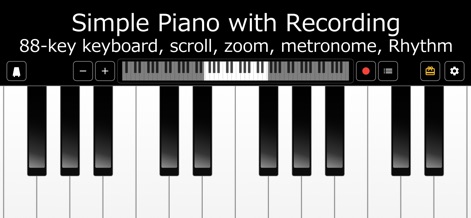
Users can engage with the app's full 88-key virtual keyboard, seamlessly navigating octaves with the scroll bar and instantly recording performances with the dedicated record button.
Interactive Keyboard Interface
Description
Download
More Like This
Apps with similar features and user experience
Minimoog Model D Synthesizer
Moog Music Inc.

GeoShred
Wizdom Music LLC

VIRAL Synth T2x | Synthesizer
AudioKit Pro, LLC

GeoShred Play
Wizdom Music LLC

Pop Drummer -Real Drum Machine
Lumbeat Ltd.
Pure Strings Instrument & AUv3
e-instruments lab GmbH

Keylimba
David Fu
簡単ぴあの 音楽の作曲や音符の記憶、キーボード練習
hiroki sugimoto
X Drum - 3D & AR
Revontulet Soft Inc.
This page is not an official page of the app or its developer, but an independent editorial publication created for informational and commentary purposes. Unless expressly stated otherwise, neither the app nor its developer is affiliated with, endorsed by, sponsored by, authorized by, or otherwise officially connected with MWM, Apple, Google Play, the app publisher, or the app's developer, and nothing on this page implies that the app was developed using MWM's services. Any trademarks, logos, screenshots, and other content remain the property of their respective owners.