
This page is not an official page of the app or its developer, but an independent editorial publication created for informational and commentary purposes. Unless expressly stated otherwise, neither the app nor its developer is affiliated with, endorsed by, sponsored by, authorized by, or otherwise officially connected with MWM, Apple, Google Play, the app publisher, or the app's developer, and nothing on this page implies that the app was developed using MWM's services. Any trademarks, logos, screenshots, and other content remain the property of their respective owners.


ReShoot: AI Photos & Edits
No longer constrained by a single shot, users gain absolute visual control. The app puts a full studio in your pocket.
Downloads
750k+User Rating
Total Ratings
9.5KPublisher
Category
Graphics & DesignLocales
9Latest Version
1.3.10Size
125.1 MBFirst Released
Sep 3, 2025An analytical overview of AI-powered capabilities designed for enhanced digital presence and creative content generation.
Key Features of ReShoot: AI Photos & Edits
AI Professional Business Headshots
It enables users to generate polished, professional headshots suitable for resumes, LinkedIn, and corporate profiles from a simple selfie, offering significant time and cost savings.
AI Photoshoot Generation
The app transforms a single selfie into a variety of high-quality, magazine-style photoshoots with diverse outfits and backgrounds, perfect for enhancing digital presence.
AI Product Photography Studio
This tool provides small business owners and creators with the ability to instantly generate professional-grade product images for e-commerce, ads, and social media marketing.
One-Tap AI Photo Enhancement
It allows users to effortlessly enhance any photo's quality and appearance with intelligent, one-tap adjustments, ensuring visually appealing results for all platforms.
AI Cartoon & Anime Filters
The app features artistic filters that convert photos into captivating cartoon or anime styles, ideal for creative expression and engaging social media content.
AI Logo & Image Generation
This tool supports creators and businesses by generating unique logos and various custom visual assets, facilitating branding and content creation from text or concepts.
AI Photo Merging
It allows for the realistic and seamless combination of multiple individuals' photos into a single, shared image, offering novel creative possibilities.
AI Hairstyle & Makeover Preview
The app provides virtual try-on functionalities for different hairstyles and hair colors, enabling users to preview new looks before making personal style changes.
AI Interior Design Preview
This feature allows users to visualize diverse interior design styles within their own home photos, aiding in creative planning and decor decisions.
AI Tattoo Visualization
It enables users to virtually try on various tattoo designs on their body, facilitating informed decisions for personal expression without commitment.
Frequently Asked Questions
Everything you need to know about ReShoot: AI Photos & Edits
What is ReShoot: AI Photos & Edits?
ReShoot is a free AI photo editor that transforms selfies into professional photoshoots using Google's Gemini 2.5 Flash Image technology. It offers various AI tools for editing, generating images, and creating unique visual content.
What AI technology powers ReShoot: AI Photos & Edits?
ReShoot: AI Photos & Edits is powered by Google’s new viral image editor, Gemini 2.5 Flash Image, also known as Nano Banana. This advanced AI technology enables its diverse photo editing capabilities.
Is ReShoot: AI Photos & Edits free to use?
Yes, ReShoot: AI Photos & Edits is completely free. It allows users to transform selfies into stunning photoshoots and access various AI editing tools without cost.
Can ReShoot create magazine-style portraits from a selfie?
Yes, ReShoot features an AI Photo Generator that turns selfies into magazine-style portraits with stunning outfits. Users can achieve ultra-realistic AI photos from a single selfie.
How can I merge photos with AI using ReShoot?
ReShoot provides an AI Power feature to merge photos, allowing users to combine two people’s photos into one realistic, shared picture. This is useful for creating merged couple travel photos.
Does ReShoot offer AI professional business headshots?
Yes, ReShoot provides AI Professional Business Headshots. Users can create professional headshots in suits or business outfits without needing a studio, making it ideal for profile pictures and resumes.
Can I try new hairstyles and colors with ReShoot: AI Photos & Edits?
Yes, ReShoot allows users to try on hairstyles and hair colors virtually before committing to a salon visit. This feature helps find the perfect look.
Can ReShoot generate AI tattoos?
Yes, ReShoot includes an AI Tattoo Generator. Users can try on tattoo ideas and see how they would look on their skin before getting a permanent tattoo.
Can ReShoot help with interior design ideas?
Yes, ReShoot features an AI Interior Designer. Users can explore interior design ideas for their dream home and visualize them in seconds with just one tap.
Can ReShoot create product photos for online shops?
Yes, ReShoot offers an AI Product Photo Studio. This feature generates professional product images in seconds, suitable for online shops, ads, and social media posts.
Where can I find ReShoot's privacy policy?
ReShoot's Privacy Policy is available at https://reshootapp.org/privacy. Users confirm acceptance of it and the Terms of Use by using the app.
Does ReShoot enhance photo quality?
Yes, ReShoot offers photo enhancement features, allowing users to upscale images to HD, UHD, and 4K quality. This reveals the best version of any photo with one tap.
Can ReShoot expand images to different sizes?
Yes, ReShoot can expand images. Users can choose to resize their images to various formats such as Square, Story, or Portrait, as demonstrated in the app.
What kind of retouching features does ReShoot provide?
ReShoot offers AI retouching features that allow users to easily modify elements within an image. For example, it can change objects like a cardboard box into a flower bouquet.
Can ReShoot show my future self or family?
Yes, ReShoot includes an 'AI aging' feature to 'See Your Future Self.' It can also merge features to predict a baby's appearance, simulating family visuals.
The following screenshots and description are sourced directly from the app's official store listing and are the property of the app developer.
App Store
Screenshots
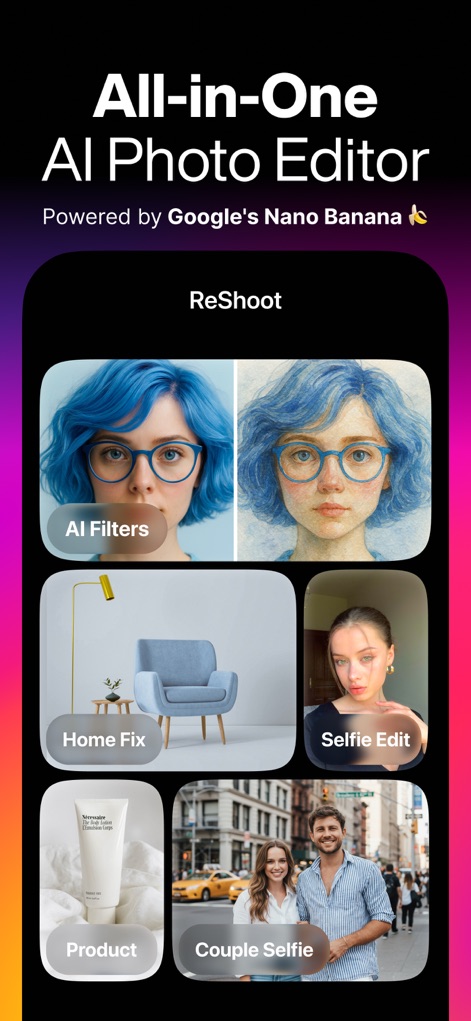
Discover the app's diverse capabilities, showcasing a main dashboard with features like 'AI Filters' for artistic transformations and 'Home Fix' for interior design previews.
Creative Hub Explored
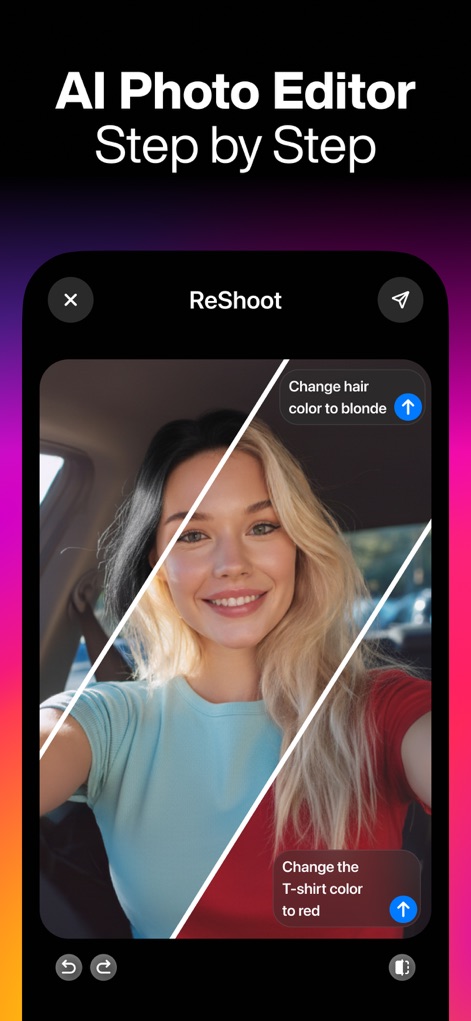
Witness the intuitive editing process as users can effortlessly change hair color to blonde and modify a T-shirt's hue to red with simple text commands.
Effortless AI Editing
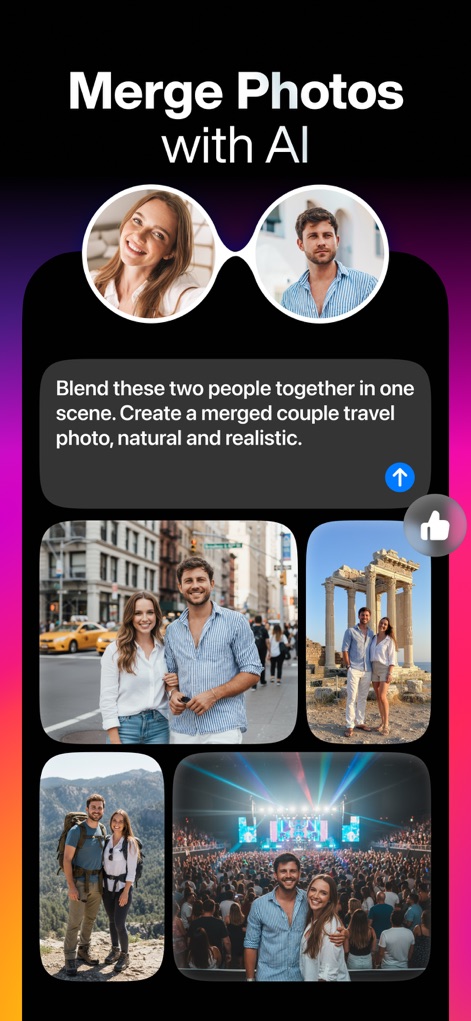
Explore the power of AI to combine two individual portraits into a single realistic image, exemplified by a merged couple travel photo and various scenic composite shots.
Seamless Photo Merges
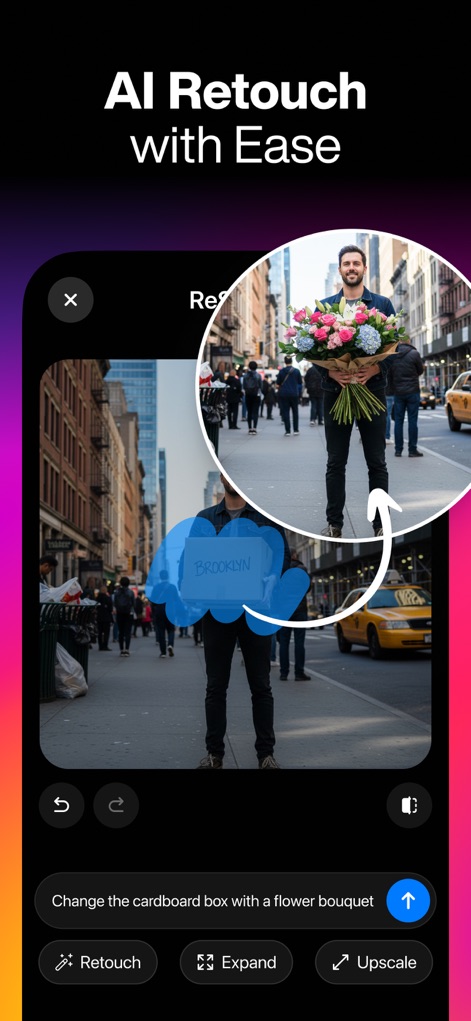
Observe how this tool allows for easy object replacement, such as transforming a cardboard box into a vibrant flower bouquet, alongside options to 'Retouch' and 'Expand' images.
Instant Object Swaps

See how the app intelligently expands image boundaries, offering various aspect ratios like 'Square' and 'Story' to perfectly frame and fit content for different platforms.
Creative Canvas Expansion
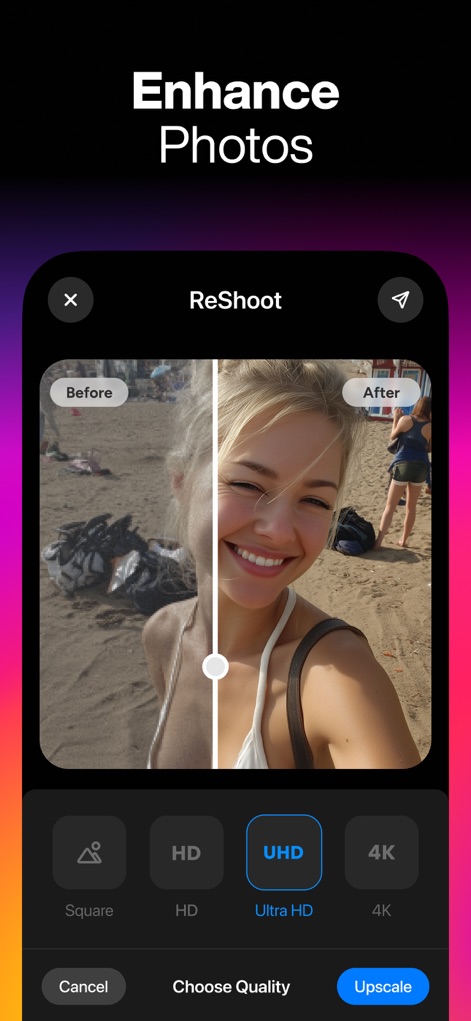
Experience the dramatic improvement in image clarity with the app's enhancement features, demonstrating a 'Before' and 'After' comparison and 'UHD' quality selection for superior resolution.
Quality Restoration Unveiled
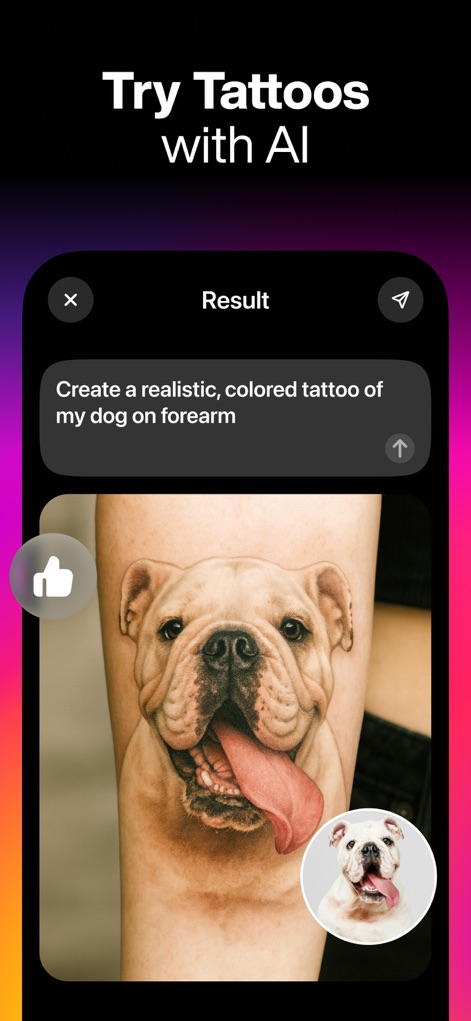
Preview potential body art designs with AI, showcasing the creation of a realistic, colored tattoo of a dog on a forearm, complete with the original image for comparison.
Virtual Tattoo Studio
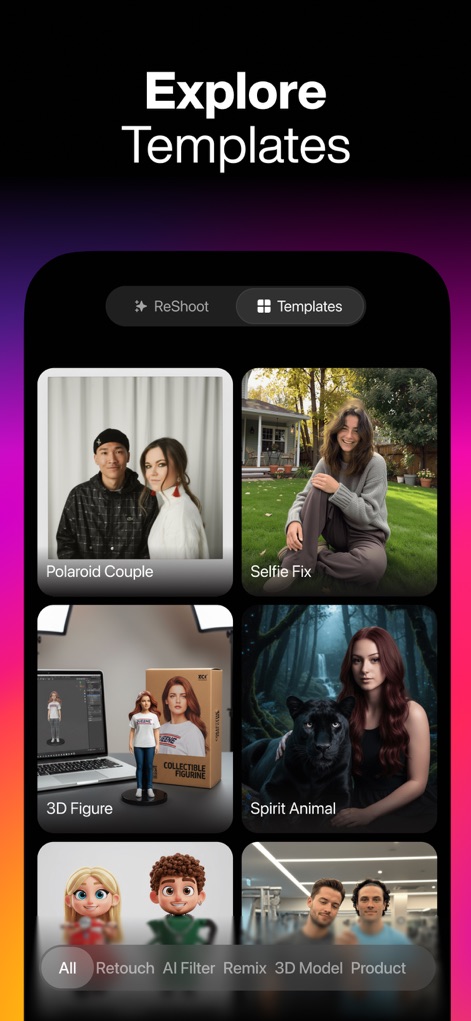
Browse a rich collection of creative templates including 'Polaroid Couple' and 'Spirit Animal', complemented by filter options like 'AI Filter' and '3D Model' to discover new styles.
Inspiration Galore
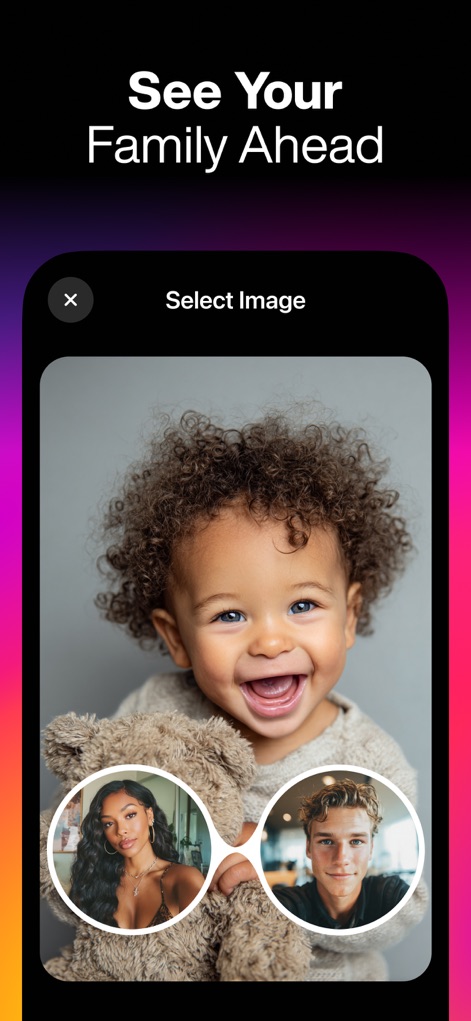
Delve into the AI's predictive capabilities, allowing users to envision their future family members by blending two parental images to generate a baby's appearance.
Future Faces Revealed
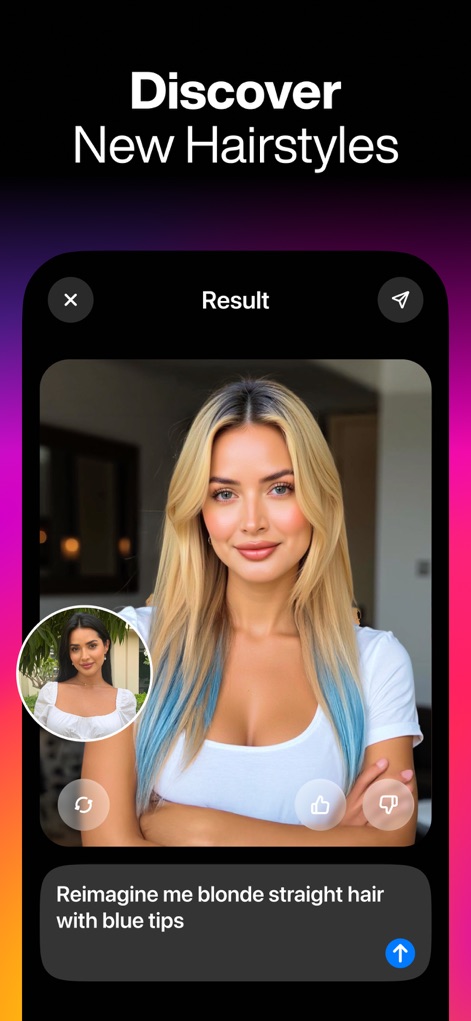
Experiment with new looks using AI, as seen with a user reimagining their hair with 'blonde straight hair with blue tips' and comparing it to their original appearance.
Hair Makeover Magic
Description
Download
More Like This
Apps with similar features and user experience
Portraiz AI Headshot Generator
vimage app Szolgaltato Korlatolt Felelossegu Tarsasag
醒蓝AI照相馆- 形象照 职业照 证件职业拍摄 合拍 换脸
Shanghai Huijing Network Technology Co., Ltd
New Profile Pic Avatar Maker
Informe Laboratories, Inc.
Toon Avatar Generator: AiShots
Turgay Saba
AI Photo Editor: ShotX Creator
Sota Labs Technology Joint Stock Company
Portrait - AI Photo Generator
TorchUp LLC
GIO - AI Headshot Generator
Prequel Inc.

Lumvio ai - ai photo generator
Ad Venture Internet Ve Pazarlama Anonim Sirketi
Version AI: AI Photo Creator
Apptribe Dijital Hizmetler Limited Sirketi
This page is not an official page of the app or its developer, but an independent editorial publication created for informational and commentary purposes. Unless expressly stated otherwise, neither the app nor its developer is affiliated with, endorsed by, sponsored by, authorized by, or otherwise officially connected with MWM, Apple, Google Play, the app publisher, or the app's developer, and nothing on this page implies that the app was developed using MWM's services. Any trademarks, logos, screenshots, and other content remain the property of their respective owners.