
This page is not an official page of the app or its developer, but an independent editorial publication created for informational and commentary purposes. Unless expressly stated otherwise, neither the app nor its developer is affiliated with, endorsed by, sponsored by, authorized by, or otherwise officially connected with MWM, Apple, Google Play, the app publisher, or the app's developer, and nothing on this page implies that the app was developed using MWM's services. Any trademarks, logos, screenshots, and other content remain the property of their respective owners.


Scan & Translate+ Text Grabber
Paper text becomes editable, instantly translated, and yours to command.
Downloads
10M+User Rating
Total Ratings
12.5KPublisher
Category
ProductivityLocales
15Latest Version
6.5.20Size
102.4 MBFirst Released
Apr 17, 2014An Analytical Overview for Bridging Language Divides with OCR and Translation Technology
Core Features of Scan & Translate+ Text Grabber
Advanced OCR for Printed Materials
The app provides advanced optical character recognition (OCR) technology, accurately digitizing text from diverse printed sources like documents, menus, and signs.
Extensive Language Translation
It allows users to instantly translate recognized text into over 90 languages, effectively addressing communication barriers in various personal and professional contexts.
Offline Mode for Uninterrupted Use
This tool features premium capabilities for offline text recognition and translation, ensuring reliable functionality even without an internet connection, which is vital for travelers and remote work.
Auditory Translation Playback
The app provides text-to-speech functionality, enabling users to listen to recognized and translated texts in more than 44 languages, which is beneficial for learning and accessibility.
Editable & Shareable Text
It allows users to edit recognized text, copy it to a clipboard, and seamlessly share it through various platforms including social media, email, or SMS, enhancing workflow and communication.
Persistent History Log
This tool features a history function that automatically saves all scanned and translated texts, allowing for easy retrieval and reference at any time, supporting study and professional record-keeping.
Frequently Asked Questions
Everything you need to know about Scan & Translate+ Text Grabber
What is the Scan & Translate+ Text Grabber app?
Scan & Translate+ Text Grabber is an application that scans and extracts text from printed sources like documents or signs. It translates the extracted text into over 90 languages.
How many languages does Scan & Translate+ Text Grabber support for translation?
The Scan & Translate app supports translation into more than 90 different languages. It also recognizes texts in over 70 languages and reads texts in over 44 languages.
Can Scan & Translate+ Text Grabber translate documents offline?
Yes, the premium version of Scan & Translate+ Text Grabber offers offline text recognition and offline translations. This feature allows use without an internet connection.
How do I use the Scan & Translate app to translate text?
To use the Scan & Translate app, select the original text's language, take a picture of the document, then press "Scan." The recognized text appears for translation into your chosen target language.
What are the premium features included with a Scan & Translate+ Text Grabber subscription?
Premium features for Scan & Translate+ Text Grabber include unlimited translations, unlimited text recognitions, offline text recognition, offline translations, an ads-free experience, and Snap Mode.
What types of documents can the Scan & Translate app scan and translate?
The Scan & Translate app scans various printed materials, including business documents, contracts, homework, menus, recipes, notes, letters, articles, instructions, product labels, and road signs.
Does Scan & Translate+ Text Grabber require an internet connection for advanced features?
Yes, advanced optical character recognition for 79 languages and full text translation for over 90 languages require an internet connection. Premium subscriptions offer offline capabilities.
How does the Scan & Translate+ Text Grabber app save translated texts?
All recognized and translated texts are automatically saved in the Scan & Translate app's History. Users can recover these texts at any time from the History section.
Can I listen to translated text using the Scan & Translate+ Text Grabber app?
Yes, the Scan & Translate app allows users to listen to text that has been recognized and translated. This feature supports more than 44 languages.
What subscription options are available for Scan & Translate+ Text Grabber?
Scan & Translate+ Text Grabber offers standard subscription options, including a 1-month Subscription and a 1-year Subscription. These plans unlock all premium features.
How do I cancel my Scan & Translate+ Text Grabber subscription or free trial?
You can cancel your Scan & Translate+ Text Grabber subscription or free trial through your iTunes account settings. Cancellation must occur 24 hours before the period ends to avoid charges.
Does the free version of Scan & Translate+ Text Grabber have any limitations?
Yes, the free version of Scan & Translate+ Text Grabber may have limitations. These can include a restricted number of daily text recognitions and translations, which are subject to change.
What permissions does the Scan & Translate+ Text Grabber app require to function?
For complete access and full functionality, Scan & Translate+ Text Grabber requires permission to access your device's Camera and Photos.
The following screenshots and description are sourced directly from the app's official store listing and are the property of the app developer.
App Store
Screenshots

The app's top-ranking status is highlighted by the '1' laurel, alongside icons showcasing its versatility for documents and images.
Global Translation Leader

This feature empowers users to download language packs and activate offline mode, ensuring seamless translation without internet connectivity.
Offline Access Anytime

Witness the app's capability to scan a physical document, like a recipe, and provide an immediate, accurate translation below the original text.
Instant Text Conversion
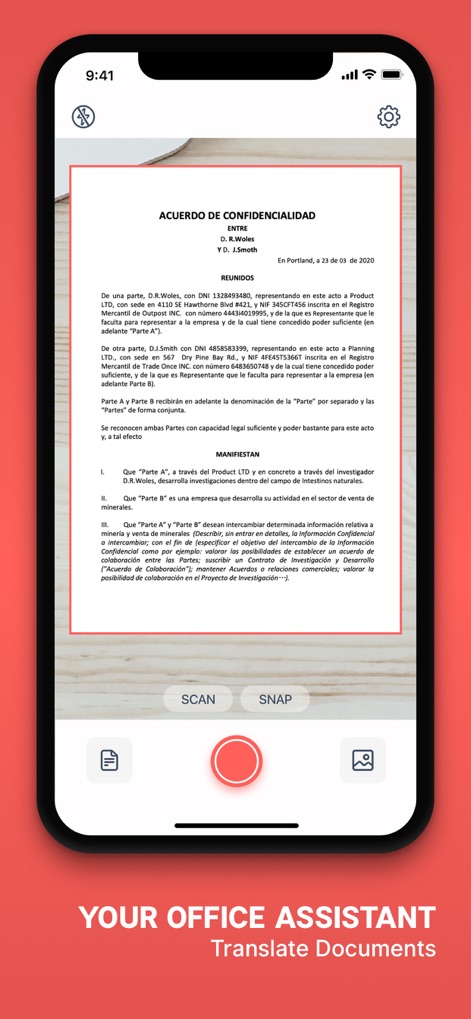
Observe how this tool expertly captures complex business documents, offering both 'Scan' for precision and 'Snap' for quick captures of text.
Professional Document Scanning
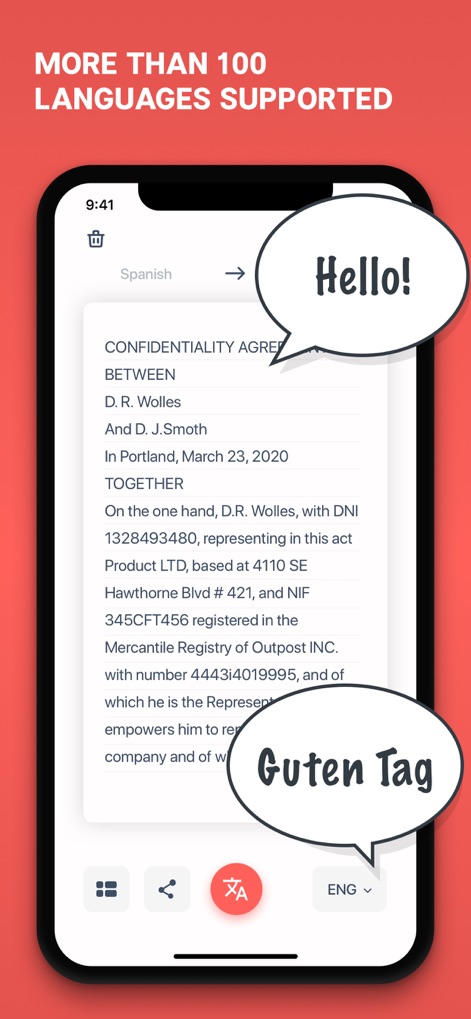
This screen emphasizes the app's support for over 100 languages, visually reinforced by the 'Hello!' and 'Guten Tag' speech bubbles indicating diverse translations.
Multilingual Communication Hub

See how the app facilitates language learning by scanning Japanese text and offering a Spanish translation, complete with a voice button for pronunciation assistance.
Language Learning Companion
Description
Download
More Like This
Apps with similar features and user experience

DeepL Translate
DeepL SE

腾讯翻译君-多语言翻译
Tencent Technology (Shenzhen) Company Limited

出国翻译官- 多语言语音翻译聊天交友
Beijing Qicai Muzhi Technology Co.,Ltd.

Translate Voice:Ai Chat
TINY BOLT (HK) CO., LIMITED

GO Translate・AI Translator App
INNOVAPP LLC

翻译全能王-中文日文图片扫描翻译器
Shanghai Baowu Network Technology Co., Ltd.

translation-Global translation
Hebei jiudao network technology co., ltd

Photo Translator: Camera OCR
Son Hoang

Voice Translator : Language +
AmazinPro Technology Solutions And Training Company Limited
This page is not an official page of the app or its developer, but an independent editorial publication created for informational and commentary purposes. Unless expressly stated otherwise, neither the app nor its developer is affiliated with, endorsed by, sponsored by, authorized by, or otherwise officially connected with MWM, Apple, Google Play, the app publisher, or the app's developer, and nothing on this page implies that the app was developed using MWM's services. Any trademarks, logos, screenshots, and other content remain the property of their respective owners.