SellAway
SellAway
Download on App Store

This page is not an official page of the app or its developer, but an independent editorial publication created for informational and commentary purposes. Unless expressly stated otherwise, neither the app nor its developer is affiliated with, endorsed by, sponsored by, authorized by, or otherwise officially connected with MWM, Apple, Google Play, the app publisher, or the app's developer, and nothing on this page implies that the app was developed using MWM's services. Any trademarks, logos, screenshots, and other content remain the property of their respective owners.


Logo of SellAway
Download on App Store

SellAway

The rugged, mobile-first platform for B2B professionals. Manage your catalog, take orders in signal-free warehouses, and eliminate manual entry with seamless QuickBooks and Zoho integration.

Key Figures

Downloads

0

User Rating

1.0/5

Total Ratings

0

Publisher

SELLAWAY TECHNOLOGIES INC.

Category

Business

Locales

1

Latest Version

1.24.4+95

Size

37.0 MB

First Released

Jul 24, 2023
Features

The Ultimate Toolkit for Wholesale Professionals

Stop juggling spreadsheets and paper forms. SellAway streamlines your B2B operations with powerful features built specifically for the realities of field sales.

True Offline Productivity

Never lose a sale to a poor signal. Create orders and browse products 100% offline; we sync everything automatically once you're back online.

Smart Catalog & Scanning

Transform your tablet into a high-speed showroom. Use barcode scanning for instant lookups and generate professional PDF catalogs on the fly.

The following screenshots and description are sourced directly from the app's official store listing and are the property of the app developer.

App Store

Screenshots
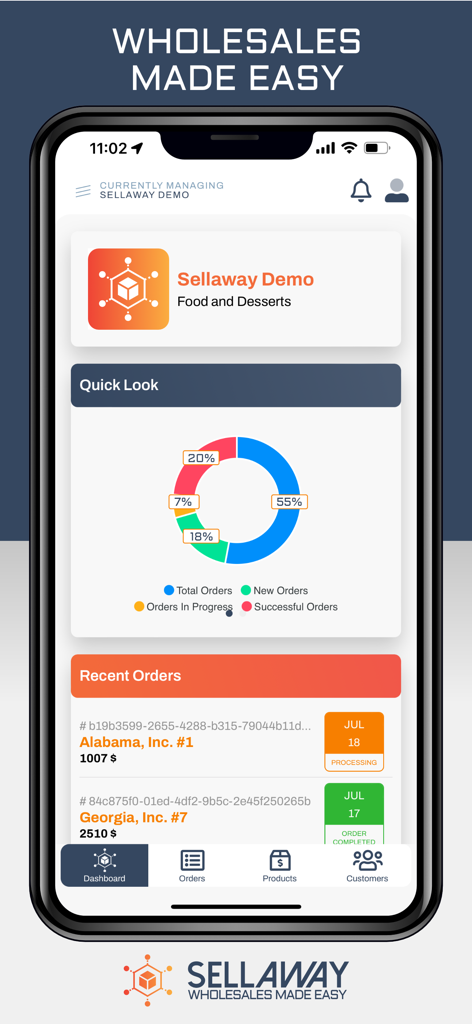
SellAway - SellAway app dashboard displaying wholesale order statistics and recent transactions
SellAway app dashboard displaying wholesale order statistics and recent transactions

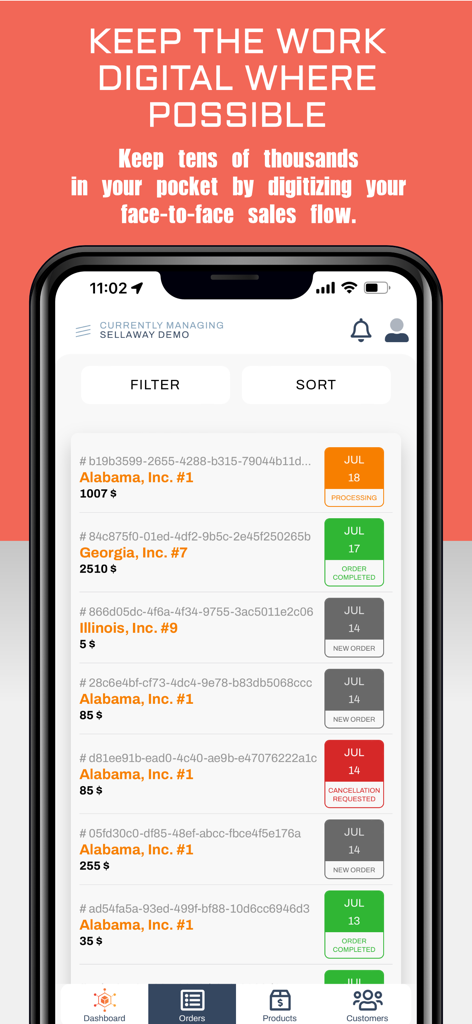
SellAway - SellAway mobile app interface showing a list of digital sales orders and statuses
SellAway mobile app interface showing a list of digital sales orders and statuses

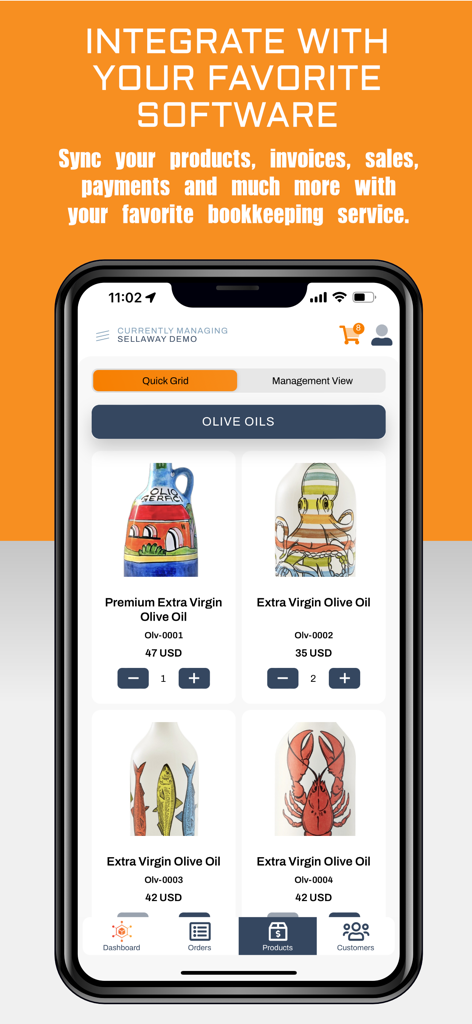
SellAway - SellAway mobile app interface showing a digital product catalog of olive oils with options to sync with bookkeeping software.

SellAway mobile app interface showing a digital product catalog of olive oils with options to sync with bookkeeping software.

Description

THE RESULT: YOUR WHOLESALE BUSINESS IN YOUR POCKET - ONLINE OR OFFLINE Stop juggling spreadsheets, phone calls, and paperwork. SellAway puts your entire B2B operation in one app - manage products, take orders, and serve customers from anywhere. No internet? No problem. SellAway works fully offline. Take orders in warehouses with no signal, visit customers in remote areas, or work during flights. Your data syncs automatically when you're back online. Never lose a sale because of poor connectivity again. ------------------------------ WHY SELLAWAY? Built by wholesalers, for wholesalers. We know the reality of field sales - spotty WiFi, basement warehouses, rural customer locations. That's why offline-first isn't just a feature, it's our foundation. Whether you're a sales rep on the road, a warehouse manager fulfilling orders, or a business owner tracking performance - SellAway adapts to how you work, wherever you work. ------------------------------ POWERFUL FEATURES # Offline Mode - Our Signature Feature • 100% functional without internet - browse products, create orders, manage customers • Automatic background sync - data uploads silently when connection returns • Smart conflict resolution - never worry about data loss • Per-organization storage - each business stays separate and secure • Visual sync indicators - always know your data status at a glance • Resume interrupted syncs - pick up right where you left off • Optimized for large catalogs - handles thousands of products smoothly # Product Management • Complete product catalog with images, variants & pricing • Barcode scanning for quick product lookup • Category organization for easy navigation • Bulk import/export via Excel • PDF catalog generation to share with customers # Order Processing • Create orders in seconds with intuitive cart • Custom pricing per customer • Order history and status tracking • Notes and attachments for each order • Quick reorder from previous purchases # Customer Management • Full customer database with contact details • Customer-specific price lists • Order history per customer • Multiple shipping addresses support # Business Insights • Real-time sales dashboard • Revenue and order statistics • Performance tracking at a glance # Multi-Role Access • Owner: Full control over everything • Sales Rep: Products, orders, customers • Warehouse: Order fulfillment focused • Customer: Browse and place orders # Multi-Organization • Manage multiple businesses from one app • Switch between organizations instantly • Separate data and settings per organization ------------------------------ BUILT FOR THE FIELD • Fast and responsive - no waiting around • Works on phones and tablets • Clean interface that's easy to learn • Confirmation dialogs prevent mistakes • Loading states keep you informed ------------------------------ INTEGRATIONS • QuickBooks Online sync • Zoho Books sync • More integrations coming soon ------------------------------ GET STARTED Download SellAway and transform how you run your wholesale business. Work from anywhere - with or without internet. Start your free trial today - no credit card required. Questions? Contact us at support@sellaway.app

Download

Download on App Store

This page is not an official page of the app or its developer, but an independent editorial publication created for informational and commentary purposes. Unless expressly stated otherwise, neither the app nor its developer is affiliated with, endorsed by, sponsored by, authorized by, or otherwise officially connected with MWM, Apple, Google Play, the app publisher, or the app's developer, and nothing on this page implies that the app was developed using MWM's services. Any trademarks, logos, screenshots, and other content remain the property of their respective owners.