
This page is not an official page of the app or its developer, but an independent editorial publication created for informational and commentary purposes. Unless expressly stated otherwise, neither the app nor its developer is affiliated with, endorsed by, sponsored by, authorized by, or otherwise officially connected with MWM, Apple, Google Play, the app publisher, or the app's developer, and nothing on this page implies that the app was developed using MWM's services. Any trademarks, logos, screenshots, and other content remain the property of their respective owners.


SNAP.SHARE
The account-free, end-to-end encrypted solution for professionals to scan and send sensitive documents directly to their partners with Swiss-grade privacy.
Downloads
59K+User Rating
Total Ratings
2K+Publisher
Category
BusinessLocales
10Latest Version
2.3.0Size
20.2 MBFirst Released
Feb 8, 2018Efficiency Meets Swiss-Grade Security
The professional way to digitize and transmit sensitive documents in seconds, without the friction of account creation or data privacy concerns.
Instant No-Account Access
Eliminate app fatigue. Use secure QR-code authentication to start sending documents immediately without creating yet another password or user profile.
End-to-End Swiss Encryption
Protect your financial data with asymmetric encryption and Swiss-hosted servers. Your sensitive documents are never permanently stored on your phone or our system.
Frequently Asked Questions
Everything you need to know about SNAP.SHARE
How does SNAP.SHARE work?
SNAP.SHARE digitizes and transmits paper documents in three steps. Users scan a QR code, photograph the document using their smartphone camera, and then send the digitized document directly to a designated target application. This automates the process efficiently.
Does SNAP.SHARE require a user account?
No, SNAP.SHARE does not require a user account. The application uses specific QR codes, called Snapshare-IDs, for automatic and secure login to its service. This simplifies access and maintains user privacy.
Is document transmission with SNAP.SHARE secure?
Yes, document transmission with SNAP.SHARE is secure. The app ensures confidentiality through end-to-end encryption and asymmetric encryption of scanned documents. It also performs automatic and secure authentication via specific QR codes.
What image processing features does SNAP.SHARE offer?
SNAP.SHARE offers several image processing features. These include automatic perspective image rectification, image post-processing like rotating pages, cropping, and applying color filters. The app also provides high image resolution and image zoom for quality assessment.
Which tax applications integrate with SNAP.SHARE?
SNAP.SHARE currently integrates with the tax application 'Obwalden eTax'. Integrations with 'Dr. Tax Privat', 'Dr. Tax Professional', and various Swiss cantonal tax software are under development to expand compatibility.
What languages does SNAP.SHARE support?
SNAP.SHARE supports multiple languages. These include German, French, Italian, English, Portuguese, Spanish, Bosnian, Serbian, Croatian, and Turkish. This provides broad accessibility for users.
The following screenshots and description are sourced directly from the app's official store listing and are the property of the app developer.
App Store
Screenshots
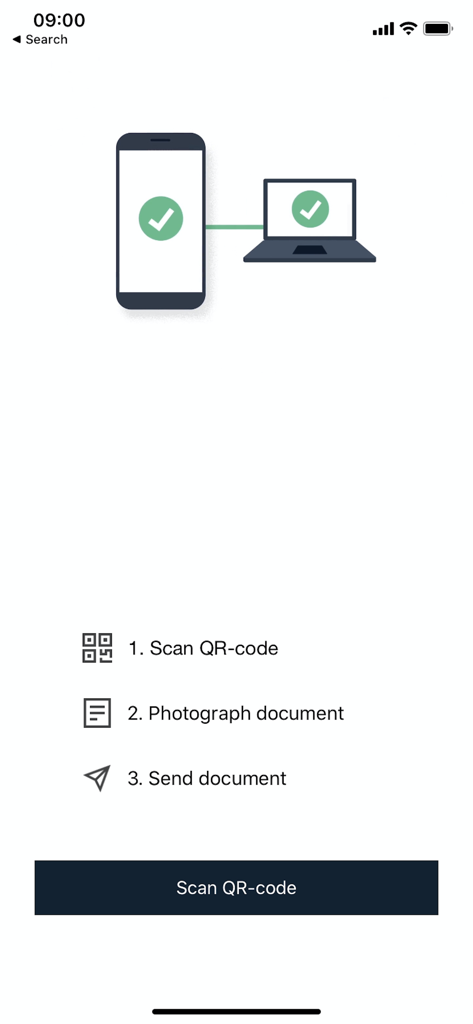
Interface of the SNAP.SHARE app showing a 3-step document transmission process
Description
Download
More Like This
Top-ranked apps in the same category

Microsoft Teams
Microsoft Corporation

Zoom Workplace
Zoom Communications, Inc.

WhatsApp Business
WhatsApp Inc.

Indeed Job Search
Indeed Inc.

LinkedIn: Network & Job Finder
LinkedIn Corporation

Adobe Acrobat Reader: Sign PDF
Adobe Inc.

WeCom-Work Communication&Tools
Tencent Technology (Shenzhen) Company Limited

BOSS直聘-招聘求职找工作神器
Beijing China Product Bo Farce Network Technology Co., Ltd.

DingDing - Redefine Work in AI
DingTalk Technology Co., Ltd.
This page is not an official page of the app or its developer, but an independent editorial publication created for informational and commentary purposes. Unless expressly stated otherwise, neither the app nor its developer is affiliated with, endorsed by, sponsored by, authorized by, or otherwise officially connected with MWM, Apple, Google Play, the app publisher, or the app's developer, and nothing on this page implies that the app was developed using MWM's services. Any trademarks, logos, screenshots, and other content remain the property of their respective owners.