
This page is not an official page of the app or its developer, but an independent editorial publication created for informational and commentary purposes. Unless expressly stated otherwise, neither the app nor its developer is affiliated with, endorsed by, sponsored by, authorized by, or otherwise officially connected with MWM, Apple, Google Play, the app publisher, or the app's developer, and nothing on this page implies that the app was developed using MWM's services. Any trademarks, logos, screenshots, and other content remain the property of their respective owners.


Study Bunny: Focus Timer
Focus falters. This app turns study into a winnable game.
Downloads
2.5M+User Rating
Total Ratings
74.2KPublisher
Category
ProductivityLocales
1Latest Version
60.06Size
123.0 MBFirst Released
Sep 11, 2019An Analytical Overview of Study Bunny's Key Features for Academic Success
Core Productivity Enhancements
Focus Timer with Motivational Pauses
This tool offers a structured way to manage study sessions, coupled with immediate motivational support to help users overcome distractions and maintain concentration, directly addressing struggles with procrastination and focus.
Integrated Productivity Tools (To-Do List, Flashcards, Study Tracker)
The app provides essential academic organizational tools, including task management, active recall learning, and progress monitoring, which are crucial for effective time management and improved study efficiency.
Gamified Coin Earning System
This feature introduces a rewarding gamified element, turning study time into an opportunity to earn virtual currency, which serves as a significant positive reinforcement for consistent effort.
In-App Store for Rewards
This provides a tangible (virtual) reward system, allowing users to spend earned coins on customizable items or music, enhancing the app's engaging and interactive experience while reinforcing productive study habits.
Frequently Asked Questions
Everything you need to know about Study Bunny: Focus Timer
What is the Study Bunny: Focus Timer app?
Study Bunny: Focus Timer is an app that helps users time their studying, earn virtual coins for productivity, and access tools like a To Do list, Flashcards, and a customizable Study Tracker.
How does Study Bunny: Focus Timer help users stay focused?
Study Bunny: Focus Timer helps users stay focused by timing study sessions. It provides motivational advice if a user needs to pause their session.
Can I customize my bunny in Study Bunny: Focus Timer?
Yes, users can customize their bunny in Study Bunny: Focus Timer. Studying earns coins, which can be spent in the in-app store to buy items for personalizing the bunny and its environment.
Does Study Bunny: Focus Timer include a to-do list feature?
Yes, Study Bunny: Focus Timer includes a to-do list feature. This tool is available to help users manage their tasks and enhance their study productivity.
Can I study with friends in Study Bunny: Focus Timer?
Yes, users can study with friends in Study Bunny: Focus Timer. The app allows users to either invite their friends or join existing study groups.
How do users earn coins in Study Bunny: Focus Timer?
Users earn coins in Study Bunny: Focus Timer by actively studying. These virtual coins are then used within the app to purchase items or music from the store.
Does Study Bunny: Focus Timer provide study statistics?
Yes, Study Bunny: Focus Timer provides comprehensive study statistics. Users can track their study hours with color-coded tags and view or edit session blocks in a weekly or monthly format.
Are flashcards available in Study Bunny: Focus Timer?
Yes, flashcards are available in Study Bunny: Focus Timer. They are one of the helpful productivity tools offered within the app to aid users in their studies.
Is there a tutorial for Study Bunny: Focus Timer?
Yes, a detailed tutorial for Study Bunny: Focus Timer is available online. Users can access it at www.superbyte.site/tutorial, and the webpage can be translated into any language.
Where can I find support or FAQs for Study Bunny: Focus Timer?
Users can find support and FAQs for Study Bunny: Focus Timer within the app's settings. Additionally, a comprehensive FAQ section is available on the official website at www.superbyte.site/faq.
Can Study Bunny: Focus Timer users label their study sessions with subjects and colors?
Yes, Study Bunny: Focus Timer users can label their study sessions. Before starting a timer, they can assign an optional subject and choose a specific color tag for the session block.
The following screenshots and description are sourced directly from the app's official store listing and are the property of the app developer.
App Store
Screenshots

Explore the app's charming interface, featuring a friendly bunny avatar and an intuitive coin display for tracking rewards.
Your Study Companion

The app facilitates group study by allowing users to invite or join friends, fostering a communal learning environment with multiple bunny characters.
Collaborative Study Sessions
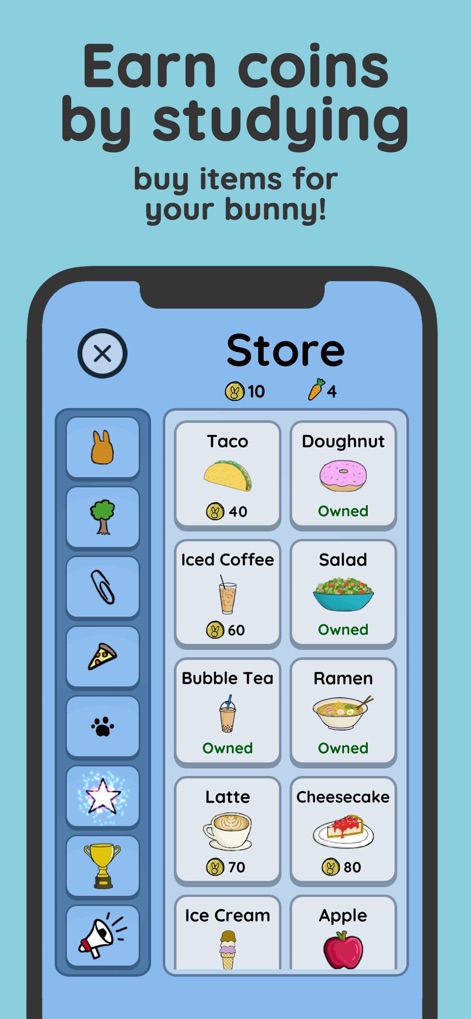
Users can redeem earned coins in the in-app store, purchasing a variety of items like delicious snacks and refreshing drinks to personalize their bunny.
Reward Your Efforts

This tool provides a comprehensive study tracker, allowing users to visualize daily study hours with distinct color-coded tags for different subjects.
Detailed Study Analytics

Users can finely manage their study schedule through the customizable weekly view, where session blocks are easily editable and arranged by time.
Flexible Schedule Management

Before starting a session, the app allows users to personalize their study time by selecting a color tag and assigning an optional subject for better organization.
Session Setup & Tagging

The app integrates crucial study aids, including an interactive to-do list for task management and flashcards for effective memorization.
Integrated Productivity Tools

Users can delight in dynamic customization through regularly added items, creating unique environments and experiences for their bunny, accessible via a rich menu of icons.
Dynamic Customization Options
Description
Download
More Like This
Apps with similar features and user experience

Forest: Focus for Productivity
SEEKRTECH CO., LTD.

FocusFlight - Deepfocus Timer
Cement Planet LTD

Flora - Green Focus
AppFinca Inc.

Focus Traveller - Flow Timer
WEI JEN CHEN

FocusPomo · Pomodoro Timer
FocusPomo Apps Co., Ltd.
ChickFocus: Pomodoro Timer
伟 谭

My Little Pomodoro: Focus
DEVFLOOR Co.,Ltd.

Focra: Chat, Connect People
明书 江

Focus Friend, by Hank Green
B-Tech Consulting Group LLC
This page is not an official page of the app or its developer, but an independent editorial publication created for informational and commentary purposes. Unless expressly stated otherwise, neither the app nor its developer is affiliated with, endorsed by, sponsored by, authorized by, or otherwise officially connected with MWM, Apple, Google Play, the app publisher, or the app's developer, and nothing on this page implies that the app was developed using MWM's services. Any trademarks, logos, screenshots, and other content remain the property of their respective owners.